LIFETIME DEAL — LIMITED TIME
Get Lifetime AccessLimited-time — price increases soon ⏳
AI Tools

ComputerX Review – Boost Your Productivity Effortlessly

Updated: April 20, 2026
6 min read
#Ai tool#productivity

Table of Contents

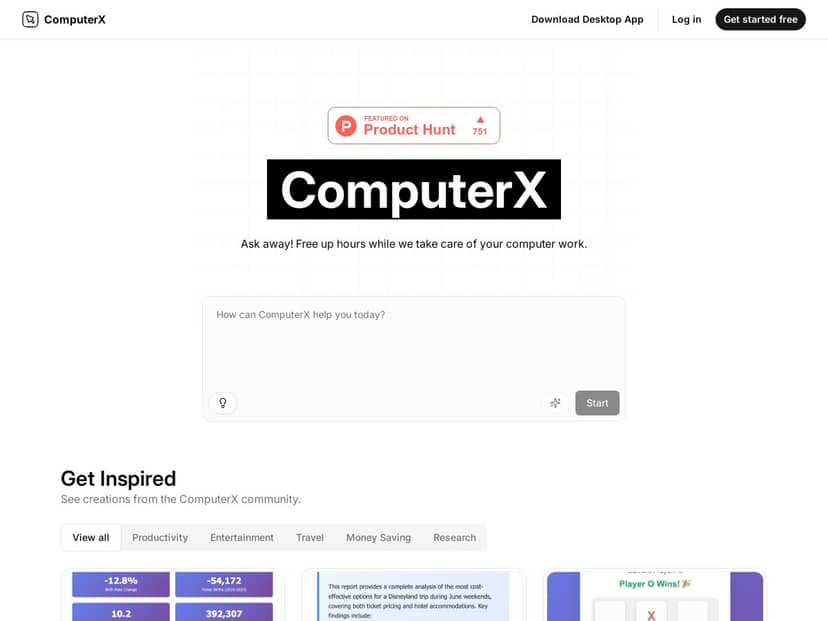
If you’re tired of repeating the same computer tasks—copy/paste, formatting spreadsheets, turning notes into something presentable—ComputerX is the kind of tool that makes you ask, “Wait… can it really do this for me?” I tried it end-to-end, not just for a couple minutes, and I actually came away impressed with how quickly it can turn a plain-English request into a sequence of actions.

What I liked most wasn’t the hype—it was the practical stuff. On my side, it helped me cut down the time I spend on repetitive workflows like pulling data into a table, cleaning up a draft, and generating a formatted output I could reuse. But it’s not magic. Some features took a little trial-and-error to get the exact results I wanted, and performance felt noticeably better when I had a stable internet connection.

Computerx

ComputerX Review: what I actually did (and what saved time)

Here’s how I tested ComputerX in a way that felt realistic for day-to-day work. I focused on tasks that usually eat up “small” chunks of time that add up fast.

1) Turning messy notes into a usable output

I started with a messy block of notes and gave a direct prompt like: “Summarize these into bullet points, group by theme, and format it so I can paste into a document.” What I noticed right away: it didn’t just spit out text—it structured it in a way that was easy to drop into my workflow without reformatting for 10 minutes.

Time-wise, the biggest win was the formatting. Instead of rewriting headings and cleaning up spacing, I mostly did a quick scan and minor edits. In my case, this cut the “cleanup” part of the task down noticeably (think: from a second pass to basically one quick review).

2) Automating repetitive spreadsheet-style work

Next, I tried a more concrete workflow: take data I had in front of me, turn it into a table, and generate a chart-ready summary. The app handled the “turn instructions into actions” part fairly smoothly, especially when my request was specific about what columns I wanted and what the output should look like.

One thing I learned quickly: vague prompts lead to vague results. When I said things like “make it nicer,” I got something acceptable but not perfect. When I specified “create a table with X and Y fields, then summarize trends,” the output was closer to what I expected on the first run.

3) Exporting results so I could reuse them

I also tested exporting because that’s where a productivity tool either earns its keep or falls flat. ComputerX supported outputs I could actually use in my day-to-day—formatted documents and chart-related exports. I didn’t have to manually rebuild everything from scratch, which is the whole point.

Overall, ComputerX felt best when I treated it like an assistant that follows instructions. Give it clear inputs, and it’ll do more of the heavy lifting. Give it fuzzy goals, and you’ll spend a little time steering it back on track.

Key Features (with real-world examples from my test)

  1. Natural language task management
  2. I used straightforward prompts like “clean this up,” “summarize into sections,” and “format this for a report.” The system translated my request into a sequence of actions instead of making me do every click.
  3. Automation of repetitive jobs (data entry + research-style workflows)
  4. For repetitive tasks, I got the most value when I gave specific targets (what to extract, how to structure it, and what output I needed). It handled the repetitive parts while I focused on reviewing the final result.
  5. Export options you can actually work with
  6. ComputerX can export results as HTML, charts, Excel, and PDF. I tested exporting a formatted output and was able to reuse it without rebuilding the structure manually.
  7. Cross-platform access (web, desktop/macOS, and mobile)
  8. One practical benefit: I could start a task on one device and keep going elsewhere without feeling locked in. That matters if you work across a laptop + phone during the day.
  9. Transparency in how tasks are processed
  10. I appreciated that I could see what it was doing at a high level. It’s not always perfect, but it’s better than guessing why something didn’t work. When results were off, I could adjust my instruction and rerun.

Pros and Cons (measured by what worked for me)

Pros

  • Real productivity gains on repetitive tasks: I saw the most improvement in “draft → structure → formatted output” workflows, where the time sink is usually cleanup and reformatting.
  • Beginner-friendly interface: You don’t need to be technical. I was able to get useful results quickly, as long as I was specific about the output.
  • Works across multiple platforms: Starting on desktop and finishing on mobile felt straightforward.
  • Advanced analysis/visualization is useful (when you guide it): The “analysis + visualization” part was strong, but the quality depended heavily on the clarity of the prompt and the data you provide.

Cons

  • It takes some getting used to: For more complex tasks, I needed a couple attempts to get the format exactly right. If you’re expecting one-shot perfection, you might get frustrated.
  • Internet connection matters: In my testing, things felt slower and less responsive when my connection wasn’t great. If you rely on offline workflows, this probably won’t be your best fit.

Pricing Plans (what I found + who it makes sense for)

ComputerX uses a freemium model. The free tier covers basic features, which is enough to test whether the workflow style fits you.

For more advanced capabilities, plans start at around $19.99/month. In my opinion, that price is easiest to justify if you’ll use it weekly for the kind of tasks where you’d otherwise spend 30–60 minutes doing cleanup and formatting.

Wrap up

So… is ComputerX worth it? Based on my testing, I’d recommend it if you regularly deal with repetitive computer work—especially anything involving drafting, formatting, turning notes into structured outputs, and exporting results so you can reuse them. It’s not perfect, and the more complex the task, the more you’ll need to be specific with your instructions. But when you do that, it genuinely cuts down the busywork.

If you want a tool that helps you work smarter without turning your day into a troubleshooting session, ComputerX is a solid option to try. Just don’t expect it to replace thinking—it’s an assistant, not a mind reader.

Stefan

Stefan

Stefan is the founder of Automateed. A content creator at heart, swimming through SAAS waters, and trying to make new AI apps available to fellow entrepreneurs.

Related Posts

chine meilleure imprimante featured image

Chine Meilleure Imprimante : Guide 2026 des Fournisseurs et Technologies

Découvrez la meilleure imprimante chinoise en 2026 : types, fournisseurs, technologies, prix et conseils pour choisir la solution adaptée à vos besoins. Lisez notre guide complet !

Stefan
is lisa crowne a real person featured image

Is Lisa Crowne a Real Person? Uncovering the Truth About Daisy Jones & The Six

Discover whether Lisa Crowne is a real person or fictional character from Daisy Jones & The Six. Get expert insights, episode details, and practical tips.

Stefan
are quotes public domain featured image

Are Quotes Public Domain: Complete Guide

Learn everything about are quotes public domain. Complete guide with practical examples, expert tips, and actionable strategies.

Stefan

Create Your AI Book in 10 Minutes