Table of Contents
Understanding what your customers think is crucial for any business. Cynthia AI makes analyzing customer feedback a breeze with its AI-driven capabilities. This platform promises to provide actionable insights, enabling product teams to boost user satisfaction and make informed decisions. In this review, we’ll dive deep into what Cynthia AI offers, its key features, and how it can benefit your business.
Cynthia AI Review
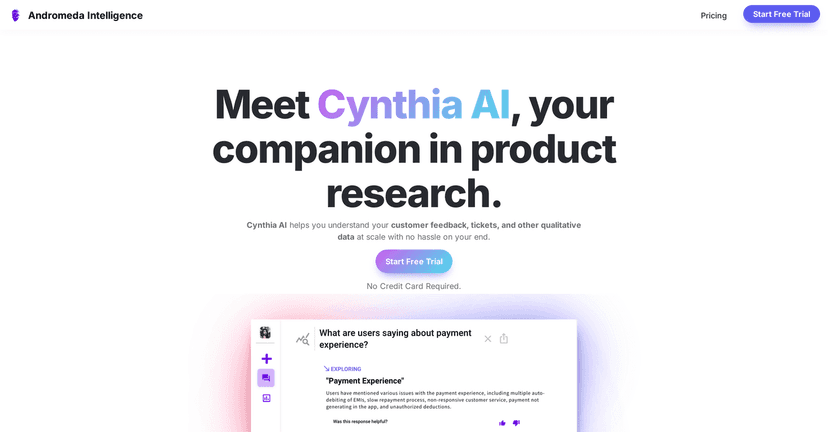
Cynthia AI stands out in the crowded marketplace of customer feedback platforms. Its deep search technology enables rapid access to vital information, crucial for companies that need answers quickly. The platform integrates seamlessly with various data sources, from Zendesk to social media, allowing for a holistic view of customer sentiments. An impressive feature is the automated reports that summarize insights and metrics, simplifying the decision-making process for teams.
Moreover, Cynthia AI excels in language processing. By analyzing customer feedback in multiple languages, it breaks down cultural barriers and understands emotions effectively. This ensures that companies can cater to a global audience and make data-driven decisions that resonate across different markets. With augmented intelligence, Cynthia AI enhances human decision-making, blending the best of human and machine insights.
However, while the platform is robust, its effectiveness largely depends on the quality of ingested data. Quality insights require quality data – a point to keep in mind. Also, the trial period offered may not be long enough for users to fully gauge all its capabilities, which could be a downside for some.
Key Features
- Deep Search Technology for quick information retrieval
- Data ingestion pipelines for seamless data processing
- Automated reports for strategic insights
- Multilingual support for global feedback analysis
- Augmented intelligence for enhanced decision-making
Pros and Cons
Pros
- User-friendly and easy to integrate
- Provides actionable and clear insights
- Handles diverse language data effectively
- Offers a free trial without credit card required
Cons
- Insights dependent on data quality
- Limited duration of trial may be insufficient
Pricing Plans
Cynthia AI does not provide specific pricing details in the content. Interested users can explore pricing options on the Cynthia AI Pricing Page. A free trial is available for those wanting to test the platform before a financial commitment.
Wrap up
In conclusion, Cynthia AI presents a compelling option for businesses seeking to harness customer feedback for actionable insights. With its impressive features and user-friendly interface, it can be an excellent addition to your toolkit. While there are a few considerations regarding data quality and trial duration, the benefits are evident. Give Cynthia AI a try and unlock the full potential of your customer feedback.
Promote Cynthia AI