LIFETIME DEAL — LIMITED TIME
Get Lifetime AccessLimited-time — price increases soon ⏳
AI Tools

Gemelo AI Review – A Closer Look at Next-Gen Digital Twins

Updated: April 20, 2026
9 min read
#Ai tool#engagement

Table of Contents

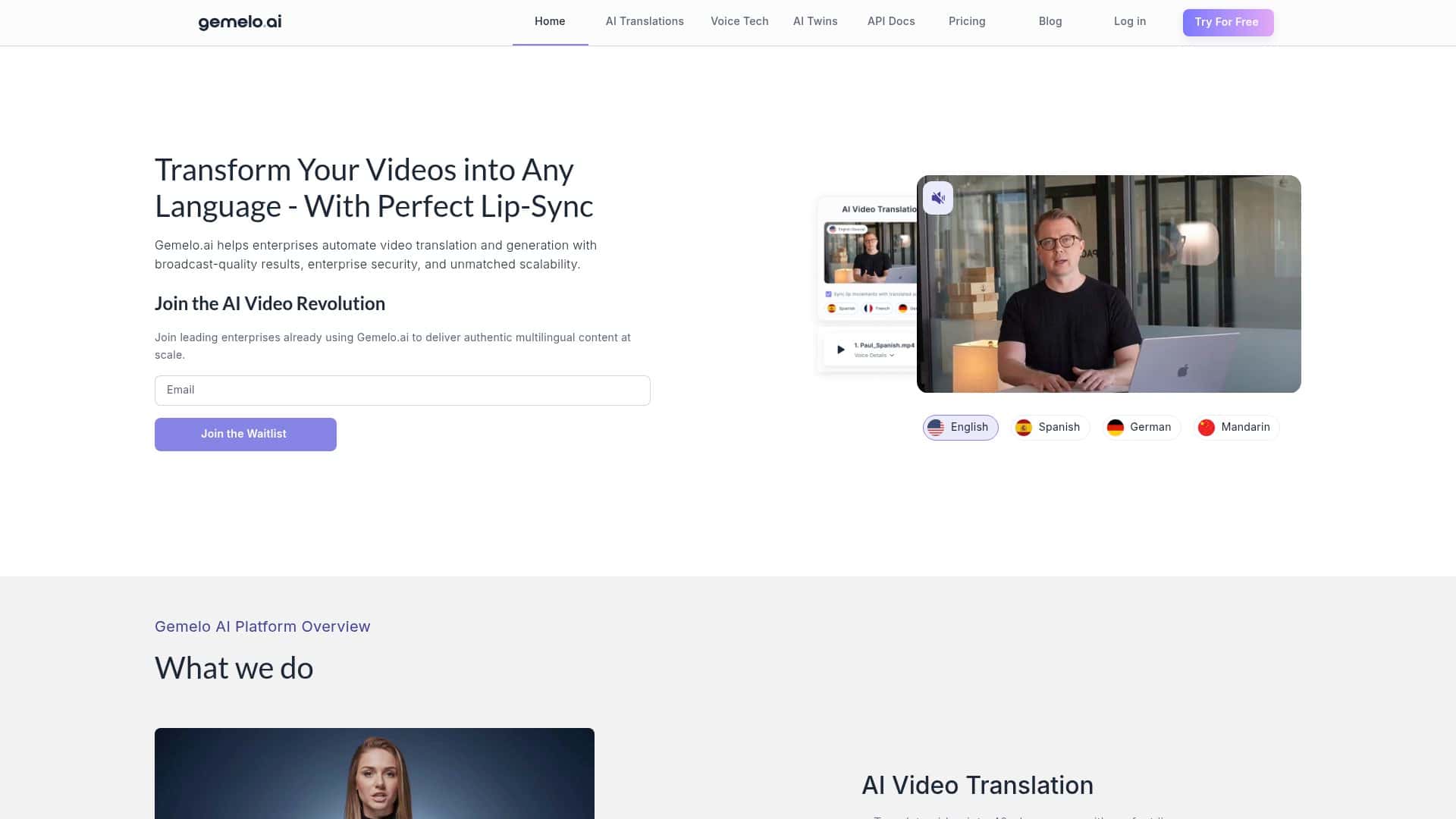
If you’re trying to make customer conversations feel less “robotic” and more like a real person is on the other end, Gemelo AI is one of the few tools that’s explicitly built around photorealistic digital avatars (often called AI Twins).

In this review, I’m going to break down what Gemelo AI actually does, what you need to provide to get results, what the workflow looks like in practice, and where it can fall short—because no avatar platform is perfect.

Gemelo AI Review

Here’s the simplest way I’d describe Gemelo AI: it helps you create an AI Twin/AI avatar that can talk to people (real-time conversation) and can also generate synthetic video content you can use for marketing or support.

I’m not going to pretend every result is flawless. Avatar tools often look amazing in demos and then get weird in edge cases (fast talking, accents, long prompts, or when the input quality isn’t great). But if your use case is “consistent brand voice + repeatable scripted conversations + scalable video,” Gemelo is built for that.

What I looked for (so this isn’t just hype)

When I evaluate an AI avatar platform, I focus on a few practical things:

  • Inputs: What do you actually have to upload or configure? (photos/voice/video samples, brand assets, conversation scripts, etc.)
  • Outputs: Does it produce usable video and audio, or do you get artifacts that make it obvious it’s synthetic?
  • Workflow time: How long it takes to go from “setup” to “something you can post or deploy.”
  • Consistency: Does it sound/act the same across multiple runs?
  • Control: Can you steer it toward your brand voice and policy boundaries?

How the workflow typically goes

While every project is different, most teams using Gemelo AI follow a similar path:

  • Create or select an AI Twin (a specific avatar identity).
  • Define the voice/persona (this is where voice cloning comes in—more on that under limitations).
  • Generate synthetic video for ads, onboarding, product explainers, or “talking head” style support content.
  • Enable real-time conversation so the avatar can respond in a chat-like interaction (the exact setup depends on how you integrate it).
  • Integrate with your stack if you want it to plug into marketing automation or customer service workflows.

A mini use case you can picture

Let’s say you run a DTC brand and you want a virtual brand ambassador for product questions.

  1. Script your top 20 questions (shipping, returns, sizing, ingredients, compatibility, etc.).
  2. Record/prepare approved voice samples for voice cloning (only with proper consent—more on that below).
  3. Create your AI Twin and set the persona to match your brand tone (friendly, confident, no slang).
  4. Generate 3 short video clips (15–30 seconds each) for landing pages or email campaigns.
  5. Enable real-time conversation for support chat or a site widget, then test the responses against your FAQ.
  6. Review and refine—you’ll almost always tweak prompts, guardrails, and “don’t say” boundaries after the first day of testing.

That’s where tools like this actually shine: not in one-off miracles, but in turning your existing messaging into something scalable and more engaging than static text.

Key Features

1) Photorealistic AI Twins and avatars

The core promise is photorealistic digital avatars—basically, an identity you can reuse across multiple video generations and conversations. In my experience with avatar tools, the “photorealistic” part only matters if you can keep the look consistent. So the real question is: can you reliably reproduce the same avatar vibe across different outputs?

With Gemelo AI, the feature is positioned as “AI Twins,” meaning you’re not just generating one random video—you’re working with an avatar identity you can keep deploying.

2) Real-time interaction (conversation)

“Real-time” is the headline, but it’s still worth being realistic about expectations. You’re generally trading speed for naturalness—if the system has to process audio, interpret intent, and then generate a response, latency will vary depending on prompt complexity and how you’ve integrated it.

What you can do to improve the experience is simple: keep your conversation flows tight. If you let the avatar ramble with open-ended prompts, you’ll see more drift and longer response times.

3) Synthetic video creation for marketing and support

Video generation is where most teams see the most immediate ROI—because it’s reusable content. For example, you can generate:

  • Product explainer clips (features + benefits)
  • Onboarding videos (“Here’s how to get started”)
  • FAQ-style talking head content
  • Sales outreach videos for different segments

The practical tip: write your prompts like you’re briefing a spokesperson. Short sentences. Clear structure. If your prompt is vague (“talk about our product”), you’ll get a vague result.

4) Personalized customer engagement

Personalized engagement usually comes down to two things:

  • Persona settings (tone, formality, style)
  • Conversation context (what the avatar “knows” about the user or the scenario)

If you’re using this for support, you’ll want to map common customer intents to pre-approved responses. That keeps your brand consistent and reduces the chance the avatar says something it shouldn’t.

5) Virtual brand ambassador roles

This is basically the “use it like a spokesperson” angle. The avatar can serve as a consistent face across campaigns—especially helpful if you’re tired of rotating staff or repeating the same footage.

One thing I like about this approach: you can keep your ambassador style stable while updating the scripts. That’s a lot easier than reshooting everything every time you change a promotion.

6) Integration with marketing automation tools

“Integration” can mean a lot of different things, so here’s how to think about it:

  • If it integrates with your marketing tools, you can trigger avatar video generation or deploy content based on events (new lead, abandoned cart, onboarding step).
  • If it integrates with customer service workflows, it can route conversations or provide an avatar-driven response layer.

Before you commit, ask what the integration actually supports (API, webhooks, supported platforms). You don’t want a “works with everything” pitch that turns into manual copy/paste in month one.

7) Scalable video content generation

Scalability is the whole point here. Instead of producing one video at a time, you’re generating multiple variations—often by changing the script, offer, or audience angle.

If you’re planning a real campaign, I’d start with a small batch (like 5–10 videos) and test performance. Then scale what works. That’s how you avoid burning budget on content that doesn’t convert.

8) AI-powered customer service support

For customer service, you’ll usually need guardrails:

  • What topics it can handle
  • What it must escalate to a human
  • What it should never claim (pricing accuracy, medical/legal advice, etc.)
  • How it should respond when it doesn’t know

This is also where you’ll notice the difference between “demo-ready” and “production-ready.” The avatar can sound great, but your workflow needs to keep it safe and accurate.

Pros and Cons

Pros

  • Engagement that looks more human than standard chatbots: if you’re using video and voice, the experience tends to feel more personal than text-only support.
  • Reusable AI Twin identity: you’re not starting from scratch every time, which helps with consistency.
  • Scalable content: once your scripts and persona are dialed in, producing more video variations is faster than traditional shoots.
  • Good fit for brand ambassador use: consistent tone + consistent on-screen presence can be a real advantage for marketing teams.
  • Real-time conversation capability: when integrated well, it can reduce friction for common questions.

Cons

  • Costs add up fast if you scale video + voice: token-based pricing means heavy usage (especially audio/video generation) can burn through your allowance quickly.
  • Learning curve for best results: you’ll get better outputs once you learn how to write prompts and structure scripts for your avatar.
  • Voice cloning requires real consent and careful handling: if you don’t have permission to use a voice, you shouldn’t be cloning it. Also, you’ll need to think about how you store and manage voice data.
  • Brand safety is on you: even with guardrails, avatars can generate something off-brand if you don’t enforce boundaries and escalation rules.
  • Not every edge case will look/feel perfect: long or messy prompts, unfamiliar accents, or highly specific questions can lead to awkward phrasing or response drift.

My honest take? Gemelo AI is most compelling when you treat it like a production system, not a one-time experiment. If you’re willing to set up scripts, guardrails, and a review workflow, it can be genuinely useful. If you want “press a button and it’s done,” you’ll probably feel disappointed.

Pricing Plans

Pricing can change, so treat this as a snapshot based on the information provided in the original draft. Here’s what it states:

  • Free tier: 600 tokens for video and audio, plus up to 3 AI Twins per month.
  • Professional plan: $19/month, includes 900 tokens, voice cloning, and premium avatars.
  • Enterprise: custom features and support for larger needs.
  • Extra tokens: can be purchased if you run out.

Token-based pricing is helpful, but it’s also why you should estimate usage before you commit. A practical budgeting approach is to define:

  • How many videos you’ll generate per week
  • Whether you’ll also use real-time conversation heavily
  • How many voice/audio interactions you expect

If you can, check Gemelo’s official pricing page directly (the exact token costs per video/audio request can vary). Here’s the link to use: Gemelo AI.

Wrap up

Gemelo AI is a solid option if you want photorealistic digital avatars plus real-time conversation—especially for marketing and customer support workflows that benefit from a consistent brand “face.”

Just don’t ignore the trade-offs: voice cloning means you need consent and a plan for brand safety, and token-based pricing means you’ll want to budget for scaling. If you’re ready to script, test, and refine, Gemelo AI can be more than a shiny demo—it can actually become part of your customer experience.

Stefan

Stefan

Stefan is the founder of Automateed. A content creator at heart, swimming through SAAS waters, and trying to make new AI apps available to fellow entrepreneurs.

Related Posts

experts publishers featured image

Experts Publishers: Best SEO Strategies & Industry Trends 2026

Discover the top experts publishers in 2026, their best practices, industry trends, and how to leverage expert services for successful book publishing and SEO.

Stefan
wann macht ein blog sinn featured image

Wann macht ein Blog Sinn? Warum Bloggen sich 2026 lohnt

Entdecke, warum ein Blog 2026 noch immer sinnvoll ist. Erfahre praktische Tipps, Vorteile und wie du mit deinem Blog langfristig Erfolg hast. Jetzt lesen!

Stefan
done for you audio books featured image

Done For You Audiobooks: The Best Top Strategies for 2026

Discover the best done-for-you audiobooks strategies in 2026. Learn how to leverage expert services, top platforms, and industry trends to succeed.

Stefan

Create Your AI Book in 10 Minutes