Table of Contents
Keeping a diary sounds nice… until you actually sit down and realize you have to turn your messy thoughts into full-on paragraphs. I’ve been there. Some days I can write for 20 minutes. Other days I’m staring at a blank page like, “What do I even say?”
That’s where Gendiary caught my attention. The whole idea is simple: you talk/write in a more natural, conversational way, and the AI helps turn what you say into a cleaner diary entry. It also looks at emotions and organizes your history so you can actually find patterns later.
So does it feel helpful or just gimmicky? In my experience, it’s genuinely easier to start writing—and that matters more than people think.

Gendiary Review: Does an AI Diary Actually Help?
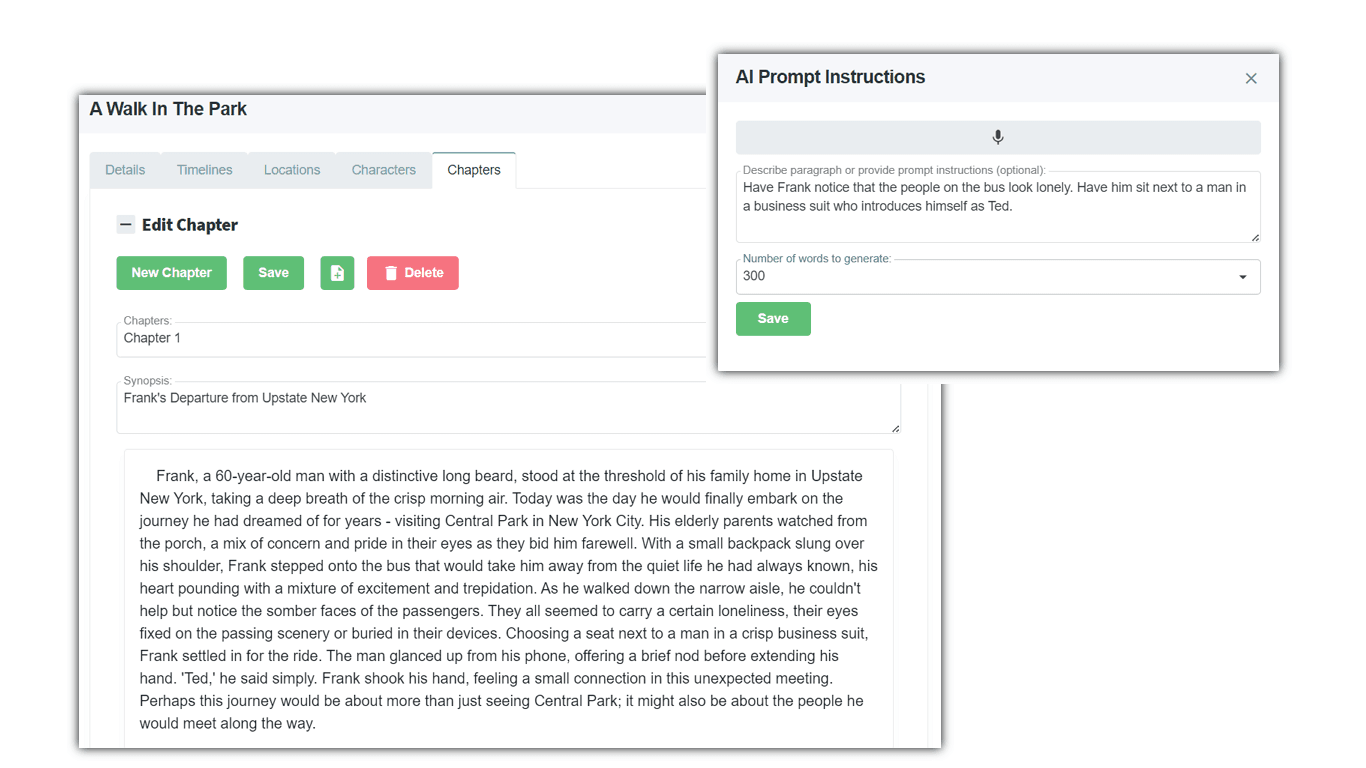
Gendiary is basically an AI diary companion. Instead of forcing you to start with a blank page, you can type or talk out your thoughts like you’re venting to a friend. Then the app organizes it into something that reads like an actual diary entry.
What I noticed right away is that it lowers the “effort barrier.” If you’ve ever tried journaling after a long day, you know it’s not the feelings that stop you—it’s the formatting. This app handles that part. You still provide the content, though. It doesn’t magically know your life.
It also includes emotion tracking. That’s the part I found most useful for looking back. For example, if I’m feeling stressed for a week straight, it’s nice to see that reflected instead of guessing. And when I’m having a good streak, it helps me notice what was different (sleep, workload, social time—stuff like that).
One more thing: searching and revisiting past entries feels easier than most basic journaling apps. It’s not just “scroll and pray.” You can go back and actually find what you wrote.
Key Features I’d Actually Use
- AI Diary Generation lets you create entries through conversation. I like that you don’t have to write perfectly. You can be messy first, then the app shapes it afterward.
- Emotion Tracking & Analysis provides insights into emotional states. If you journal daily, those patterns start to matter. If you only journal occasionally, you might not get much trend data.
- Customized Diary Entries support non-linear thought expression. This is great for people who think in fragments—like “work was chaotic, but I felt proud anyway.”
- Historical Data Queries help you search past entries. In my experience, this is the feature that turns journaling into something you can learn from, not just store.
- User-Friendly Interface makes diary keeping feel less like homework. The smoother it is to write, the more likely I am to actually do it.
Pros and Cons (Real Talk)
Pros
- It’s easier to start writing. If you struggle with journaling because you don’t know what to say, conversational input helps a lot.
- Emotion insights can be surprisingly motivating. Seeing your mood trends makes it feel less like “writing into the void.”
- Supportive tone. The AI guidance feels more like encouragement than judgment, which is exactly what I want when I’m having an off day.
- Helpful for busy schedules. When you only have 5–10 minutes, the app helps you still get something meaningful down.
Cons
- Privacy is the big question. Any AI diary app raises concerns about how entries are stored and whether they’re used to improve models. I’d strongly recommend checking the privacy policy before putting anything super sensitive in there.
- Some people may miss “raw” journaling. If you love writing in your own exact voice, AI formatting might feel like it’s smoothing things out. You may want to review the final entry instead of accepting it blindly.
- Emotion tracking isn’t perfect. AI can misread tone sometimes—especially if you’re using sarcasm, jokes, or very short entries. I’d treat the emotion labels as a starting point, not a medical verdict.
Pricing Plans
Pricing details for Gendiary aren’t clearly listed in the content I reviewed. What I suggest: check the site directly (and look for a monthly vs. yearly option). If you’re testing it, also see whether there’s a free trial or limited free usage—AI tools can get expensive once you’re using them daily.
If you want to get started, you can visit Gendiary here.
Wrap up
Overall, I think Gendiary is best for people who want to journal but don’t want the friction. The AI diary generation makes it easier to write, and the emotion tracking is the kind of feature that turns entries into something you can learn from later.
Just don’t ignore the privacy side. If you’re the type who journals about sensitive topics, read the policy carefully and consider what you’re comfortable sharing with an AI system. If you’re okay with that, Gendiary can be a pretty solid journaling companion—especially on days when you don’t feel like writing.
Promote Gendiary