LIFETIME DEAL — LIMITED TIME
Get Lifetime AccessLimited-time — price increases soon ⏳
AI Tools

Hipocampus Review (2026): Honest Take After Testing

12 min read
#Ai tool

Table of Contents

Hipocampus screenshot

What Is Hipocampus?

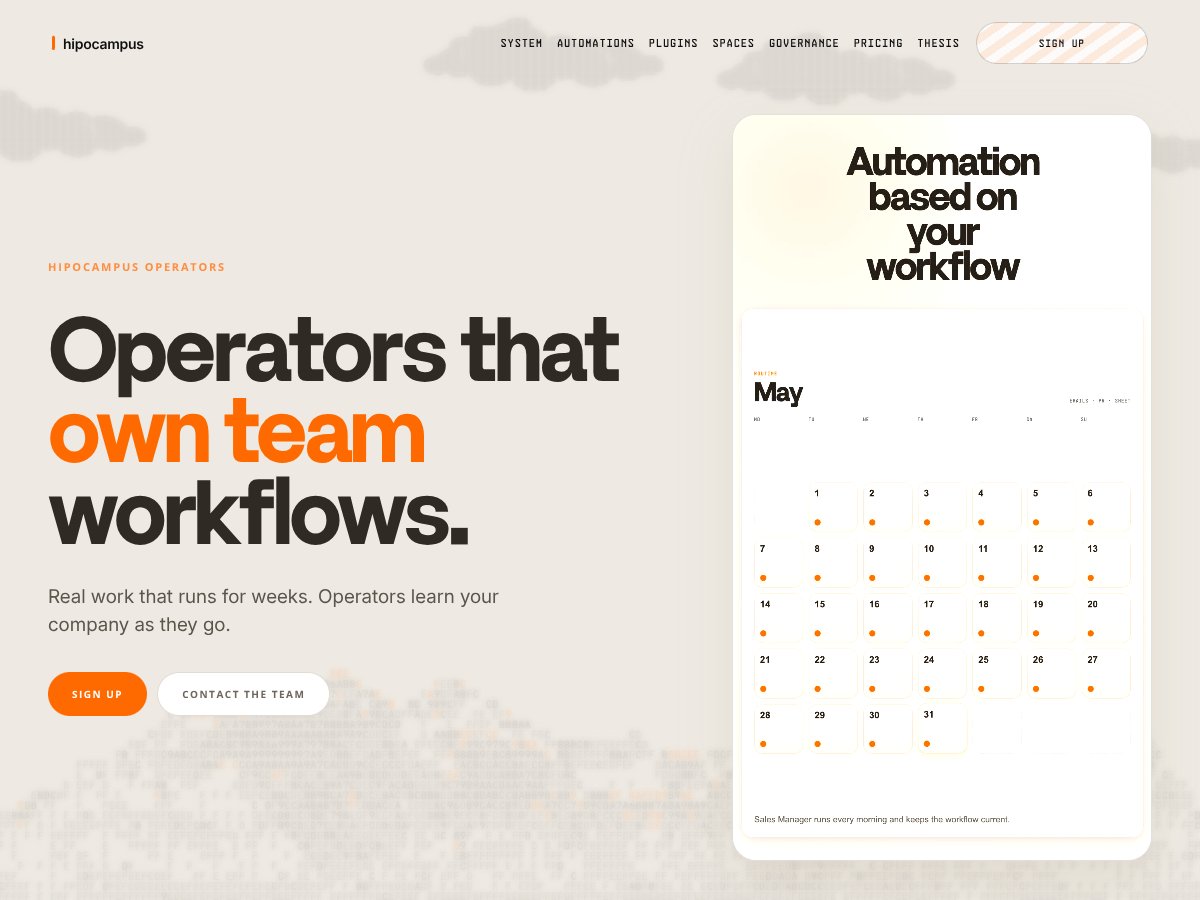
Honestly, I was pretty intrigued when I first heard about Hipocampus. The idea of a tool that can run long-term workflows across multiple systems, learn your company's quirks, and keep everything in memory sounded like a dream — but I approached it with a healthy dose of skepticism. It’s not your typical automation platform that just connects a few apps; it claims to own workflows, remember past decisions, and even learn from user demonstrations. That’s a lot to unpack.

At its core, Hipocampus is marketed as an operator layer that manages real workflows over weeks or even months. Instead of ephemeral automations that run once and forget, it aims to create persistent, governed processes that evolve with your team’s needs. It promises features like long-term memory, structured handoffs, approvals, delegation, and shared context, all within a single system. The idea is to reduce manual handoffs, prevent context loss, and make automation more reliable over time.

What I noticed was that Hipocampus doesn't really advertise itself as a plug-and-play automation tool in the traditional sense. There are no detailed tutorials, no clear onboarding flow, and I couldn't find any integration docs or APIs on the website. It feels more like a specialized platform for teams willing to experiment with a new way of managing workflows that span weeks. The team behind it is not explicitly named on the site, which makes me wonder about its maturity and support structure. Given the recent launch in April 2026, it's still very much in the early stages.

My initial impression? It’s as advertised, but with a caveat: this isn’t a finished product that you can deploy immediately. It’s more of a concept or prototype that promises to handle complex, long-term workflows. But I was surprised to find how little concrete detail there is about how it actually operates day-to-day. Still, it’s an interesting approach that could fill a real gap — if it works as promised, and if you’re willing to deal with some rough edges.

One thing to manage expectations on: Hipocampus isn’t a ready-made automation suite like Zapier or n8n. It’s more like a framework for building custom, governed workflows over time — so don’t expect to just connect a few apps and be done. Also, because it’s so new, I wouldn’t rely on it for mission-critical processes just yet. But if you’re curious about long-term automation that learns and remembers, it’s worth keeping an eye on.

Hipocampus Pricing: Is It Worth It?

Hipocampus interface
Hipocampus in action
Plan Price What You Get My Take
Free Tier Unknown Details not disclosed; likely limited features or usage caps Since the free tier info isn't clear, it's hard to assess its value. Be cautious if you want to test without committing.
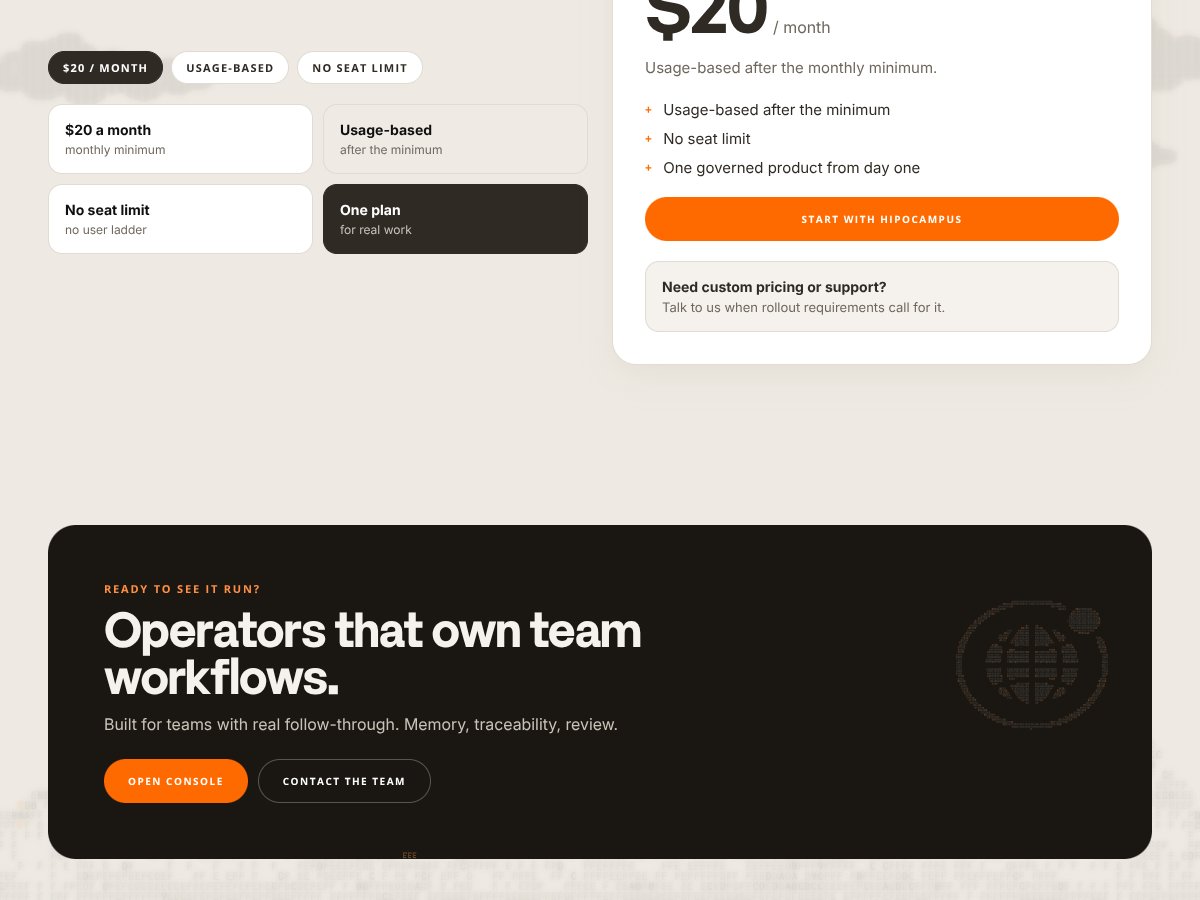
Paid Plan $20/month + Usage-based
  • No seat limits
  • One governed product
  • Usage-based billing after a monthly minimum
  • Access to workflow automation, memory, approvals, and integrations
Here’s the thing about the pricing: it’s straightforward—$20 a month plus usage charges—but what they don’t tell you on the sales page is how predictable those usage costs are or what the threshold is before surcharges kick in. For small teams or simple workflows, this might be a fair deal, especially considering no seat limits. But if your workflows are heavy or your team grows, the costs could increase unexpectedly. What they don't tell you is whether the $20/month covers all core features or if some advanced automations or integrations are locked behind additional costs. Fair warning: if you’re planning a large rollout, ask for specifics upfront. I was honestly expecting more detailed tiered plans or feature gates, but it looks like everything hinges on usage. For teams with consistent, predictable workflows, this could be cost-effective. For those with unpredictable or high-volume activity, you’ll want to keep an eye on your usage. This might be a dealbreaker for some who prefer fixed costs or need more granular control over features. So, in summary: if your workflows are modest and predictable, the $20/month is probably fair. Just watch out for usage spikes that could bump your costs. **Note:** Since the pricing info is not fully transparent, I recommend reaching out directly for a quote if your needs are complex or large-scale.

The Good and The Bad

What I Liked

  • Persistent memory system: Unlike ephemeral chat bots, Hipocampus remembers your workflows, documents, and decisions over weeks. The fact that it compounds its memory over time means you don’t lose context with each reload or handoff. That’s a game-changer for long-term projects.
  • Workflow ownership: The operators don’t just automate tasks—they own entire workflows, learning from your patterns and automating repetitive work. The pattern recognition from user demonstrations was especially impressive, saving me time in setting up routine jobs.
  • Built-in governance: Having approvals, escalation paths, and audit trails makes it suitable for team environments that require oversight. It’s not just about automation but ensuring reliability and accountability.
  • Tool integrations: The one-click OAuth connections to popular apps like Gmail, Slack, Google Drive, and GitHub are a real timesaver. It streamlines connecting your existing tools without complex setup.
  • Structured task management: The task queue with clear states (Backlog, Queued, In Progress, Review, Done) adds transparency and control. It’s nice to see work tracked visibly rather than just relying on chat history or scattered emails.
  • Automation flexibility: Scheduled runs, event triggers, and chained operators provide a versatile automation framework that can adapt to many workflows.

What Could Be Better

  • Limited visibility into features and pricing: Since the tool is very new, there’s a lack of detailed documentation, user reviews, or clear feature gates. This makes it hard to evaluate whether it can handle your specific needs without trial or direct inquiry.
  • Ambiguous use cases: The site mentions general workflow automation but doesn’t specify typical scenarios or industries where Hipocampus excels. You’re left guessing whether it’s suitable for your niche or more general business use.
  • Integration depth: While many tools are listed, it’s unclear how deeply these integrations work or if there are limitations on certain apps. For complex workflows, you might find the integrations somewhat shallow or require custom development.
  • Early-stage maturity: Being a recent launch, the platform might lack robustness, extensive support, or advanced customization options. If you need mature enterprise features or dedicated support, this could be a concern.
  • Pricing transparency and scalability: The lack of detailed pricing info makes it hard to predict costs as your usage grows. If your workflows expand, unexpected charges could become a problem, especially since the usage-based component is opaque at this stage.

Who Is Hipocampus Actually For?

Hipocampus interface
Hipocampus in action

If your team is dealing with complex, long-term workflows across multiple tools and you’ve struggled with context loss, Hipocampus might be a fit. It’s especially suited for teams that want automated ownership of their processes, with built-in governance and traceability. For example, a product team managing bugs, releases, and documentation across Jira, GitHub, and Slack could leverage Hipocampus to keep everything in sync and ensure accountability.

Similarly, if you’re a legal or compliance team handling case files, emails, and decision logs, the persistent memory and provenance features could help maintain a solid audit trail over weeks or months.

However, it’s probably not ideal for solo users or small startups without complex, ongoing workflows. If you’re just looking for a simple Zapier alternative to connect a few apps, Hipocampus might be overkill—and potentially more expensive—without the usual no-code ease.

In short, the best users are teams that need persistent, governed automation that learns over time and can handle workflows spanning multiple weeks or months. Expect a learning curve and some setup effort, but if you’re committed, it could streamline your operations significantly.

Who Should Look Elsewhere

If your needs are straightforward, such as automating simple tasks between two apps or you require a highly customizable platform with mature support, Hipocampus might not be the best choice. Its early-stage nature means you might encounter bugs, limited documentation, or lack of advanced features you depend on.

For solo entrepreneurs or small teams that don’t need long-term workflow ownership, a simpler no-code tool like Zapier or Make.com could be more suitable and cost-effective. Similarly, if your primary concern is quick automation without governance or memory, Hipocampus’s strengths may be unnecessary.

Organizations that prioritize budget predictability over flexible, usage-based billing might find the lack of clear pricing models frustrating. If you’re a larger enterprise seeking dedicated support and custom integrations, wait until the platform matures and offers enterprise plans.

Finally, if your workflows are highly specialized or require deep customization beyond what current integrations support, you might want to consider building a bespoke solution or using more established automation frameworks.

How Hipocampus Stacks Up Against Alternatives

CrewAI

  • What it does differently: CrewAI acts more like an AI-powered project manager, orchestrating workflows with a focus on team collaboration and task delegation. It emphasizes AI-driven task assignment and progress tracking, rather than persistent memory or long-term automation.
  • Pricing: Typically, CrewAI offers tiered subscriptions starting around $50-$100 per user/month, but prices vary based on features and team size. Exact pricing for enterprise plans may be custom.
  • Choose this if... you need a collaborative AI assistant that helps assign tasks and monitor project progress in real-time, rather than managing complex long-term workflows.
  • Stick with Hipocampus if... your priority is automating complex, multi-week workflows with persistent memory, approvals, and structured handoffs across fragmented systems.

n8n

  • What it does differently: n8n is an open-source, no-code workflow automation tool that integrates with many apps and services. It allows you to build custom workflows visually but doesn’t inherently include AI-driven pattern recognition or persistent memory.
  • Pricing: Free for self-hosted, open-source version; cloud plans start around $20/month for basic tiers, with higher pricing for enterprise features.
  • Choose this if... you want a flexible, customizable automation platform and are comfortable with open-source tools, but don’t need AI to learn your workflows over time.
  • Stick with Hipocampus if... you want AI that adapts and learns from your workflows, especially if you need long-term, governed automation across multiple tools.

Zapier

  • What it does differently: Zapier is a no-code automation tool that connects apps via simple triggers and actions. It’s great for quick, straightforward automations but lacks AI or persistent memory for complex workflows.
  • Pricing: Free tier available with limited zaps; paid plans start at $19.99/month for more zaps and features.
  • Choose this if... you need quick, simple integrations across popular apps without complex state management or AI learning.
  • Stick with Hipocampus if... your workflows require AI-driven automation, long-term memory, or more governance and structured handoffs.

Make.com

  • What it does differently: Make.com offers visual automation with some AI integration options, and supports complex scenarios. However, it doesn’t focus heavily on AI pattern recognition or persistent state but is more flexible for diverse automation needs.
  • Pricing: Starts at $9/month for basic plans, with advanced plans going up to $299/month.
  • Choose this if... you want a versatile automation platform with some AI features and are okay with managing your workflows more manually.
  • Stick with Hipocampus if... you need AI that learns over time and manages long-running, multi-week workflows reliably across tools.

LangChain Agents

  • What it does differently: LangChain is a framework for building AI agents that can operate persistently and handle complex decision-making. It’s more developer-focused and requires technical expertise to set up.
  • Pricing: Open-source framework; costs depend on cloud hosting and API usage.
  • Choose this if... you’re a developer wanting to build custom, AI-driven agents tailored to your workflows, with full control over their behavior.
  • Stick with Hipocampus if... you prefer a managed, user-friendly platform that doesn’t require coding and focuses on workflows with governance and shared context.

Bottom Line: Should You Try Hipocampus?

Overall, I’d rate Hipocampus around 7 out of 10. It’s promising for teams that need persistent, long-term AI-driven workflows with structured handoffs and shared context. But, it’s still very new—early days, limited real-world testing, and a lack of detailed docs mean it’s not a plug-and-play solution yet.

If your team handles complex, multi-week projects across multiple tools and you’re looking for an AI that learns from your patterns and helps maintain workflow continuity, give it a shot. The persistent memory and governance features are a real plus if reliability and compliance matter.

However, if you just need quick automations, simple integrations, or don’t require long-term AI learning, alternatives like Zapier or n8n are probably better bets—they’re mature and widely used.

For the cost, the free tier (if available) could be worth exploring to see how the workflow management feels. Upgrading to paid plans makes sense if you need more automation capacity or longer-term workflows, but keep in mind that early-stage platforms may lack support or customization options.

Personally, I’d recommend Hipocampus if your team is ready to experiment with AI-managed workflows and wants to optimize complex processes over weeks. If you’re more about quick automations or just starting out, simpler tools might serve you better in the short run.

If your use case is heavily dependent on long-term, governed workflows with shared context, give Hipocampus a try. If you need straightforward integrations or quick automations, you’ll probably be better off with established no-code tools or automation platforms.

Common Questions About Hipocampus

  • Is Hipocampus worth the money? It’s early days, so it’s probably best for teams willing to experiment. If you need proven stability, you might wait until it matures further.
  • Is there a free version? There might be limited access or trial options, but detailed info isn’t publicly available yet. Expect some restrictions on usage or features.
  • How does it compare to CrewAI? CrewAI focuses more on project management and collaboration, whereas Hipocampus emphasizes persistent, long-term workflows with AI learning and shared context.
  • What integrations does it support? Specific integrations aren’t fully listed yet, but it aims to work with common company tools. Expect some customization required.
  • Can I get a refund? Refund policies aren’t publicly detailed, especially since it’s newly launched. Check their terms once available or contact support for clarification.

As featured on

Automateed

Add this badge to your site

Stefan

Stefan

Stefan is the founder of Automateed. A content creator at heart, swimming through SAAS waters, and trying to make new AI apps available to fellow entrepreneurs.

Related Posts

chine meilleure imprimante featured image

Chine Meilleure Imprimante : Guide 2026 des Fournisseurs et Technologies

Découvrez la meilleure imprimante chinoise en 2026 : types, fournisseurs, technologies, prix et conseils pour choisir la solution adaptée à vos besoins. Lisez notre guide complet !

Stefan
is lisa crowne a real person featured image

Is Lisa Crowne a Real Person? Uncovering the Truth About Daisy Jones & The Six

Discover whether Lisa Crowne is a real person or fictional character from Daisy Jones & The Six. Get expert insights, episode details, and practical tips.

Stefan
are quotes public domain featured image

Are Quotes Public Domain: Complete Guide

Learn everything about are quotes public domain. Complete guide with practical examples, expert tips, and actionable strategies.

Stefan

Create Your AI Book in 10 Minutes