Table of Contents
What Is Instant Highlights V2 by Heygen?
Honestly, when I first heard about Instant Highlights V2 by Heygen, I was a bit skeptical. The idea of turning a long, often tedious video into bite-sized highlight reels with just a single click sounds great in theory — but does it really work as advertised? As someone who's spent way too much time manually clipping and editing videos, I was curious if this AI tool could actually save me time or if it’s just another overhyped app.
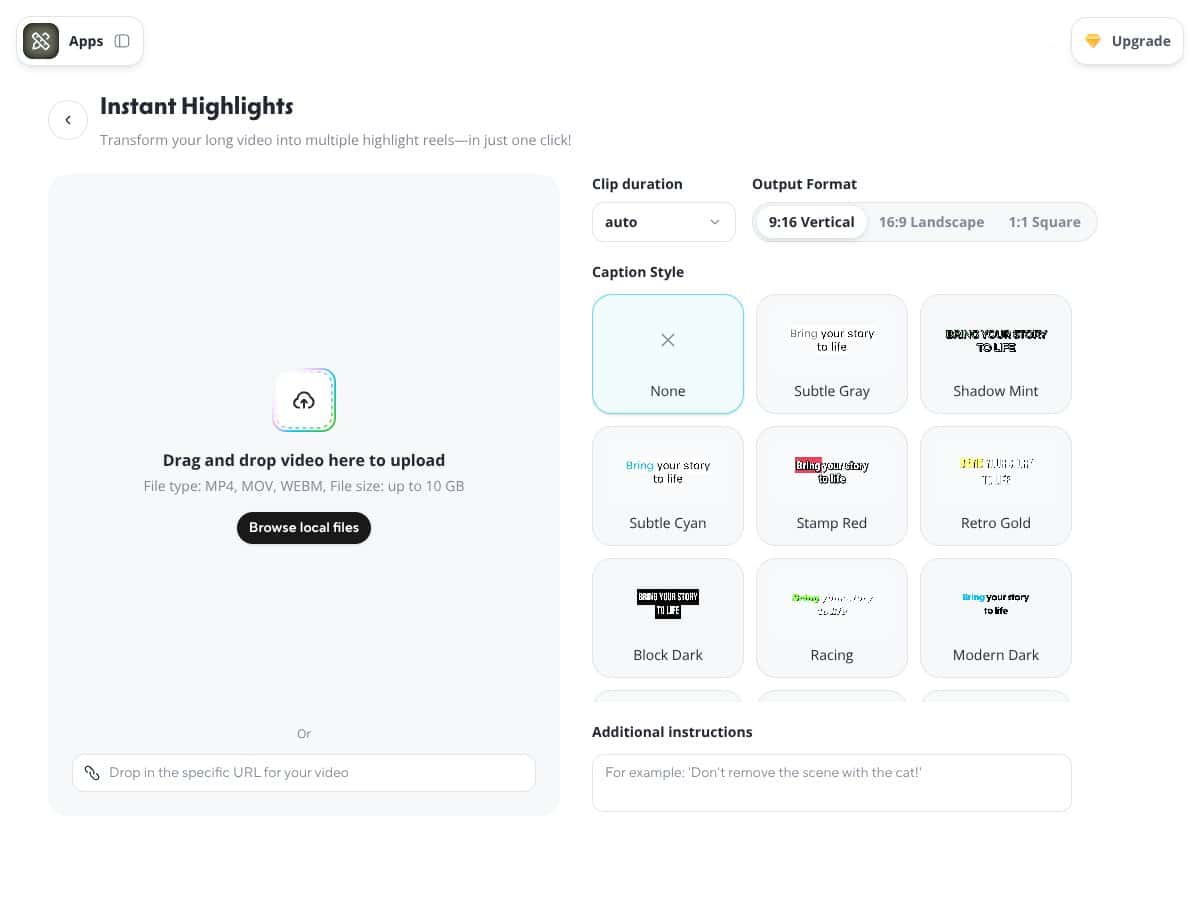
So, what does it do? In plain English: it takes a lengthy video — say, a webinar, podcast, or interview — and automatically finds the most interesting or 'highlight-worthy' parts. Then, it stitches those clips together into shorter videos optimized for social media platforms like TikTok, Instagram Reels, or YouTube Shorts. The idea is to give content creators and marketers a way to repurpose long content without slogging through hours of editing.
Who’s behind it? Heygen is a company that’s been around for a while, mainly known for its AI-driven avatar and video generation tools. They’ve built this feature as part of their broader platform, aiming to streamline video repurposing. It’s part of their effort to provide an all-in-one AI video generator, which, in my experience, makes sense given their background.
My initial impression? Well, I have to admit I was a little surprised — not necessarily in a good way — at how straightforward the process looked. It’s pretty much as simple as uploading a video, hitting a button, and waiting. But I also kept in mind that this is still labeled as a beta feature, so I didn’t expect perfection. More on that later.
One thing I want to be clear about: Instant Highlights V2 isn’t a full editing suite. It’s not going to replace a skilled editor or give you granular control over every clip. It’s more like a smart assistant that does the heavy lifting of identifying key moments, but you’re probably still going to want to review and tweak the results if you care about precision.
In summary, it aims to address the tedious task of manually finding and clipping highlights from long videos. It promises quick turnaround and social-ready clips. Does it deliver? Well, let’s dig into the features to see how it stacks up in real-world use.
Instant Highlights V2 by Heygen Pricing: Is It Worth It?
| Plan | Price | What You Get | My Take |
|---|---|---|---|
| Free Tier | Unknown / Not clearly listed | Likely limited access, basic features, perhaps a cap on video length or number of highlights | Honestly, the free tier is hard to evaluate without concrete details. It might give you a taste, but expect restrictions that could limit real usability unless they clarify more. |
| Paid Plans | Check Heygen's website — pricing varies based on usage or subscription level | Unlimited or increased quotas, priority access, possibly more customization options, and access to features like face tracking | Here’s the thing about the pricing... it’s not transparently listed, which raises red flags. If you’re serious about regular use or high-volume projects, make sure to clarify costs upfront to avoid surprises. For casual users, the value depends on whether the cost justifies the time saved. |
Honest Assessment
Without a clear published price, it’s tough to say whether Instant Highlights V2 is a bargain or overpriced. Compared to alternatives like Opus Clip or Descript, which list transparent pricing, HeyGen’s model seems more opaque. This could be a dealbreaker if you’re on a tight budget or need predictable costs.
Fair warning: be prepared to dig into your plan details before committing. If you’re a creator or marketer producing content regularly, it may be worth it — but only if the actual costs align with your budget.
How Instant Highlights V2 by Heygen Stacks Up Against Alternatives
Opus Clip
- What it does differently: Opus Clip offers more granular control over highlight selection with manual editing options post-AI detection. It also provides advanced analytics to see how your clips perform. - Price comparison: Opus Clip’s plans start at around $29/month, with more features unlocked on higher tiers. It’s generally more transparent about pricing than HeyGen. - Choose this if... you want more control over your highlight editing and detailed analytics for performance tracking. - Stick with Instant Highlights V2 by Heygen if... you prefer a quick, automated process with minimal manual effort and a focus on fast repurposing.Descript
- What it does differently: Descript combines transcription, editing, and video creation all in one platform, allowing for detailed manual editing alongside AI-generated clips. - Price comparison: Starting at $12/month for basic plans, it’s more expensive if you need the full editing suite, but offers more versatility. - Choose this if... you want a robust editing environment that lets you fine-tune clips after initial AI detection. - Stick with Instant Highlights V2 by Heygen if... you’re looking for a straightforward, no-fuss highlight generator without the need for detailed editing.Vizard.ai
- What it does differently: Vizard.ai specializes in automatic video editing with features like face tracking, scene detection, and dynamic framing, aimed at creating engaging social videos. - Price comparison: Vizard.ai usually offers tiered subscriptions starting around $49/month, with some free trial options. - Choose this if... you want AI-powered dynamic framing and face tracking for more engaging vertical videos. - Stick with Instant Highlights V2 by Heygen if... you want a simpler, more automated highlight tool without the extra complexity.Klap
- What it does differently: Klap focuses on turning long-form content into short clips optimized for TikTok and Reels, with automation and some level of customization. - Price comparison: Plans start at about $15/month, making it a budget-friendly alternative. - Choose this if... affordability and ease of use are your top priorities. - Stick with Instant Highlights V2 by Heygen if... you need more sophisticated AI detection and multiple layout options.Captions
- What it does differently: Captions emphasizes automatic captioning and subtitle generation, often integrated with other editing tools. - Price comparison: Usually around $10-20/month, depending on features. - Choose this if... your primary goal is captioning with some clipping features. - Stick with Instant Highlights V2 by Heygen if... you want a more comprehensive highlight creation process rather than just captions.Bottom Line: Should You Try Instant Highlights V2 by Heygen?
Overall, I’d rate Instant Highlights V2 by Heygen around 7/10. It’s a solid tool if you’re looking for a quick, automated way to turn lengthy videos into shareable short clips without much fuss. The AI detection is decent, and the ease of use makes it perfect for creators or marketers who want to save time. However, since it’s still in beta, the results can be hit-or-miss, especially with nuanced content. The feature set is growing, but it’s not quite a substitute for manual editing if you need perfect precision.
If you’re a content creator or social media manager who needs to produce a high volume of short clips regularly, this tool is worth trying — especially on the free tier to see how it works for you. The paid plan could be worthwhile if you want faster, more reliable results and more customization options. But if you need detailed control, professional editing, or highly nuanced highlight selection, you might want to look elsewhere.
Personally, I’d recommend giving it a shot if you’re okay with some rough edges and want a fast, automated workflow. If your content requires more finesse or branding, investing in tools like Descript or Opus Clip might serve you better.
In summary, if speed and simplicity matter most, Instant Highlights V2 is a handy tool — just keep expectations realistic regarding perfect highlight accuracy.
Common Questions About Instant Highlights V2 by Heygen
Is Instant Highlights V2 by Heygen worth the money?
It can be worth it if you need rapid content repurposing and are okay with some AI-driven inaccuracies. It’s a good time-saver, but not perfect.
Is there a free version?
Yes, Heygen offers a free tier, but features like highlight generation may be limited or require credits. Check their current plans for specifics.
How does it compare to Opus Clip?
Opus Clip offers more manual control and analytics, making it better for detailed editing. Instant Highlights V2 is more automated and faster for quick clips.
Can I customize the highlights?
To some extent — you can set instructions and clip durations, but detailed manual editing is limited compared to professional software.
Does it support multiple languages?
Yes, it auto-detects language and supports multiple languages, making it versatile for international content.
Can I get a refund?
Refund policies depend on HeyGen’s terms, typically available if the service is faulty or not as described. Check their support for specific cases.