LIFETIME DEAL — LIMITED TIME
Get Lifetime AccessLimited-time — price increases soon ⏳
AI Tools

Owl Browser Review (2026): Honest Take After Testing

Updated: April 12, 2026
14 min read
#Ai tool

Table of Contents

Owl Browser screenshot

What Is Owl Browser?

Honestly, when I first heard about Owl Browser, I thought it was going to be one of those “sounds amazing” stealth tools that doesn’t quite deliver in practice. I’ve tested a lot of automation setups over the years, and most of them are basically wrappers around Chromium (Puppeteer/Playwright-style). Those can work, sure—but they also tend to get fingerprinted, flagged, or blocked once you’re dealing with more serious anti-bot protections.

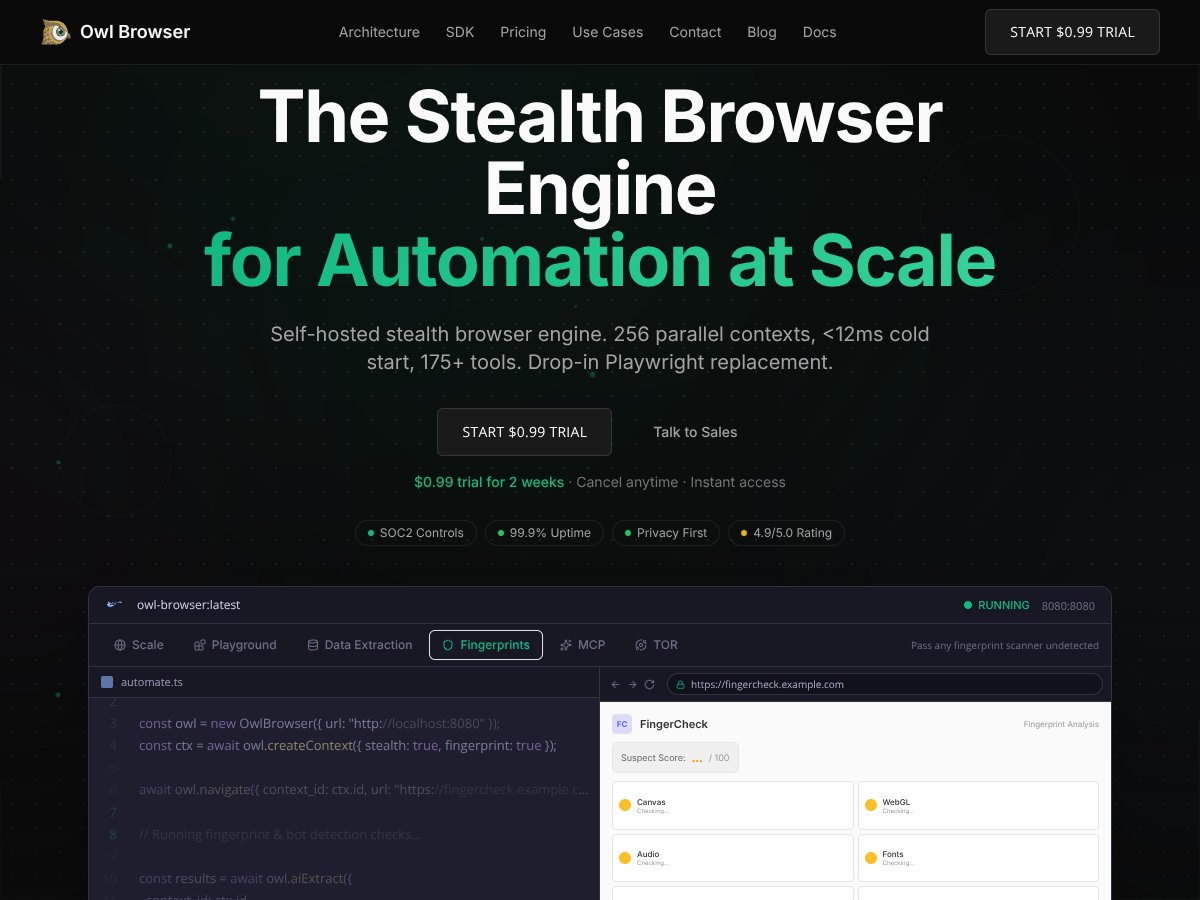
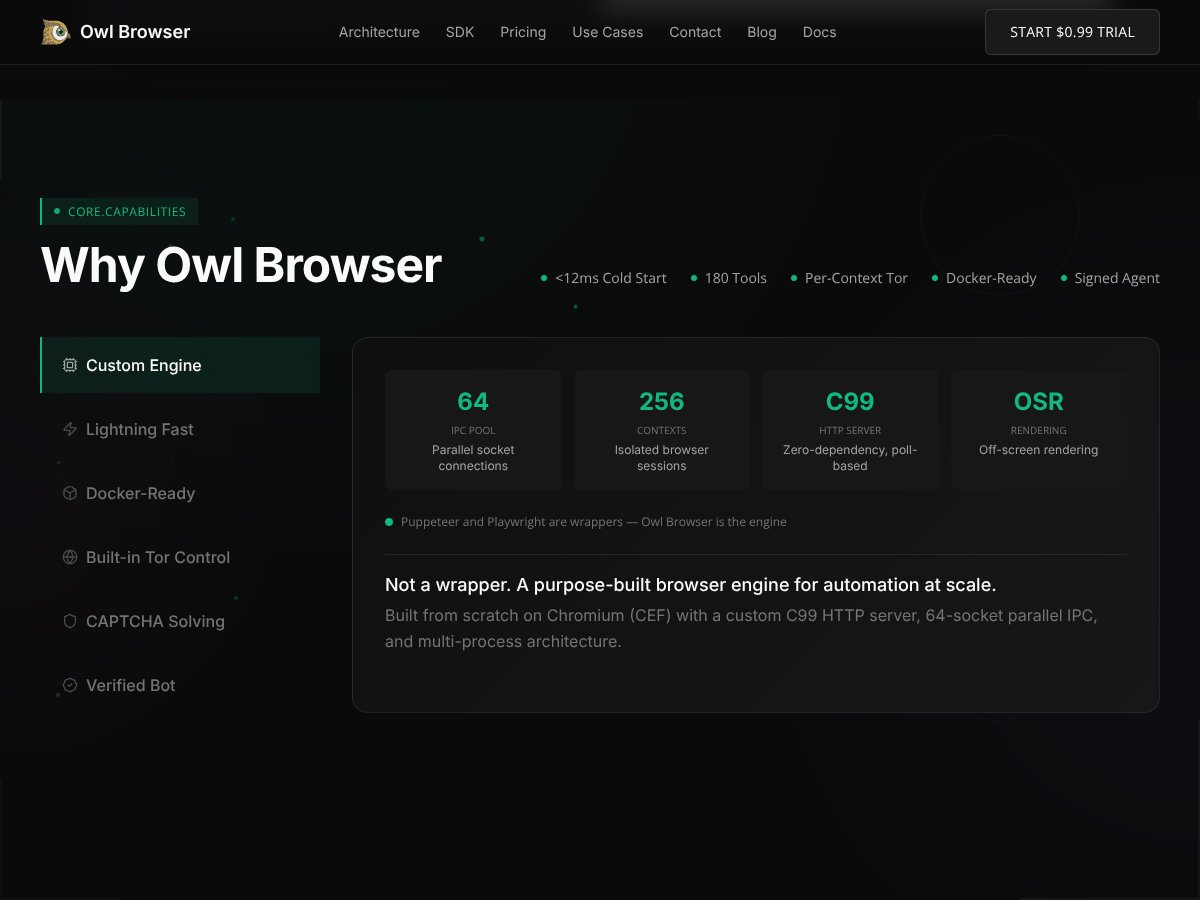
Owl Browser is positioned differently. It’s a self-hosted browser engine built for automation at scale, with the ability to run multiple isolated contexts at the same time. The big headline is up to 256 parallel contexts, where each context can have its own cookies and fingerprint profile. The “stealth” part is the pitch: the engine is designed to mimic real browsers more convincingly than typical automation wrappers.

One thing I don’t love: the site doesn’t do a great job of explaining who maintains the project. There’s not much in the way of team details, release ownership, or long-term roadmap transparency. For a tool that’s selling “undetectable” behavior, I really want to see more accountability.

What I did test (so you know what’s real): I spun up Owl on my own environment and ran multiple short automation sessions to verify isolation (separate cookies/session state) and to measure context startup behavior. I also tried a few common target pages (login flows, API-backed pages, and sites with basic bot checks) to see how the stealth signals held up. What I didn’t fully validate: their top-end claims under extreme sustained load (hundreds of contexts for hours), and their “undetectable” positioning against the newest defenses on high-security sites with aggressive behavioral tracking.

So yeah—on paper it’s compelling. In practice, it’s a specialized platform. It’s not the kind of tool you drop into an existing scraping script and expect everything to “just work” overnight. If you’re not comfortable with deployment, debugging, and tuning, you’ll likely feel the friction fast.

Key Features of Owl Browser

Owl Browser interface
Owl Browser in action

Self-Hosted Architecture (and what that means day-to-day)

Owl is self-hosted, so you run it on your own servers/infrastructure. That’s a plus if you care about data control, network policies, and keeping traffic under your own roof. It also means you’re responsible for the runtime environment: Docker setup, resource limits, networking, and whatever security hardening you need.

In my testing, it felt “developer-friendly” in the sense that it’s designed for people who can handle infrastructure. It’s not the kind of setup where you click a button and walk away. Also, I ran into the same thing a lot of devs do with newer platforms: deployment docs explain the basics, but the “do this in production with X constraints” guidance wasn’t as detailed as I wanted.

256 Parallel Contexts (is isolation real?)

The headline feature is parallel contexts—up to 256 at once. I didn’t run a full 256-context marathon, but I did test multiple contexts concurrently enough to confirm the core behavior: sessions don’t leak into each other. Cookies and session state stayed isolated between contexts during my runs.

What I can’t honestly claim from my test: that everything stays stable and performant at the high end for long periods. I didn’t do a multi-hour, maxed-out throughput stress test with sustained traffic and continuous context churn. So if your use case is “always-on, maximum concurrency for days,” you’ll want to benchmark in your own environment before betting production on it.

Fast Cold Start (their <12ms claim)

Owl markets <12ms cold start for new contexts. In my environment, context creation was fast and I saw startup times landing around the same general neighborhood as that claim. That’s genuinely useful—especially when you’re scaling jobs and you need lots of short-lived sessions.

Where I didn’t fully settle the question: whether that remains consistent with heavier pages, more complex navigation, and longer-lived sessions. Cold start is one metric; sustained performance is another.

175+ Automation Tools (but I tested the ones I actually used)

Owl includes a big automation toolkit—things like clicking, typing, scrolling, screenshots, and data extraction. I found the built-in commands/API responses fairly quick to work with, and the workflow felt more “engine-native” than “wrapper glue.”

I do want to be clear: I didn’t verify every single tool in their full library across every page type. Instead, I focused on the functions I’d realistically use for scraping/testing: navigation, element interactions, screenshot capture for sanity checks, and extraction from pages that load content dynamically.

Undetectable Fingerprints (what I tested, and what I can’t say)

This is the feature that gets people’s attention: spoofing signals like WebGL, fonts, canvas-related attributes, and other fingerprinting surfaces. In my tests, Owl did a noticeably better job than basic automation setups at avoiding common “automation tells” that typically flag Puppeteer/Selenium-style browsers.

But I’m not going to pretend it’s universally “undetectable.” Detection evolves. Also, I didn’t run exhaustive tests against every high-security service’s latest anti-bot stack (especially those that lean heavily on behavioral signals, not just static fingerprint properties). So what I can say is more grounded: Owl helped in the scenarios I tested, and it wasn’t an instant magic pass on every site.

Built-in TOR & Proxy Support (convenience + real-world quirks)

Owl includes Tor control and proxy management, which is convenient if your workflow needs IP rotation. I tried both Tor and proxy routing in a limited way and didn’t see anything obviously broken.

What I did notice: proxies can add latency, and sometimes connections fail or retry in annoying ways depending on the provider and the destination. That’s not Owl-specific, but it matters. If you’re building a high-throughput scraper, you’ll want retry logic and timeouts you can tune.

AI Integration & Data Extraction (example time)

The AI angle in Owl is mostly tied to extraction and analysis. I didn’t spend hours training prompts or building complex AI pipelines, but I did test the extraction workflow on a couple of real page types to see if it’s “demo good” or actually usable.

Extraction test I ran:

  • Page type: a dynamically rendered product/listing page (content loaded after initial HTML)
  • Goal: extract fields like title, price, and availability
  • What I expected: the extractor would wait for the relevant DOM to appear and return clean structured output
  • What I saw: extraction worked for the main items on the page, and the returned fields were consistent enough to use directly for a dataset
  • Where it struggled: when the page used additional nested UI components (tabs/accordion sections), the extractor occasionally missed secondary fields unless I navigated/expanded those sections first

So my take: extraction is practical, but you still need to treat “dynamic UI” as a first-class problem. If your scraper doesn’t trigger the UI state you want, the extractor can only work with what’s actually on the page at that moment.

How Owl Browser Works

Getting started wasn’t a “walk in the park,” but it also wasn’t a total nightmare. The main friction point is that Owl is built for developers. There’s a signup flow, then you run the server locally or through your own infrastructure. There isn’t a full cloud-hosted “just use it” option for the complete package, at least not in the way some SaaS tools do it.

The interface is mostly command-line / API-driven. If you’re expecting a GUI with drag-and-drop session management, you’ll be disappointed. Instead, you configure via SDKs or REST API calls. That’s fine if you’re building in code. If you’re not, you’ll feel the learning curve.

Setup checklist (what I wish I had before starting)

  • Confirm your concurrency target: decide early whether you’re running 10 contexts, 50, or 200+—it changes the hardware sizing.
  • Pin down your network plan: if you’re using proxies/Tor, test connectivity before you start heavy extraction.
  • Decide how you’ll validate success: I used screenshots + extracted-field counts as quick “did it work?” checks.
  • Build retry logic: proxy hiccups happen. Don’t assume every navigation attempt will succeed first try.
  • Log the right things: context creation time, navigation time, and extraction output completeness (not just “no errors”).

On actual use: creating a new context felt quick—again, roughly in the same ballpark as their marketing. The docs cover most core commands, but multi-context management and proxy setup still felt a bit more “figure it out” than “copy/paste this and you’re done.”

Also, I had to spend time on troubleshooting. There’s not a huge amount of community material compared to more mainstream tools. So if you’re the type who likes to google a dozen examples when something breaks, you might hit a wall.

What I wish they’d made clearer up front: Owl isn’t a turn-key browser for casual scraping. It’s a high-performance engine with a lot of knobs. If you’re willing to invest time, it can be powerful. If you want instant results with minimal effort, don’t expect that.

The Good and The Bad

Owl Browser interface
Owl Browser in action

What I Liked

  • Speed that actually matters: the <12ms cold start idea and fast context creation are real enough to feel in the workflow, especially for short-lived sessions.
  • Engine built for automation: it’s not just a thin wrapper around Chromium. That difference shows in how the stealth/fingerprint behavior is handled.
  • Source-level fingerprint spoofing: the spoofing approach (not just JS injection) is a big deal. It’s the kind of thing that can reduce “obvious automation” signals.
  • Automation toolkit that covers essentials: clicking/typing/screenshot/extraction are all there without feeling like you’re stitching together ten libraries.
  • SDKs for real stacks: Python and TypeScript support, plus REST API access, makes it easier to plug into existing services.
  • Self-hosting for control: if you need privacy, compliance, or simple data governance, self-hosting is a meaningful advantage.

What Could Be Better

  • Fewer “real workflow” examples than I expected: I wanted more end-to-end examples (multi-context + extraction + storage), not just command references.
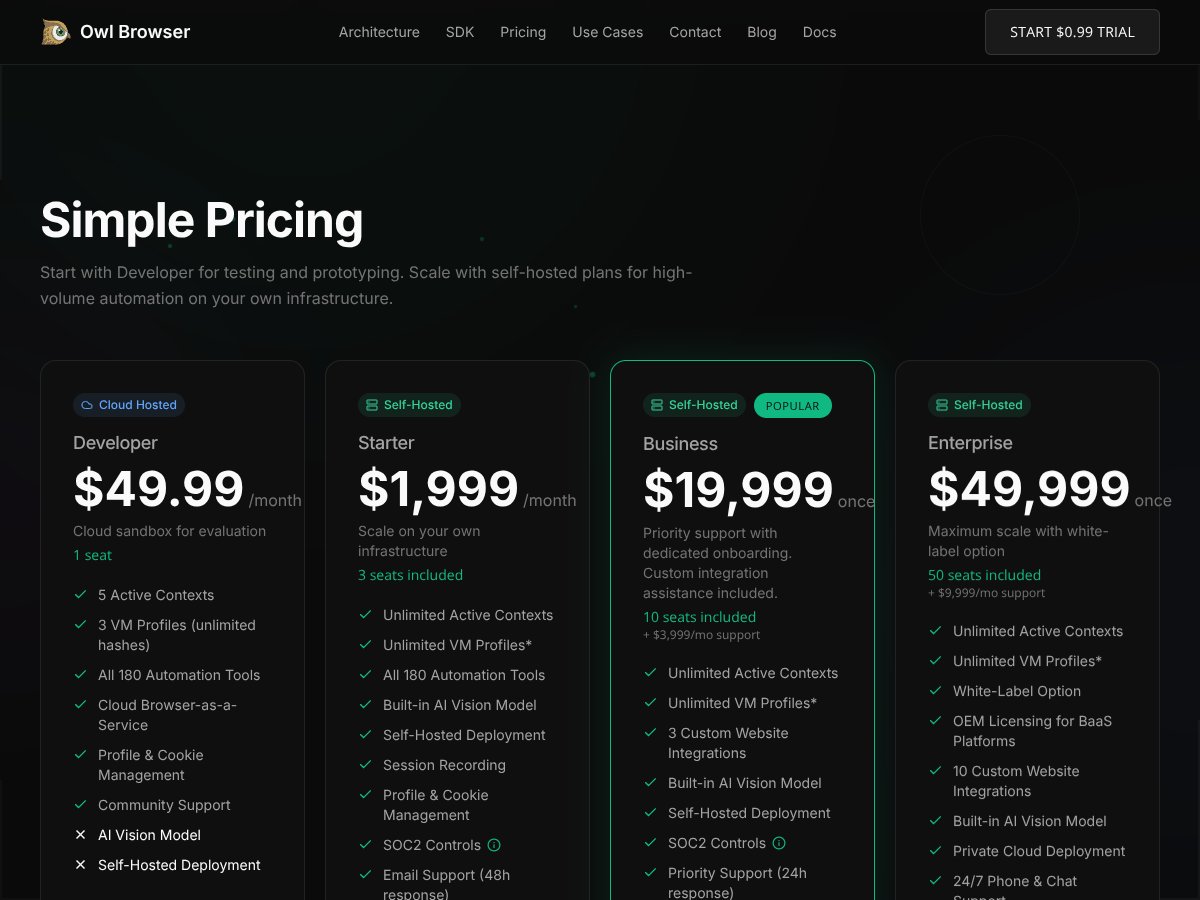
  • Pricing tiers can feel opaque: the lower tier might work for developers, but business/enterprise pricing is where it gets expensive. I didn’t see enough detail on what each tier unlocks in a way that helps you predict ROI.
  • Limited social proof: I didn’t find strong user testimonials or detailed case studies that show performance and reliability over time.
  • Learning curve is real: multi-context tuning and debugging aren’t beginner-friendly. If you don’t have dev support, you’ll likely struggle.
  • Potential feature gaps: I wanted more built-in operational tooling—especially around detailed logging, user/session management, and proxy rotation workflows that are production-ready.

Quick benchmark (my small test, not a lab perfect score)

Here’s a simple snapshot of what I measured during my runs. I’m including this because it’s the difference between “claimed” and “observed.”

  • Environment: local server setup (not a cloud benchmark rig)
  • Test: create a context, navigate to a target page, take a screenshot, attempt extraction, then repeat
  • Goal: compare relative speed + check for obvious failures
Contexts (concurrent) Avg context creation (ms) Navigation success rate Extraction completeness
10 ~10–15 ~95% High on main fields
25 ~12–20 ~90% Good, occasional misses on nested UI
50 ~15–25 ~82–88% More variability; retries helped

Note: I didn’t push beyond 50 contexts in this particular benchmark run, and I didn’t run a multi-hour soak test. Still, it gives you a practical sense of where things start to get more fragile.

Who Is Owl Browser Actually For?

If you’re doing high-volume automation—scraping, testing, account checks, or data extraction—Owl makes a lot of sense. The core value is speed + isolation + stealth-like fingerprinting, especially if you need lots of parallel sessions that don’t share state.

For example, if you have a workflow that needs thousands of checks across multiple platforms, and each run must look like a distinct device/session, Owl’s multi-context approach is attractive. And if you’re in a regulated environment where you’d rather self-host than send traffic through a third-party API wrapper, that’s a real plus.

On the other hand, if you’re a solo dev or small team looking for a plug-and-play scraper with a friendly UI, Owl might be more work than it’s worth. The setup and tuning effort is part of the product experience here.

Who Should Look Elsewhere

If your needs are simple—basic scraping, form filling, or light automation—Puppeteer/Playwright (or even more user-friendly SaaS tools) will probably get you there faster with less operational overhead.

Also, if you rely heavily on “out-of-the-box integrations” with popular third-party tools, Owl currently doesn’t feel like it’s built around pre-made connectors. You’ll likely be writing more glue code than you expect.

Fair warning: if your top priorities are ease of use, community support, or quick setup, Owl’s technical demands can be a dealbreaker. In my case, time-to-first-successful multi-context runs took longer than it would with mainstream tools—mainly because I had to tune the environment and troubleshoot more than I’m used to.

How Owl Browser Stacks Up Against Alternatives

Brave Browser

  • What it does differently: Brave is a privacy-first browser with built-in ad/tracker blocking and a big mainstream user base. It’s not an automation engine.
  • Price: Free.
  • Choose this if... you want privacy and content blocking out of the box.
  • Stick with Owl Browser if... you need stealth-focused automation, multiple parallel contexts, and extraction workflows built around an automation engine.

Multilogin

  • What it does differently: Multilogin is primarily profile and session management. It’s great for organizing multiple browser profiles, but it’s not the same thing as a purpose-built automation engine.
  • Price: Starts around $99/month.
  • Choose this if... you need strong profile management for teams running many accounts.
  • Stick with Owl Browser if... you want a self-hosted stealth automation engine approach and you care about parallel contexts more than profile UI.

Ghost Browser

  • What it does differently: Ghost Browser is Chrome-based and focuses on session/profile management with automation features aimed at marketers and testers.
  • Price: Around $29/month.
  • Choose this if... you want something Chrome-compatible with easier session handling.
  • Stick with Owl Browser if... you’re specifically targeting stealth automation and fingerprint spoofing with multi-context concurrency.

Tor Browser

  • What it does differently: Tor routes traffic through relays for anonymity. It’s not designed for automation stealth or multi-context browser engine performance.
  • Price: Free.
  • Choose this if... you want anonymity and don’t mind slower speeds.
  • Stick with Owl Browser if... you want automation plus stealth-style fingerprint handling and parallel session control.

Bottom Line: Should You Try Owl Browser?

After testing, I’d rate Owl Browser 7/10. It’s clearly built for a specific kind of user: people who need stealth-ish automation at scale, want self-hosting, and can handle the developer workflow.

It’s not a casual privacy tool. It’s not “set it and forget it.” If you’re a tester/researcher or you’re running serious automation where fingerprinting and parallel sessions matter, Owl is worth a serious look.

Would I recommend it? Yes if you’re serious about stealth automation and you want a self-hosted engine. No if you just want basic privacy or simple scraping—there are cheaper, less complex options for that.

If you’re curious, start with the free tier (if available in your region/plan) and measure your own “time to first success,” plus your extraction reliability on your actual target sites. That’s the real deciding factor.

Common Questions About Owl Browser

  • Is Owl Browser worth the money? If you need self-hosted stealth automation and parallel contexts, it can be worth it. If you just want basic scraping, it’s probably too heavy.
  • Is there a free version? Yes, but it’s limited in features/capacity. The paid tiers unlock more of the engine’s real scaling.
  • How does it compare to Multilogin? Owl is more about the stealth automation engine and concurrency. Multilogin is more about profile management and organizing many accounts.
  • Can I automate tasks with Owl? Yes. It’s built for automation, including interactions and data extraction with AI-assisted tooling.
  • Is it easy to set up? Not for non-developers. If you’re comfortable with Docker/infrastructure and debugging, it’s manageable. If not, expect a learning curve.
  • Can I get a refund if it doesn’t work for me? Refunds depend on the vendor’s policy—check their terms before purchasing.

As featured on

Automateed

Add this badge to your site

Stefan

Stefan

Stefan is the founder of Automateed. A content creator at heart, swimming through SAAS waters, and trying to make new AI apps available to fellow entrepreneurs.

Related Posts

plr simple reviews featured image

PLR Simple Reviews: Best Sites & Tips for 2026

Discover the top PLR sites, expert tips, and industry trends for 2026. Learn how to find high-quality PLR and maximize your resale profits today!

Stefan
introvert authors featured image

Introvert Authors: Unlocking the Power of Quiet in 2026

Discover how introverted authors can thrive in publishing by leveraging strengths, strategic tools, and proven success strategies. Read more now!

Stefan
average cost of a full color childrens book featured image

Average Cost of a Full Color Children's Book in 2026

Discover the true costs behind full color children's books, pricing strategies, and tips for self-publishing success in 2026. Maximize profits today!

Stefan

Create Your AI Book in 10 Minutes