LIFETIME DEAL — LIMITED TIME
Get Lifetime AccessLimited-time — price increases soon ⏳
AI Tools

Prompt Engine Review – Simplify AI Prompt Generation

Updated: April 20, 2026
5 min read
#Ai tool#Prompts

Table of Contents

Let me be honest: I used to spend way too long staring at a blank prompt box, tweaking wording like it was going to magically turn better with enough coffee. If you’ve ever thought, “Why is this so hard?”—you’re not alone. Most people don’t struggle with AI itself. They struggle with getting from an idea in their head to a prompt that actually produces useful output.

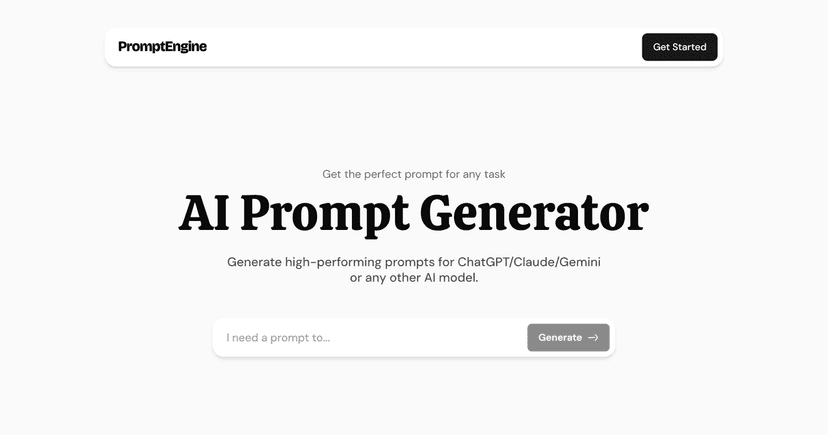
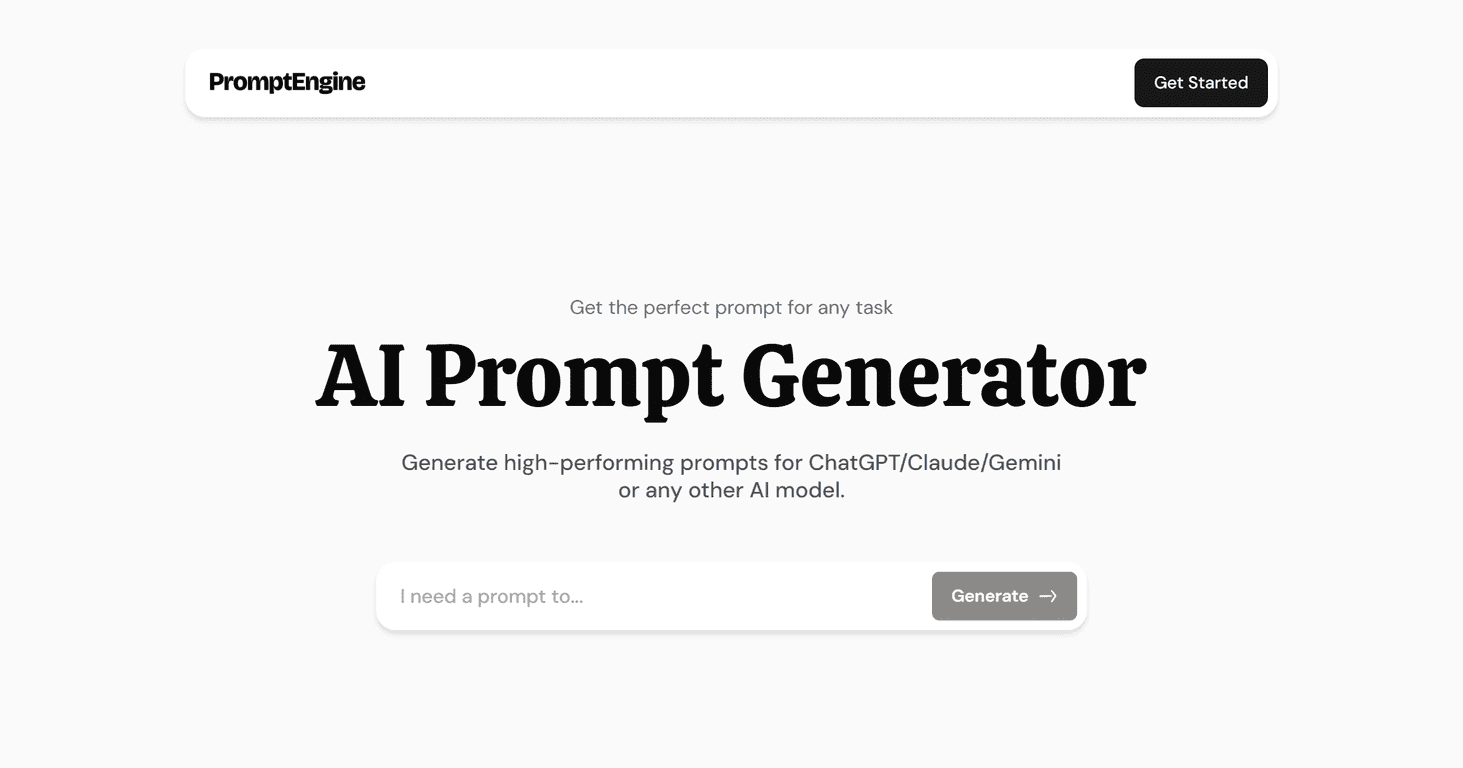
That’s where Prompt Engine comes in. In my experience, it’s a pretty straightforward AI prompt generator that helps you create prompts for models like ChatGPT, Claude, and Gemini without having to guess the “right” format every time. You tell it what you want to do, and it generates a prompt you can use right away.

Prompt Engine

One thing I noticed quickly: the interface feels simple. There’s an input field, you enter your task, and you get a prompt back. No complicated setup. And yes, it’s responsive too—I tested it on both desktop and mobile, and it didn’t turn into a tiny, awkward mess on my phone, which is more than I can say for a lot of tools like this.

If you work with AI regularly—writing, summarizing, brainstorming, drafting, outlining—this kind of tool can save time. Not because it replaces your thinking, but because it helps you get started faster and usually with fewer “try again” loops.

Prompt Engine Review: Does It Actually Help?

Prompt Engine is positioned as an AI prompt generator that helps you create prompts for multiple popular models, including ChatGPT, Claude, and Gemini. The core idea is pretty simple: you describe the task you want to do, and it generates a prompt you can paste into your favorite AI tool.

In practice, I found it most useful for the “middle” tasks—things that are too specific to be generic, but not so complex that you need to write a prompt from scratch every single time. For example, I used it for requests like:

  • “Turn my messy notes into a clean blog outline with headings and bullet points.”
  • “Draft a friendly email asking for a meeting, but keep it under 120 words.”
  • “Summarize this text into 5 key takeaways and include a short recommendation.”

What I liked is that it reduces the friction. Instead of starting blank, you’re starting with a structured prompt. That structure matters—without it, models often respond in a way that’s “technically correct” but not really what you needed.

Also, it’s not just for people who already know prompt engineering. If you’re new, you can still type what you want in plain language and get something usable back. If you’re more experienced, you can treat the generated prompt as a starting point and fine-tune it.

Key Features (What You’ll Actually Use)

  1. AI Prompt Generation: It generates prompts tailored to the task you describe, so you’re not stuck guessing phrasing and structure.
  2. Multiple AI Model Support: It’s designed to work with ChatGPT, Claude, and Gemini, which is handy if you switch tools depending on the job.
  3. User-Friendly Interface: You basically use one main input field. No steep learning curve, and it doesn’t feel cluttered.
  4. Responsive Design: Works on both desktop and mobile. I paid attention to spacing and readability, and it held up well on smaller screens.

One small practical tip: when you use Prompt Engine, be specific about constraints. If you want a certain tone, length, or format (like “bullet points,” “JSON,” “step-by-step”), include it in your task description. The more constraints you give, the less you’ll have to “fix the prompt” later.

Pros and Cons (My Real Take)

Pros

  • It saves time: You get a usable starting prompt quickly, which cuts down on the “rewrite, resend, rewrite again” cycle.
  • Better AI results with less effort: Because the prompt comes pre-structured, the responses tend to be more aligned with what you asked for.
  • Easy to use: The flow is simple enough that even if you’re not technical, you can still get value.

Cons

  • Pricing isn’t clearly listed: When I looked for details, the site didn’t show a full breakdown of plans upfront. You’re basically nudged to sign in and start.
  • Model performance varies: Even with a solid prompt, different AI models can produce different quality. That’s not Prompt Engine’s fault, but it does mean you might still need to tweak prompts depending on which model you’re using.

Pricing Plans: What I Found

Prompt Engine doesn’t clearly display pricing tiers on the public page. Instead, it encourages users to “Get Started” by signing in. That usually means there are options or tiers behind the login screen, but the exact structure (monthly/annual pricing, limits, etc.) isn’t shown upfront.

If pricing transparency matters to you, I’d recommend checking after you sign in so you can see things like usage limits and whether there’s a free tier. I don’t love guessing when it comes to subscriptions.

Wrap up

Overall, I think Prompt Engine is a solid option if you frequently use AI and you want to spend less time wrestling with prompt wording. The interface is simple, the prompt generation helps you get to better outputs faster, and it works well on mobile too.

That said, the lack of upfront pricing details is a downside. And like any prompt tool, the results will depend on the AI model you’re using (and how specific you are with your task). If you’re tired of starting from scratch every time, it’s definitely worth trying.

Promote Prompt Engine

Stefan

Stefan

Stefan is the founder of Automateed. A content creator at heart, swimming through SAAS waters, and trying to make new AI apps available to fellow entrepreneurs.

Related Posts

book publishing budget template featured image

Book Publishing Budget Template: The Ultimate Guide for 2026

Learn how to create a comprehensive book publishing budget template for your 2026 self-publishing journey. Tips, tools, and best practices included.

Stefan
self-publishing affirmation cards featured image

Self-Publishing Affirmation Cards: The Ultimate 2026 Guide

Discover how to create, market, and succeed with self-publishing affirmation cards in 2026. Expert tips, top trends, and proven strategies included.

Stefan
how to ghost write a book featured image

How to Ghostwrite a Book: The Ultimate 2026 Guide

Learn how to ghostwrite a book in 2026 with our comprehensive step-by-step guide. Discover expert tips, workflows, pricing, and how to build your ghostwriting career.

Stefan

Create Your AI Book in 10 Minutes