LIFETIME DEAL — LIMITED TIME
Get Lifetime AccessLimited-time — price increases soon ⏳
AI Tools

relayd Review (2026): Honest Take After Testing

10 min read
#Ai tool

Table of Contents

relayd screenshot

What Is relayd?

Honestly, relayd caught my eye because I’ve been frustrated with the hassle of exposing local development environments to the wider internet, especially when I just want to test something quickly or share a demo without setting up complicated VPNs or cloud tunnels. The pitch is simple: it creates a secure, live network path directly from your local machine to an authenticated browser session. In plain English, it’s like a private, encrypted tunnel that lets you see your local services on your phone or another device, without relying on third-party cloud platforms like ngrok or Cloudflare Tunnel.

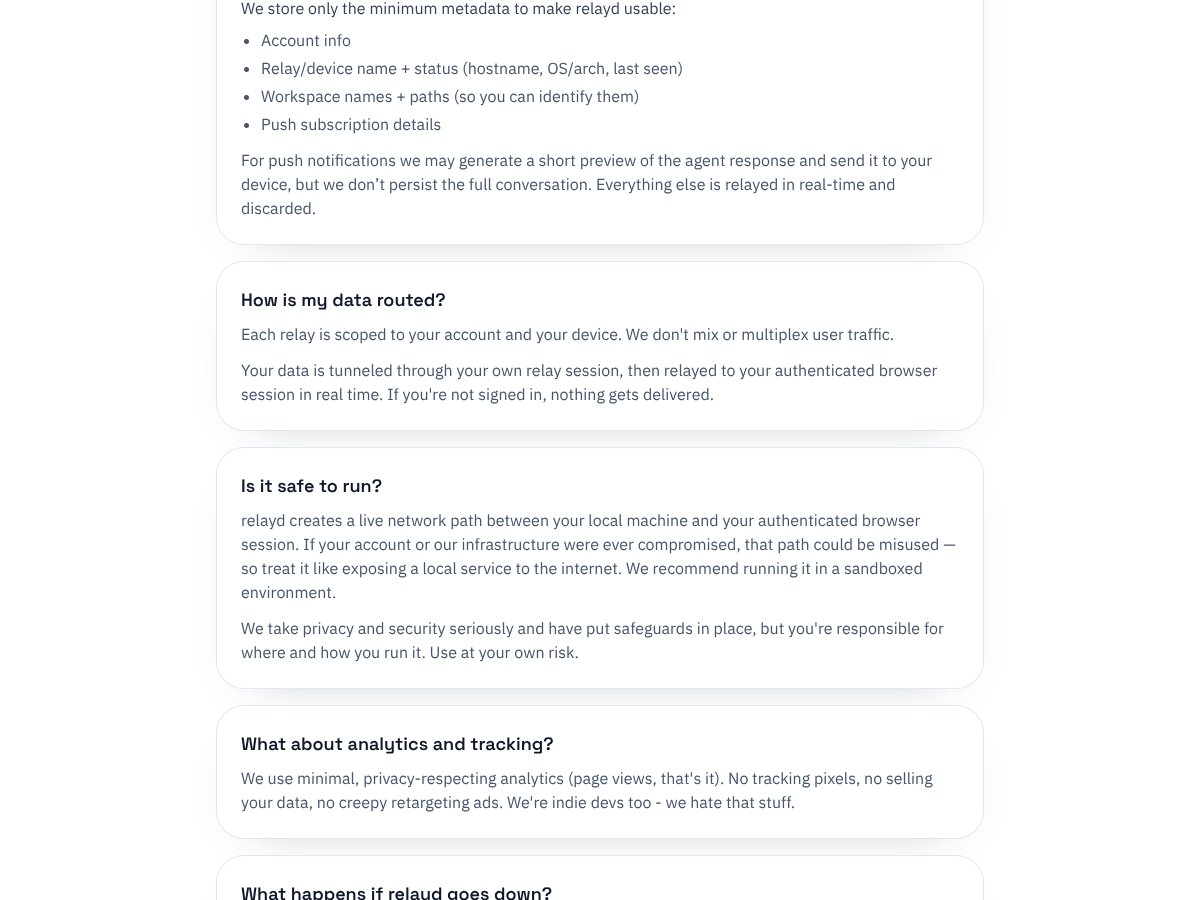
The main problem relayd aims to solve is security and privacy. Many popular tunneling tools route your traffic through their servers, which means trusting a third party with potentially sensitive data. relay d emphasizes that it keeps everything on your local machine—no data leaves your computer, and it’s built around a zero-trust architecture. That’s appealing if you’re working with sensitive code, proprietary services, or just want peace of mind that no one can snoop on your traffic.

As for who’s behind relayd, it’s developed by an indie dev who seems to be focused on privacy-conscious, developer-friendly tools. There’s no big company name attached, which makes me a bit cautious about support and longevity, but also makes sense given the project’s lightweight nature. I’d say it’s early-stage, with limited documentation and no public roadmap, so don’t expect a polished enterprise-grade product.

My initial impression was that it did what it advertised—creating a secure, local-to-web tunnel without fuss. But I also noticed right away that there’s no fancy dashboard, no detailed setup wizard, and no clear onboarding instructions. It’s very minimalistic. If you’re comfortable with command-line tools and network configurations, you might find it straightforward; if you prefer drag-and-drop GUIs, you’ll find it lacking.

The thing is, relayd isn’t trying to be a feature-rich platform. It’s focused on the core idea: keep your local environment accessible securely from anywhere without exposing yourself to the risks of third-party servers. So, don’t expect integrated collaboration, traffic analytics, or a nice user dashboard. It’s just a tool for a specific use case—nothing more, nothing less.

relayd Pricing: Is It Worth It?

relayd interface
relayd in action
Plan Price What You Get My Take
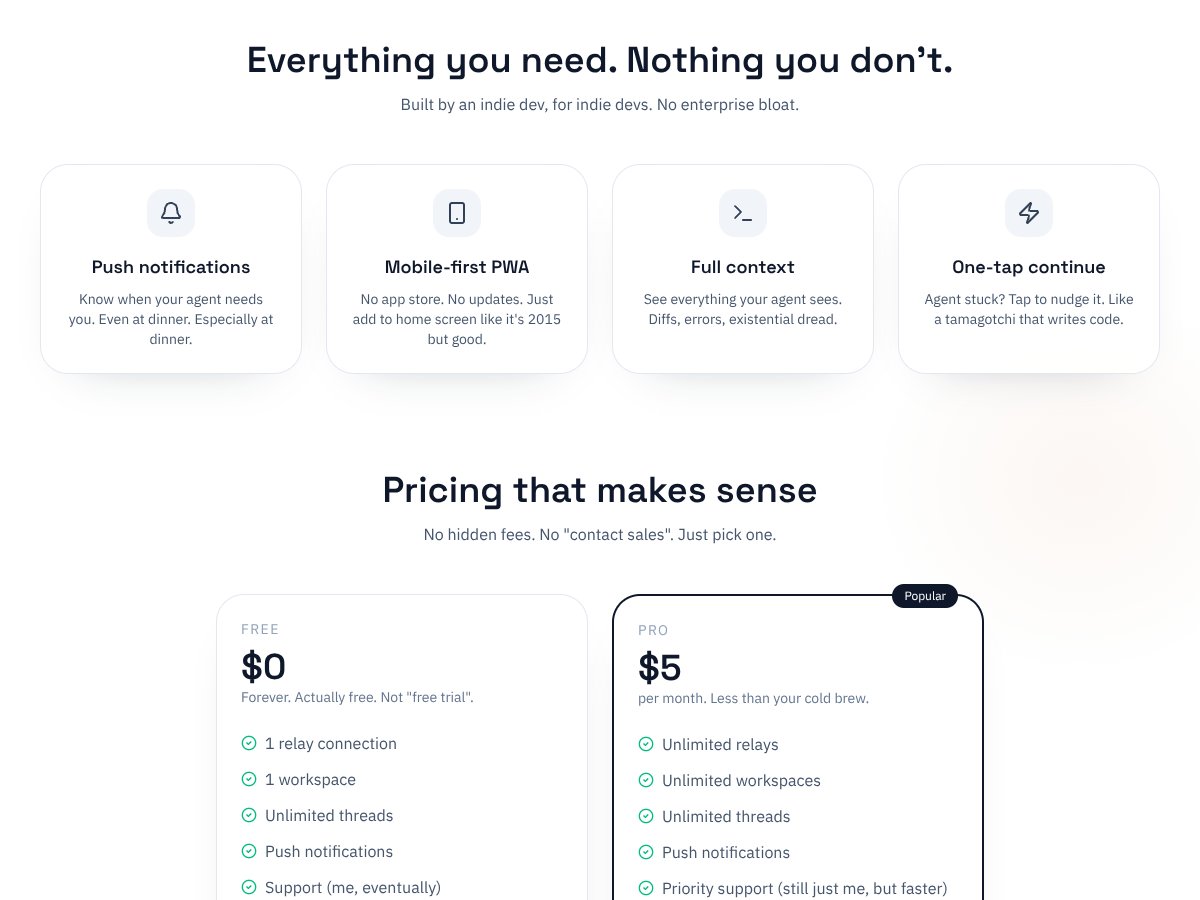
Free $0/month 1 relay connection, 1 workspace, unlimited threads, push notifications, basic support Fair for initial testing or casual use. No bells and whistles, but enough to see if it fits your workflow. Be aware that with only one relay, you’re limited in how many projects or agents you can run simultaneously.
Pro $5/month Unlimited relays and workspaces, unlimited threads, priority support, push notifications Reasonably priced, especially if you’re serious about managing multiple agents or projects. The priority support might be a plus if you hit issues, but keep in mind it’s still just one person (the developer) behind the support.

relayd Pricing: Is It Worth It?

Here's the thing about the pricing: relayd's plans are straightforward, with a clear free tier and a modest paid upgrade. What they don't tell you on the sales page is whether the free tier will be enough for your needs — especially if you're managing multiple agents or need more than one relay connection. Honestly, the free plan's limit of a single relay might be a dealbreaker for some users who expect to run several concurrent sessions or workspaces without upgrading.

Compared to alternatives like ngrok or Cloudflare Tunnel, relayd’s pricing is competitive if you’re only looking for a simple, local-to-web tunneling solution with high security. But, here’s the catch: without detailed info on usage limits or additional costs, you could run into unexpected restrictions if your needs grow. The paid plan at $5/month seems fair, especially given the focus on privacy and security, but it’s worth considering whether the features offered justify the price — which, honestly, is pretty low and accessible for most indie developers or solo operators.

Fair warning: If your workflow requires extensive integrations, advanced management, or enterprise-grade features, relayd might not be there yet. Also, keep in mind that pricing transparency is limited; they haven't published detailed usage caps or additional costs, which means you might want to test thoroughly before scaling up.

The Good and The Bad

relayd interface
relayd in action

What I Liked

  • High Security Focus: The zero-trust, local data stays on your machine, which is a huge plus if privacy is top priority. Unlike ngrok, which routes your data through their servers, relayd's approach minimizes attack vectors.
  • Simple Setup: The lightweight, local-to-web tunneling setup is refreshingly straightforward, especially for those comfortable with command-line tools. It’s less intimidating than some enterprise solutions.
  • No Cloud Dependency: No reliance on third-party cloud services means fewer points of failure and better control over your environment. That’s a big win if you’re security-conscious.
  • Clear, Transparent Pricing: The free tier and affordable paid plan are straightforward, with no hidden fees. This makes it easier to plan your budget without surprises.
  • Mobile-First, No App Store Hassle: The PWA works everywhere, no app store approvals needed. You can get notifications and monitor your agents from your phone seamlessly.
  • Real-Time Notifications & Context: Being alerted when your agents are done, with the ability to see context and diffs, streamlines your workflow and reduces unnecessary checks.

What Could Be Better

  • Limited Documentation: The onboarding experience feels rough — setup instructions are minimal, and there's little guidance on advanced features or troubleshooting, which could frustrate new users.
  • Feature Maturity: As an early-stage project, it’s missing integrations, multi-device support, or team management features that more mature tools like ngrok or Cloudflare offer.
  • No Clear Usage Limits: Without explicit limits on connections or bandwidth, you might run into restrictions unexpectedly, especially on the free plan.
  • Lack of User Feedback or Reviews: No visible user testimonials or community feedback means you’re flying somewhat blind regarding reliability at scale.
  • Potential Scalability Concerns: For larger teams or more complex setups, relayd may not yet be suitable. It’s primarily aimed at indie developers and solo workflows.

Who Is relayd Actually For?

If you're an indie developer, solo coder, or hobbyist who wants a privacy-centric way to expose your local development environment securely over the web, relayd might be a good fit. It’s especially useful if you’re tired of relying on third-party cloud services that could become a security concern or add latency. If you often find yourself working remotely from cafes, co-working spaces, or even the bathroom (hey, no judgment), the mobile-first approach can make your life easier.

For example, if you’re developing a web app on your local machine and want to share a preview link with a client or collaborator without exposing your entire network, relayd’s secure tunnels could be perfect. It also works well if you’re testing webhooks, APIs, or local services that need to be accessible externally, but only to trusted browsers or devices.

However, if you require deep integrations with cloud platforms, team collaboration features, or advanced monitoring, relayd might not be the best choice yet. It’s mainly suited for individual workflows or very small teams that prioritize security and simplicity over bells and whistles.

Who Should Look Elsewhere

This isn’t ideal if you need a mature, feature-rich tunneling platform with extensive documentation, integrations, or enterprise features. If you’re managing a team or want a solution that scales with your organization’s growth, tools like ngrok, Cloudflare Tunnel, or Tailscale Funnel might be more appropriate. They offer more robust management dashboards, usage analytics, and broader protocol support.

Fair warning: If you’re uncomfortable with early-stage projects that lack detailed documentation or user feedback, or if security concerns make you need a vendor with a proven track record, relayd may leave you wanting. Also, if you rely heavily on automation workflows that require complex configuration or support for multiple protocols, relayd’s focus on simplicity might be limiting.

How relayd Stacks Up Against Alternatives

ngrok

  • What it does differently: ngrok is probably the most well-known tunneling tool, offering easy setup and a robust cloud-based infrastructure. It handles multiple protocols, custom domains, and has a large user base. Unlike relayd, ngrok routes traffic through its cloud servers, which means your data passes through third-party infrastructure.
  • Pricing: Free plan available with limited connections and features; paid plans start around $5/month for additional features and higher limits.
  • Choose this if... you need a reliable, well-documented service with extensive protocol support and don't mind trusting a cloud provider with your data.
  • Stick with relayd if... security and privacy are your top concerns, or if you prefer a zero-trust, local-first approach without dependency on third-party cloud services.

Cloudflare Tunnel (formerly Argo Tunnel)

  • What it does differently: Cloudflare Tunnel integrates tightly with Cloudflare's CDN and security features, offering fast, secure exposure of local services with minimal setup. It leverages Cloudflare's global network to optimize delivery.
  • Pricing: Free for basic usage, with paid plans for additional features and enterprise options.
  • Choose this if... you're already using Cloudflare for DNS or CDN, and want a seamless, integrated solution that leverages their infrastructure.
  • Stick with relayd if... you prefer to avoid relying on a third-party cloud provider and want to keep everything on your local network for maximum privacy.

Tailscale (with Funnel)

  • What it does differently: Tailscale creates a secure mesh network between devices, making local services accessible remotely via WireGuard tunnels. Funnel adds a layer to expose local apps securely without exposing entire networks.
  • Pricing: Free for personal use with some device limits; paid plans start at around $5/month per user.
  • Choose this if... you want seamless device-to-device connectivity across multiple platforms with built-in security.
  • Stick with relayd if... you want a lightweight, zero-trust tunnel without the complexity of full mesh networking.

Localtunnel / Serveo

  • What it does differently: These are simple, open-source tools that expose local servers via a public URL. They are quick to set up but often less stable and lack robust security features.
  • Pricing: Free, but reliability and security vary significantly.
  • Choose this if... you need a quick, temporary solution and are okay with potential instability or security risks.
  • Stick with relayd if... you need a more secure, stable, and privacy-conscious solution that doesn't rely on third-party hosting.

Bottom Line: Should You Try relayd?

Overall, I’d give relayd a solid 6.5/10. It’s a promising tool that puts security front and center, which is rare in this space. The concept is straightforward, and if your priority is keeping local data private without depending on third-party cloud services, relayd is worth a shot. However, it’s still early days—documentation is sparse, and the feature set feels limited compared to big players like ngrok or Cloudflare Tunnel.

If you’re a developer who values control, privacy, and security above all, you should definitely give relayd a try. It’s especially suited if you’re comfortable with command-line tools and don’t need complex protocol support or enterprise features. On the flip side, if you need something bulletproof with extensive protocol support, commercial support, or a large community, you might want to look elsewhere.

The free tier (if available) may be worth testing, but the true value lies in the security benefits if you opt for the paid version. Personally, I’d recommend it for privacy-conscious folks who want a local-first approach. If you’re just trying to demo a quick project or need a reliable, easy-to-use tunnel, ngrok or Cloudflare Tunnel might serve you better. But if security is your top concern, relayd deserves a spot on your radar.

If your main goal is to keep everything on your local machine and avoid third-party exposure, give relayd a shot. If you need quick, reliable access with minimal fuss, it might be better to stick with established solutions like ngrok or Cloudflare Tunnel.

As featured on

Automateed

Add this badge to your site

Stefan

Stefan

Stefan is the founder of Automateed. A content creator at heart, swimming through SAAS waters, and trying to make new AI apps available to fellow entrepreneurs.

Related Posts

best practices for honest affiliate reviews featured image

Best Practices for Honest Affiliate Reviews in 2026

Discover proven strategies for creating honest, transparent affiliate reviews that build trust, boost conversions, and ensure compliance in 2026. Learn more now!

Stefan
Verdent Review – Honest Insights on Verdent

Verdent Review – Honest Insights on Verdent

reliable tool to boost your gardening skills

Stefan
FaceSymmetryTest Review – Honest Look at Free AI Tool

FaceSymmetryTest Review – Honest Look at Free AI Tool

FaceSymmetryTest is a fun online tool

Stefan

Create Your AI Book in 10 Minutes