Table of Contents

What Is Skyvern MCP & Skills?
Honestly, I was pretty skeptical when I first heard about Skyvern MCP & Skills. The idea of automating browser workflows using AI sounds great on paper, but I’ve seen plenty of tools promise similar things only to fall flat or require tons of manual setup. So, naturally, I wanted to dig in and see if this tool lives up to its claims—or if it’s just another shiny gimmick.
In plain English, Skyvern MCP & Skills is an open-source tool that aims to automate repetitive tasks you do on websites—things like filling out forms, extracting data, downloading invoices, or even logging into accounts—without needing to write complex scripts or manage brittle selectors. Instead of manually coding each step, you describe what you want in simple language, and Skyvern handles the rest using AI, computer vision, and some clever automation tricks.
What it’s really trying to solve is the pain point of traditional browser automation tools like Selenium or Playwright, which often require you to painstakingly identify the exact HTML selectors, deal with page layout changes, and maintain fragile scripts. Skyvern’s pitch is that it replaces that fragility with AI-powered understanding—making automation more accessible and adaptable.
The project is backed by an open-source ethos, and from what I could find, it’s developed by a team that emphasizes transparency and community involvement. It’s not a big corporate product with a huge marketing budget; instead, it’s more of a niche tool aimed at developers and power users who want flexible automation without the hassle of managing code at every step.
My initial impression? It’s as advertised—if you’re familiar with the pain of traditional automation, Skyvern does seem to offer a different approach. The setup was quick, and I was able to get a basic workflow running within minutes. But I also want to be clear that this isn’t a magic wand. It’s a complex piece of software that still has some rough edges, and I wouldn’t expect it to replace all scripting or give you a fully plug-and-play experience right out of the box.
One thing I need to stress early: It’s not a point-and-click automation platform for total beginners. If you’re used to drag-and-drop tools or low-code interfaces, you might find Skyvern’s approach more technical—especially when configuring integrations or debugging. Also, the documentation, while promising, could be more detailed, so some trial and error was involved during my testing.
Skyvern MCP & Skills Pricing: Is It Worth It?

| Plan | Price | What You Get | My Take |
|---|---|---|---|
| Free Tier | Unknown / Not clearly specified | Limited or unspecified — likely basic features, possibly limited runs or usage caps | Here’s the thing about the pricing... The website hints at a free option, but details are scarce. If you’re considering this for serious automation, you’ll want to verify what’s included before relying solely on the free tier. Be cautious about hidden limits or restrictions that might surface once you start using it heavily. |
| Pro / Paid Plans | Not explicitly listed | Access to full automation features, API usage, possibly higher concurrency, premium support, and cloud-based capabilities | What they don't tell you on the sales page is the actual costs — I was honestly expecting to find clear, transparent pricing, but it seems to be on a quote-based or tiered model. Fair warning: without concrete numbers, it’s hard to gauge if this will fit your budget. If you need predictable costs, this might be a dealbreaker for some, especially for scaling teams or heavy users. |
Overall, the pricing transparency seems limited. If you’re a small business or individual developer, you might want to reach out for a quote or trial before committing. For larger enterprises, expect that you’ll need to negotiate or get a custom plan. This lack of clear, upfront costs could be a hurdle, especially if you’re comparing it against more traditional automation tools with fixed prices.
The Good and The Bad
What I Liked
- Natural language automation: Skyvern’s ability to let you describe tasks in plain English is a real game-changer. It’s a huge time-saver over writing complex scripts or managing brittle XPath selectors.
- Open-source core: The fact that the core is open-source under AGPL-3.0 means you can inspect, customize, and contribute to the codebase. That’s rare in the SaaS automation world and adds a layer of trust.
- Computer Vision + LLM integration: Combining visual understanding with language models allows Skyvern to handle dynamic, visually complex websites — something traditional tools struggle with.
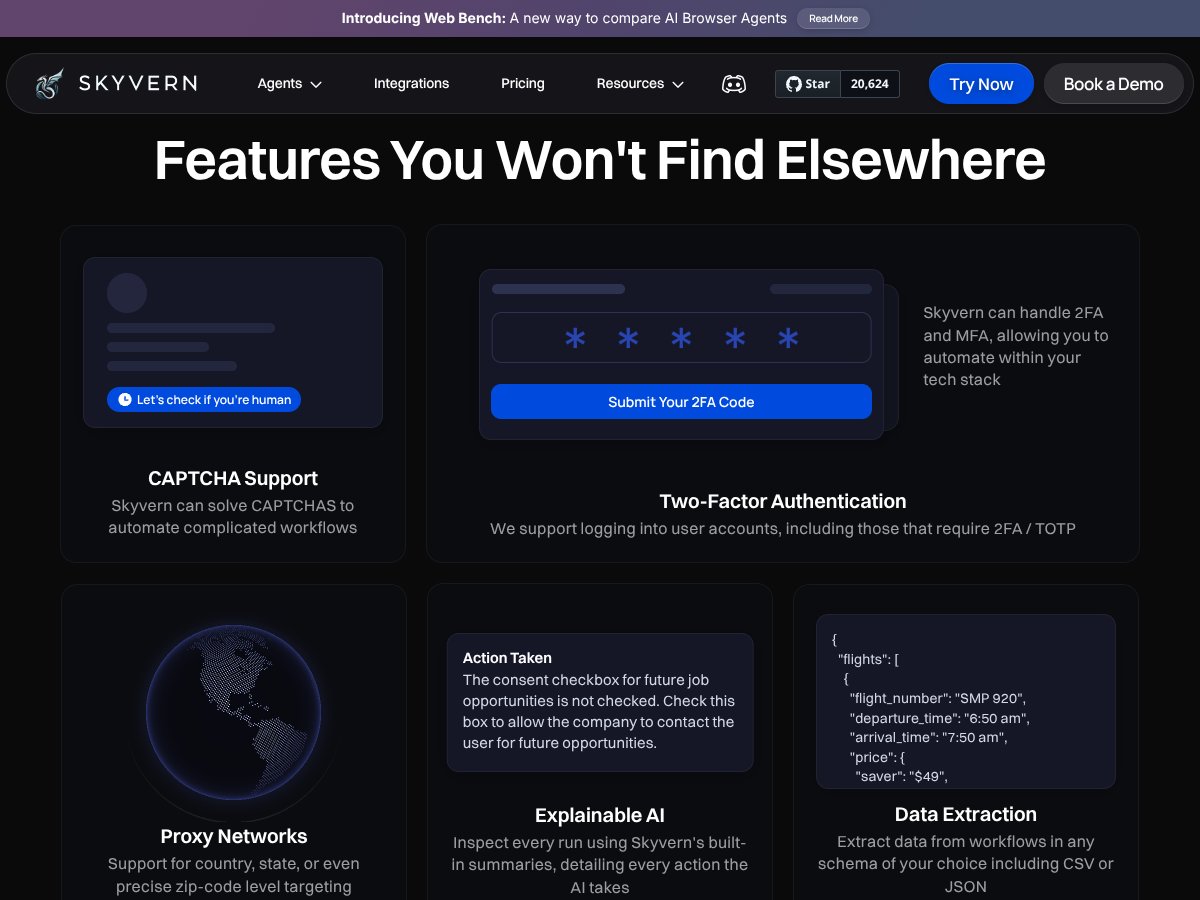
- Support for complex workflows: Features like CAPTCHA solving, 2FA, proxy support, and multi-agent coordination make it suitable for sophisticated automation needs.
- Livestream debugging and explainability: The livestreaming and detailed summaries help you understand what the AI is doing, which is crucial for troubleshooting and trust.
What Could Be Better
- Limited public documentation: The lack of detailed docs, especially around pricing, setup, and limitations, makes it hard to evaluate fully before trying.
- No clear pricing info: Without transparent plans and costs, it’s difficult to compare with alternatives like Selenium or UiPath. This might deter casual or budget-conscious users.
- Steep learning curve for advanced features: While basic tasks seem straightforward, configuring complex workflows or multi-agent setups may require a learning curve that’s not well documented.
- Potential vendor lock-in: Cloud features and reliance on proprietary LLM integrations could make migration tricky if you decide to switch tools later.
- No user reviews or case studies: The absence of testimonials makes it harder to gauge real-world reliability or long-term value.
Who Is Skyvern MCP & Skills Actually For?
If you’re a technically savvy professional dealing with repetitive, browser-based workflows—like data entry, form filling, or report extraction—Skyvern could be a real timesaver. It’s especially suited for those who want to automate across complex, visually rich websites where traditional selectors break down. For example, a compliance officer automating government form submissions, or a data analyst extracting info from vendor portals, might find this tool invaluable.
However, if you’re a solo user or a small team with tight budgets and need predictable costs, you should proceed cautiously. The open-source core is promising, but the cloud services and support might come with costs that aren’t immediately clear. Also, if you prefer a well-documented, user-friendly setup with extensive tutorials, this might feel a bit raw or underdeveloped.
Who Should Look Elsewhere
This isn’t the best fit if you’re primarily looking for a plug-and-play RPA solution with guaranteed enterprise support, like UiPath or Automation Anywhere. Those platforms offer more polished user interfaces, detailed onboarding, and predictable pricing—at the expense of flexibility and open-source transparency.
Similarly, if your workflows are simple and don’t require visual understanding or AI-driven task decomposition, traditional tools like Selenium, Puppeteer, or Playwright might be more straightforward and cost-effective. Skyvern’s strengths really shine in scenarios where visual complexity or dynamic content makes selectors unreliable, or where natural language commands are a significant advantage.
Finally, if you’re not comfortable with open-source tools or don’t want to tinker with integrations and APIs, this might be more hassle than it’s worth. The lack of extensive support and documentation could lead to frustration if you’re expecting a turnkey solution.
{"pros": ["Natural language automation simplifies complex workflows and reduces coding effort.","Open-source core allows transparency and customization.","Combines computer vision and LLMs to handle visually complex sites.","Supports advanced features like CAPTCHA, 2FA, and proxies.","Livestream debugging and explainability enhance trust and troubleshooting."], "cons": ["Pricing details are not transparent or publicly listed.","Limited documentation makes onboarding challenging.","Potential costs and limitations in cloud-based features.","Steep learning curve for advanced multi-agent workflows.","Lack of user reviews or case studies to validate long-term reliability."], "useCases": ["Automating complex form submissions on dynamic websites.","Data extraction from visually complex portals.","Automating repetitive tasks like invoice retrieval or job applications.","Handling multi-step workflows involving CAPTCHA and 2FA.","Scaling automation across multiple sites with API-driven concurrency."]}How Skyvern MCP & Skills Stacks Up Against Alternatives
Selenium
- What it does differently: Selenium is a tried-and-true browser automation framework that requires manual coding and relies heavily on XPath or CSS selectors. You write scripts in languages like Python, Java, or C# to interact with web pages directly.
- Price comparison: Free and open-source. No licensing costs, but you need to invest time in coding and maintenance.
- Choose this if... You need full control over automation scripts, want to build highly customized workflows, and have coding skills.
- Stick with Skyvern MCP & Skills if... You prefer natural language automation without deep coding, especially when dealing with complex or brittle websites where selectors change often.
Playwright
- What it does differently: Playwright offers programmatic browser control with multi-language support, focusing on reliability and speed, but still requires scripting and selector management.
- Price comparison: Free and open-source, but you need to handle your own scripting and logic.
- Choose this if... You want a robust, script-based automation framework with support for multiple browsers and languages, and are comfortable with code.
- Stick with Skyvern MCP & Skills if... You want to avoid scripting and prefer describing automation tasks in plain English, especially for quickly changing websites.
Puppeteer
- What it does differently: Puppeteer is a Node.js library for controlling Chrome headless, excellent for developers who want tight browser control but requires coding expertise.
- Price comparison: Free, but requires JavaScript/Node.js coding skills.
- Choose this if... You’re a developer needing detailed browser automation with code-level control.
- Stick with Skyvern MCP & Skills if... You want automation via natural language without writing code, especially on complex, dynamic websites.
UiPath
- What it does differently: UiPath is an enterprise RPA platform focusing on drag-and-drop automation for business processes, with strong integration and scalability, but at a higher cost.
- Price comparison: Enterprise pricing, typically starting in the thousands per year. Not as transparent as open-source tools.
- Choose this if... Your organization needs scalable, enterprise-grade automation with management and governance features.
- Stick with Skyvern MCP & Skills if... You’re a developer or small team wanting flexible, AI-powered automation without enterprise overhead and costs.
Bottom Line: Should You Try Skyvern MCP & Skills?
Overall, I’d rate Skyvern MCP & Skills around a 7/10. It’s a solid choice if you’re looking to automate browser workflows quickly without deep coding, especially for complex tasks that break traditional selectors. The setup is fast, and the natural language interface is a huge plus for non-developers.
It’s perfect for small to medium teams, or individual power users, who want a flexible, AI-driven automation tool that’s easy to get started with. But if your needs are purely enterprise-scale, or you prefer full control via scripting, other tools like UiPath or Selenium might be better suited.
The free tier is definitely worth trying to see if it fits your workflow, and upgrading could be worthwhile if you’re doing frequent or complex automation. Personally, I’d recommend giving it a shot if your tasks involve lots of form filling, data extraction, or repetitive browsing—especially if you’re not a coding ninja.
If you're managing simple repetitive jobs and want quick setup, Skyvern is a smart pick. If your focus is on building highly customized, scalable automations, you might want to consider alternatives like UiPath or scripting frameworks.
Common Questions About Skyvern MCP & Skills
- Is Skyvern MCP & Skills worth the money? It’s worth it if you value quick setup and natural language automation. It may fall short if you need heavy customization or enterprise features.
- Is there a free version? Yes, there’s a free tier with limited features, great for testing and small projects. The exact limits aren’t always clear, so check their site for current details.
- How does it compare to UiPath? UiPath is more scalable and enterprise-focused but more expensive and complex. Skyvern is more accessible for individual users or small teams wanting AI-driven automation.
- Can I get a refund? Refund policies depend on the platform where you purchase or subscribe. Check their terms during sign-up for specific details.
- Does it support complex workflows? Yes, Skyvern supports multi-step workflows, form filling, and data extraction, with AI handling the decision-making.
- What LLM providers does it support? It supports OpenAI, Anthropic, Gemini, Ollama, and others, giving you flexibility based on your preferences and budget.
- Is it easy to debug? Yes, livestreaming and interactive debugging features help you troubleshoot automation in real time.
- Can I automate login and CAPTCHA handling? Yes, Skyvern includes built-in anti-bot, proxy, and CAPTCHA handling, making it capable of automating login-heavy workflows.