Table of Contents
What Is SwipeBetter, Really?
I’ll admit it—I was skeptical too. The whole “upload your dating profile and get a 0–100 score” idea sounds like something that either helps a lot… or just gives you a pretty number to obsess over. So I tested SwipeBetter the way most people would: with real dating-app screenshots, not some polished demo profile.
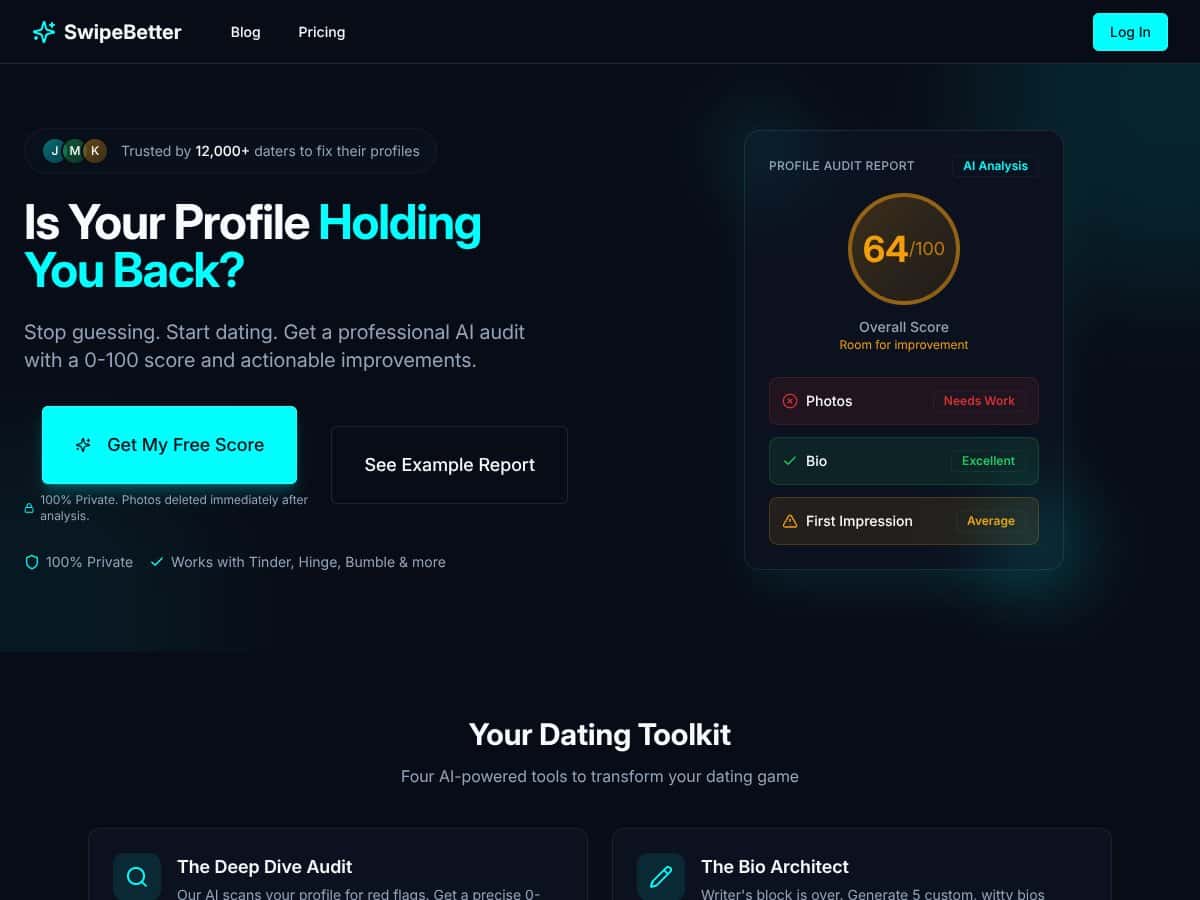
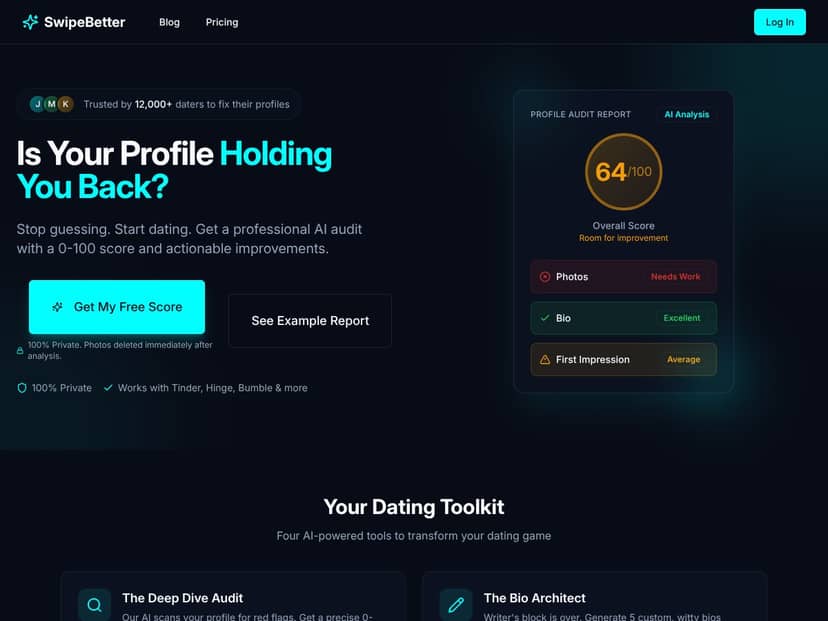
SwipeBetter’s basic promise is pretty simple. You upload screenshots from your dating profile (photos + bio/prompt text), and the tool returns a score from 0 to 100 plus suggestions meant to improve your results. The site frames this as an “audit” for common problems—like unclear photo order, weak bio structure, or language that might read as negative or low-effort.
One thing I didn’t love off the bat: the site doesn’t do a great job explaining who’s behind it. There wasn’t any clear founder story or team page that felt detailed enough for me to judge credibility. When you’re handing over screenshots of something as personal as a dating profile, I want a little more transparency than “trust the AI.”
Also, this isn’t an in-app feature. You don’t connect Tinder/Bumble/Hinge and get live feedback while you swipe. Instead, you take screenshots manually and upload them through the web portal. That means it’s more of a one-time (or periodic) review tool than a continuous profile monitor.
SwipeBetter isn’t trying to be a dating coach either. In my experience, it behaves more like a digital editor: it flags issues, suggests changes, and (optionally) generates bio drafts. But it won’t replace actually thinking about your own vibe, your dating goals, or how you want to show up in conversations.
Key Features of SwipeBetter
Profile Score (0-100)
This is the headline feature. Upload your screenshots, and SwipeBetter gives you a 0–100 score plus breakdown notes. In my test, the score felt like it was trying to quantify a mix of photo presentation and bio/prompt clarity. The site describes it as being based on AI algorithms that evaluate things like trust signals, attractiveness, and overall appeal.
“Trust signals” is one of those phrases that can mean a lot of things, so I paid attention to what the report actually flagged. In the feedback, it leaned toward cues like: whether your main photo is clear, whether you look approachable, whether group shots make it hard to identify you, and whether your bio/prompt comes across as positive and specific instead of vague or overly negative.
One practical thing I noticed: when I had a clearly lit main photo and a bio that was short and readable, the score result looked better than when my screenshots included messier photo order and a longer, less focused bio. That part tracks with common dating-app advice, but what’s missing is the “why” behind the weighting. There’s no transparent rubric that tells you, for example, “photos = 60% of score, bio = 40%.”
Red Flag Detection
SwipeBetter’s red flag detection is basically the tool’s “spot the problems” section. It looks at your photos and bio/prompt text for things it thinks might turn people off. In my test, I used a profile screenshot set that included a few photos that weren’t ideal (lighting wasn’t great, and one shot where my expression was less “inviting”). The report called out issues like lighting clarity and facial expression as possible negatives.
Here are a couple examples of the kind of feedback I saw (paraphrased from the report items themselves, since the wording can vary by profile):
- Photo order guidance: it suggested moving a stronger “main” image to the first slot.
- Expression/approachability: it flagged a photo where the face reads less open as less trustworthy/less inviting.
- Bio readability: it nudged me toward shorter phrasing and clearer intent instead of long-winded lines.
Some flags felt a little obvious—like “put your best photo first.” But honestly? That’s still useful if you’re stuck and you’ve been staring at your own profile too long. The tool helps you see what you might be ignoring.
Detailed Feedback (What’s Working + What Isn’t)
After the scan, SwipeBetter gives you a set of notes that break down issues by category. What I appreciated is that it doesn’t just say “your profile is bad.” It actually points to specific areas—photos vs. bio/prompt—and suggests what to change.
That said, some of the suggestions lean generic. For example, I saw advice that sounded like it could apply to a lot of people (“shorten your bio,” “make your first photo clearer,” “add a more positive tone”). If you want truly tailored coaching—like how to position your story for your exact audience—this won’t fully scratch that itch.
Bio Suggestions (5 Drafts)
SwipeBetter generates five bios based on your vibe/input. I tested this by giving it a couple different prompt angles (a “more serious” vibe vs. a “more playful” vibe). What I noticed: the drafts weren’t just random filler. Some of the lines were actually usable—like short openers that feel natural and not like they were written to impress an algorithm.
Still, not every draft landed. A few were a little too “template-y,” and one or two felt like they belonged to a different personality than the one I was trying to present. If you’re going to use these, I’d treat them like starting points. Take the best line, then rewrite it so it sounds like you.
Photo Analysis (Category Scores + Explanations)
SwipeBetter does photo analysis across multiple categories. In my test, the report highlighted patterns like: well-lit photos and clear facial visibility doing better than dim shots or images where you’re harder to identify quickly.
It also flagged a group photo as less trustworthy/less effective, which makes sense—on most apps, people swipe fast and they need to figure out who you are instantly. Where I wanted more: it didn’t fully account for context (like if the group shot is clearly you centered, or if the photo tells a story). It’s focused on performance cues more than narrative.
Reply Assistant (Chat Suggestions)
This feature surprised me a bit. You upload a screenshot of a conversation, and SwipeBetter suggests replies. In my view, it works best as a quick idea generator.
Would I rely on it for complex back-and-forth or sensitive situations? No. But if you’re staring at “hey” messages and you need something that sounds friendly and specific, it can help you get unstuck.
Pricing (What It Costs and What You Actually Get)
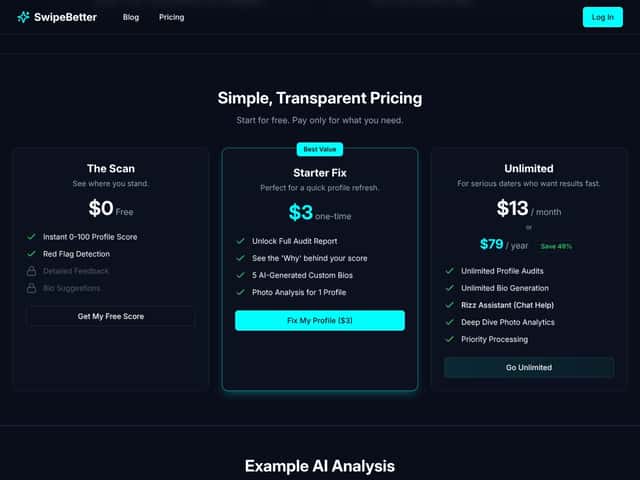
Pricing is one of the clearer parts of the experience. Here’s what I saw:
- The Scan: free to get an instant score and basic feedback.
- Starter Fix: $3 one-time for a full audit report and the bio suggestions/photo analysis/red flag detection for a profile.
- Unlimited: $13/month or $79/year for unlimited audits plus extra features like reply assistance.
My take: the $3 option is the easiest “try it without overcommitting” deal. The subscription makes sense if you’re actively testing multiple profiles or tweaking your setup regularly. If you only need one refresh, paying monthly would be unnecessary.
How SwipeBetter Works (Step-by-Step)
Getting started is straightforward. I signed up, then I was prompted to upload screenshots. The upload flow is simple—no weird steps, no long setup. I took screenshots from my dating app, uploaded them through the portal, and hit submit.
The analysis itself took about a minute or so. That speed matters—if you’re using this as a quick “what should I fix today?” tool, waiting 10 minutes wouldn’t be ideal.
Once it’s done, the dashboard shows your score up front and then breaks issues into categories like photos and bio/prompt. I didn’t feel like I was digging through a maze to find the actionable parts.
What I found missing is guidance on prioritization. It tells you what to fix, but it doesn’t really rank “do this first” in a way that’s super obvious. So you end up deciding: do you follow everything, or pick the top 2–3 changes?
Also, because it’s screenshot-based, you have to manually make changes in the app and then re-upload if you want to re-test. That’s not a deal-breaker, but it is a bit clunky if you’re trying to iterate quickly.
Overall, it’s a solid process for a “second opinion” style review. Just don’t expect it to replace your judgment or do magic while you’re actively swiping.
SwipeBetter Pricing: Is It Worth It?
| Plan | Price | What You Get | My Take |
|---|---|---|---|
| The Scan | $0 | Instant 0-100 profile score, red flag detection, detailed feedback, bio suggestions | Good for a quick baseline. It won’t feel deep if you want more than surface-level changes, but it’s a solid “should I pay?” test. |
| Starter Fix | $3 one-time | Full audit report, 5 AI-generated bios, photo analysis for one profile, fix suggestions | If you want one focused improvement pass, this is the sweet spot. Still, it’s one-and-done—no ongoing monitoring. |
| Unlimited | $13/month or $79/year | Unlimited profile audits, bios, photo analysis, reply assistant, priority processing, unlimited AI analysis | Worth it if you’re actively testing multiple profiles or constantly tweaking. If you’re just casually dating, it might be overkill. |
Pricing-wise, I don’t feel like I’m being tricked. The free scan lets you see the format and whether the feedback feels useful. The $3 upgrade is low risk, and the unlimited plan is only worth it if you’ll actually use it more than once.
One more reality check: SwipeBetter can’t guarantee matches. It can improve your presentation and clarity, but app results depend on a ton of stuff it can’t control—your location, the age range you’re targeting, competition in your area, and even who’s online at the moment.
On privacy: I didn’t see enough verifiable detail in the content you provided to confidently state a “photos are deleted immediately after analysis” claim. If you care about this (and you should), check SwipeBetter’s privacy policy for the exact retention language and the date/section it references.
The Good and The Bad
What I Liked
- Clear pricing structure: You can start free, then upgrade without guessing what’s behind the paywall.
- Actionable feedback: It points to specific fixes like photo order and bio clarity rather than vague “be better” advice.
- Multiple tools in one audit: You get bio suggestions, red flag detection, and photo analysis together.
- Fast results: In my test, the scan returned quickly (around a minute).
- Helpful for quick iteration: If you’re making changes anyway, it gives you a checklist for what to try next.
What Could Be Better
- No direct app integration: You have to upload screenshots manually, so it’s not live feedback.
- Limited score transparency: It gives a 0–100 number, but it doesn’t explain the weighting behind the score.
- Some suggestions are generic: A few tips felt like they could apply to almost anyone, which reduces how “personal” it feels.
- Bio drafts aren’t always on-tone: Some lines are great; others need rewriting to sound like you.
- Social proof is thin: If you’re the kind of person who needs lots of user reviews, you might find it hard to fully trust without more public history.
- AI can miss nuance: It may not fully understand your intent, your humor style, or cultural context—so treat it as a guide, not authority.
Who Is SwipeBetter Actually For?
SwipeBetter is best for people who want a quick, structured review of their dating profile and are willing to test changes. In my experience, it’s especially useful if you’ve hit a point where you’re not sure what’s holding you back.
It’s a good fit if you’re:
- Trying to improve without hiring a coach: You get a “checklist” style audit for a low price.
- Experimenting with photo order and bio clarity: The feedback is focused on presentation, which is exactly where small changes can matter.
- Newer to online dating: If you don’t know what “good” looks like yet, it helps you avoid common mistakes.
- Budget-conscious: The $3 plan is an easy entry point.
If you already have a strong profile and you’re mostly just waiting for the right people to show up, SwipeBetter may feel less necessary. But if you’re stuck, it can help you stop guessing.
Who Should Look Elsewhere?
If you want deep, personalized coaching (or you want something that integrates directly with your dating apps), SwipeBetter isn’t really built for that.
It might not be ideal if you:
- Need human coaching: There’s no therapist-level tailoring here—just AI feedback.
- Want seamless app integration: You’ll still be taking screenshots and re-uploading.
- Care a lot about privacy: Because you upload images, you’ll want to verify retention/deletion details in the privacy policy before using it.
- Expect guaranteed results: No tool can promise matches. Your profile is only one piece of the puzzle.
- Run multiple profiles for different audiences: If you’re managing a bunch of accounts, you might find the workflow too manual.
If your goal is “instant improvements with zero effort,” you might be happier with something more integrated or more human-driven. But if you want practical feedback you can act on today, SwipeBetter is worth trying.
How SwipeBetter Stacks Up Against Alternatives
PhotoFeeler
- What it does differently: PhotoFeeler leans on real user feedback for your photos—attractiveness, likability, trustworthiness—rather than analyzing your bio/prompts with AI.
- Price comparison: Typically around $10–$20 for a set of votes, or bundles for multiple photos. Costs can add up if you want feedback on many images.
- Choose this if... you want crowd-based validation and you trust human reactions more than algorithmic scoring.
- Stick with SwipeBetter if... you want an audit that also covers your bio/prompt content and red flags—not just photo ratings.
ROAST
- What it does differently: ROAST uses AI to analyze more of your full dating presence—photos, bios, prompts—and aims to optimize your “dating persona” overall.
- Price comparison: Often around $20–$30 per profile review.
- Choose this if... you want a broader makeover, including messaging/prompt-style improvements.
- Stick with SwipeBetter if... you want a quicker, more targeted profile audit focused on match potential without as much “extra” content.
YourMove.ai
- What it does differently: YourMove.ai is more centered on messaging and conversation improvement, with some profile-related features mixed in.
- Price comparison: Usually subscription-based around $10–$25/month.
- Choose this if... your biggest problem is opening lines and reply quality—not your profile structure.
- Stick with SwipeBetter if... your priority is profile audits, photo feedback, and bio/prompt revisions.
ProfilePic.ai
- What it does differently: ProfilePic.ai focuses on generating new AI-created profile photos. It’s not really about grading your existing photos and bios.
- Price comparison: Often around $20–$50 depending on the set and resolution.
- Choose this if... you want fresh images to replace weak ones.
- Stick with SwipeBetter if... you already have decent photos and you want to optimize what you’ve got.
Hinge Prompt AI Tools
- What it does differently: These tools target Hinge specifically—helping you improve prompt answers and writing style for that platform.
- Price comparison: Often free or bundled with other features; some premium tiers cost a few dollars.
- Choose this if... you only use Hinge and you want prompt-level help.
- Stick with SwipeBetter if... you want something that works across Tinder/Bumble/Hinge-style profiles and reviews both photos and bios/prompts.
Bottom Line: Should You Try SwipeBetter?
After testing it, I’d rate SwipeBetter around 7/10. It’s genuinely useful if you want a structured, AI-driven review—especially when you’re unsure what’s turning people off. The feedback is fast, and the tool does a good job pointing you toward likely fixes (photo clarity/order, bio readability, and “approachability” cues).
Where it falls short is exactly where you’d expect AI to fall short: the score isn’t fully transparent, some advice is generic, and the tool can’t truly replace human judgment or your own understanding of your vibe.
If you’re already putting effort into your photos and bios and you just want an extra set of eyes, SwipeBetter is worth trying—especially at the $3 Starter Fix level. If you want deep coaching or seamless integrations, you’ll probably be happier looking elsewhere.
Would I recommend it personally? Yes—with the right expectations. Use it as a second opinion, then make changes you can actually stand behind. If you prefer human feedback from friends or you already know what to fix, you might skip it.
Common Questions About SwipeBetter
- Is SwipeBetter worth the money?
- It can be worth it if you want quick, structured feedback and you’re willing to test changes. The free scan helps you decide if the audit style works for you, and the $3 plan is a low-risk way to try it.
- Is there a free version?
- Yes—SwipeBetter’s “The Scan” is listed as free. It typically gives you the basic score and initial feedback, while paid tiers expand the report.
- How does it compare to PhotoFeeler?
- PhotoFeeler is crowd-based photo feedback. SwipeBetter is more of a full profile audit, including your bio/prompt content and red flag detection.
- Can I get a refund?
- Refunds depend on where you purchase and their policy. I’d check SwipeBetter’s refund/terms page before buying.
- Does it integrate directly with dating apps?
- No direct integrations are mentioned in the content here. You’ll need to upload screenshots manually.
- How accurate is the AI analysis?
- It’s decent at spotting common profile issues, but it can miss nuance—like your humor style, cultural context, or what your audience actually responds to. Use it as a guide, not gospel.
- Is it suitable for all dating platforms?
- It’s designed to audit profiles from multiple apps (Tinder, Bumble, Hinge, etc.) based on screenshots, but results can vary depending on how each app presents photos and prompts.