LIFETIME DEAL — LIMITED TIME
Get Lifetime AccessLimited-time — price increases soon ⏳
AI Tools

Agentikus Review (2026): Honest Take After Testing

Updated: April 12, 2026
9 min read
#Ai tool

Table of Contents

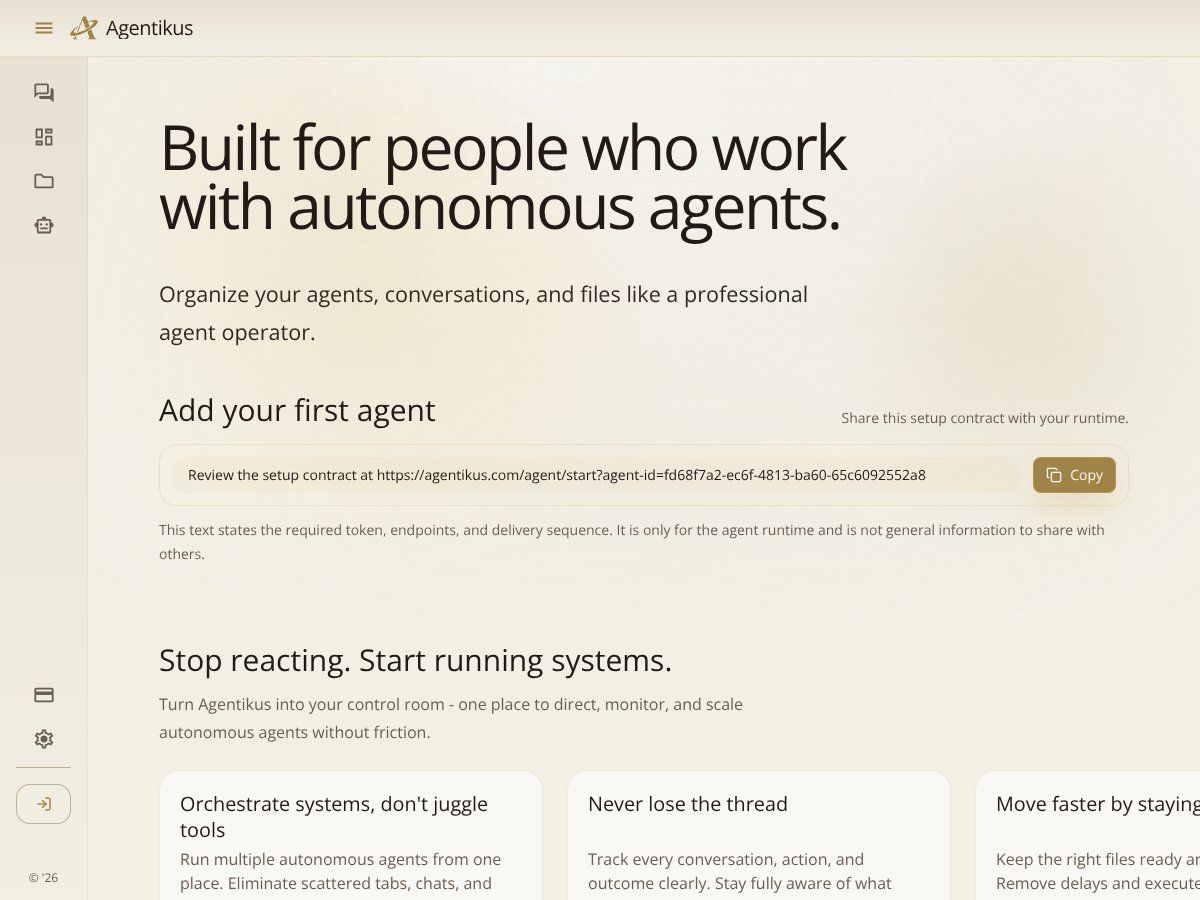
Agentikus screenshot

What Is Agentikus?

I went into Agentikus expecting something more “platform-y” than it actually is. After spending time poking around the dashboard and going through the setup flow, my takeaway is pretty simple: Agentikus is a control interface for other AI agents—not the brains behind them.

In plain English, it’s meant to act like a centralized hub where you can organize, monitor, and direct autonomous AI agents from one place. Instead of juggling multiple chat tabs (or bouncing between tools to find the right run), you send instructions, review what each agent said, and keep related files from getting scattered.

Here’s the part I found most useful: it’s designed around the reality that agent workflows get messy fast. When you’ve got multiple tasks running at once, it’s not just “chatting”—it’s tracking context, checking progress, and figuring out where things went off the rails. Agentikus is basically trying to reduce that mental load by giving you one place to look.

That said, I don’t want to oversell it. The website messaging (and what I experienced in practice) makes it clear it’s not a full agent framework with its own built-in model engine. You still need to rely on your existing runtimes/LLMs and whatever your agents are already using. Agentikus sits on top as a dashboard/wrapper so you can manage activity more cleanly.

Also, I wasn’t able to find much “about the team” info on the site. For me, that matters—support quality and update cadence are easier to trust when there’s a clear company behind the product. If you’re the kind of user who needs long-term stability, it’s worth keeping that in mind while you test.

So, what did I actually notice during testing? The interface feels built for oversight. You’re not constantly writing prompts in fifty different places. You’re managing “agent activity” as a workflow—open a conversation, review the output, and move on. If you’re expecting one-click automation that magically handles everything end-to-end, you’ll likely feel disappointed. Agentikus is more like a control room than a complete automation stack.

Agentikus Pricing: Is It Worth It?

Pricing is one of the areas where Agentikus feels a little too vague. I looked for specific plan names, exact prices, and clear limits (like how many agents you can run, how many runs you can execute, or whether file storage costs extra), and I didn’t find a fully transparent breakdown on the public-facing page I checked.

What I could confirm: there is a free tier, but the details of what’s included (and what’s capped) weren’t clearly spelled out in a way I could confidently benchmark. The paid plan pricing also wasn’t presented with the kind of specificity I personally prefer before paying—especially for tools that may hit usage limits.

Plan Price What You Get My Take
Free Tier Unknown (not clearly listed) Basic access (exact feature set and limits not clearly stated) If you’re just testing whether the dashboard fits your workflow, the free tier could be enough. If you need predictable caps, you may want to confirm limits before committing.
Pro / Paid Plans Not clearly listed (check website) More agent management and monitoring features (exact inclusions not specified) I can’t fairly judge value without seeing concrete limits and what each tier unlocks. If you’re running active multi-agent workflows, that transparency matters.

Here’s what I’d recommend based on how these tools typically work: don’t assume the paid tier “automatically” means unlimited agents or unlimited activity. If the dashboard is tied to agent runs, you’ll want to know whether you’re paying for seats, runs, storage, or something else.

So is it worth it? The value proposition could be solid—if the paid tier gives you the monitoring and file workflow you actually need. But if you’re the type who budgets tightly, I’d treat the pricing page as something you should verify directly before you upgrade.

How Agentikus Stacks Up Against Alternatives

AutoGPT

  • Different goal: AutoGPT is built as an agent framework that can run tasks with less step-by-step prompting once you set it up. Agentikus, in contrast, is more about managing and observing agents you already have working.
  • Setup expectations: AutoGPT tends to require more technical tinkering—configuration, prompting strategy, and making sure your loop behaves. Agentikus feels aimed at users who want oversight without spending days building the system.
  • Cost reality: AutoGPT itself is free/open-source, but you still pay for compute/hosting depending on how you run it. Agentikus is subscription-based, but I’m not going to repeat an “around $10–$20” estimate here because I couldn’t verify exact pricing details from the public page I checked.
  • Choose Agentikus if: you want a dashboard for multiple agents—things like reviewing conversations and tracking activity—without turning your life into DevOps.
  • Stick with AutoGPT if: you want deeper control over autonomy and are comfortable iterating on agent behavior.

Zapier for AI

  • Different approach: Zapier is great for connecting apps and automating repetitive workflows. It’s not primarily about controlling autonomous agents in the “run + monitor + review” sense that Agentikus is aiming for.
  • When it wins: If your goal is “trigger X when Y happens,” Zapier is often the faster path. Agentikus is more relevant when you’re managing agent activity itself.
  • Cost comparison: Zapier plans typically scale based on task volume and integrations. Agentikus pricing (from what I could verify) wasn’t transparent enough for me to do a fair apples-to-apples comparison.
  • Choose this if: you’re already deep in Zapier and you want to add AI into existing app workflows.
  • Stick with Agentikus if: you need a more direct interface for agent monitoring, conversation review, and file handling.

AI Dungeon / Text-based Interfaces

  • Entertainment vs. operations: AI Dungeon is fun, but it’s not meant to manage multiple agents or coordinate task workflows. It’s a text experience, not an operational dashboard.
  • Workflow fit: If you’re trying to run structured projects (docs, tasks, multi-step outputs), you’ll probably outgrow a purely interactive interface.
  • Choose this if: you want creative, story-driven interactions.
  • Stick with Agentikus if: you want something that feels closer to a command center for AI work.

Custom Built Solutions

  • Maximum control: If you build your own dashboard using APIs (for example, an LLM provider API plus your own UI), you can tailor everything—logging, permissions, analytics, and exactly how files move between steps.
  • Real tradeoff: You’re also taking on development time, maintenance, and debugging when something breaks. That’s the part people underestimate.
  • Cost range: Custom systems can get expensive depending on hosting and engineering effort. Agentikus may be cheaper because you’re buying a ready-made interface—but only if it matches your requirements.
  • Choose this if: you have the technical resources and very specific needs.
  • Stick with Agentikus if: you want a usable control panel without building from scratch.

Bottom Line: Should You Try Agentikus?

I’ll give Agentikus a 7/10 based on what I tested and what I could verify from the product presentation. Here’s how I arrived at that score:

  • Onboarding & usability: 8/10 — the interface is clearly meant for oversight, and it doesn’t feel like you need a computer science degree to navigate it.
  • Monitoring experience: 7/10 — the “review conversations / track activity” concept is strong, but I didn’t see the kind of deep, detailed analytics you might expect from more advanced platforms.
  • File workflow: 7/10 — file management is positioned as a core feature, but the exact supported formats and permission model weren’t clearly documented in the material I reviewed.
  • Transparency: 5/10 — pricing and plan limits weren’t presented in a way I could confidently evaluate without extra steps.
  • Reliability / completeness: 7/10 — it does what a dashboard should do, but it won’t replace the underlying agent setup or “do everything for you.”

What I liked most is also what makes it practical: it’s trying to stop the “tab chaos” problem. When you’re running multiple AI tasks, having one place to check conversations and see what happened is genuinely helpful. It’s not flashy—it’s functional.

Where it falls short for me is expectation-setting. If you want a full agent platform with built-in intelligence, deep analytics, and automation capabilities that eliminate your manual oversight, Agentikus won’t get you there. It’s a management layer, not a replacement for the agents and tools themselves.

So who should try it? I think it’s a good fit for solo operators, small teams, and semi-professional users who want a single dashboard to oversee multiple agent conversations without constantly switching tools. If you’re experimenting and want a cleaner way to monitor what’s going on, it’s worth trying.

Just make sure you verify pricing limits and plan details before you commit—because for a tool like this, those constraints can make or break the value.

Common Questions About Agentikus

  • Is Agentikus worth the money? If you need a centralized dashboard to manage multiple AI agents and you’ll actually use monitoring/review workflows regularly, it can be worth it. But because the public pricing details and limits weren’t clearly listed where I looked, I’d verify plan caps before paying.
  • Is there a free version? Yes, there’s a free tier. The exact inclusions and limits weren’t clearly spelled out in the materials I reviewed, so treat it as a “try it and see” option rather than a guaranteed long-term free plan.
  • How does it compare to AutoGPT? AutoGPT is more focused on running autonomous agent logic (framework behavior). Agentikus is focused on management—monitoring and reviewing agent activity from a dashboard. If you want autonomy, AutoGPT-style setups are usually the better fit.
  • Can I exchange files and monitor activity? The product positioning suggests file management and activity tracking are key features. What I couldn’t confirm from the public info I checked was the detailed list of supported file types, specific permission controls, or how granular the monitoring is.
  • Is it easy to get started? From the experience of navigating the dashboard, it’s fairly straightforward—more “control panel” than “build an agent framework.” If you already have your agent workflow set up elsewhere, getting started should feel less painful.
  • Can I get a refund? I didn’t verify refund terms directly in this review. The best move is to check the terms/refund policy on the provider’s site before upgrading, since refund rules usually depend on usage and billing cadence.

As featured on

Automateed

Add this badge to your site

Stefan

Stefan

Stefan is the founder of Automateed. A content creator at heart, swimming through SAAS waters, and trying to make new AI apps available to fellow entrepreneurs.

Related Posts

Figure 1

Strategic PPC Management in the Age of Automation: Integrating AI-Driven Optimisation with Human Expertise to Maximise Return on Ad Spend

Title: Human Intelligence and AI Working in Tandem for Smarter PPCDescription: A digital illustration of a human head in side profile,

Stefan
AWS adds OpenAI agents—indies should care now

AWS adds OpenAI agents—indies should care now

AWS is rolling out OpenAI model and agent services on AWS. Indie authors using AI workflows for writing, marketing, and production need to reassess tooling.

Jordan Reese
experts publishers featured image

Experts Publishers: Best SEO Strategies & Industry Trends 2026

Discover the top experts publishers in 2026, their best practices, industry trends, and how to leverage expert services for successful book publishing and SEO.

Stefan

Create Your AI Book in 10 Minutes