LIFETIME DEAL — LIMITED TIME
Get Lifetime AccessLimited-time — price increases soon ⏳
AI Tools

AI Content Detector Review – Analyze AI Text Easily

Updated: April 20, 2026
5 min read
#Ai tool#content

Table of Contents

I’ve tested a bunch of AI content detector tools over the last year, and honestly? Most of them fall into two camps: either they’re super vague (“likely AI”) or they spit out numbers that don’t tell you much. So when I saw the Free AI Content Detector, I wanted to see how useful it actually is day-to-day—especially for people who just need a quick sanity check.

Ai Content Detector

Here’s the short version: you paste text, it analyzes it, and you get a report pretty much instantly. No account required, and it’s designed to be mobile-friendly, which I appreciate because not everyone is writing at a desk. But does it really help you figure out what’s human vs. machine? Let’s break it down.

AI Content Detector Review

The AI Content Detector is built for quick checks. In my experience, the flow is straightforward: paste your text into the tool and get a report within seconds. You don’t have to create an account, and you don’t have to hunt around for settings before you see results—which matters when you’re on a deadline.

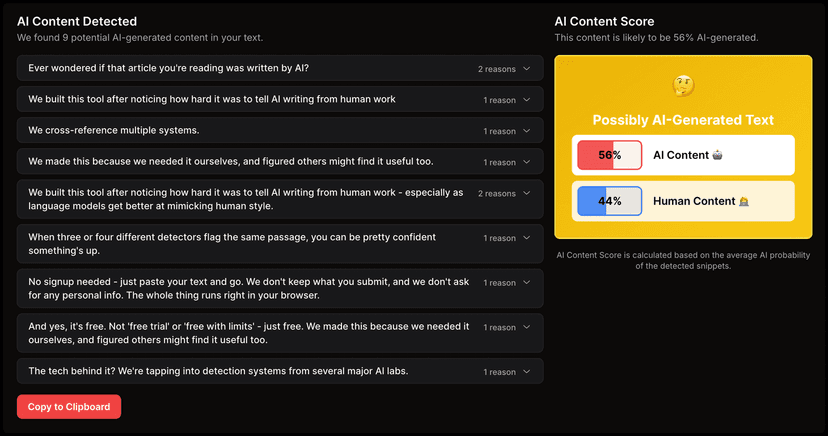
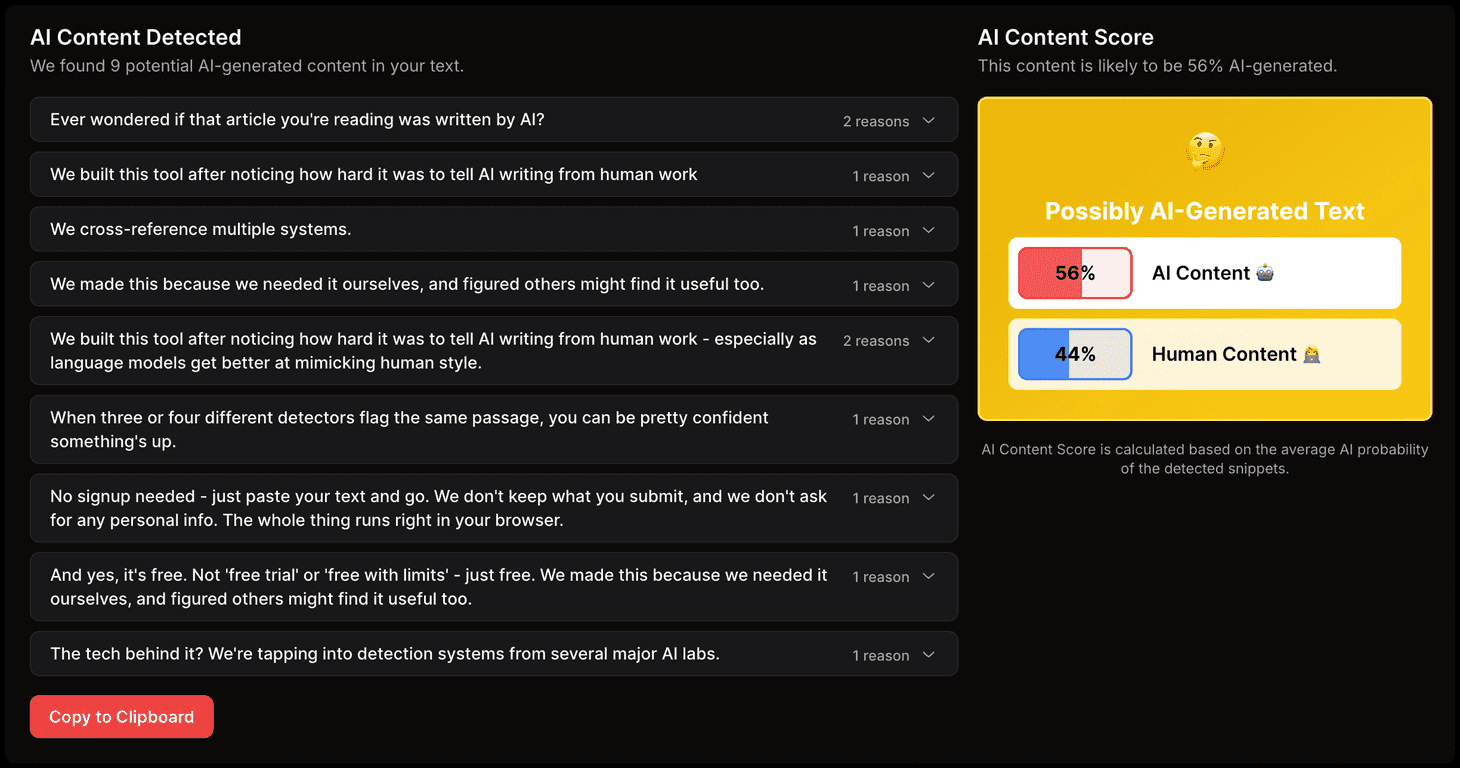
What stood out to me in the report is that it doesn’t just give you one overall answer. It highlights sections that are likely AI-generated and includes probability-style scoring to help you understand how strong the match is. That “where” part is important. If the tool only tells you “AI” or “human,” it’s basically useless for editing. But if it flags specific paragraphs or sentences, you can actually do something with the feedback.

Also, it’s mobile-friendly. I tested it from a phone browser and it still felt usable—no weird layout breakage or tiny buttons you can’t tap. If you’re a student reviewing an essay on the go, or a marketer checking a draft before sending it to a client, that’s a real plus.

One quick note though: no detector is perfect. Even the best tools can misread certain writing styles—especially if your text is polished, structured, or heavily optimized for SEO. So I treat results like a guide, not a courtroom verdict.

Key Features

  1. Instant analysis without registration
    You paste text and get results quickly. I didn’t have to wait for sign-up or jump through steps.
  2. Detailed results that flag likely AI-generated sections
    Instead of only giving an overall verdict, it highlights parts of your content that look more machine-written.
  3. Content score overview (human vs AI)
    This gives you a quick “at a glance” read. It’s helpful when you’re deciding whether edits are needed.
  4. Privacy-focused behavior (no content storage)
    This is one of the reasons I like trying tools like this—nobody wants their drafts sitting around in someone else’s database.
  5. Multi-model detection for higher accuracy
    Using more than one approach generally improves consistency. At minimum, it reduces the chance that you get a weird result from a single model.

Pros and Cons

Pros

  • Free to use with no hidden costs—at least for the basic credits offered.
  • Fast results (seconds). I could paste, check, and move on without waiting around.
  • Simple interface. There’s nothing complicated to configure, which is great for non-technical users.
  • Works for a lot of scenarios: students checking drafts, freelancers polishing copy, and businesses doing internal reviews.

Cons

  • No premium tier for advanced users (based on what’s presented here). If you want deeper controls or more detailed reporting beyond the basics, you might feel limited.
  • Customization options are pretty constrained. I couldn’t really “tune” the analysis to match a specific writing style or format.
  • Still not perfect. If your writing is naturally structured (like many SEO pages), you may get flagged even when it’s genuinely human.

Pricing Plans

The AI Content Detector is entirely free to use. From what’s listed, you get 5 free credits for analysis, and you can use the tool without registration.

In practice, that’s enough for quick tests—like checking a paragraph you’re unsure about, or running a draft headline + intro to see if anything looks suspicious. If you’re doing this multiple times a day for client work, you’ll likely want more than 5 credits, but for light use, it’s a solid start.

Wrap up

Overall, I think the Free AI Content Detector is worth trying if you just need quick feedback. The best part is that it’s not only “yes/no”—it helps you spot the sections that might be AI-generated, which makes it easier to revise instead of guessing. And since it’s free with a small credit allowance and doesn’t require sign-up, it’s accessible for students and everyday writers.

Just keep expectations realistic. Use it like a checklist, not a final authority. If it flags a section, read it closely, adjust the tone, add your own examples, and make sure the writing sounds like you—not like a template.

Promote AI Content Detector

Stefan

Stefan

Stefan is the founder of Automateed. A content creator at heart, swimming through SAAS waters, and trying to make new AI apps available to fellow entrepreneurs.

Related Posts

Figure 1

Strategic PPC Management in the Age of Automation: Integrating AI-Driven Optimisation with Human Expertise to Maximise Return on Ad Spend

Title: Human Intelligence and AI Working in Tandem for Smarter PPCDescription: A digital illustration of a human head in side profile,

Stefan

ACX is killing the old royalty math—plan now

Audible’s ACX is moving from a legacy royalty model to a pooling, consumption-based approach. Indie audiobook earnings may swing with listener behavior.

Jordan Reese
AWS adds OpenAI agents—indies should care now

AWS adds OpenAI agents—indies should care now

AWS is rolling out OpenAI model and agent services on AWS. Indie authors using AI workflows for writing, marketing, and production need to reassess tooling.

Jordan Reese

Create Your AI Book in 10 Minutes