Table of Contents
I went into AISong pretty skeptical, if I’m honest. Most “AI music” tools either sound generic, fall apart when you ask for anything specific, or lock the good stuff behind a paywall. So I tested it the way I’d actually use it: short lyrics, a clear genre vibe, and a couple of experiments to see what it could really do.
My goal wasn’t to make a Grammy-level track. It was to answer one question: Can I get something usable in minutes without knowing music theory? What I noticed is that the workflow is fast, the interface is straightforward, and the results are often surprisingly polished—especially for quick demos, content background tracks, and remix ideas.
AISong Review
Here’s what I actually did to test AISong, step by step—so you can judge whether it matches your expectations.
What I typed (lyrics → song)
I started with a simple, “content creator” style prompt—nothing fancy, just a vibe and a few lines. My input looked like:
- Lyrics prompt: “Neon nights on my skin, city lights pulling me in. I’m chasing that midnight glow, won’t let go.”
- Genre: Pop (I wanted something that would sound modern and catchy)
- Goal: A short, singable hook I could reuse as a demo idea
In my run, I generated the first version quickly—within a couple of minutes—and then made 2 variations. What I noticed right away: the melody is usually the strongest part. Even when the lyrics feel a little “AI-ish,” the track can still be catchy enough to be usable.
Output examples (what stood out)
I can’t embed audio files here, but I can tell you what I heard and what I’d expect you to check. These are the kinds of details I look for when deciding if a music tool is worth my time.
- Example #1 (Pop, neon-night vibe): The chorus landed pretty well. The vocals sounded “produced” rather than flat. However, I did notice occasional repetition where a human songwriter would probably change phrasing—so if you’re listening closely, it can feel a bit loop-y.
- Example #2 (same lyrics, different variation): The track felt slightly more energetic. The rhythm section (kick/snare pattern) was clearer, and the hook was easier to remember. This one would’ve worked nicely as a short reel soundtrack.
- Example #3 (switching style): When I moved away from straight pop toward a more “cinematic” feel, the arrangement got fuller—more layers, wider sound. The tradeoff? It took a bit more iteration to get a version that didn’t feel too generic.
Bottom line from my testing: AISong is good at producing something that sounds like a finished track quickly. If you want “perfect lyrics” or highly personalized storytelling, you’ll likely tweak and regenerate more than you think.
Converting text into music: does it actually work?
Yes—this is one of the most practical parts of AISong. I tried a second prompt where I wasn’t giving full lyrics, just a description of the mood and imagery. The result wasn’t just background music—it had structure. You could clearly hear sections (intro → main → hook).
One thing I appreciated: it doesn’t require you to be super specific. You can be “vague but descriptive,” and it still produces a coherent track. That’s rare.
Vocal remover: how clean is it?
I tested the vocal removal feature by using a track where vocals were pretty prominent. What I looked for:
- Artifacts: Does it leave a “ghost” vocal effect?
- Music bleed: Are the vocals removed without damaging the instrumental?
- Consistency: Does it hold up across the whole song or only certain sections?
In my experience, the vocal removal is strong enough for remixing and backing track use. The instrumental doesn’t sound totally pristine like a professionally isolated stem, though. There can be moments where the mix feels slightly thinner right where the vocals used to be. Still, for creators who want karaoke-style audio, it’s genuinely useful.
Variations: quick iteration, but don’t expect “full control”
AISong’s variation tools are great when you’re trying to find “the one” quickly. I generated a few takes and noticed the changes weren’t random chaos—they usually shift arrangement energy, vocal delivery, and texture in a way that keeps the overall vibe consistent.
That said, customization is not like working in a DAW. You’re not going to dial in exact chord progressions, swap drum patterns manually, or control every production parameter the way you could in Ableton or FL Studio. If you want that level of control, you’ll still end up using AISong as a starting point, not the final authority.
Key Features
- AI music creation from text or lyrics: I tested it with short, simple lines and got structured songs back quickly. The “from lyrics” workflow is the easiest path if you already have a hook.
- Automated lyric generation with emotional depth: “Emotional depth” is a marketing phrase, but I get what they mean. When I asked for a more wistful tone, the phrasing and cadence shifted. It wasn’t poetry, but it did sound like it was aiming for a mood instead of just rhyming randomly.
- Convert lyrics into full compositions: In practice, this means you’re not just getting a melody snippet. You get arrangement structure that feels like a complete track (intro, main sections, and a hook).
- Vocal remover: Useful for backing tracks and remixes. Expect occasional artifacts in the vocal frequency range—good enough for most creator use, but not “studio stem perfect.”
- Supports 30+ genres: The list is broad (pop, classical, jazz, and more). I tested pop and a more cinematic style and got noticeably different arrangement energy. Still, the more niche the genre, the more you may need to regenerate to get something that feels “right.”
- Royalty-free music with commercial rights: This is the big one if you’re making content. I recommend you double-check the current AISong terms/policy on the site, because these things can change. In my testing, the tracks were clearly meant for creator use, but the exact license wording matters for monetization.
- Beginner-friendly workflow: No music theory required. If you can type a sentence and pick a genre, you can get results.
- Multiple languages and styles: I didn’t go deep into every language option, but the tool is clearly designed to support more than just English. If you need multilingual hooks, this is worth exploring.
Pros and Cons
Pros
- Super quick results: I was getting usable tracks in minutes, not hours. That’s the whole point for most people.
- Works well for demos and content: The mix and arrangement are polished enough for reels, shorts, and background music.
- Genre switching is noticeable: When I changed the genre/style, the track direction actually changed—not just the label.
- Vocal remover is genuinely practical: It’s not perfect like professional stem isolation, but it’s good enough to build remixes and backing tracks.
- Beginner-friendly: You don’t need to know chords or BPM to get something that sounds “produced.”
Cons
- Customization isn’t DAW-level: You can’t directly control every production element. If you’re picky about sound design, you’ll still want a traditional editor.
- Paywall limitations: Like most tools, some features are better on paid plans. In my experience, the free tier is mainly for testing—don’t expect unlimited regeneration for serious projects.
- Lyrics can repeat or feel templated: If you listen closely, you may notice repetitive phrasing. Regenerating helps, but you may still want to edit the lyrics yourself.
- Vocal removal can thin the mix slightly: Expect minor artifacts or a bit of “emptiness” where vocals used to be, depending on the source track.
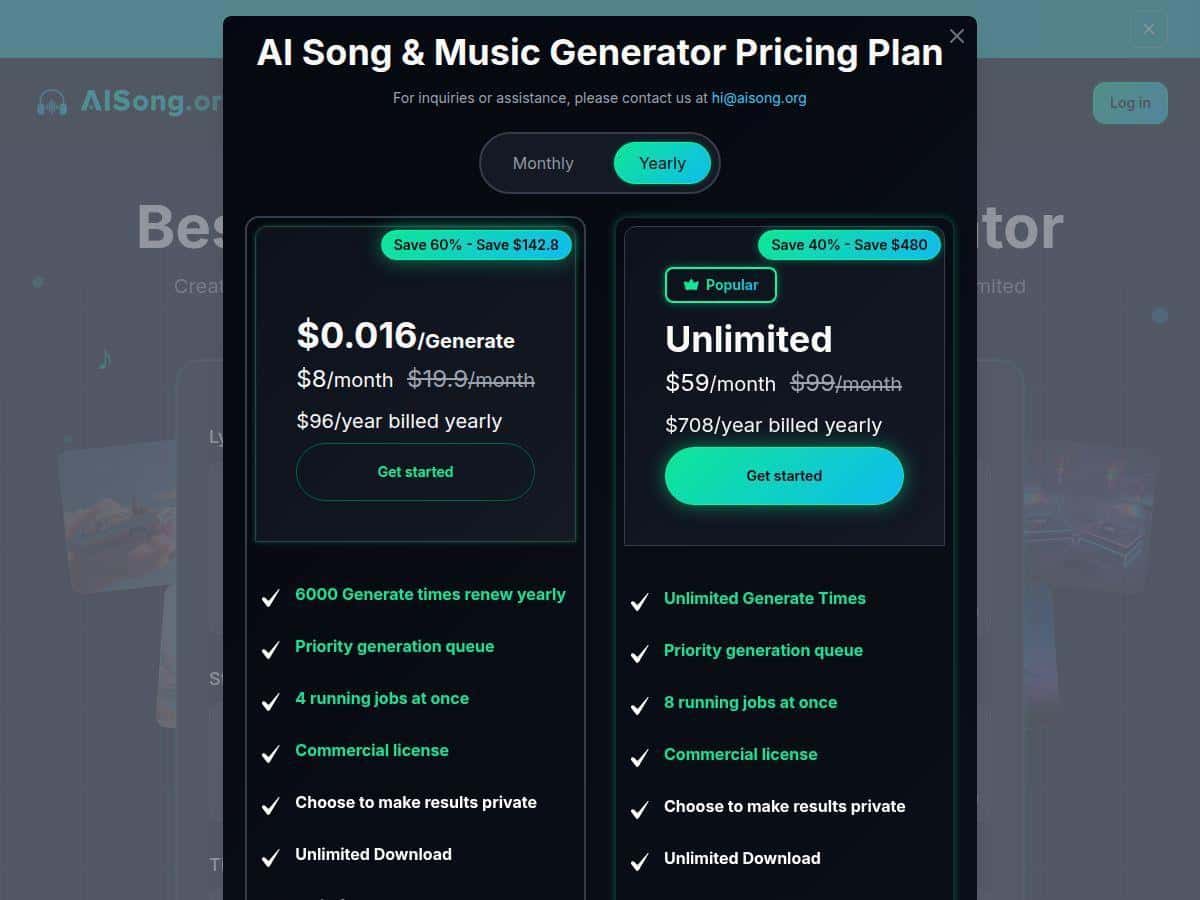
Pricing Plans
I checked the pricing setup, but I’m not going to pretend I can guarantee the exact numbers won’t change tomorrow. The pricing page on the site is the source of truth, and it’s smart to verify before you commit.
That said, here’s the practical breakdown based on what AISong offers:
- Free version: Basic access so you can test the generator and see how the outputs sound.
- Premium plans: Unlock more advanced tools and/or higher limits for generation and exports, which matters if you’re making multiple tracks or iterating a lot.
If you’re comparing plans, here are the exact things I’d check on the pricing page:
- How many generations you get per day/month on each tier
- Whether vocal removal and advanced features are paywalled
- Export format options (audio type/quality)
- Any watermarking or restrictions on commercial use
Want to be extra safe for monetized content? Read the commercial rights/license details on their site and save the wording for your records.
Wrap up
After testing AISong, my take is pretty simple: it’s one of the more approachable AI music tools for getting a decent, structured track fast. If you’re a creator who needs something usable for videos, demos, or remix experiments, it delivers. Just don’t go in expecting full creative control like a studio workflow—think of it as a speed-first music generator that you can refine with your own taste.