Table of Contents
If you’ve ever tried generating voiceovers and thought, “Cool… but why does it sound like a robot reading my script?” then you’ll probably like what I found with AIVocal. I tested it for a real mini-project (a short intro + a 2–3 minute narration block) and the output was genuinely usable—clear pronunciation, good pacing, and none of that constant “flat” delivery I get from some free tools.
Here’s the important part: it’s not just “easy.” The workflow feels straightforward in a way that doesn’t waste time. Paste text, choose a voice/language, hit generate, and download. No account prompts, no weird hoops. Still, it’s not a full production studio either—so I’ll point out what’s missing and what to watch for so you don’t waste time.
AIVocal Review (2026): What I Noticed After Testing It
I tested AIVocal on a desktop (Chrome) in the middle of a small script rewrite—nothing fancy, just a realistic use case. I used a short, punchy intro first, then a longer paragraph to see if the voice stayed consistent across sentences.
What I did (so you can compare):
- Input: I pasted two sample blocks of text (one ~2 sentences, one ~1 short paragraph).
- Language/voice: I selected an English voice and generated the same text twice to compare delivery.
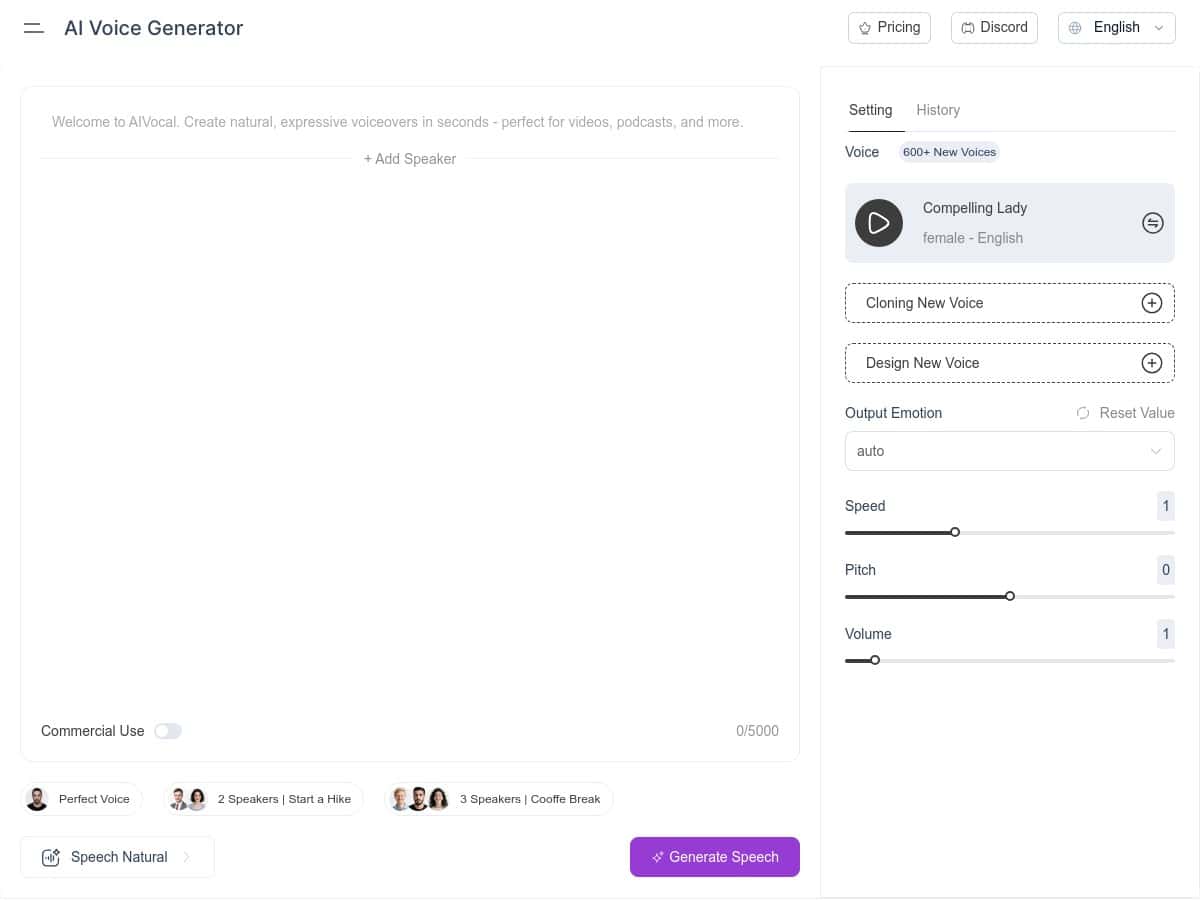
- Controls I tried: I adjusted the speed slightly and switched the emotion from a neutral tone to a more expressive style.
- Export: I downloaded the generated audio right away and listened through on my usual headphones.
How it sounded: The biggest win for me was intelligibility. Words didn’t feel “mushed,” and the rhythm wasn’t overly robotic. When I changed emotion, it wasn’t just a volume change—it actually altered delivery in a noticeable way (more energy in the right places, less monotone overall).
Latency + quality: Generation was fast enough that I could iterate without getting annoyed. I didn’t notice clipping or harsh distortion in my tests, and background noise wasn’t an issue on the files I downloaded.
One limitation I ran into: Like most text-to-speech tools, odd punctuation and super long sentences can still trip it up. If your script is one giant sentence, you’ll get better results by splitting it into smaller chunks (think 1–2 sentences per paragraph). That’s not a dealbreaker—just something I’d do anyway for better pacing.
Key Features That Matter (Not Just the Marketing Bits)
Here’s what AIVocal offers that actually affects the final voiceover.
- Large voice library: AIVocal claims 900+ voices across 140+ languages. I didn’t personally count every voice option in the UI, but the selection list is clearly extensive when you browse.
- Emotion styles: You can pick voice emotions (like calm/happy/sad depending on what’s available in the voice options). In my tests, emotion changes the delivery enough that it feels more “performed” than purely neutral reading.
- Speed / pitch / volume controls: I found these controls useful for matching the tone of the script. Want a faster “YouTube explainer” vibe? Slow it down for narration? You can tweak it without leaving the page.
- No signup required: This is one of those features that sounds small until you’re actually using it. I was able to generate and download without creating an account.
- Simple workflow: Input text → choose voice + language → generate → download. That’s it.
Quick tip I used: If your text includes names, numbers, or acronyms, don’t assume the voice will pronounce everything perfectly. I got better results by formatting numbers in a more “spoken” way (example: “2026” as “two thousand twenty-six”) and breaking up dense sentences.
What I’d want more control over
This is the part that separates “good free voice generator” from “full production tool.” AIVocal is great for speed and decent quality, but I didn’t see the kind of deep editing features you’d expect in higher-end editors.
- No timeline editor: You can’t easily splice audio chunks together inside the tool.
- No advanced markup / SSML-style control: I didn’t find a way to add detailed speech tags (pauses, emphasis rules, phoneme-style pronunciation control).
- No batch export workflow: I didn’t see a “generate 20 scripts at once” style option.
- No voice cloning: If you’re looking for cloning your own voice or using custom reference audio, that’s not part of the free experience I tested.
Pros and Cons (Based on Real Usage)
Pros
- Free and no sign-up friction: I could generate immediately and download without creating an account.
- Natural-sounding delivery: In my tests, pronunciation and pacing were good enough for real voiceover use (especially short-form and explainer-style scripts).
- Lots of voices and languages: Browsing options feels broad, not limited to a handful of generic voices.
- Fast workflow: Iterating on scripts was painless—generate, listen, tweak, repeat.
- Emotion + tone controls help: The emotion setting isn’t just cosmetic. It meaningfully changes how the voice performs.
Cons
- Limited “production” features: You won’t get the advanced editing you’d expect from paid voiceover suites.
- Not built for complex direction: If your script needs precise pronunciation control, you may have to rephrase text or split it up.
- Best for quick projects: It’s a strong fit for quick narration, video VO, and basic podcasts—not heavy post-production.
Pricing Plans: Is AIVocal Really Free?
AIVocal is completely free to use in the way I tested it. I didn’t run into subscriptions, paywalls, or “you need an account” prompts during generation and download.
That said, free tools can change over time. If you’re relying on it for a deadline, I’d generate a test file first—listen for pacing and clarity—and then scale up from there.
Try these exact steps (so you know what to listen for)
- Paste a 2–3 sentence script (example: an intro + a transition sentence).
- Select an English voice (or your target language), then set speed to 1.0 if that’s available.
- Pick a baseline emotion (neutral/standard), generate, and listen for clarity on tricky words.
- Then switch emotion (for example to something more upbeat/calm), regenerate, and compare whether the delivery matches your video tone.
- Finally, tweak pitch/volume slightly and re-listen—don’t just judge it once. I usually give it 10–15 seconds of the middle of the clip, where errors tend to show up.
Wrap up
Overall, AIVocal impressed me for a free voice generator. It’s quick, the voices feel genuinely readable, and the emotion/speed controls are actually useful. If you’re making short videos, quick explainers, or you just need voiceover without paying for a full suite, it’s a solid option.
Just don’t expect it to replace pro editing tools or give you deep pronunciation control. Use it the way it’s meant to be used—fast iteration, clean scripts, and a couple of test renders—and you’ll get results that sound better than you’d expect for “free.”