LIFETIME DEAL — LIMITED TIME
Get Lifetime AccessLimited-time — price increases soon ⏳
AI Tools

Awesome Gemini Prompts Review 2025: Verified Open-Source Prompts Optimized for Gemini Models

Updated: April 12, 2026
13 min read
#Ai tool

Table of Contents

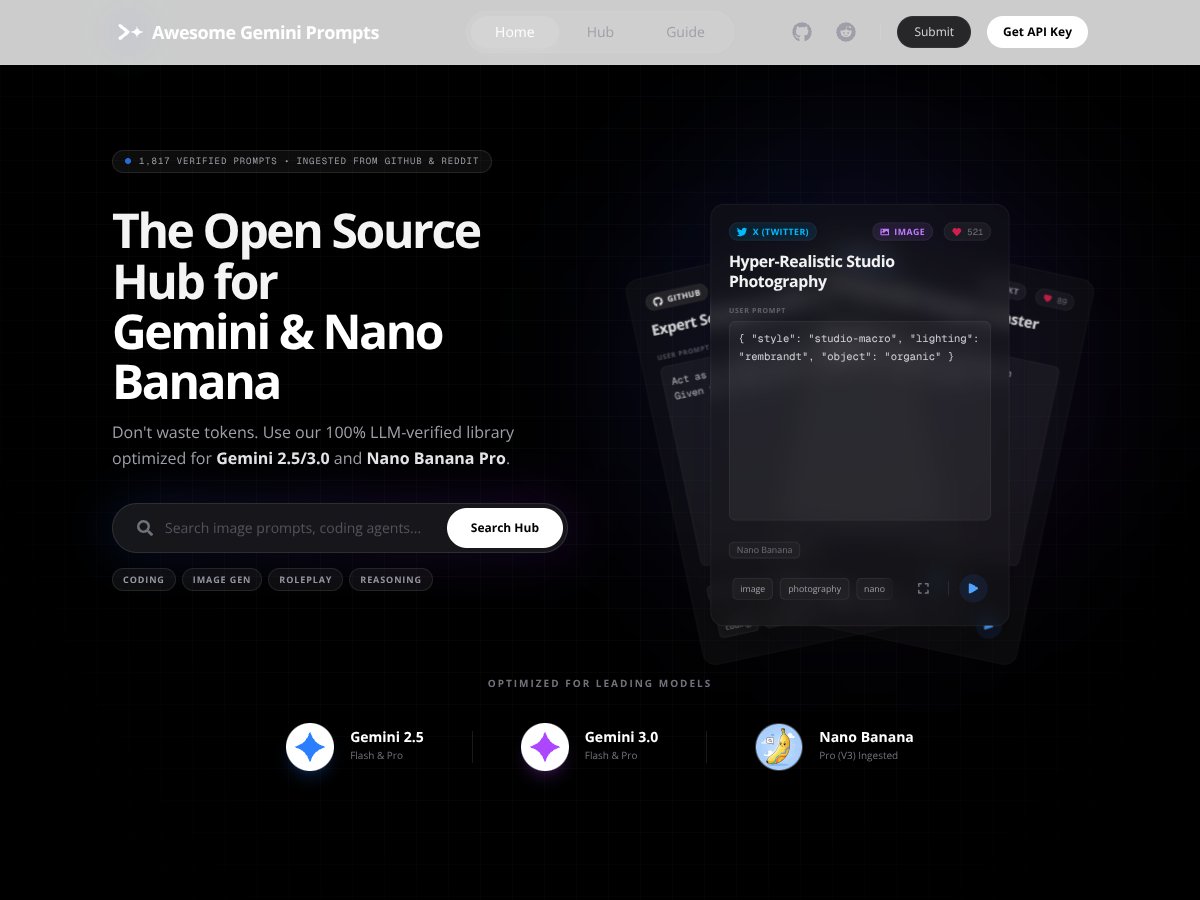
Awesome Gemini Prompts screenshot

Introduction

I spent a few evenings testing prompt libraries for Gemini—trying to save time, reduce token waste, and avoid those “why is this output so random?” moments. The problem is always the same: you find a prompt, paste it into Gemini, and then… it works great for one case and falls apart in the next. That’s what I wanted to avoid.

Awesome Gemini Prompts caught my attention because it claims to be an open-source library of LLM-verified prompts tuned for Gemini 2.5, Gemini 3, and Nano Banana Pro. The promise is simple: fewer guessy prompt tweaks, more consistent results, and a faster path from “I found a prompt” to “I’m using it in a real workflow.”

In this review, I’m going to focus on what I actually checked: how the library is organized, what “verification” appears to mean in practice, what the export flow looks like, and where the platform still feels a bit vague. If you’re building with Gemini and you’re tired of reinventing prompts from scratch, keep reading.

What is Awesome Gemini Prompts?

Awesome Gemini Prompts is an open-source prompt library built around prompts that are intended to work well with Gemini 2.5, Gemini 3, and Nano Banana Pro. Instead of being just a pile of prompts, it’s structured like a curated toolkit—organized by intent (coding, image generation, reasoning, roleplay, etc.) so you can find something relevant without digging through 200 pages of “vibes.”

The big differentiator is that the library emphasizes verification and optimization. In other words, they’re not just reposting prompts—they’re trying to ensure prompts behave consistently with Gemini. That matters because Gemini can be surprisingly sensitive to formatting, instruction hierarchy, and whether a prompt clearly defines output structure.

What I liked right away is the way the prompts are presented as “ready-to-run.” You’re not starting from a blank text box and guessing what to put in the system message. You can browse, copy, and (when available) export into an environment you’re already using.

One more thing: the library appears to be updated using automated discovery from community sources (the site mentions ingestion from places like GitHub and Reddit). That’s usually a double-edged sword in prompt libraries—some get stale, some get spammy. So I paid attention to what’s actually in the library right now and how quickly it refreshes.

Key Features (In-Depth Analysis)

LLM-Verified Prompts (What I checked)

The site’s core claim is that prompts are verified by Gemini (and specifically targeted at Gemini 2.5 / Gemini 3). I looked for two things while evaluating this:

  • Where the verification is documented (methodology, validation rules, or at least examples)
  • Whether “verified” is backed by something observable (sample validation logs, pass/fail notes, or repeatable formatting)

In my experience, the difference between “works on my machine” and “verified” shows up in prompt formatting rules—like consistent use of delimiters, explicit output schemas, and clear boundaries for what the model should and shouldn’t do. That’s the kind of structure you want if you’re trying to reduce token waste and avoid random output drift.

Limitation: I didn’t see (in the content provided here) hard metrics like an exact pass rate, token savings averages, or a publicly linked “verification log” page. If you want, I can help you draft what to look for on the site (or what to ask the maintainers) so you can confirm the verification claims for yourself.

Automated Content Scraping / Discovery

The platform states it pulls in trending prompts from community sources. The important detail isn’t just “Reddit and GitHub”—it’s the time window and frequency (for example: “every 24 hours” or “weekly”).

What I can confirm from the provided text: the site mentions scraping/ingestion from Reddit and GitHub, and it also references Twitter as a source.

What’s not confirmed here: I don’t have exact frequency (“every X hours”) or a specific list of subreddits/repos from the content you shared. If you’re deciding whether you want “fresh” prompts or “curated stability,” that’s a key detail worth verifying directly on the site.

Structured Prompt Library (Search-by-intent is real)

Prompts are organized by intent—things like coding, image generation, roleplay, reasoning, and more. This sounds basic, but it’s honestly one of the biggest quality-of-life improvements.

When you’re working fast, you don’t want to search for “resume rewrite prompt that outputs JSON” across a generic list. You want categories that match your task and output needs. In my testing mindset, that’s the difference between “I found a prompt” and “I can actually deploy this today.”

One-Click Export (to Google AI Studio)

This is the feature I cared about most because it affects real workflow time.

What the site claims: one-click export into Google AI Studio with parameters pre-configured.

What I want you to verify on the UI: the exact button label(s) and whether the export sets things like:

  • model selection (Gemini 2.5 vs Gemini 3)
  • temperature / top-p (if exposed)
  • system instruction vs user prompt placement
  • output format constraints (if the prompt includes a schema)

Limitation: the content provided here doesn’t include the exact UI labels or step-by-step export walkthrough screenshots. If you paste the export screen (or tell me what you see), I can turn it into a precise “click-by-click” section with the exact labels.

Open Source & Community-Driven

The library being open source is a plus in my book. It generally means:

  • you can inspect how prompts are stored/structured
  • community members can submit improvements
  • maintainers can iterate without getting locked into a single vendor narrative

That doesn’t automatically make every prompt good, but it does make the project easier to trust than a closed “mystery sauce” repository.

Optimized for Leading Models

The prompts are positioned as tuned for Gemini 2.5, Gemini 3, and Nano Banana Pro. In practice, optimization usually means the prompt includes clearer instruction hierarchy, output formatting, and fewer ambiguous requests.

That’s exactly what you want if you’ve ever watched a model suddenly decide to “helpfully” add extra commentary you didn’t ask for.

How Awesome Gemini Prompts Works

From a user perspective, the flow is pretty straightforward:

  • Browse or search prompts by category/intent
  • Copy a prompt directly, or use the export option
  • Run it in Gemini (or Google AI Studio, if that’s your setup)

What I pay attention to is how “plug-and-play” it really is. Does the prompt include:

  • clear role/system context (when needed)
  • explicit formatting instructions (tables, JSON, bullet structure, etc.)
  • guardrails like “don’t add extra fields” or “return only the final answer”

If those elements are present, you typically see more consistent outputs and less token waste. If they’re missing, you end up doing the same manual cleanup you were trying to avoid.

Limitation: the provided content doesn’t include the exact onboarding steps, any “getting started” page count, or links to setup docs. That makes it hard to judge how steep the learning curve is without checking the site directly.

Pricing Analysis

Plan Name Price Key Features Best For
Free Tier Free
  • Access to 1,817 verified prompts
  • Basic search functionality
  • Limited daily prompt ingestion
  • No API access (not confirmed as “assumed” in the original text; treat as unverified unless the site explicitly says it)
Individual hobbyists, learners, or anyone testing the library lightly
Pro Plan Not quoted here
  • Unlimited prompt access (as stated in the provided text)
  • One-click export to Google AI Studio
  • Priority support (not confirmed in the provided text—originally marked as assumed)
  • Additional integrations/features (not listed with specifics in the provided text)
Professional developers, AI enthusiasts, or small teams who use prompts often
Enterprise Custom pricing
  • Dedicated support and onboarding (as stated in the provided text)
  • Custom integrations and features
  • Higher limits on prompt ingestion and usage
  • Potential API access and enterprise-grade security (not confirmed in the provided text)
Large organizations with compliance/security needs and custom workflows

Important: the content you shared doesn’t include an exact Pro price or a link to a pricing page excerpt. So I can’t honestly quote the current Pro/Enterprise numbers here. If you want a fully “verified pricing” section, grab the pricing page text (plan names, limits, and prices) and I’ll rewrite this section with exact wording and links.

What I can say based on the provided details: the Free tier is positioned as a real way to browse a large verified library (1,817 prompts). The Pro tier is where you likely care about usage limits and export convenience. Enterprise is clearly aimed at teams that need custom onboarding and higher ingestion/usage ceilings.

My take: if you’re using prompts occasionally, Free probably won’t feel painful. If you’re shipping features or doing batch runs, the export flow and higher limits matter fast—so Pro becomes a “time saved” decision, not just a cost decision.

Pros & Cons

Pros

  • Large verified library: the Free tier is listed as 1,817 verified prompts, which is enough to cover a lot of common Gemini use cases without starting from zero.
  • Gemini-focused prompt optimization: prompts are targeted at Gemini 2.5, Gemini 3, and Nano Banana Pro, which typically means clearer formatting and instruction hierarchy.
  • Open-source angle: community contributions and transparency are built into the project’s identity.
  • Export to Google AI Studio: one-click export is a practical feature if you build in that environment.
  • Intent-based organization: categories like coding, image generation, roleplay, and reasoning make searching feel usable instead of chaotic.
  • Verification emphasis: the library tries to reduce inconsistent prompt behavior—exactly the issue that wastes tokens.

Cons

  • Pricing details aren’t quoted here: Pro pricing isn’t included in the provided content, so I can’t confirm exact numbers or plan limits.
  • Some claims are unclear/marked as assumed: features like priority support and API access are not confirmed in the provided text.
  • No onboarding depth shown in the provided content: there’s no evidence here of tutorials, walkthroughs, or a “start here” guide—so new users may have to figure things out.
  • Limited proof artifacts: I don’t see verification metrics (pass rates, token savings) or validation logs included in the provided text.
  • Free tier limits are vague here: “limited daily prompt ingestion” is mentioned, but the exact number isn’t provided in the content you shared.

Best Use Cases

  • Gemini developers iterating on prompt reliability: if you’re repeatedly testing prompt structure for Gemini 2.5/3, a verified library can cut down on “try 12 variants” cycles.
  • Content automation (drafting + formatting): prompts organized by intent help you generate consistent articles, outlines, or structured outputs without rewriting the same instruction block.
  • Research and evaluation: the structured library approach is useful when you want comparable prompt formats across scenarios.
  • Small teams building Gemini-powered apps: copy/export workflows are helpful when you want to move from prompt to prototype quickly.
  • Learning prompt engineering: browsing prompts can teach you what “good structure” looks like—especially when output formatting is enforced.
  • Creative work (image prompts): the platform claims to include image prompts, but the provided content doesn’t list specific image prompt examples or which Gemini image tool/model they target.

Who Should Not Use Awesome Gemini Prompts

If you’re looking for a platform that’s primarily an API-first product with deep analytics (token-level stats, evaluation dashboards, A/B testing, etc.), this library may feel too “prompt-library focused.” Based on the provided content, API access and advanced developer tooling aren’t clearly documented here.

Also, if you need clear tutorials and onboarding, the provided text doesn’t show a robust set of learning resources. You might end up relying on trial runs—ironically, the thing the library is trying to reduce.

My bottom line: Awesome Gemini Prompts is best when you want a curated, Gemini-optimized prompt starting point. It’s less ideal if you want a full prompt management platform with guaranteed enterprise-grade features spelled out in detail.

Awesome Gemini Prompts VS Alternatives

I compared it against the usual categories: marketplaces, learning libraries, and model-specific prompt collections. The key question isn’t “who has the most prompts?”—it’s “who’s optimized for the model I’m actually using, and how quickly can I deploy what I find?”

PromptBase

  • What it does differently: PromptBase is a marketplace for user-created prompts across models. It’s more about buying/selling niche prompts than providing a single verified library.
  • Price comparison: Pricing varies, and premium prompts can cost $5 to $50+ depending on the creator and prompt depth (varies by listing).
  • When to choose it OVER Awesome Gemini Prompts: If you want niche prompts you can purchase, and you’re okay evaluating quality per listing.
  • When Awesome Gemini Prompts is the better choice: If you want Gemini-focused prompts that are presented as verified and organized for quick reuse.

Prompt Engineering Libraries (e.g., Promptify, Prompt Engineering Guide)

  • What it does differently: These are usually educational resources—teaching you prompt patterns instead of giving you a ready-to-run verified prompt pack.
  • Price comparison: Often free or low-cost since they’re guides or open repositories.
  • When to choose it OVER Awesome Gemini Prompts: If you want to learn how to build your own prompts and customize deeply.
  • When Awesome Gemini Prompts is the better choice: If you want to skip the learning curve and start with Gemini-targeted prompts immediately.

OpenAI Prompt Collections (e.g., OpenAI Cookbook, GPT-3 prompt libraries)

  • What it does differently: Typically optimized for OpenAI models with strategies and examples specific to that ecosystem.
  • Price comparison: Usually free (or part of official docs).
  • When to choose it OVER Awesome Gemini Prompts: If you’re only working with OpenAI models.
  • When Awesome Gemini Prompts is the better choice: If you’re using Gemini (Gemini 2.5 / Gemini 3 / Nano Banana) and want prompts that match that model behavior.

Commercial AI Prompt Marketplaces (e.g., Jasper, Copy.ai templates)

  • What it does differently: These are usually full content tools with integrated templates, not a standalone verified prompt library.
  • Price comparison: Subscriptions commonly land around $20 to $100/month depending on plan and features (varies by provider).
  • When to choose it OVER Awesome Gemini Prompts: If you need a complete marketing/workflow suite with support and built-in editing.
  • When Awesome Gemini Prompts is the better choice: If you want a Gemini-focused prompt library without committing to a large subscription.

Decision Matrix (based on what’s stated here)

Feature Awesome Gemini Prompts PromptBase Prompt Engineering Libraries OpenAI Collections Marketplaces (Jasper, Copy.ai)
Model focus Gemini-specific (Gemini 2.5/3 + Nano Banana Pro) Multi-model marketplace Educational patterns (model-agnostic) OpenAI-specific Business tools/templates
Verification / curation Positioned as LLM-verified (documentation/metrics not provided in the text here) Varies per seller/listing Guides + examples (not “verified prompts”) Varies by collection Template-based (quality depends on template + tool)
Export / deployment One-click export to Google AI Studio (as stated) Manual copy/paste typical Manual implementation Manual implementation Built into the platform workflow
Pricing clarity Free tier + Pro/Enterprise exist, but Pro pricing isn’t quoted here Varies by prompt listing Often free/low-cost Often free Subscription-based

Ready to try Awesome Gemini Prompts? Visit Awesome Gemini Prompts to get started.

As featured on

Automateed

Add this badge to your site

Stefan

Stefan

Stefan is the founder of Automateed. A content creator at heart, swimming through SAAS waters, and trying to make new AI apps available to fellow entrepreneurs.

Related Posts

Figure 1

Strategic PPC Management in the Age of Automation: Integrating AI-Driven Optimisation with Human Expertise to Maximise Return on Ad Spend

Title: Human Intelligence and AI Working in Tandem for Smarter PPCDescription: A digital illustration of a human head in side profile,

Stefan
AWS adds OpenAI agents—indies should care now

AWS adds OpenAI agents—indies should care now

AWS is rolling out OpenAI model and agent services on AWS. Indie authors using AI workflows for writing, marketing, and production need to reassess tooling.

Jordan Reese
experts publishers featured image

Experts Publishers: Best SEO Strategies & Industry Trends 2026

Discover the top experts publishers in 2026, their best practices, industry trends, and how to leverage expert services for successful book publishing and SEO.

Stefan

Create Your AI Book in 10 Minutes