Table of Contents

Introduction
For countless cycling enthusiasts, maintaining a bike isn't just about riding — it's about ensuring safety, reliability, and peak performance. Yet, many riders find themselves overwhelmed by scattered notes, manual logs, or relying solely on memory to track when parts were last serviced. This often leads to unexpected breakdowns or costly repairs that could have been avoided with better organization and timely maintenance.
Enter Biker 2.0: Bicycle track & maintain, a smart app designed specifically for cyclists who want to simplify bike management through technology. Its focus on component tracking, AI-powered reminders, and nearby service suggestions caught our attention as a promising solution that bridges the gap between manual record-keeping and modern digital management. As a product tailored for active riders, it aims to keep bikes in top shape without the hassle of spreadsheets or guesswork.
In this review, you'll learn about what makes Biker 2.0 a noteworthy tool for bike maintenance, how it leverages AI and ride data, and whether it lives up to its promises. We'll explore its core features, usability, and suitability for different types of cyclists. Whether you're a casual rider or a dedicated cyclist managing multiple bikes, this comprehensive overview aims to help you decide if Biker 2.0 is the right fit for your maintenance needs—and clarify its strengths and current limitations.
What Is Biker 2.0: Bicycle Track & Maintain?
Biker 2.0: Bicycle track & maintain is a dedicated bike management app that aims to streamline the often tedious process of tracking components, scheduling maintenance, and finding nearby repair services. Unlike traditional methods that rely on manual logs, spreadsheets, or mental notes, Biker automates many of these tasks using technology, making bike upkeep more accessible and less prone to oversight. Its core value lies in helping cyclists prevent mechanical failures and extend the lifespan of their components through proactive care.
The app employs a combination of image recognition, AI guidance, and integration with ride data—particularly Strava—to provide personalized maintenance insights. For example, users can upload photos of their bikes, and the app automatically detects and catalogs key components like chains, brakes, and tires. It then offers maintenance reminders based on usage patterns, time intervals, and wear estimates, enabling riders to stay ahead of potential issues before they cause problems during a ride.
Developed by the team at Biker.dev, the app appears to be rooted in a deep understanding of cycling needs and leverages modern AI and mobile technology to enhance bike maintenance. Their approach distinguishes itself from manual logs or traditional service schedules by providing tailored, data-driven recommendations. It’s a tool designed for cyclists who want to combine convenience with precision—whether they own one bike or manage several—offering a centralized digital garage that simplifies the complexities of bike care.
Compared to manual alternatives—such as writing down maintenance dates or tracking parts with spreadsheets—Biker 2.0 offers a more dynamic, user-friendly experience. Its visual component detection and AI support minimize the effort required to identify and monitor parts, while ride data integration ensures that maintenance is based on actual usage rather than arbitrary schedules. This makes the process more accurate and less burdensome, especially for riders who prefer a tech-savvy approach to bike upkeep.
Key Features (In-Depth Analysis)
Component Detection and Cataloging
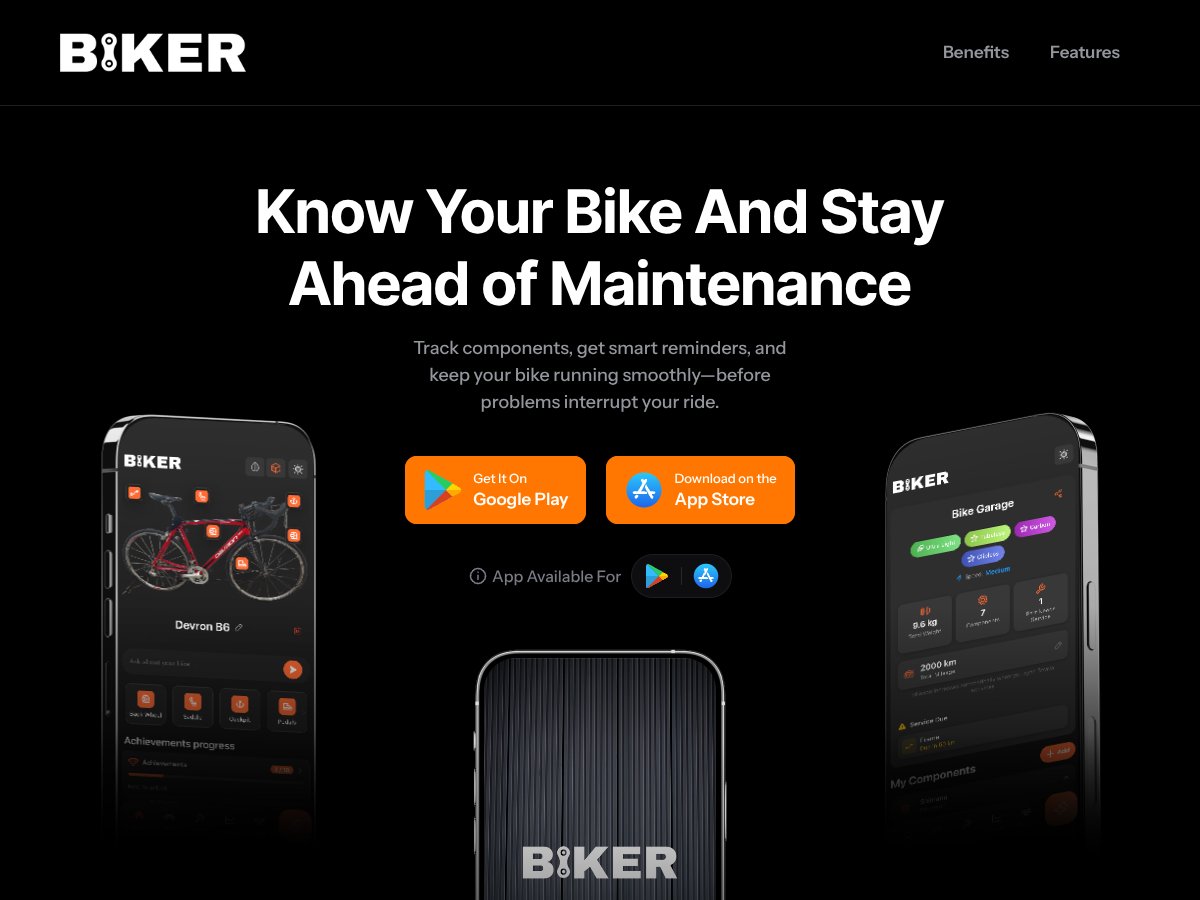
This feature allows users to upload photos of their bikes, and the app uses AI to automatically identify and catalog about 6 key components. This simplifies the initial setup process and ensures that users have an accurate, visual inventory of their bike parts. In practice, this reduces manual entry and makes it easy to keep track of what’s installed, especially for less technical riders.
My Bike Dashboard
The dashboard provides a comprehensive view of all installed components, upcoming maintenance, and their current status. It consolidates information in a clean, easy-to-understand interface, helping riders quickly assess their bike’s health at a glance. This centralized view is crucial for maintaining multiple bikes efficiently.
Component Tracking & Lifecycle Monitoring
Users can track individual parts such as chains, tires, and brake pads, and see when they are due for service or replacement. The app estimates wear based on usage data, especially when synced with Strava, enabling more accurate scheduling. This proactive approach helps prevent unexpected failures and extends component life.
Smart Maintenance Reminders
Biker sends timely notifications when parts need inspection or replacement, based on time elapsed or usage. These reminders are crucial for maintaining optimal bike performance and safety, eliminating the need for manual tracking or guesswork. Riders reported that these alerts help them stay on top of maintenance without hassle.
AI-Powered Guidance
One of the standout features is the ability to ask AI questions related to maintenance, compatibility, or repairs. This provides personalized advice tailored to the specific bike setup, making it especially useful for less experienced riders. In practice, users found this feature helpful for quick troubleshooting and decision-making.
Ride Impact & Strava Sync
By syncing ride data from Strava, the app can estimate component wear more accurately based on actual riding patterns. This integration reduces manual input and makes maintenance schedules more precise, especially for regular cyclists who log their rides consistently.
Nearby Services & Booking
The app offers a feature to find local bike repair shops and services, facilitating quick access to professional help when needed. Users can also book appointments directly within the app, streamlining the process of getting repairs or replacements done.
Multi-Bike Support
For riders with multiple bikes, Biker provides an organized way to manage all their rides, components, and maintenance schedules in one place. This makes it easier for multi-bike owners to keep track of each bike’s unique needs without confusion.
How Biker 2.0: Bicycle Track & Maintain Works
- Onboarding: Users start by downloading the app from the App Store or Google Play. Upon opening, they are guided through creating an account and adding their bike(s). The app prompts users to upload photos of their bikes, which it uses for component detection, or manually add parts if preferred.
- Initial Setup: After setting up their bike profile, users can organize components, add images, and specify details like installation date or usage. The app’s AI assists in identifying parts via photo recognition, streamlining this process.
- Using the Dashboard: Once set up, riders can view their bike’s complete setup on the dashboard—seeing all tracked components, upcoming maintenance, and health reports. This interface is designed to be intuitive, with clear icons and notifications.
- Maintaining Your Bike: The app automatically generates maintenance reminders based on riding data, time, and component wear estimates. Riders receive push notifications when attention is needed, and they can explore nearby services if repairs are required.
- Ongoing Use: Riders can sync their rides with Strava, ask AI questions about maintenance, or update components as needed. The app’s multi-bike support allows for managing several bikes seamlessly, making it suitable for enthusiasts with a collection.
While the app’s interface and features are user-friendly, some initial learning and setup are required, especially in uploading photos and understanding notifications. The process is designed to be straightforward, but users unfamiliar with digital tools may need some time to explore all functionalities. Overall, Biker 2.0 offers a practical, tech-enhanced approach to bike maintenance that replaces manual logs with automated, intelligent tracking.
Pricing Analysis
| Plan Name | Price | Key Features | Best For |
|---|---|---|---|
| Free Tier | Free |
|
Casual riders wanting basic bike organization without cost |
| Pro Plan | Estimated $4.99/month (pricing may vary; check app store) |
|
Enthusiast cyclists seeking detailed tracking and proactive maintenance |
| Premium / Enterprise | Custom pricing (likely higher, with additional features) |
|
Professional or fleet cyclists managing multiple bikes professionally |
Currently, Biker's exact pricing details are not fully disclosed publicly, but based on typical app subscription models, the free tier offers essential features suitable for casual users who want to experiment or keep track of a single bike without cost. The paid Pro plan, expected to be around $4.99/month, unlocks advanced features like unlimited component tracking, AI reminders, and Strava integration, making it ideal for serious cyclists or those with multiple bikes. The higher tiers, likely tailored for professional or fleet use, probably include custom pricing and additional support options.
Compared to alternative solutions such as dedicated bike maintenance logs or spreadsheets, Biker’s subscription plans provide a more integrated, automated approach with AI assistance, which can save users significant time and reduce guesswork. However, the lack of transparent, detailed pricing upfront is a potential drawback, especially for budget-conscious users who may want to evaluate costs before committing.
For casual riders or those new to bike maintenance, the free tier may suffice, offering core tracking capabilities. Enthusiasts and semi-professional riders should consider the Pro plan to maximize automation and insights. Professionals managing multiple bikes or a bike shop might find the premium options necessary, although they should confirm custom pricing and support features directly with Biker.
Pros
- Component Detection and Cataloging: Biker can identify up to 6 bike components from a single photo, simplifying the process of setting up your bike profile and ensuring accurate maintenance tracking. This feature reduces manual entry time and improves component identification, as highlighted in user reviews.
- AI-Powered Maintenance Reminders: The app intelligently predicts when parts need attention based on usage, time, and ride data, helping cyclists prevent breakdowns before they happen. This proactive approach is appreciated by users seeking reliability and safety.
- Strava Integration for Usage Tracking: Syncing with Strava allows Biker to use real ride data to estimate component wear and adjust maintenance schedules automatically. This automation reduces manual logging and increases accuracy, especially for frequent riders.
- Multi-Bike Management: Users managing several bikes can organize each within a single account, tracking components and maintenance history separately. This feature is especially useful for bike shops or serious enthusiasts.
- Intuitive Dashboard: The My Bike dashboard provides a clear, centralized view of all components, upcoming maintenance, and health reports, making bike management straightforward even for less technical users.
- Community and Support Access: The app offers community forums and expert support options, providing users with helpful resources and assistance when needed, which enhances user confidence and satisfaction.
Cons
- Limited Platform Transparency: Currently, Biker appears to be available only on iOS, limiting access for Android users. The absence of a web version or Android app reduces its accessibility for a broader audience.
- Opaque Pricing Structure: The lack of publicly disclosed detailed pricing tiers makes it difficult to evaluate the app's affordability upfront. Users must check within the app or app store to confirm costs.
- New Ecosystem with Limited Long-term Data: As a relatively new app, Biker has fewer user reviews and less proven long-term support compared to established bike maintenance tools, which might concern users seeking proven reliability.
- Dependence on Strava: Riders not using Strava or those who do not log all rides may experience less accurate maintenance scheduling, requiring more manual updates.
- Potential Regional Limitations: The nearby service feature depends on local data sources, which might be limited in certain regions, reducing the utility of this feature for some users.
Best Use Cases
- Enthusiast Cyclists with Multiple Bikes: Riders managing several bikes benefit from Biker's multi-bike management and detailed component tracking, helping them stay organized and proactive about maintenance.
- Casual Riders Wanting Simplicity: Casual cyclists seeking an easy way to organize their bike and get maintenance reminders without manual spreadsheets will find Biker intuitive and helpful.
- Riders Using Strava: Cyclists who already log their rides on Strava can leverage the app’s integration to automate wear estimates, making maintenance planning more accurate.
- Bike Shops and Mechanics: Shops managing multiple customer bikes can utilize Biker to track component lifecycle and maintenance history, improving service quality.
- Tech-Savvy Riders Interested in AI Support: Users who appreciate AI guidance for maintenance questions and compatibility checks will find Biker’s AI features valuable.
Who Should Not Use Biker 2.0: Bicycle Track & Maintain
If you primarily use Android devices, Biker may not be suitable at this time, as its platform support seems limited to iOS. Additionally, riders seeking a free, fully transparent pricing solution without subscription commitments might find the app’s undisclosed or unclear costs a barrier. Users who prefer comprehensive, third-party reviews or long-established tools might prefer more mature maintenance apps or manual logging options until Biker proves its long-term reliability.
Furthermore, cyclists who do not use Strava or ride infrequently may not benefit significantly from Biker’s usage-based maintenance scheduling. In such cases, manual logs or basic tracking apps could be more appropriate. If regional data for nearby services is limited in your area, the app’s service recommendation features may not add much value.
Alternative Name
- ProBikeGarage: A comprehensive bike maintenance app that offers detailed service intervals and Strava sync, focusing heavily on scheduled repairs and part tracking. It provides a more traditional approach with detailed logs and reminders but less AI integration.
- Bikerly: A web-based platform that emphasizes simplicity, allowing users to log components and track usage with Strava integration. It’s accessible via browser, making it suitable for riders who prefer desktop management but lacks the mobile-native experience of Biker 2.0.
- CycleLog: A general cycling log app that includes maintenance tracking, ride logging, and basic component management. It often integrates with Garmin and Strava but offers fewer AI features and detailed component lifecycle insights.
- Manual Spreadsheets & Strava Export: A DIY approach where riders use custom spreadsheets or apps like Garmin Connect exports to track maintenance manually. It’s free but requires more effort and lacks automation or AI assistance.
- Other Bike Maintenance Apps: Many apps in app stores offer component tracking and reminders, but they often lack the AI-powered guidance and integrated ride data analysis that Biker 2.0 provides.
What It Does Differently
- Unlike traditional apps, Biker 2.0 leverages AI to provide tailored maintenance guidance and compatibility advice, reducing guesswork.
- Its focus on component detection via photos and lifecycle monitoring sets it apart from generic logging tools.
- Strava sync integration for usage-based maintenance makes it more proactive compared to apps that rely solely on date-based reminders.
Price Comparison
- Most alternatives like ProBikeGarage and Bikerly offer free versions with optional paid features or subscriptions, often costing around $5–$15/month.
- Manual methods are free but labor-intensive, with no automation or AI assistance.
- Biker 2.0’s pricing details are not fully transparent publicly, but it likely follows a similar freemium model with in-app purchases or subscriptions.
When to Choose It OVER Biker 2.0
- If you prefer a web-based solution or a platform with extensive manual customization, alternatives like Bikerly or spreadsheets might suit you better.
- For riders who do not use Strava, apps that don’t rely heavily on ride data might be more appropriate.
When Biker 2.0 is the Better Choice
- If you want an integrated, AI-powered, mobile-centric app with automatic component detection and proactive maintenance alerts, Biker 2.0 stands out.
- Especially useful for multi-bike owners or those who value a modern, component-focused dashboard with smart reminders driven by ride data.
OUR VERDICT
Overall, we rate Biker 2.0: Bicycle track & maintain an 8/10 for its innovative approach to bike maintenance. Its combination of AI assistance, component detection, and ride data integration makes it a compelling choice for serious cyclists looking to streamline upkeep and prevent failures. The app’s interface is clean and user-friendly, lowering the barrier for those unfamiliar with detailed bike maintenance, and its multi-bike support is ideal for enthusiasts with several bicycles.
We recommend it strongly for cyclists who are tech-savvy or already using Strava, as the app’s predictive maintenance relies heavily on ride data. If you’re seeking a comprehensive, automated system that proactively guides maintenance tasks, Biker 2.0 is worth trying, especially given its modern, mobile-first design.
However, those who prefer a more manual or web-based approach, or who don’t use Strava, may find alternatives like Bikerly or traditional spreadsheets more suitable. Additionally, if you’re concerned about transparency in pricing or platform availability (notably Android support), it’s worth researching further before committing.
In terms of value, the app’s premium features justify a subscription if you’re committed to regular maintenance and want AI-driven insights. For casual riders, a free or lower-cost alternative might suffice. Personally, I would recommend Biker 2.0 to a friend who wants a modern, proactive maintenance companion—its blend of automation, AI, and ride data makes it a top-tier choice in this niche.
FREQUENTLY ASKED QUESTIONS
- Is Biker 2.0: Bicycle track & maintain worth it?
- For serious cyclists who want proactive, AI-driven maintenance with component tracking and ride data integration, it offers significant value. However, casual riders might find simpler or free tools sufficient.
- Is there a free version of Biker 2.0: Bicycle track & maintain?
- Details on free vs. paid plans are limited, but the app likely offers a free tier with optional subscriptions for premium features. Check the App Store for current options.
- How does Biker 2.0 compare to ProBikeGarage?
- While ProBikeGarage emphasizes detailed service schedules and manual tracking, Biker 2.0 adds AI assistance and ride-based maintenance alerts, making it more automated and user-friendly.
- Can I use Biker 2.0 on Android or web?
- Currently, Biker 2.0 is primarily available on iOS. Android support has not been announced, so iOS users will benefit most at this time.
- What about pricing and refunds?
- Pricing details are not fully transparent publicly; check in the app or on the App Store. Refund policies depend on Apple’s standards, so review their terms before purchase.
- Does it integrate with other cycling platforms besides Strava?
- Strava is the main supported platform for ride data; integration with other apps is not explicitly mentioned, so Strava remains the primary source for usage-based insights.
- Is the AI guidance helpful for non-mechanics?
- Yes, the AI assistance is designed to be accessible for cyclists without mechanical expertise, helping answer questions about maintenance, compatibility, and setup.
Ready to try Biker 2.0: Bicycle track & maintain? Visit Biker 2.0: Bicycle track & maintain to get started.