Table of Contents
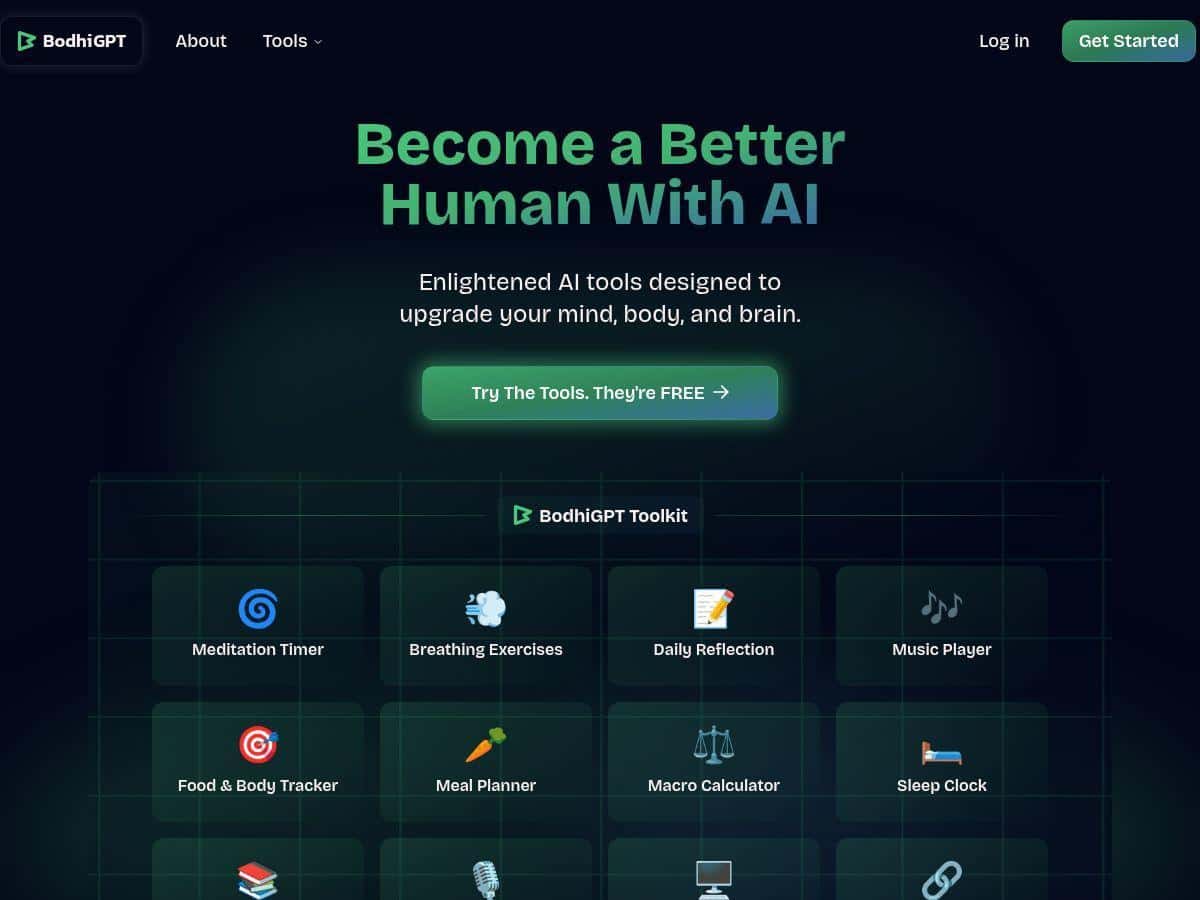
I’ve been trying to find an AI tool that doesn’t just spit out generic “motivational” text. That’s why I spent some time with BodhiGPT—to see if it can actually support my mental, physical, and cognitive habits in a way that feels useful day-to-day. The pitch is an all-in-one well-being platform, and the first thing I noticed was how clean the interface feels. No clutter. No maze of menus.
What I liked most is that it tries to cover multiple angles (mind, body, brain) instead of forcing you into one narrow “self-improvement” lane. Over the weeks I used it, I didn’t expect it to magically fix my life—but I did notice small changes in how I planned my day and how I talked myself through stress. The responses felt supportive, and when I gave it context (my goal + what I was dealing with), it didn’t just bounce back the same template every time.
BodhiGPT Review
Here’s the straight talk: BodhiGPT is best when you treat it like a coach you actually give details to. If you just type “help me focus,” you’ll get something helpful, sure—but it’s not going to feel magically personalized. The “aha” moment for me came when I started using it more like a conversation: goal first, constraints second, and then what’s happening right now.
What I used it for most often:
- Stress reset / calmer mindset (especially on busy days)
- Focus planning (turning a vague task list into a realistic next step)
- Brain-friendly prompts (learning and recall-style questions)
- Body habit nudges (small movement reminders rather than big “start a new life” plans)
In terms of personalization signals, I noticed the biggest differences when I provided:
- My current goal (e.g., “get through a tough workday” vs “build a long-term habit”)
- Time constraints (10 minutes vs 45 minutes changes the suggestions a lot)
- What I’m feeling (stressed, distracted, low energy, etc.)
And yes, I did run a few example prompts to see how it handled different themes. Below are the kinds of prompts that made the output feel “real” instead of generic:
Example prompts I tested (and what I got back)
- Prompt: “I’m anxious and can’t focus. Help me calm down in 3 minutes, then give me one task to do next.”
What I noticed: The response leaned toward quick grounding steps first, then shifted into a single “next action” instead of a long list. That structure helped me actually start. - Prompt: “Plan a 25-minute focus session for studying. I have distractions and I keep switching tabs.”
What I noticed: It recommended a tighter plan (start + checkpoint + end) and included ways to reduce friction. The best part was that it didn’t pretend I’d suddenly become a robot—it worked with the problem. - Prompt: “Give me a simple daily routine that supports my energy. I’m not consistent with exercise.”
What I noticed: It suggested smaller, repeatable actions rather than “work out 5 days a week.” I prefer that approach because it’s easier to stick to.
One limitation I ran into: the site doesn’t give as much detail up front about what each “module” actually does. So while the experience felt broad (mind/body/brain), I sometimes had to explore inside the product to understand the exact tool I was using. If you’re the type who wants full transparency before you pay, that might be annoying.
Key Features
Instead of repeating vague marketing lines, I’m going to break down what you can actually expect from BodhiGPT based on how the experience shows up when you use it.
- AI-powered well-being prompts (mind, body, brain)
Where it shows up: In the main chat-style experience, where you choose what you want help with and then describe your situation.
Example interaction: “I’m stressed about work—help me reset and pick the next step.”
What supports the claim: The outputs I saw consistently shifted tone and structure depending on whether I asked for stress support, focus planning, or habit guidance. - Focus support that turns “I should do X” into an actionable plan
Where it shows up: When you ask for planning and productivity help (especially around short sessions).
Example interaction: “Give me a 25-minute plan to study with checkpoints.”
What supports the claim: The suggestions weren’t just generic tips—they included a start-to-finish flow that made it easier to actually begin. - Body habit nudges (small, doable changes)
Where it shows up: In routines and daily habit prompts where you mention energy, consistency issues, or motivation dips.
Example interaction: “I’m inconsistent with exercise—make me a routine I can stick to.”
What supports the claim: The responses tended to propose “minimum viable” actions (short movement, easier starts) rather than all-or-nothing goals. - Brain-oriented learning/review style guidance
Where it shows up: In prompts about learning, recall, or how to study more effectively.
Example interaction: “Help me learn this topic and test my understanding with questions.”
What supports the claim: The outputs leaned into questioning and practice formats instead of only summarizing. - Easy-to-navigate interface
Where it shows up: The layout and flow make it simple to jump between prompts without feeling lost.
Example interaction: Just switching between stress help and focus planning without extra setup.
What supports the claim: I didn’t waste time hunting for the right screen, which matters if you’re using it daily.
Pros and Cons
Pros
- Broad coverage across mind/body/brain instead of one narrow productivity angle.
- Better results with context—when you provide details, the tone and structure change.
- Action-first responses (especially for focus and “what do I do next?” moments).
- Friendly, low-friction experience—it feels quick to use when you’re busy.
Cons
- Tool transparency is limited. I want clearer descriptions of what each feature/module includes before I rely on it.
- Personalization isn’t magic. If you don’t give it your situation, you’ll get more generic guidance.
- Customization options aren’t obvious from the outside, so you may need to experiment to find what fits you.
- Pricing details can be unclear unless you check the official page at the time you sign up.
Pricing Plans
I saw BodhiGPT Pro costs $12/month when billed monthly. I also noticed that yearly billing is supposed to be cheaper, but the exact tier breakdown (and what’s included at each level) wasn’t fully spelled out in the content I reviewed.
So before you commit, I’d do two quick checks on the official site:
- Confirm the current monthly vs yearly price (pricing can change).
- Verify what you get in each plan—especially any limits like message caps, feature access, or premium modules.
If you want the most accurate, up-to-date info, use the official page linked above and compare what’s included right now (not what was true last month).
Wrap up
BodhiGPT is a solid pick if you want an AI companion that can help across multiple areas—stress, focus, habits, and learning—without making you jump through hoops. The experience is quick, the structure of the advice is usually what I need to take action, and it improves a lot when I give it context instead of vague prompts.
That said, I wouldn’t call it perfectly transparent. If you care a lot about knowing exactly what every feature does (and how personalization works under the hood), you may need to spend a little time exploring inside the app or double-check details on the official site before paying.
Overall, if you’re looking for a practical self-improvement tool that feels more like coaching than “random AI text,” BodhiGPT is worth your attention.