LIFETIME DEAL — LIMITED TIME
Get Lifetime AccessLimited-time — price increases soon ⏳
AI Tools

Cencurity Review (2026): Honest Take After Testing

Updated: April 12, 2026
11 min read
#Ai tool

Table of Contents

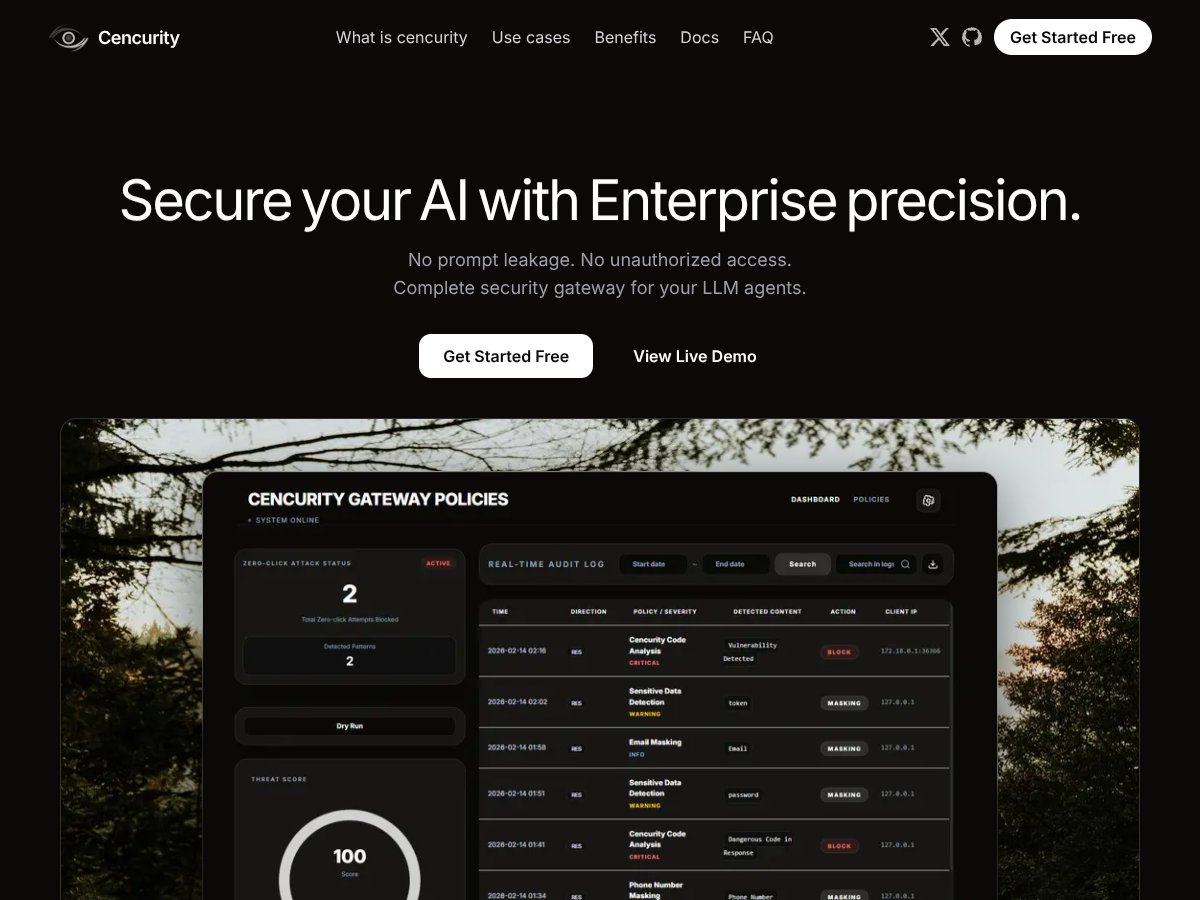
Cencurity screenshot

What Is Cencurity?

When I first ran across Cencurity, I’ll be honest—I wasn’t 100% sure how it fit into an LLM stack. I assumed it was just another “AI safety” wrapper, but after I looked through their docs/site and the way they describe the request flow, it clicked. Cencurity is a security gateway built for large language models (LLMs) and AI agents. In practice, it sits between your app and the model provider and inspects traffic as it moves in both directions.

So instead of relying on developers to remember “don’t leak secrets” every single time, Cencurity tries to catch risky content automatically. Depending on your configuration, it can scan, mask, or block sensitive items like PII, API keys/credentials, and certain risky prompt patterns before they ever reach the downstream model—or before the model’s output goes back to your users.

The real problem here is pretty obvious: LLMs don’t just generate text, they also happily echo whatever they’re given. If your system prompts, tool outputs, or retrieved documents contain customer data or internal secrets, you can end up with a leak in seconds. Cencurity’s pitch is basically “put enforcement at the edge of your AI workflow,” and in my view that’s the right place to do it. It’s also the kind of control you want when you’re dealing with compliance requirements, internal copilots, or customer-facing chatbots where one mistake becomes a ticket you don’t want to write.

From what I could see, it’s still early-stage. They’ve been showing up in places like Product Hunt, and the website reads more like a focused startup than a giant vendor with endless case studies. That’s not automatically a deal-breaker, but it does mean you should verify details yourself—especially around reliability, log retention, and what’s included in the free tier.

One more thing: Cencurity isn’t trying to be a full enterprise security suite. It’s concentrated on LLM traffic and data leakage control. If you were hoping for network security, endpoint protection, or broad cloud posture management, you’ll need other tools for that.

Also, the pricing page (at least where I looked) doesn’t give a clean “here are the plans and exact limits.” That matters, because it makes it harder to estimate cost before you talk to sales.

Cencurity Pricing: Is It Worth It?

Cencurity interface
Cencurity in action

Here’s the part that’s honestly a little annoying: Cencurity doesn’t publish detailed plans with exact pricing on the website. What they do mention is a free tier, but the “what you actually get” details are pretty thin. Then for paid plans, it looks like you’re expected to contact sales for a quote.

My honest take: a free tier is great, but vague limits make it hard to judge whether you can run real policy testing (not just a demo). If you’re evaluating for production use, I’d treat the free tier as a “try it out” step, not a full proof of value.

The lack of published numbers means budgeting is guesswork. For teams with straightforward needs, quote-based pricing can still work—but for larger orgs, you’ll want to ask early about usage limits (requests/minute), log retention, and what “mask vs block vs allow” enforcement costs look like at scale.

Plan Price What You Get My Take
Free Tier Free (details not clearly published) Limited information on included features/limits
Paid Plans Not publicly listed (quote-based) Enterprise controls, expanded feature access, support/customization (based on what they describe)

So is it worth it? It could be. But because the pricing and limits aren’t transparent upfront, you’ll want to get specific answers fast. Ask for (1) the exact free-tier caps, (2) log retention defaults, (3) whether masking happens deterministically (same input → same redaction), and (4) what happens to streaming/SSE traffic under load.

If you can get those answers and the product fits your workflow, then yeah—this might be a solid investment. If not, you’ll probably feel like you’re paying for uncertainty.

The Good and The Bad

What I Liked

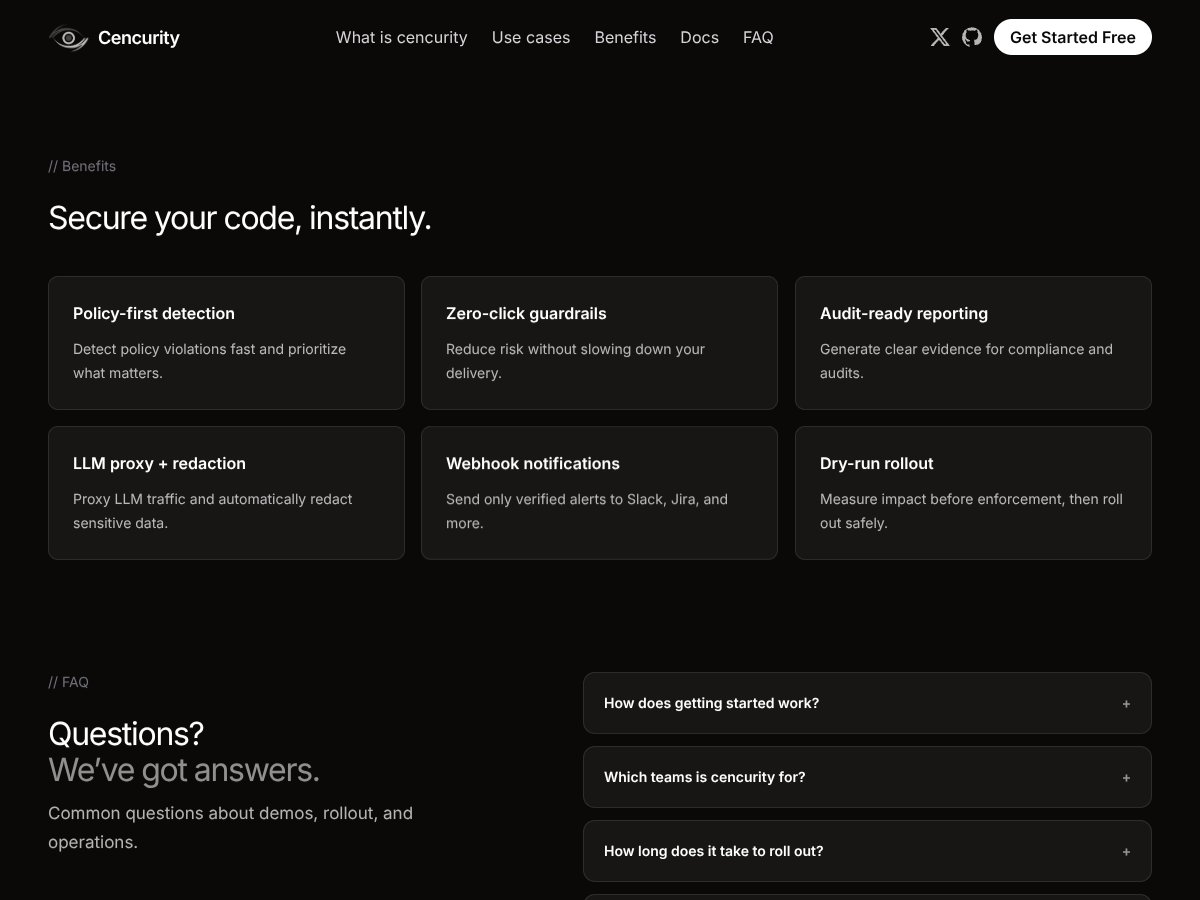
  • Built for LLM traffic (not generic security theater): The whole point is controlling prompt/response data as it moves between your app and the model provider. That focus matters because it’s exactly where leaks actually show up—inputs, tool outputs, and generated responses.
  • Edge enforcement via policies: The idea of using policies to decide what gets masked, blocked, or allowed is the right model for LLM governance. In my experience, teams don’t need “one-size-fits-all safety”—they need rules that match their actual data types (customer PII, internal secrets, code snippets, etc.).
  • Dry-run mode for safer rollouts: I like systems that let you test policy behavior before enforcement. Even without getting overly fancy, this is how you avoid the “we blocked everything and now production is down” scenario. The bigger win is you can tune patterns and thresholds against real traffic.
  • Audit logging for reviews and investigations: If you’re in anything regulated—or even just dealing with customer trust—you need logs you can search after an incident. The product’s logging approach is meant to support that kind of audit trail, and that’s a real differentiator versus basic “content filter” tools.
  • Policy flexibility across workflows: LLM apps aren’t one flow. You might have internal copilots, customer chat, and tool-calling all happening differently. The ability to apply different policies by workflow/use case is what makes this usable for real teams.
  • Streaming-aware approach (SSE mentioned): For real-time chat UIs, streaming isn’t optional anymore. The fact that they talk about handling streaming flows suggests they’re thinking about modern LLM integrations instead of only batch requests.

What Could Be Better

  • Pricing transparency is limited: If you can’t see plan names, limits, and costs, it’s hard to compare total cost of ownership. For security tools, that’s a big deal. You don’t want to find out after the fact that log retention or request volume costs extra.
  • Setup is likely for technical teams: This looks like a self-hosted/proxy-style product. That means you’ll need to be comfortable running infrastructure and integrating it into your existing LLM routing.
  • Early-stage product means fewer public proof points: Because it’s relatively new, you may not find a lot of published case studies, benchmarks, or long-term reliability reports. For mission-critical deployments, you’ll want to validate performance and failure modes yourself.
  • Scope is LLM-specific: If your security team expects coverage across network security, cloud workload protection, or endpoint controls, Cencurity won’t replace that. It’s a targeted tool.
  • Integration details aren’t super obvious from the outside: I couldn’t quickly confirm (from public info alone) how deeply it plugs into multi-cloud environments or which SaaS workflows it supports out of the box. You’ll probably need to map it to your architecture.

Who Is Cencurity Actually For?

In my opinion, Cencurity fits best when you’re building or operating LLM-powered systems where data leakage is a real risk—not a theoretical one. If you’re a developer, security engineer, or platform team managing internal copilots, customer chatbots, agent workflows, or tool-calling setups, you’ll probably see the value fast.

Think about the kinds of apps where prompts and outputs can accidentally contain sensitive information: customer support agents handling PII, internal research assistants using proprietary knowledge, or developers using LLMs to generate code that might include secrets from logs or config files.

It’s also a good fit for regulated industries (finance, healthcare, legal) where you need stronger controls and auditability. The reason is simple: if something goes wrong, you want a trail—and you want the system to have prevented the leak in the first place.

One caveat: if you’re just trying to “add a layer” without any technical involvement, you may find this less comfortable than a pure SaaS security product. This looks like something you integrate deliberately.

Who Should Look Elsewhere

If your security needs are broader than LLM traffic, you’ll likely end up supplementing Cencurity anyway. For example, if you’re looking for full cloud workload security, endpoint protection, vulnerability management, or network-level controls, Cencurity is not that tool. It’s focused on the proxy layer for AI interactions.

Also, if your team isn’t comfortable with self-hosting or managing deployment pipelines, this could become a time sink. Even if the integration is “straightforward,” you still have to run it, monitor it, and handle failure scenarios.

And if you don’t deal with sensitive data or compliance requirements, the cost/complexity might not justify the benefit. In those cases, simpler filters and process controls might do enough.

Finally, if you’re expecting a plug-and-play SaaS experience with transparent pricing and minimal setup, the current approach may feel like a mismatch.

How Cencurity Stacks Up Against Alternatives

SentinelOne Singularity

  • Scope: SentinelOne is a broader cloud workload security platform (plus endpoint protection) with AI-driven threat detection. It’s built to catch malware, vulnerabilities, and threats across infrastructure, not to specifically mask LLM prompt/response content.
  • Cost model: SentinelOne is typically enterprise-tier and priced per endpoint/scale. Cencurity’s pricing isn’t publicly listed, so you’ll need to compare quotes—but it’s usually easier to justify Cencurity when your primary risk is AI data leakage.
  • Pick it when: you need general threat detection and security coverage across cloud assets, not just LLM traffic.
  • Stick with Cencurity when: your main goal is controlling what gets sent to—and returned from—LLM workflows (especially for compliance and governance).

ChatGate

  • Overlap: ChatGate also positions itself around proxying LLM traffic and adding controls. If you just need a straightforward gate in front of your model calls, it may be enough.
  • Potential difference: Cencurity appears to emphasize audit logging and policy-driven enforcement more heavily, which matters when you’re doing security reviews or incident investigations.
  • Pick ChatGate when: you want minimal configuration and a simpler proxy setup.
  • Stick with Cencurity when: you need stronger logging/audit trails and more granular masking/blocking policies.

Curity

  • Core focus: Curity is more about API security and identity (OAuth, OpenID Connect, API gateway capabilities). That’s valuable, but it’s not specifically designed for LLM prompt/response data masking.
  • Pricing/packaging: Curity tends to be enterprise-focused with custom quotes. Cencurity’s value proposition is narrower: protect AI interactions and sensitive content.
  • Pick Curity when: your priority is securing customer-facing APIs and authentication flows.
  • Stick with Cencurity when: you’re trying to govern internal AI workflows and reduce prompt/response leakage risk.

Other Alternatives

  • Generic proxies exist: There are plenty of API gateways and security gateways, but many don’t do LLM-specific masking and real-time inspection in the way you actually need for prompt/response governance.
  • Broader security tools: If you need general cloud security or API management, tools like AWS WAF or Apigee can help—but they won’t replicate the specialized LLM protections Cencurity is built for.

Bottom Line: Should You Try Cencurity?

After looking closely at what Cencurity is trying to do, I’d put it at about a 7/10 for the right audience. It’s a strong option if you’re dealing with real LLM data leakage risk and you want policy-based masking/blocking plus audit logs.

What I like most is the practicality: a dry-run approach for policy tuning and audit logs for later. If you’re running internal AI workflows or building chatbots that touch sensitive data, those two things alone can save you a lot of pain during rollout—and later during audits.

Where it loses points is transparency and scope. Pricing isn’t clearly published, and the product is focused on LLM traffic rather than being a full-stack security platform. If you’re not technical enough (or you can’t spare DevOps time), you may find the setup effort annoying. And because it’s newer, you’ll want to validate performance and reliability for your specific workload.

If you’re experimenting, start with the free tier (assuming it’s enough to test your real policy rules). For ongoing enterprise use, it could be worth the investment—just make sure you get clear answers on limits, logging/retention, and enforcement behavior before you commit.

Common Questions About Cencurity

  • Is Cencurity worth the money? If your LLM apps regularly handle sensitive data, it can be. If you don’t, the complexity and cost probably won’t feel justified.
  • Is there a free version? Yes, there’s a free/open-source self-hosted option mentioned, but the exact limits aren’t clearly spelled out everywhere—so treat it as a testing step, not a full production guarantee.
  • How does it compare to SentinelOne Singularity? SentinelOne is broader cloud workload and endpoint security. Cencurity is specialized for LLM prompt/response inspection, masking, and governance.
  • Can I get a refund? Refunds would depend on the vendor’s paid plan terms. For the open-source/free option, refunds aren’t applicable.
  • Does it support streaming responses? They indicate support for streaming flows (including SSE-style handling) and scanning behavior around streamed content/code blocks.
  • Is it easy to deploy? For technical teams, it should be manageable via a proxy/gateway setup and Docker-style workflows. Non-technical teams will likely need help.
  • Can I customize policies easily? Yes—policy-driven controls are the core idea, so you can define what gets masked or blocked based on your use case and compliance needs.
  • What kind of audit logs does it generate? It’s designed to produce detailed traffic logs to support security reviews. The exact schema/redaction behavior should be confirmed in their docs or with a sample export before you rely on it for compliance.

As featured on

Automateed

Add this badge to your site

Stefan

Stefan

Stefan is the founder of Automateed. A content creator at heart, swimming through SAAS waters, and trying to make new AI apps available to fellow entrepreneurs.

Related Posts

Figure 1

Strategic PPC Management in the Age of Automation: Integrating AI-Driven Optimisation with Human Expertise to Maximise Return on Ad Spend

Title: Human Intelligence and AI Working in Tandem for Smarter PPCDescription: A digital illustration of a human head in side profile,

Stefan
AWS adds OpenAI agents—indies should care now

AWS adds OpenAI agents—indies should care now

AWS is rolling out OpenAI model and agent services on AWS. Indie authors using AI workflows for writing, marketing, and production need to reassess tooling.

Jordan Reese
experts publishers featured image

Experts Publishers: Best SEO Strategies & Industry Trends 2026

Discover the top experts publishers in 2026, their best practices, industry trends, and how to leverage expert services for successful book publishing and SEO.

Stefan

Create Your AI Book in 10 Minutes