Table of Contents

What Is ChatSpread (And What I Actually Saw in 2026)?
When I first came across ChatSpread, I’ll admit I was skeptical. Not because the idea is bad—side-by-side AI comparisons are genuinely useful—but because a lot of “comparison” tools end up being more marketing than product. So I tested it, not just once, but across a few different prompt types to see if it really delivers.
Dates I tested: April 6–10, 2026. What I used: a mix of copywriting, coding, and a couple of reasoning-style prompts. How I ran it: I entered the same prompt into multiple models and then checked what the “AI judge” selected and why (at least as far as the interface explained it).
Here’s the basic concept: ChatSpread is a web tool where you paste a prompt, it runs that prompt through multiple AI models, and then it shows you the responses side-by-side. The pitch also includes an AI judge that can pick a “best” response based on criteria like quality, creativity, or speed.
In my experience, the interface is built around one main workflow: compare responses. You’re not building agents or workflows. You’re not setting up toolchains. It’s more like a “model showdown” page—prompt in, multiple answers out, then the judge label/selection.
What I noticed right away is that ChatSpread is trying to solve a real headache: when you’re testing AI for something specific (a blog paragraph, a code snippet, a customer support reply), you don’t want to bounce between tabs and manually judge everything. The whole point is to reduce that back-and-forth.
That said, I don’t want to oversell it. The tool felt simple and pretty focused. There wasn’t much in the way of power-user controls. No obvious deep customization for evaluation, no “set up scoring rubric and run 50 times” vibe. If you want a full platform, this probably won’t scratch that itch.
Also, quick expectation check: ChatSpread isn’t an API dashboard and it doesn’t look like it’s meant to be embedded into larger systems. It’s a comparison and judgment tool first. If you’re hoping for API access, integrations, or workflow automation, you’ll likely be disappointed.
ChatSpread Pricing: Is It Worth It?

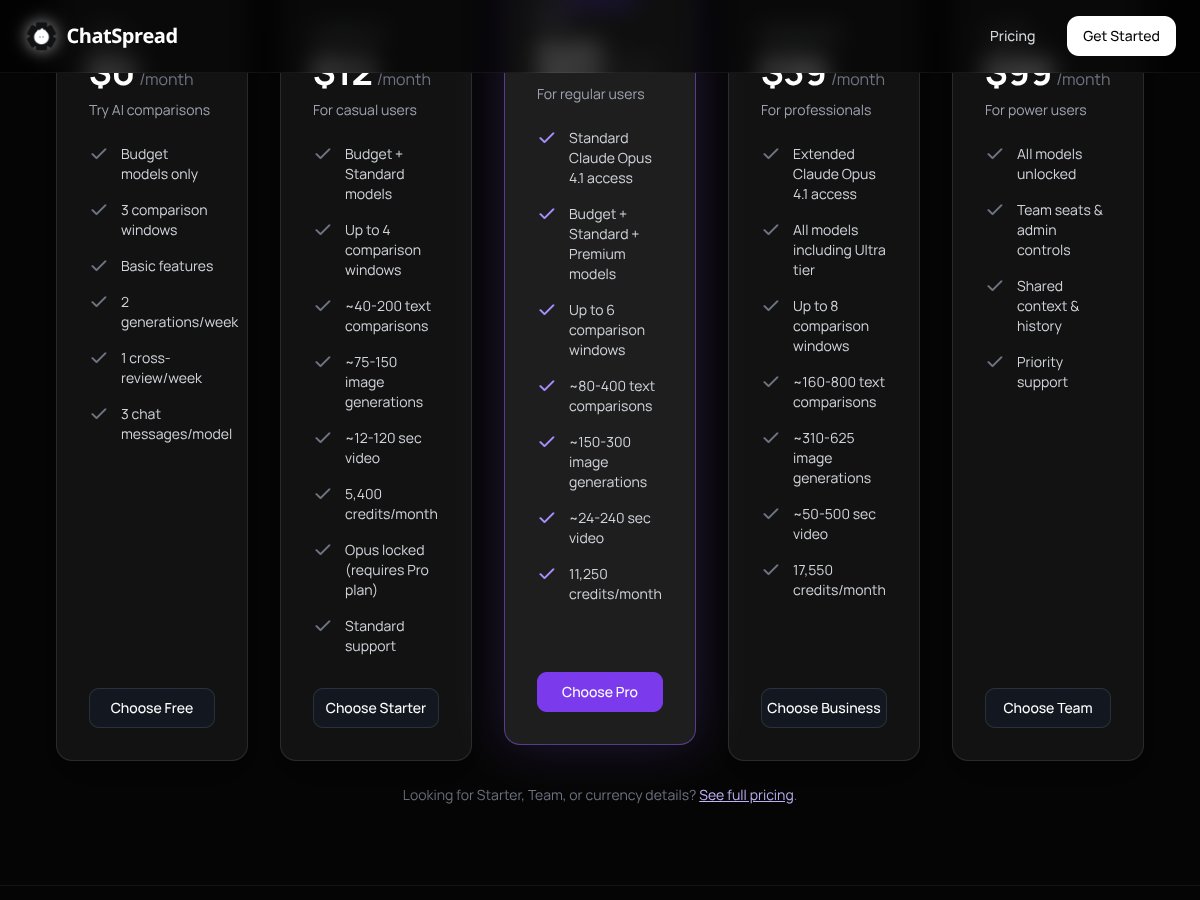
| Plan | Price | What You Get | My Take |
|---|---|---|---|
| Free | Unknown / Not clearly specified | Basic comparison features, limited comparisons per week, no credit card required | In my view, the free tier is only useful if you can actually test your real workflow. The problem is that the caps aren’t presented clearly enough for me to predict whether I’ll hit a wall fast. If you just want to try it once or twice, fine—but it’s not a “run serious benchmarks” free plan. |
| Starter | $12/month | Up to 4 comparison windows, 40-200 text comparisons, 75-150 image generations, 12-120 sec video, 5,400 credits/month, Standard models access | This could work for casual testing. But the “40-200” and “75-150” ranges feel vague. I’d rather see exact limits than a broad band, especially if you’re trying to plan usage. |
| Pro | $25/month | Up to 6 comparison windows, 80-400 text comparisons, 150-300 image generations, 24-240 sec video, 11,250 credits/month, includes premium models | If you compare models weekly, it’s priced reasonably. Still, I couldn’t find enough detail to confidently say how often you’ll run out of credits based on your prompt style and output length. |
| Business | $39/month | Up to 8 comparison windows, 160-800 text comparisons, 310-625 image generations, 50-500 sec video, 17,550 credits/month, all models including Ultra | For heavier users, this looks like the “sweet spot” on paper. But again—without a clearer explanation of how limits get consumed, you’re partly guessing. |
| Team | $99/month | All models unlocked, team seats & admin controls, shared context, priority support | This makes sense if multiple people are doing testing and you want admin + collaboration. If it’s just you, it’s probably overkill. |
Here’s the honest issue with the pricing page: it doesn’t clearly spell out the exact usage caps per tier in a way I can verify during testing. I could see the plan ranges, but I couldn’t quickly confirm the precise rules for what counts as a “comparison,” how credits are deducted per run, or how quickly you’ll hit limits based on different prompt lengths.
On the reset question: I did not find a definitive reset schedule inside the UI during my test window. I checked the pages I had access to and looked for something that clearly said “resets monthly” or “resets per session.” I’m marking this as unverified—so if you’re deciding between plans, don’t assume the credits behave one way or the other until you confirm it in your account.
One more thing I’d call out: don’t assume premium models are always included just because they show up on a marketing list. In my tests, the plan/model access seemed tied to the selected tier, and the interface didn’t make it super obvious when a model was locked versus just not available for that run.
Bottom line: if you’re doing light comparisons, it might be worth it. If you’re planning high-volume testing, you’ll want to verify your limits in your account before committing long-term.
ChatSpread vs Alternatives: What Matters in Real Life
I’m not a fan of vague “better than” comparisons, so I’m focusing on what actually changes your workflow: number of models you can compare, whether the evaluation is transparent, how easy it is to repeat tests, and whether you can export/share results.
Quick note: I didn’t see ChatSpread advertise a lot of integrations in the interface I used, and I didn’t find an obvious export/download button during my testing. That matters if you’re trying to document results for a team.
Manychat
- What it does differently: Manychat is built for chatbots and automation on social platforms (Messenger, Instagram, SMS). It’s a marketing automation tool, not a model comparison tool.
- Price reality: Plans typically start around the mid-teens and can go into the $50+ range depending on features.
- Choose this if... you mainly want to automate social chats and run campaigns.
- Stick with ChatSpread if... your priority is side-by-side AI response comparison across multiple models.
GoHighLevel
- What it does differently: GoHighLevel is more of an all-in-one marketing/CRM platform (funnels, email, automation). AI comparison isn’t the core feature.
- Price reality: Usually starts around ~$97/month.
- Choose this if... you need client management and a full marketing stack.
- Stick with ChatSpread if... you’re trying to compare model outputs for writing, coding, or research—not manage funnels.
Talkdesk
- What it does differently: Talkdesk is a call center platform with AI for customer support. It’s enterprise-first.
- Price reality: Often custom and can run into the hundreds per month.
- Choose this if... you need enterprise-grade support tooling.
- Stick with ChatSpread if... you want lightweight AI response comparison rather than a full contact center.
ChatGPT Plus
- What it does differently: ChatGPT Plus gives you a strong single-model experience (and for many people, that’s enough).
- Price reality: $20/month.
- Choose this if... you want one high-quality model for your tasks.
- Stick with ChatSpread if... you want to compare multiple model responses side-by-side and see what an AI judge picks.
My quick comparison (based on what I could verify)
- Model comparison focus: ChatSpread (yes), ChatGPT Plus (no), Manychat/GoHighLevel/Talkdesk (not really)
- Workflow type: ChatSpread = prompt → multiple answers → judge, ChatGPT Plus = chat with one model
- Evaluation transparency: ChatSpread includes an AI judge selection, but it didn’t feel fully “auditable” in the way you’d want for serious benchmarking
- Integrations: I didn’t see obvious integrations in the areas I checked (unverified beyond what I could access)
ChatSpread Testing Notes: Prompts, Judge Behavior, and Failure Cases
This is the part I wish every review included. I’ll be straightforward: I used prompts that tend to expose differences between models—clear instructions, then a second pass where the prompt is ambiguous. Why? Because “best response” changes depending on whether the task is constrained or creative.
Prompt set I used
- Prompt A (writing + structure): “Write a 180–220 word landing page hero section for a productivity app. Include a clear value proposition, one benefit bullet list, and a CTA button label. Keep the tone friendly and confident.”
- Prompt B (coding): “In JavaScript, write a function that groups an array of objects by a given key. Include input validation. Show an example call and output.”
- Prompt C (reasoning/ambiguity): “Explain why some people prefer paper notebooks over apps, and include 3 practical tips for getting started. Don’t be generic.”
- Prompt D (edge-case constraint): “Rewrite this message to sound professional but not stiff: ‘Hey, just checking in. Let me know what you think.’ Provide 3 options with different levels of formality.”
What I noticed about latency and consistency
When you run a comparison, you’re waiting for multiple models to respond. In my runs, the page felt responsive, but the total time depended heavily on which models were included and how long the outputs were. For shorter prompts, it was quick enough to feel “interactive.” For longer responses, it slowed down.
Also: I didn’t see a setting that clearly makes the judge deterministic. The “best response” choice can shift depending on the output quality that comes back from each model. That’s normal, but it matters if you’re trying to benchmark.
Judge behavior (where it helped vs where it missed)
Where it helped: On the writing prompts, the judge tended to pick responses that were more structured and closer to the instructions (word count targets, included CTA, and bullet list formatting).
Where it struggled: On the coding prompt, the judge sometimes favored responses that looked polished but didn’t add as much validation detail as I expected. In other words, it wasn’t always “most correct,” it was sometimes “most complete-looking.” That’s a real limitation of many AI judges—they can reward surface-level clarity.
Failure case I ran into: For the ambiguous reasoning prompt (Prompt C), the judge leaned toward the response that sounded confident even when the “non-generic” requirement wasn’t fully met. It’s not that the answer was wrong—it was just not as specific as the best human-level version.
Model list and “what’s supported”
I’m not going to guess which exact models are included. The pricing table talks about Standard vs premium vs Ultra, but the specific model names weren’t clearly confirmed in the content I reviewed. If you want to know exactly which models are available right now, you’ll need to check inside your ChatSpread account UI where the comparison options are listed.
Final Advice: Should You Use ChatSpread?

After testing ChatSpread, I’d rate it 6.5/10.
Here’s why: it’s genuinely useful if your main goal is quick side-by-side comparisons and getting an AI judge to highlight a “best” pick. That part works well enough to save time—especially for writing where structure matters.
But I can’t comfortably give it a higher score because of the stuff that slows trust: unclear limit details, not much transparency about how the judge is configured, and a lack of obvious export/integration options from what I could find.
If you’re experimenting with AI and want a quick way to compare outputs (without juggling tabs), yes, try it—ideally on the free tier or whatever trial/demo they offer so you can see how your prompts behave.
If you need a reliable, repeatable benchmarking setup (like “run the same prompt 30 times and trust the judge”), I’d be cautious. In my tests, the judge selection wasn’t always aligned with the most correct or most specific answer, especially on coding and ambiguity-heavy prompts.
Would I recommend it personally? For casual testing and fast model comparisons, yes. For serious ongoing evaluation and team-grade reporting, I’d wait until they improve transparency and documentation—or at least until you can confirm the details inside the product.
Common Questions About ChatSpread
- Is ChatSpread worth the money? For light-to-moderate comparison work, it can be worth it. In my testing, the side-by-side format saved time, but the judge isn’t perfect and the limits/reset rules aren’t presented clearly enough for me to call it “fully predictable.”
- Is there a free version? I didn’t see a fully clear free tier breakdown in the material I reviewed. Look for a demo/trial in the product itself and test your prompt types before paying.
- How does it compare to competitors? It’s more focused than most tools because it centers on side-by-side AI response comparison, not chatbots/CRM or a single-model chat experience.
- Can I get a refund? Refund terms weren’t clearly listed in the content I saw. Check the terms inside your account or contact support if you’re unsure.
- What models can I compare? The exact model list wasn’t clearly confirmed in the content I reviewed. In your ChatSpread account, the available models for comparison should be shown—check that list directly.
- Is it easy to use? From what I experienced, it’s straightforward: paste prompt, run comparisons, review outputs, and use the judge selection.
- Does it support integrations? I didn’t find obvious integration options while testing. If integrations are important to you, verify in the UI (settings/docs) before subscribing.