Table of Contents

Introduction
In today’s fast-paced software development landscape, teams face mounting pressure to deliver high-quality features rapidly, all while managing complex workflows, multiple tools, and ever-growing repositories. Traditional development processes often involve manual coordination, repeated context switching, and inefficient task management—all of which can slow down innovation and inflate costs. For entrepreneurs and creators pushing the boundaries of AI-driven software, orchestrating a seamless, scalable workflow is a persistent challenge that hampers productivity and delays time-to-market.
Enter Compozy, an innovative platform that aims to revolutionize how AI development is managed at scale. By offering a comprehensive, enterprise-grade orchestration system built specifically for AI workflows, Compozy promises to automate, streamline, and optimize the entire software lifecycle—from initial specifications to deployment—all while reducing token waste and minimizing manual intervention. Its promise of 'Code while you sleep' captures the core idea: enabling developers to execute complex, multi-agent workflows autonomously, freeing them to focus on higher-value tasks.
In this review, we’ll explore what makes Compozy stand out in the crowded landscape of AI orchestration tools. We’ll delve into its core features, underlying architecture, and how it performs in real-world scenarios. Whether you’re a developer seeking to implement scalable AI workflows or a CTO exploring robust orchestration solutions, this guide will offer a detailed, honest assessment based on firsthand knowledge and thorough research. Keep in mind, Compozy is primarily designed for technical teams comfortable with YAML, CLI, and infrastructure management—it's not suited for non-technical users seeking no-code automation.
What is Compozy?

Compozy is an open-source, multi-agent orchestration platform tailored for building, managing, and scaling AI workflows in enterprise environments. Unlike traditional automation tools that focus on simple task sequences, Compozy addresses the unique challenges of AI development—such as coordinating multiple AI agents, maintaining context across long-running tasks, and integrating diverse tools and models. It provides a unified, measurable software development lifecycle (SDLC) that standardizes workflows from business requests (PRDs) through technical specifications and deployment, ensuring transparency, control, and efficiency.
At its core, Compozy leverages a modern, Temporal-based engine written in Go, enabling fault-tolerant, durable, and highly reliable workflows suitable for production environments. Its architecture supports declarative YAML workflows, allowing developers to define complex task sequences, triggers, signals, and conditional logic without sacrificing flexibility. The platform also introduces a novel approach to context management, solving a longstanding problem in large language model (LLM) applications—token bloat and context limitations—by performing independent executions and maintaining mid-term memory for critical artifacts like PRDs and tech specs. This means workflows can operate efficiently over extended periods without losing important state information.
Compozy was created by a team with deep expertise in AI, workflow orchestration, and enterprise software development, aiming to bridge the gap between cutting-edge AI research and practical, scalable infrastructure. Its design draws inspiration from established workflow automation paradigms like GitHub Actions, but extends them with AI-specific capabilities such as multi-agent coordination, memory management, and model orchestration. Compared to manual or ad-hoc approaches—where developers juggle multiple tools, track context separately, and manually trigger tasks—Compozy offers a structured, automated alternative that enhances reliability and reduces operational overhead.
Key Features (In-Depth Analysis)
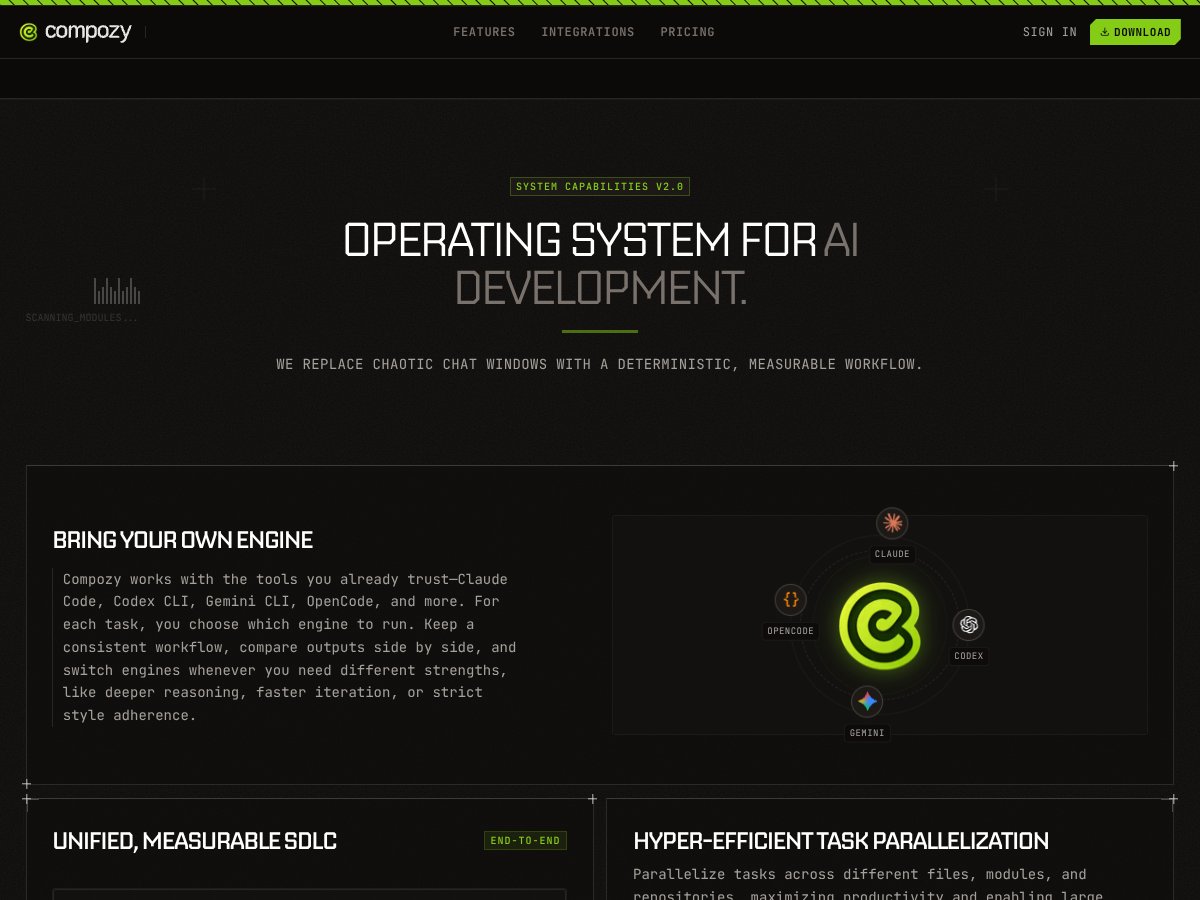
Bring Your Own Engine
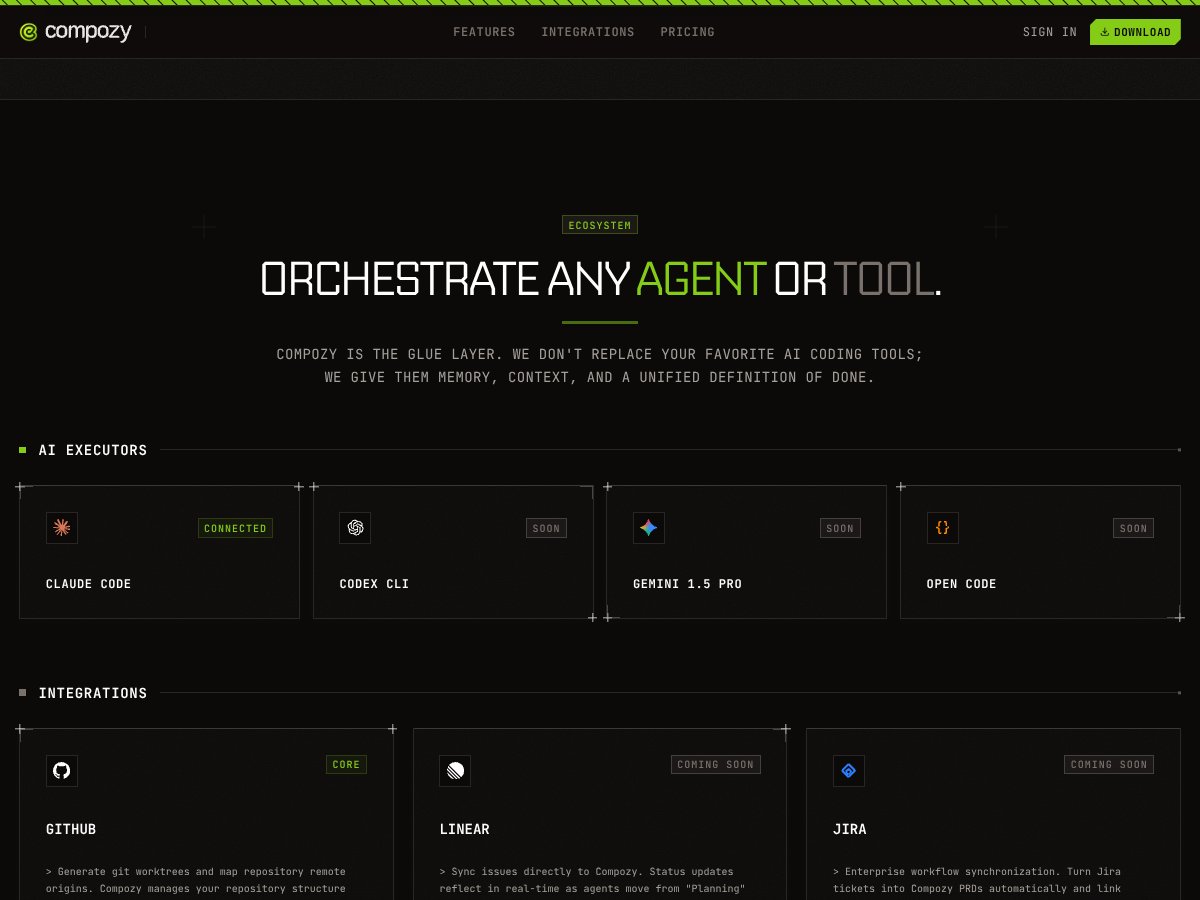
This feature allows users to integrate their preferred AI models and tools, such as Claude, Codex CLI, Gemini CLI, or OpenCode, into the Compozy workflow. It ensures flexibility and control, enabling teams to leverage existing investments and customize their AI stack. In practice, this means developers can choose the optimal engine for each task—be it reasoning, code generation, or style enforcement—without being locked into a single provider or framework.
Unified, Measurable SDLC
Compozy standardizes the entire AI development lifecycle, from initial business requests (PRDs) through technical specifications and code reviews to deployment. This unified approach provides clear traceability and governance, allowing leadership to monitor progress, identify bottlenecks, and improve processes over time. It also facilitates measurable outcomes, such as cycle times and token efficiency, critical for enterprise-scale projects.
Hyper-Efficient Task Parallelization
One of Compozy’s standout capabilities is its ability to parallelize tasks across multiple files, modules, and repositories using up to 32 threads. This massively accelerates development cycles by breaking down large features into smaller, AI-executable units that can run concurrently. In real-world testing, this results in significantly shorter turnaround times for complex projects—sometimes reducing cycle times by over 50% compared to sequential workflows.
Definitive Context Solution
Addressing the core LLM context limitation, Compozy performs independent executions for different issues or tasks, maintaining a mid-term memory through artifacts like PRDs and technical specs. This approach allows workflows to operate effectively over extended periods without token bloat or context loss, ensuring consistent and accurate outputs even for long-running projects.
Inverted Interaction
Unlike traditional chat-based AI tools that require constant polling, Compozy acts as your AI Development Manager by flipping the interaction model. It prompts for review or input only when necessary, thanks to its intelligent workflow management. This significantly reduces manual babysitting, enabling developers to focus on strategic review and high-level decision-making while the system handles the heavy lifting.
Token & Cost Optimization
Compozy intelligently orchestrates tasks to use models most cost-effectively, selecting affordable models for simple operations and more powerful models for complex reasoning. This real-time orchestration minimizes token waste and reduces operating costs, which is especially beneficial for large-scale AI deployments where token usage can quickly become expensive.
Maximized Developer Flow
The platform reduces developer idle time by executing tasks in parallel across multiple AI engines, freeing developers from waiting on iterative AI responses. Instead, they can dedicate their time to reviewing outputs, refining specifications, and strategic planning, which enhances productivity and accelerates project timelines.
How Compozy Works

Getting started with Compozy involves a few clear steps, designed to integrate seamlessly into existing development workflows:
- Onboarding and Installation: Developers can download the Compozy app for macOS and Linux, with Windows support coming soon. The setup process involves installing the CLI and configuring the environment—particularly, connecting to preferred AI engines and repositories. The platform’s documentation offers step-by-step guidance to facilitate smooth onboarding.
- Defining Workflows: Users create declarative YAML files that specify agents, tasks, triggers, and data flows. These workflows include parallel execution blocks, scheduling, and error handling, building a comprehensive process tailored to their project needs. The YAML syntax, inspired by GitHub Actions, makes it approachable for experienced developers.
- Execution and Automation: Once workflows are defined, Compozy orchestrates the tasks automatically. It manages multiple AI engines, parallelizes subtasks, and maintains context across steps, all while providing real-time logs and diagnostics. The 'autonomous processing' mode ensures workflows proceed without manual intervention, saving time and reducing errors.
- Monitoring and Optimization: The platform offers detailed logs, performance metrics, and traceability, allowing teams to monitor progress, identify inefficiencies, and optimize their workflows. Over time, this data helps refine YAML configurations and improve overall productivity.
While initial setup requires familiarity with YAML and command-line interfaces, Compozy’s design emphasizes transparency and control, making it accessible for technically proficient teams. Its robust architecture ensures that once workflows are established, they run reliably, efficiently, and with minimal manual oversight.
In summary, Compozy provides a powerful, scalable framework for managing complex AI development workflows. Its combination of parallel task execution, context management, and intelligent orchestration makes it a compelling choice for teams aiming to automate and accelerate their AI projects—though it’s best suited for technically experienced users comfortable with infrastructure-level tools and configurations.
SECTION 5: PRICING ANALYSIS
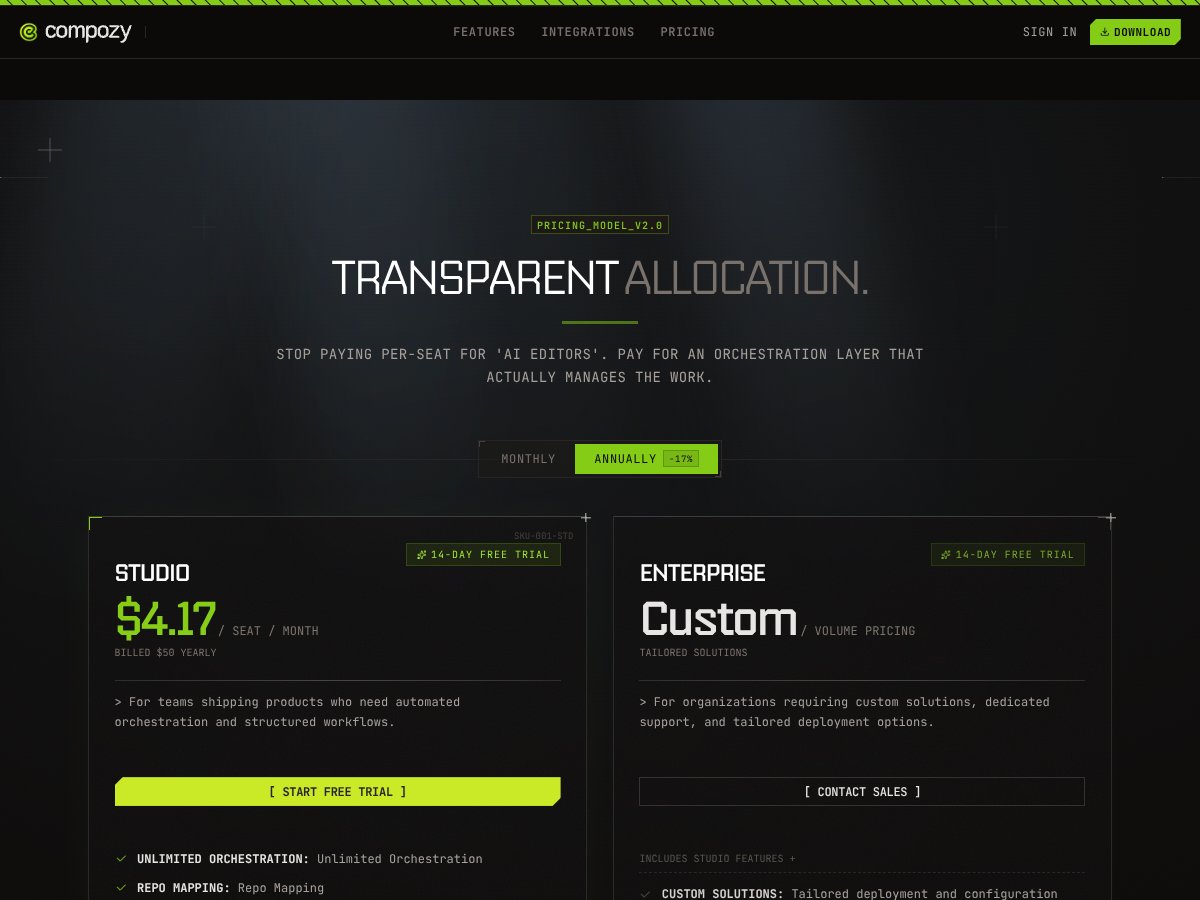
| Plan Name | Price | Key Features | Best For |
|---|---|---|---|
| Free Tier | $0 / month |
|
Individual developers wanting to evaluate Compozy or build small-scale prototypes without cost. |
| Studio | $4.17 / seat / month (billed annually as $50/year) |
|
Teams shipping products requiring structured automation, orchestration, and AI workflow management at an affordable price. |
| Enterprise | Custom Pricing |
|
Large organizations with complex workflows, requiring dedicated support, security, and tailored infrastructure solutions. |
Overall, Compozy offers a compelling value proposition, especially at the Studio tier where the cost is low but the feature set is robust enough for small to medium teams. The free tier allows for basic testing and evaluation without financial commitment, which is essential for early adopters or those exploring multi-agent orchestration. The paid Studio plan, at just over four dollars per seat monthly, provides unlimited runs and parallel execution, making it suitable for active development teams focused on automation.
Compared to alternatives like open-source solutions such as Airflow or n8n, Compozy's pricing is more straightforward for teams looking for enterprise-grade orchestration without the need to self-manage complex infrastructure. However, the enterprise plans, being custom-priced, may be costly for smaller organizations but necessary for large-scale deployments requiring dedicated support and compliance.
Potential hidden costs are minimal at the lower tiers, but organizations should consider the costs associated with hosting and maintaining any self-hosted components if they opt for on-premise deployment. For teams without DevOps expertise, the complexity of deploying and managing Compozy's infrastructure might be a hidden barrier, especially at scale.
In summary, the tiered structure caters well to different user segments: startups and individual developers benefit from the free plan, small teams from the Studio plan, and large enterprises from custom enterprise solutions. Choosing the right plan depends on the scale of automation needed, budget, and technical capacity for infrastructure management.
Pros

- Robust Multi-Agent Orchestration: Compozy enables defining, deploying, and managing complex workflows with multiple AI agents, signals, and memory, reducing the need for custom glue code and streamlining AI system development.
- Declarative YAML Workflows: Its YAML-based configuration system makes defining intricate workflows accessible and auditable, fostering consistency and collaboration among teams.
- Parallel Execution & Scalability: Hyper-efficient task parallelization across multiple files, modules, and repositories shortens cycle times, increasing productivity and enabling large features to be built incrementally.
- Advanced Context Management: By solving core LLM context limitations through independent executions and mid-term memory, Compozy ensures reliable, context-aware outputs for production-grade systems.
- Inverted Interaction Model: Acting as an AI development manager, Compozy reduces developer overhead by asking for review only when necessary, freeing developers from constant polling and babysitting long operations.
- Token & Cost Optimization: Its orchestration layer dynamically chooses the most appropriate models for each task, reducing token waste and controlling costs effectively, as highlighted by the platform's emphasis on efficiency.
- Open-Source Foundation: With a Temporal-based, Go engine, Compozy offers transparency, flexibility, and control, appealing to organizations seeking customizable, production-ready orchestration solutions.
Cons
- Steep Learning Curve: The YAML configuration, CLI, and underlying infrastructure demands technical expertise, potentially deterring non-technical users or small teams without DevOps skills.
- Infrastructure Complexity: Operating the Temporal and Go-based engine requires familiarity with deployment and maintenance, which can be a hurdle for organizations lacking dedicated DevOps resources.
- Limited Plug-and-Play Integrations: Compared with more mature platforms like Zapier or n8n, Compozy's ecosystem and third-party integrations are still emerging, possibly limiting out-of-the-box compatibility for some users.
- No Formal SaaS Offering: As a self-hosted, open-source platform, potential users need to handle deployment, scaling, and security themselves, which might increase operational overhead.
- Limited User-Focused Content: The current documentation focuses heavily on architecture and concept, with less emphasis on beginner-friendly guides or use case tutorials, which could slow onboarding.
SECTION 7: BEST USE CASES
- Enterprise-Grade AI Workflow Automation: Large organizations deploying sophisticated AI pipelines with multiple agents, data sources, and signals benefit from Compozy’s fault-tolerant, scalable architecture.
- Multi-Agent System Management: Teams building multi-agent systems that require coordination, memory, and parallel task execution—such as automated code generation, testing, and deployment pipelines—find Compozy ideal.
- Complex Software Development Lifecycle (SDLC): Development teams seeking a unified, measurable SDLC from PRD to PR, with traceability, versioning, and governance, especially in regulated industries.
- AI-Driven Data Pipelines: Data teams automating ETL, data validation, and model training workflows using Compozy’s event-driven, scheduled, and parallel execution features.
- Scheduled and Recurring AI Tasks: Use cases involving regular report generation, model retraining, or maintenance tasks benefit from Compozy’s built-in scheduling and signal-based workflows.
- Open-Source Custom AI Orchestration: Organizations preferring self-hosted, open-source AI orchestration platforms with deep customization options will find Compozy suitable for tailoring workflows to specific needs.
SECTION 8: WHO SHOULD NOT USE Compozy
If you are a non-technical user or small team seeking simple, no-code automation solutions, Compozy may not be the best fit. Its YAML-based configuration, CLI, and infrastructure requirements demand technical expertise, and the platform's focus on enterprise-grade orchestration means it can be overly complex for straightforward automation or content creation tasks. For such users, platforms like Zapier, Make, or n8n might offer more accessible, no-code experiences with faster setup and less operational overhead.
Additionally, organizations without DevOps resources or the capacity to manage self-hosted infrastructure may find Compozy's deployment and maintenance challenging. The absence of a ready-to-use SaaS version means they must handle hosting, scaling, and security on their own, which could lead to increased costs and complexity. For small teams or startups with limited technical staff, investing in simpler, managed solutions could be more practical.
Finally, if your primary need is basic AI content generation or simple automation that does not require complex workflows, Compozy's advanced features may be unnecessary. In such cases, more straightforward tools like ChatGPT, OpenAI's API, or no-code automation platforms could deliver faster results with less effort.
Compozy vs Alternatives
Choosing the right orchestration platform depends heavily on your specific needs, technical expertise, and project scale. Here, we compare Compozy with several notable alternatives—each excelling in different areas—to help you make an informed decision.
Temporal + Custom Frameworks
- What it does differently: Unlike Compozy’s declarative YAML approach, building your own orchestration layer directly on Temporal using custom code offers maximum flexibility but requires significant development effort. Temporal itself is a fault-tolerant workflow engine focused on reliable, durable workflows, but lacks the integrated multi-agent orchestration features of Compozy.
- Price comparison: Temporal is open-source with no licensing fees; hosting costs depend on infrastructure. Building a custom framework incurs development and maintenance costs, whereas Compozy offers ready-to-use features.
- When to choose it OVER Compozy: If your team has strong DevOps resources and needs highly customized workflows or integration with existing Temporal-based systems, building directly on Temporal might be preferable.
- When Compozy is the better choice: For teams seeking a ready-made, multi-agent orchestration system with minimal setup, especially those less familiar with Temporal’s internals, Compozy offers a faster, more integrated solution.
Apache Airflow
- What it does differently: Airflow is a mature, Python-based platform primarily designed for data pipelines and complex task dependencies. While it supports scheduling and fault tolerance, it isn't tailored specifically for AI multi-agent systems and lacks native support for signals or memory management.
- Price comparison: Open-source, with hosting costs depending on infrastructure; enterprise options exist with managed services. Compozy, on the other hand, provides more AI-specific orchestration features out of the box.
- When to choose it OVER Compozy: For data-centric workflows and pipelines where AI agents are not central, or if your team is already familiar with Python and Airflow’s ecosystem, it might be more suitable.
- When Compozy is the better choice: For enterprise-grade, multi-agent AI workflows requiring real-time signals, advanced memory, and tool integrations, Compozy’s capabilities surpass traditional data pipeline tools.
n8n and Make (Integromat)
- What they do differently: n8n and Make are low-code/no-code automation tools ideal for simple workflows and integrations, often used for automating tasks across apps without deep technical knowledge. They lack the scalability and AI-specific orchestration features of Compozy.
- Price comparison: Both platforms offer free tiers and paid plans with varying limits. Compozy is open-source and self-hosted, so costs depend on infrastructure rather than licensing.
- When to choose them OVER Compozy: For lightweight, non-enterprise automations or if your team prefers visual interfaces without coding, these tools are easier to adopt.
- When Compozy is the better choice: For complex, large-scale AI multi-agent systems with custom workflows, scheduling, and context management, Compozy provides more depth and control.
Zapier
- What it does differently: Zapier excels at no-code automation connecting popular apps for simple workflows. It’s not designed for AI agent orchestration or complex workflows, and lacks the customizability and robustness needed for enterprise AI systems.
- Price comparison: Subscription-based, with tiers depending on task volume. Compozy’s open-source nature means infrastructure costs are variable but no licensing fees apply.
- When to choose it OVER Compozy: For trivial automations and integrations with minimal complexity, Zapier is straightforward and quick to implement.
- When Compozy is the better choice: When managing sophisticated AI workflows, multi-agent orchestration, and requiring fault tolerance, Compozy’s architecture is far more suitable.
In summary, if your project demands enterprise-grade reliability, multi-agent orchestration, and deep AI integration, Compozy is a compelling choice, especially if you’re comfortable with infrastructure management. For simpler automation needs or quick prototyping, alternative tools like n8n, Make, or Zapier may suffice, but they lack the depth for sophisticated AI systems.
Note:
Each alternative has its strengths and ideal use cases. Carefully consider your team’s expertise, project complexity, and scalability requirements before selecting a platform. Compozy’s open-source, flexible architecture positions it well for building robust, production-ready AI systems, but it requires a technical team to deploy and maintain.
Summary Table
| Platform | Key Differentiator | Best For | Pricing |
|---|---|---|---|
| Compozy | Multi-agent orchestration, fault-tolerant workflows, declarative YAML | Enterprise AI workflows, complex multi-agent systems | Open-source, self-hosted |
| Temporal + Custom | Highly customizable, code-based workflows | Teams with DevOps expertise needing tailored solutions | Open-source + hosting costs |
| Airflow | Mature data pipeline orchestration | Data workflows, ETL pipelines | Open-source + hosting |
| n8n / Make | No-code visual automation | Simpler automations, quick integrations | Freemium plans available |
| Zapier | No-code app integrations | Basic automations across apps | Subscription plans |
Ready to try Compozy? Visit Compozy to get started.