Table of Contents

What Is DialogLab (and What I Actually Tested)?
When I first ran into DialogLab, I’ll admit I was curious and skeptical. A “multi-party conversation simulator” sounds great on paper, but I wanted to see if it really helps you model group dynamics—or if it’s just a pretty demo.
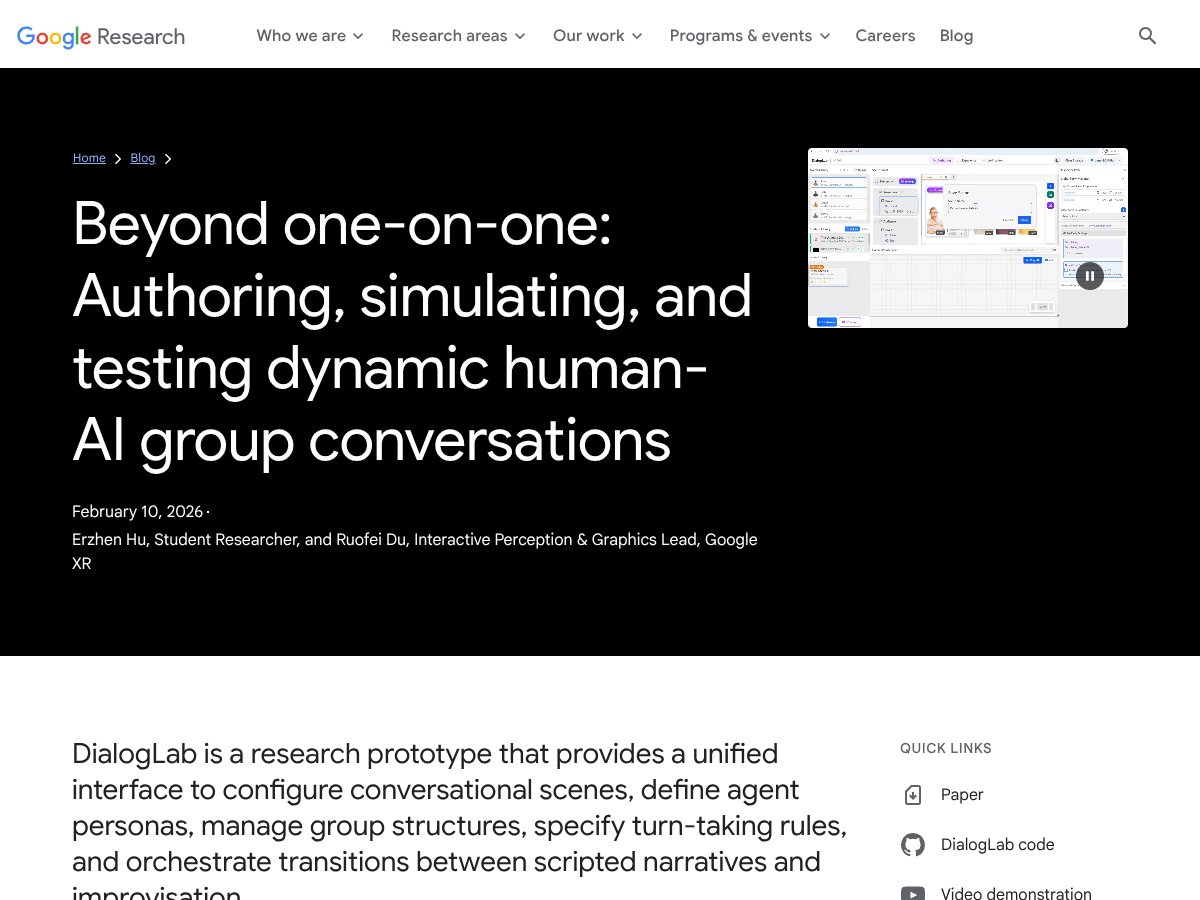
DialogLab is a Google research prototype built to simulate and test multi-party human-AI conversations. Instead of only running a one-on-one chatbot session, it lets you set up scenarios where multiple participants interact—like a group chat, a meeting, or even a more casual “everyone talks at once” situation. The big promise is that you can prototype those interactions in a controlled environment and observe how the conversation unfolds.
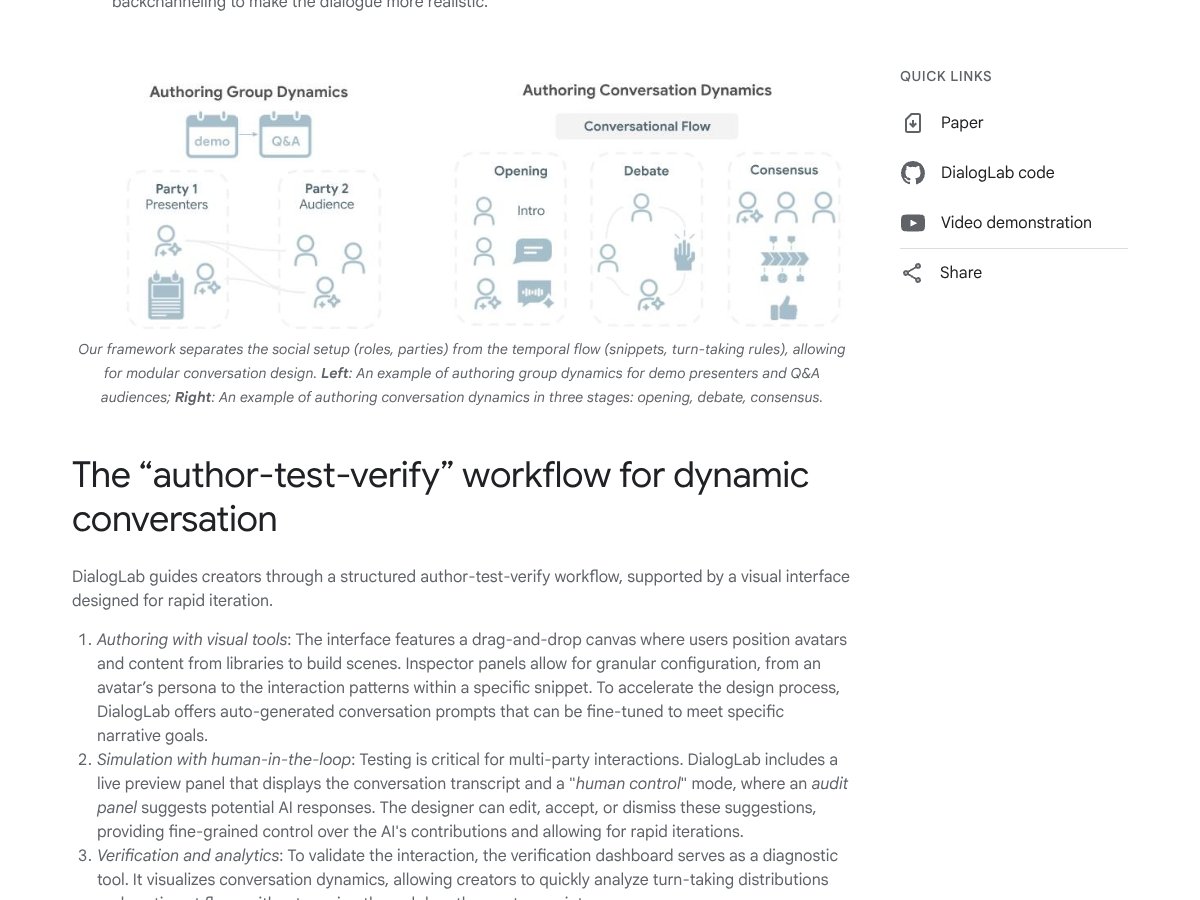
In my testing, the most useful part wasn’t some magical “AI therapist” behavior. It was the workflow for configuring multi-participant scenarios and then seeing the conversation play out as a structured interaction. I could clearly identify where each participant’s behavior came from, how the turns were handled, and what changed when I tweaked roles and instructions.
What I liked is that it’s not trying to replace your whole stack. It feels more like a sandbox for dialogue design—script parts of the scenario, let other parts be more open-ended, and then iterate. That’s exactly the kind of tool you want when you’re exploring questions like: “How do role instructions affect turn-taking?” or “What happens when one participant interrupts or goes off-topic?”
Now, the honest caveat: this is research software. It’s not a polished “click here to deploy” product. It’s more of a playground for researchers and advanced developers who want to experiment with multi-agent dialogue behavior and test ideas quickly.
And just to be super clear, this isn’t a plug-and-play chatbot builder. There’s no “enterprise dashboard,” no slick onboarding for non-technical users, and no promises of production-grade support. If you’re hoping to drop it into a live app tomorrow, you’ll probably be disappointed.
DialogLab Pricing: What’s Public (and What Isn’t)

| Plan | Price | What You Get | My Take |
|---|---|---|---|
| Free Tier | No public subscription pricing found | Download/build from the project (research prototype access) | Because it’s open-source/research-focused, you’re not buying a “tier” like a SaaS. The real cost is setup time and experimentation effort. |
| Paid Plans | Not publicly listed | No clearly defined paid feature set | If there’s any paid offering, it’s not obvious from public materials. For now, assume you’re operating it yourself. |
Here’s the pricing reality: DialogLab doesn’t appear to have a publicly documented subscription or paywall pricing structure. It’s positioned as a research prototype/open-source project, so it’s essentially “free” in the sense that you can run it locally and tinker—assuming you can set up the environment.
One thing I noticed during setup (and this is the part people usually gloss over) is that “free” doesn’t mean “zero effort.” You still have to deal with the basics: installing dependencies, getting the dev tooling working, and making sure your environment is configured correctly. DialogLab is built with a modern web stack (React/Vite/Express), so if you’re comfortable in that world, you’ll move faster.
Also, I didn’t see any clear, public “usage limits” like you’d get with a hosted platform. That’s not automatically a good thing, though. For larger experiments, you’ll likely run into practical constraints (compute, local performance, timeouts, or just the usual friction of running multiple scenarios). In other words: the limitation isn’t a quota banner—it’s your environment and your setup.
My honest take: if you want to explore multi-party dialogue testing and you’re okay doing the work to run a prototype, it’s a great candidate. If you want a turnkey commercial product with straightforward billing and support, you should probably look elsewhere.
How DialogLab Compares to Alternatives (With Real-World Differences)
LangChain
- LangChain is mainly about building multi-agent AI workflows—connecting models, orchestrating steps, and managing tool/prompt pipelines. DialogLab is more about simulating and observing group conversations as the scenario runs.
- In my experience, LangChain tends to be backend-first. You can absolutely build multi-agent systems with it, but you won’t get the same “see the interaction unfold” vibe that DialogLab is aiming for.
- Choose LangChain if you want flexible orchestration and you’re comfortable coding the logic.
- Choose DialogLab if you care more about testing how multi-party dialogue behaves (roles, turns, and interaction dynamics) and you want a visual, interactive way to inspect it.
AutoGen (Microsoft)
- AutoGen focuses on creating multi-agent systems that coordinate to complete tasks. It’s strong for structured agent-to-agent behavior and workflow-style setups.
- Pricing for AutoGen/enterprise options can vary and isn’t always “simple” in the way a small developer might expect. DialogLab, by contrast, is open-source/research-oriented—so the barrier is mainly technical, not financial.
- Choose AutoGen if your priority is automation, coordination, and scaling agent behavior for task execution.
- Stick with DialogLab if your priority is dialogue testing—especially when you want to prototype multi-party conversations with a more interactive/visual approach.
CrewAI
- CrewAI is built around orchestrating “crews” of agents for collaborative tasks. It’s excellent when the goal is coordination for work, not necessarily simulating social conversation dynamics.
- It often takes more setup if you’re trying to bend it into a dialogue-simulation use case. And depending on how you deploy, you may end up paying or maintaining your own infrastructure.
- Choose CrewAI if you want multi-agent teams to execute projects or workflows.
- Stick with DialogLab if you want to experiment with human-AI group conversation behavior and interaction patterns as a simulation.
ChatDev
- ChatDev is oriented toward simulating software development teams using AI agents. It’s more specialized toward coding collaboration than broad multi-party dialogue testing.
- If your main goal is development workflows, it can be a better fit. But if you specifically want multi-human/multi-AI conversation testing with a more conversation-centric interface, DialogLab is closer to what you’re after.
- Choose ChatDev if you want code-team simulation and agent collaboration around building software.
- Choose DialogLab if you want to focus on dialogue dynamics rather than software project execution.
Bottom Line: Should You Try DialogLab?

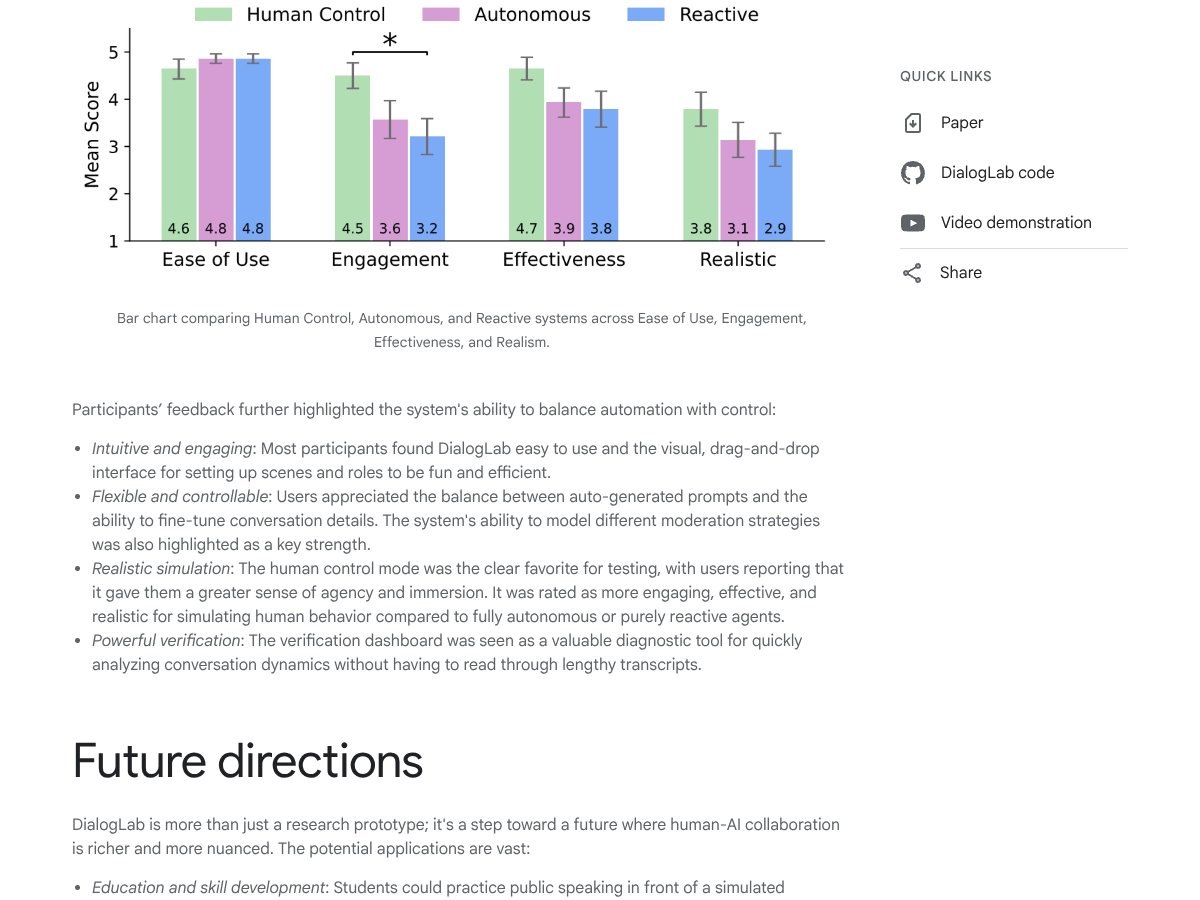
After testing DialogLab, I’d rate it 7/10. It’s genuinely interesting for research and prototyping, and the visual/interactive angle helps make multi-party testing feel more “real” than a plain text log.
What stood out to me: the animated/avatar-style presentation makes it easier to track what’s happening across multiple participants. It’s not just output—it’s a way to inspect the flow of interaction while you iterate on roles and instructions.
But I also wouldn’t oversell it. It’s still a prototype. In practice, that means you should expect rough edges—things like setup friction, incomplete polish, and limitations that show up when you push beyond small demo scenarios. If you need enterprise-grade reliability or a support team on standby, this isn’t that kind of product.
So here’s the decision rule I’d use:
- Try DialogLab if you’re experimenting with multi-party dialogue behavior and you want a visual simulation environment to iterate quickly.
- Skip it (for now) if you’re building a production system that needs rock-solid stability, clear SLAs, and a straightforward deployment/support model.
- Use alternatives (like AutoGen/CrewAI/LangChain) if your real goal is orchestration and task execution rather than conversation simulation.
Common Questions About DialogLab
- Is DialogLab worth the money? - If you’re asking “money” as in a subscription: it doesn’t really work like that publicly. It’s open/research-focused, so you’re not paying for tiers—you’re investing time to set it up and run experiments. For the right use case (dialogue simulation/prototyping), it’s worth it.
- Is there a free version? - Yes, it’s available via GitHub as an open-source project. Just remember: “free” means you handle the setup and testing environment yourself.
- How do I find the docs and repo? - Start with the official GitHub repository for DialogLab (and any linked docs inside the project). That’s where you’ll get the most up-to-date instructions and what’s currently supported.
- How does it compare to [competitor]? - DialogLab is more conversation- and visualization-oriented. AutoGen/CrewAI/LangChain are stronger when you need agent orchestration for workflows and tasks. Different strengths depending on whether you care about dialogue dynamics or execution pipelines.
- Can I get a refund? - Since it’s open-source and not sold as a typical paid product, refunds aren’t really part of the model.
- What technical skills do I need? - Basic web dev comfort helps a lot. Knowing your way around React/Vite/Express-style tooling makes setup smoother. If you’re expecting a no-code experience, this will feel too technical.
- Is it suitable for commercial projects? - Not as-is. From what I saw, it’s best treated as a research/prototyping tool. If you want to commercialize, you’d likely need engineering work to harden it, add monitoring, and ensure reliability.