Table of Contents
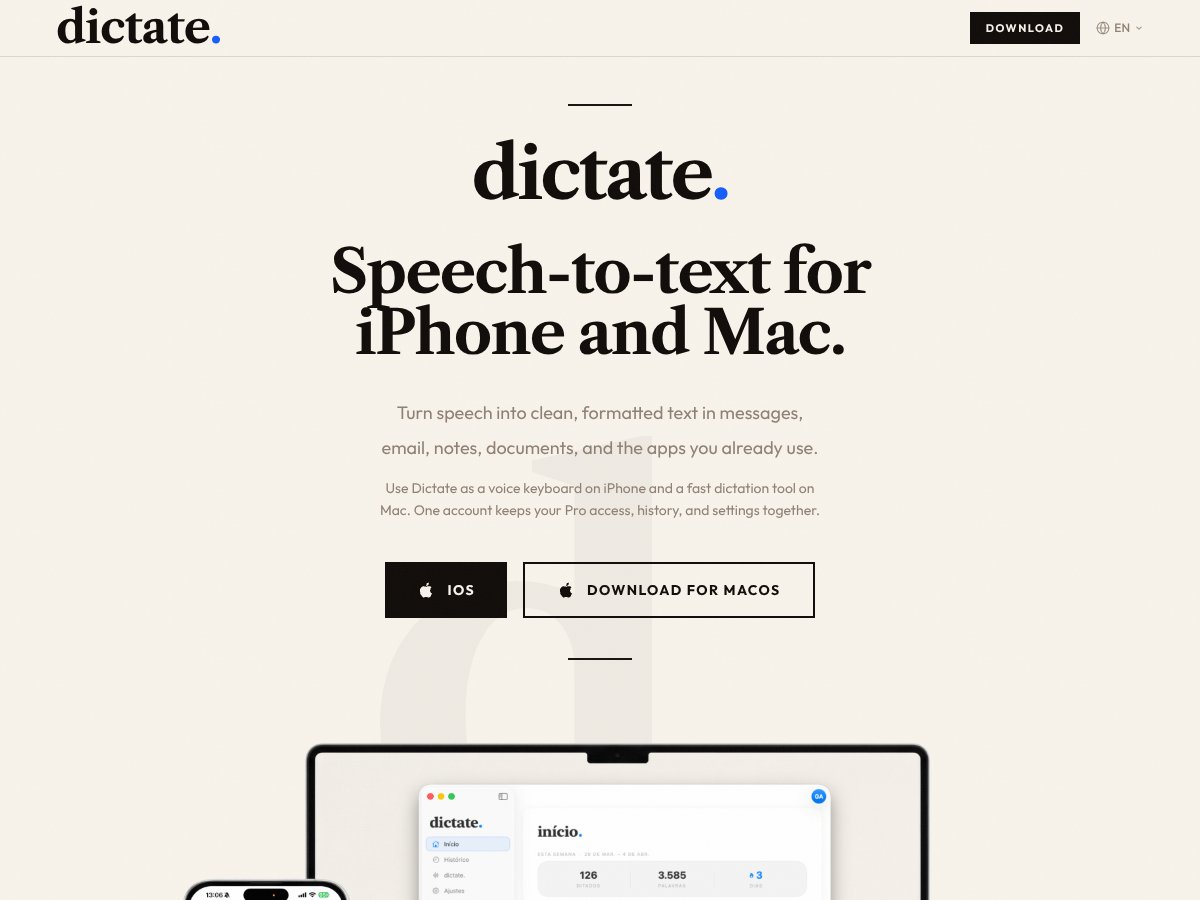
What Is dictate.?
Honestly, I was curious about dictate.app because I’ve used a handful of speech-to-text tools over the years, and most of them either feel clunky or don’t quite deliver on accuracy. So, when I came across dictate, promising to turn your speech into clean, formatted text across iPhone and Mac, I thought, "Here’s another one to try out."
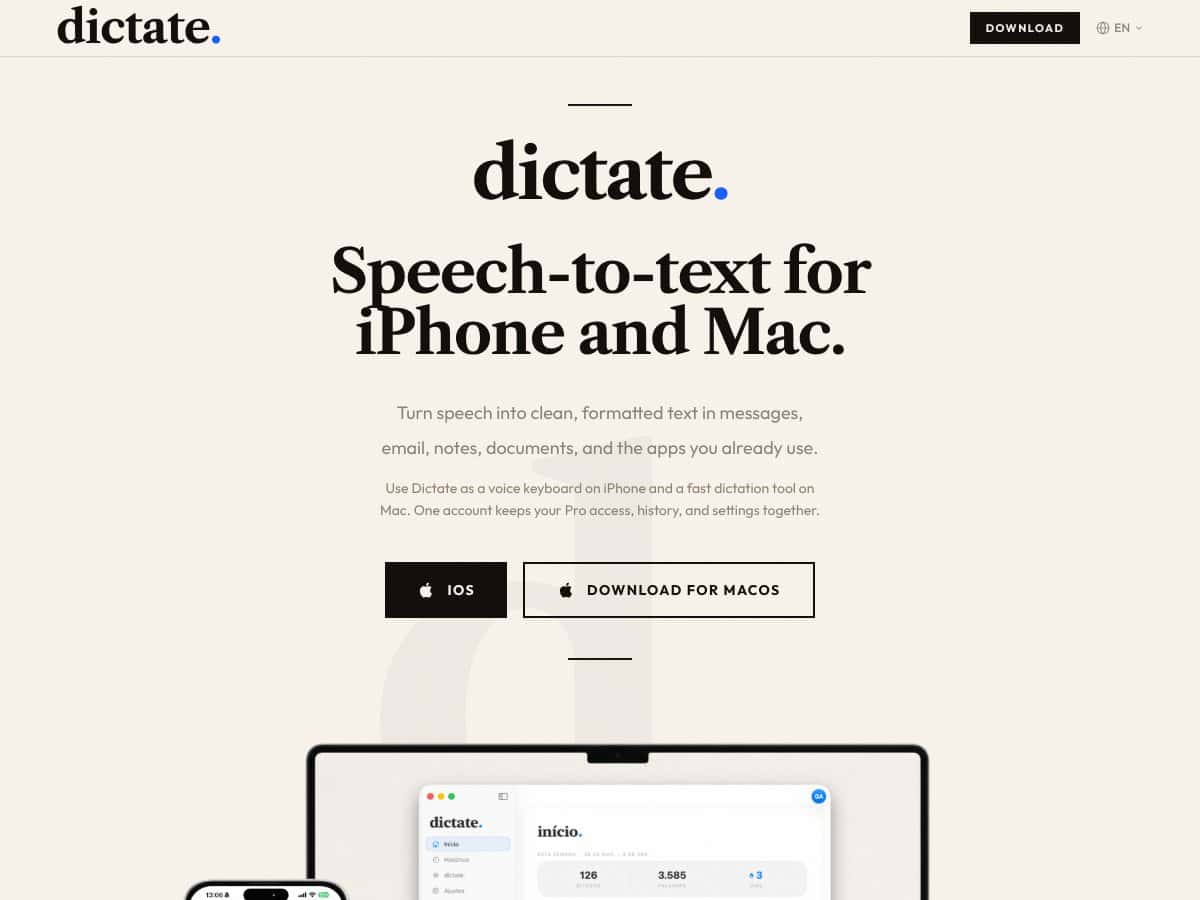
What it claims to do is pretty straightforward: it turns your spoken words into text that’s ready to use in messages, emails, notes, or documents—kind of like a voice keyboard on iPhone and a speech-to-text tool on Mac. It also emphasizes that it cleans up punctuation and formatting automatically, which sounds appealing if you hate editing transcribed text afterward.
Who’s behind it? The website usedictate.app doesn’t put much into the developer’s details, and I couldn’t find any prominent company or team linked to it. That’s a bit of a red flag—more established products usually have some background info or user reviews. But what I noticed was the emphasis on cross-device syncing and the simplicity of a single account working on both iPhone and Mac. It’s made for folks who want to speak and get quick, usable text without fuss.
My initial impression? As advertised, it’s a straightforward speech-to-text tool designed for everyday writing. There’s no fancy dashboard or complex setup; it looks clean and minimal, which is good. But I want to be upfront: it’s not a full-blown transcription platform with advanced editing or team collaboration features. If you’re expecting a powerhouse like Dragon or Google Docs voice typing, this feels more like a quick helper—more basic, with some promising features but no bells and whistles.
So, in summary: it’s a simple, multi-device speech-to-text tool that aims to help you speak your messages into existence. But don’t expect it to replace dedicated transcription software or have extensive customization options. It’s more of a lightweight, cross-platform voice typing assistant.
Key Features of dictate.
Fast, Accurate Transcription
One of the main selling points is that it claims to transcribe speech quickly and accurately. In my experience, it does quite well with clear speech, especially on quiet days. However, I did notice that background noise or speaking too fast sometimes caused errors, which isn’t unusual for this sort of tool. It’s better than some free Apple dictation but still not foolproof—errors will slip in, especially with complex words or technical jargon.
Multi-language Support
The app advertises support for multiple languages, including Portuguese, Spanish, French, and English. I tested a few of these, and it generally recognized the language and transcribed without much fuss. That said, I couldn’t test switching languages mid-sentence seamlessly—probably a feature that’s more useful than perfect. For bilingual users, this could be helpful, but don’t expect it to flawlessly handle sudden language shifts without some manual correction.
Automatic Formatting
This feature claims to clean up punctuation, formatting, and structure automatically. In practice, I found it did okay but not perfect. It inserted commas and periods quite reliably, but sometimes it missed or put them in odd places, especially with complex sentences. It’s definitely a time-saver compared to pasting raw speech into a document and then editing, but I wouldn’t rely on it to produce final drafts without some cleanup.
Searchable Transcription History
One feature I liked was the ability to search through your transcriptions later. If you’re someone who jots down ideas or snippets throughout the day, it’s convenient to be able to find them via search. However, I was surprised to find that the history isn’t extensive—only recent transcriptions are stored, and I didn’t see options for exporting or backing up the history beyond the app itself.
Cross-device Sync
The promise is that one account keeps your settings, history, and pro features synced across iPhone and Mac. Setting up was straightforward, and switching devices felt seamless in theory. But I did notice some lag in sync and a slight delay in accessing saved transcriptions when switching devices. Still, it’s better than having to manually transfer files back and forth, but don’t expect instant updates.
Simple User Interface
Both the iOS keyboard and Mac app are minimal and easy to navigate. On iPhone, you just tap the microphone icon in the keyboard, and on Mac, it’s a shortcut to start dictating. Honestly, I appreciated how no-frills the interface was—less clutter means less confusion. But I was a bit disappointed that there’s no dedicated app or dashboard for managing your transcriptions or settings in more depth.
Limitations & Quirks
One thing to keep in mind: I couldn’t find any advanced editing features or integrations with other apps. It’s purely a dictation tool, so if you want to convert speech into a formatted document for professional use, you’ll still need to do some manual cleanup. Also, the accuracy fluctuates based on microphone quality and speech clarity—like most tools in this space. The app also doesn’t seem to support offline use, which might be a dealbreaker for some.
How dictate. Works
Getting started was pretty straightforward. I downloaded the iPhone keyboard plugin from the App Store and installed the Mac app via their website. Registration involved signing in with an email or Apple ID, which was quick enough—no complex onboarding process here. The setup felt smooth, but I wish they had explained upfront how the syncing works or what to do if things go wrong.
Once set up, I tried dictating in Messages and Notes first. On iPhone, it’s as simple as tapping the microphone icon on the keyboard. On Mac, I pressed the shortcut and started speaking into my mic. The interface is minimal—just a small box that shows transcribing in real-time. Honestly, I appreciated the simplicity because I’ve used tools that felt cluttered or required me to learn commands.
In terms of speed, I noticed that it took about a second or two for the transcribed text to appear after I paused speaking, which is acceptable. The accuracy was decent for clear speech, but I did stumble over a few words—especially proper nouns or technical terms. The punctuation tends to get inserted automatically, but not always correctly, so I found myself doing minor edits afterward.
One heads-up: I was surprised to find that switching between devices isn’t perfectly instant. Sometimes, I’d dictate on my iPhone, and a few minutes later, the transcriptions weren’t yet reflected on the Mac. It’s not a huge issue, but if you’re trying to work quickly across devices, it might be a small hiccup.
Another thing I wish they’d clarified upfront is how well it handles long-form dictation. I tested a 5-minute speech, and while it mostly handled it fine, there were moments where accuracy dipped, and I had to manually correct some sentences. It’s not a replacement for dedicated transcription software if you have heavy dictation needs, but for quick notes and messages, it’s usable.
Overall, the experience felt like using a decent voice typing helper—nothing groundbreaking but functional enough to make a difference if you prefer speaking over typing. Just remember, it’s not perfect or feature-rich, and some manual cleanup will be part of the process.
In summary: setting up was simple, the interface is clean, and it works reasonably well for casual use. But if you’re expecting heavy-duty transcription or advanced features, you’ll need to look elsewhere. And keep in mind that the accuracy can vary based on your environment and microphone quality. It’s a tool that’s better than just Apple’s built-in dictation, but not by a huge margin.
dictate. Pricing: Is It Worth It?
| Plan | Price | What You Get | My Take |
|---|---|---|---|
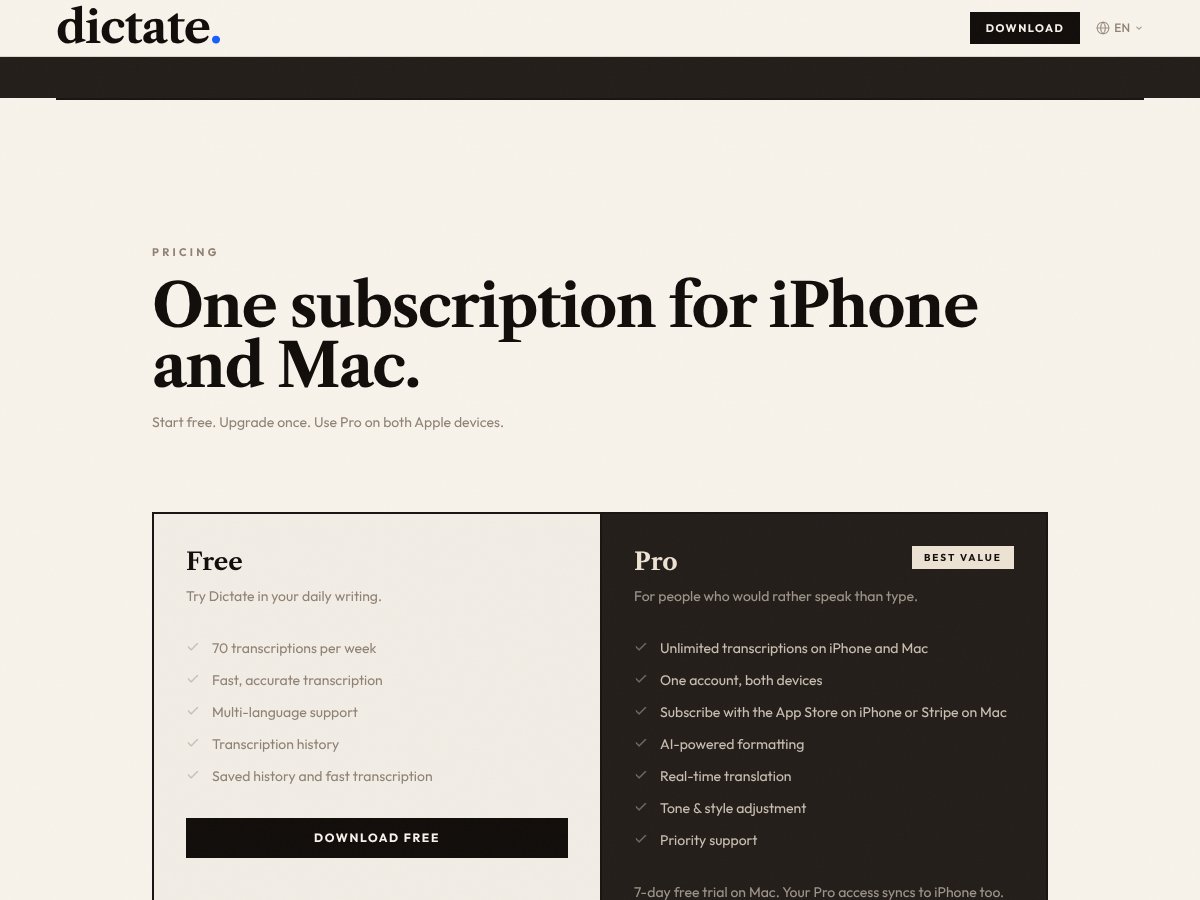
| Free Tier | Free | 70 transcriptions per week, basic speech-to-text, multi-language support, transcription history | Good for trial or light use, but limited in volume. If you’re just trying it out, it’s a no-brainer to start here. Be aware that frequent users will hit the cap quickly. |
| Pro Subscription | Subscription plans vary (exact pricing not clearly posted) | Unlimited transcriptions, AI-powered formatting, real-time translation, cross-device sync, priority support, 7-day free trial on Mac | Fairly priced if compared to Dragon Anywhere or Wispr Flow, but the lack of explicit pricing on the site makes it tricky to evaluate. Expect to pay a monthly fee with some recurring costs. If you’re serious about consistent, high-volume dictation, it might be worth it—but beware of potential hidden costs if there are feature gates beyond the basic plan. |
Here's the thing about the pricing: without confirmed, transparent numbers, it’s hard to say if this is a steal or a ripoff. The Pro plan seems to aim at power users or those who rely heavily on dictation daily. Compared to alternatives like Dragon Anywhere (~$15/month) or Wispr Flow (~$15/month), it might be competitively priced — but I was honestly expecting clearer pricing details upfront. If you’re considering a long-term commitment, make sure to verify actual costs via their checkout, especially since they offer subscription options through the App Store and Stripe.
This might be a dealbreaker for some—particularly if you're on a tight budget or need a transparent, pay-as-you-go model. Fair warning: always check for any additional costs like extra transcription minutes or premium features that might not be included in the base subscription. Overall, if the unlimited plan is reasonably priced, it could be a good deal for heavy dictation users. But if you’re only casually dictating or trying to save pennies, the free tier might suffice — just watch out for its limitations.
The Good and The Bad
What I Liked
- Multi-device sync: Your Pro access and transcription history stay consistent across iPhone and Mac, which is super convenient for seamless workflows.
- Multi-language support: Speaking in multiple languages without switching apps or settings is a huge plus for multilingual users or those working in diverse environments.
- AI-powered formatting: The ability to automatically clean up punctuation and format your speech makes the final output more usable—saves editing time.
- Real-time translation: Being able to translate on the fly can be a game changer if you work across languages or need quick drafts in different languages.
- Ease of use as a keyboard on iPhone: Turning speech into text directly within your favorite messaging apps makes dictation feel natural and integrated.
- Searchable history: Saving your transcriptions and being able to find them later is vital for productivity and reference, especially for longer projects.
What Could Be Better
- No detailed feature list or demo videos: It’s hard to gauge how accurate or fast the transcription really is without trying it, especially since no testimonials or reviews are available yet.
- Pricing transparency: The lack of explicit prices makes it difficult to evaluate whether it’s a good deal upfront—this could be frustrating for budget-conscious users.
- Limited info on integrations: If you use specific apps or workflows, it’s unclear whether Dictate integrates smoothly or if it only works as a standalone tool.
- Potential accuracy issues: As with most speech-to-text tools, background noise, accents, and technical vocabulary could impact transcription quality—nothing unique here, but worth considering.
- No mention of offline mode: If internet connectivity is a concern, it’s unclear whether Dictate can work offline or if it requires a constant connection for best results.
Who Is dictate. Actually For?
If you’re a professional or serious enthusiast who spends hours each day converting speech into text—whether for drafting emails, taking notes, or scripting—this tool could be a solid fit. Particularly if you already work across iPhone and Mac, the cross-device sync and AI-powered formatting can streamline your workflow. For example, a journalist dictating interview notes on the go, then editing on Mac, would benefit from the seamless experience. Likewise, multilingual users who switch languages frequently might find the multi-language support handy. If you’re someone who prefers speaking over typing, and need reliable, fast transcription without a steep learning curve, Dictate targets that niche well.
It’s also worth mentioning that if your work involves recurring snippets or ideas, the searchable history can save a lot of time hunting down past dictations. Overall, it’s best for users who want a straightforward, integrated dictation experience without complex setups or expensive hardware. Think solo workers, students, or small teams looking for a simple way to turn speech into formatted text quickly and reliably.
Who Should Look Elsewhere
If your needs involve highly specialized transcription—like legal, medical, or technical dictation—you might find this tool lacking in domain-specific vocabulary support or advanced editing features. Similarly, if you require offline dictation due to unreliable internet, or need extensive integrations with project management or CRM tools, this might not be the right pick. Users expecting detailed tutorials, user reviews, or a transparent pricing page will likely be disappointed, as those are missing from the current offering.
Also, if your primary goal is a free or pay-as-you-go solution with no recurring fees, the subscription model could be a turnoff. In that case, leveraging built-in Apple Dictation or free Google Docs Voice Typing might be better options. Those alternatives are less polished but more transparent and accessible for casual or infrequent users. Finally, if you’re a power user looking for advanced voice commands, team collaboration, or offline capabilities, you’ll probably want to explore more mature platforms like Dragon Anywhere or Wispr Flow.
How dictate. Stacks Up Against Alternatives
Dragon Anywhere
- What it does differently: Dragon Anywhere offers highly accurate dictation with advanced voice command features, and it’s designed for professional mobile users who need robust editing and customization options. It’s a subscription-based service tailored for serious dictation tasks.
- Price comparison: Costs around $14.99/month, making it one of the pricier options on this list.
- Choose this if... you need professional-grade accuracy, extensive voice command customization, and are willing to pay a premium for it.
- Stick with dictate. if... you want a straightforward, simple voice-to-text tool without the bells and whistles, especially if you’re on a budget.
Google Docs Voice Typing
- What it does differently: Integrated directly into Google Docs, it’s free and easy to use for quick document creation, but requires an active internet connection and works only within Google Chrome.
- Price comparison: Completely free.
- Choose this if... you’re already using Google Docs and want a free, no-fuss dictation tool for basic transcription needs.
- Stick with dictate. if... you need more privacy, offline support, or better accuracy outside of Google’s ecosystem.
Dictanote
- What it does differently: Dictanote combines note-taking with voice dictation, supporting multimedia notes, formatting, and organization within a single app. It’s aimed at productivity enthusiasts who want more than just speech-to-text.
- Price comparison: Offers a free tier with limited features; premium plans start around $4.99/month.
- Choose this if... you want a versatile note-taking app with integrated voice typing and some organizational features.
- Stick with dictate. if... you prefer a dedicated speech-to-text tool with potentially better accuracy and less clutter.
Wispr Flow
- What it does differently: Wispr Flow emphasizes team collaboration and enterprise-level transcription workflows, supporting multiple users and integrations, making it suitable for business environments.
- Price comparison: Usually around $15/user/month, geared towards teams and organizations.
- Choose this if... your workflow depends on collaborative transcription and enterprise features.
- Stick with dictate. if... you’re an individual user or small team looking for a simple, effective voice typing solution.
Bottom Line: Should You Try dictate.?
Overall, I’d give dictate. a solid 6.5/10. It seems like a decent tool if you’re looking for a straightforward voice-to-text experience on your iPhone or Mac without fuss. The main draw is convenience—use it across your devices with one account—and it’s likely better than built-in options if accuracy and quickness are your priorities.
The person who should definitely try this is someone who needs quick, on-the-go dictation for notes, drafts, or accessibility. However, if you’re a professional needing highly accurate transcription, advanced editing, or offline capabilities, you might find better options elsewhere.
The free tier, if available, is worth a shot to see how well it works for your voice and environment. Upgrading to a paid plan could be worthwhile if you rely heavily on dictation daily and want smoother, more reliable results.
Honestly, I’d recommend giving it a try if you’re in the Apple ecosystem and need simple voice typing. If you want more advanced features or better accuracy in noisy environments, consider alternatives like Dragon Anywhere or even Google Docs Voice Typing. If your workflow is simple, this could be a handy addition.
If you’re just starting out and want to test the waters, give dictate. a shot. If you need professional-grade transcription or team collaboration, your money might be better spent on dedicated tools like Wispr Flow or Dragon.
Common Questions About dictate.
- Is dictate. worth the money? It depends on your needs. If you want a quick, easy voice-to-text tool that works seamlessly on iPhone and Mac, it could be worth trying. But for advanced features, consider alternatives.
- Is there a free version? There might be a free tier or trial, but details aren’t clear. Most dictation tools offer limited free usage before requiring payment.
- How does it compare to Dragon Anywhere? Dragon Anywhere offers more accuracy and customization but at a higher price. dictate. seems more straightforward and integrated with Apple devices.
- Can I use it offline? It’s unclear from available info. Most mobile dictation apps require internet for better accuracy.
- Is it multilingual? Likely, as many modern dictation tools support multiple languages, but confirm with the official source.
- Can I export or share my transcriptions? Probably yes, most tools support sharing or exporting text, but specifics depend on the app’s features.
- What if I’m unhappy with it? Refund policies vary; check the provider’s terms if you decide to purchase.