🌸 SPRING SALE — Fresh Start, Fresh Savings
Spring Into SavingsSpring Pricing 🌼
AI Tools

Didit v3 Review (2026): Honest Take After Testing

Stefan
12 min read
#Ai tool

Table of Contents

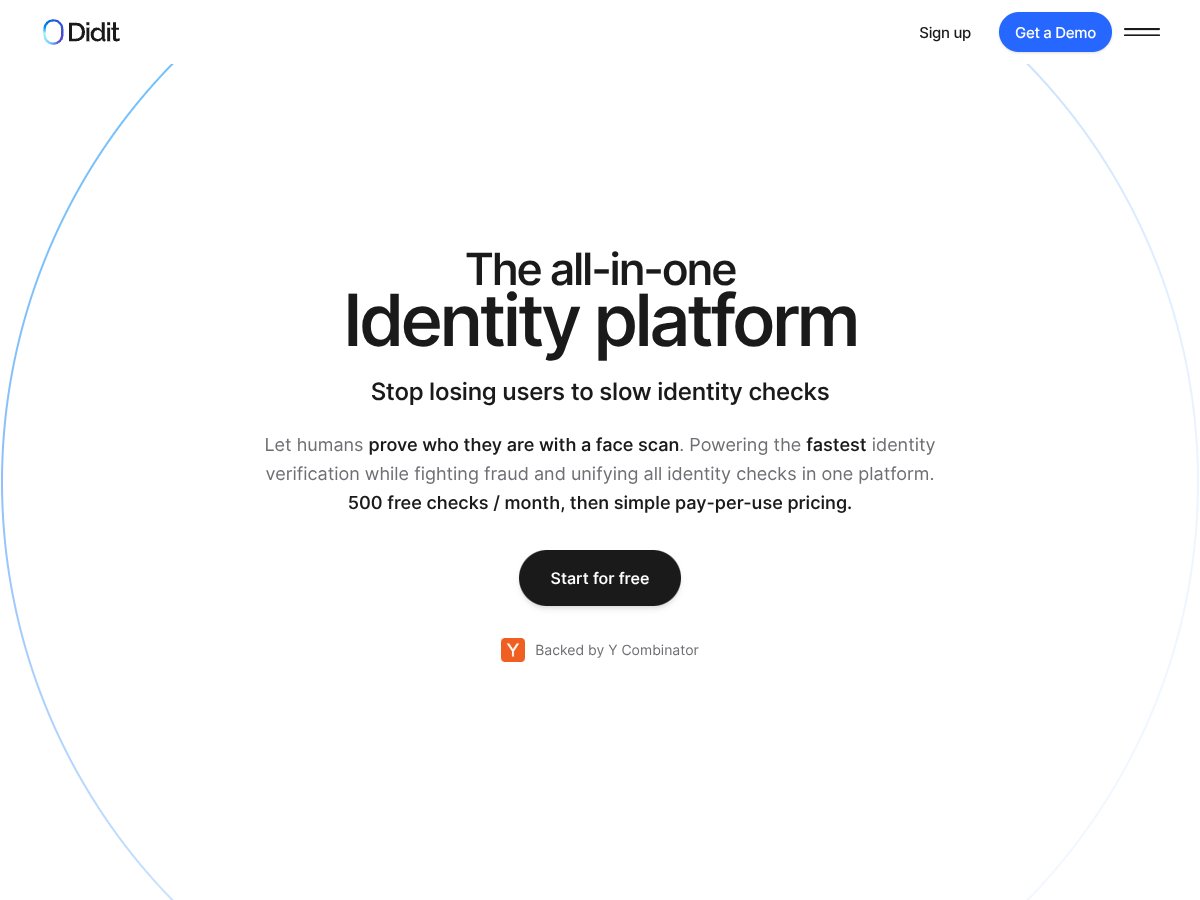
Didit v3 screenshot

What Is Didit v3?

Honestly, when I first heard about Didit v3, I was a bit skeptical. The market for identity verification tools is crowded, and most promise the moon—fast checks, airtight security, easy integration. What drew me in was their claim of unifying multiple identity checks into one platform with a simple pay-per-use model and a generous free tier. My initial thought was, "Okay, another one of those platforms claiming to be all-in-one, but does it really deliver?"

So, what does Didit v3 actually do? In plain English, it offers a way for companies—especially those dealing with compliance and fraud prevention—to verify who their users are. Think of it as a digital ID check that can confirm someone's identity through document verification, face scans, AML screening, and other checks—all from a single platform. Instead of juggling multiple vendors for different verifications, Didit promises a unified dashboard that handles everything.

Its main goal is to solve the problem of slow, fragmented identity checks that can frustrate users and slow down onboarding. You know how sometimes a user has to upload multiple documents, wait days for verification, and deal with different interfaces? Didit aims to streamline that process, making it faster and simpler.

As for who’s behind it? The company is fairly new but received some notable backing—raising $2 million and joining Y Combinator’s cohort, which does lend it some credibility. They position themselves as a developer-friendly, quick-to-implement solution, promising that you can go live in less than an hour.

My first impression? It’s as advertised—an all-in-one platform with a focus on speed and global coverage. But, I want to be upfront: don’t expect this to be a plug-and-play miracle. It’s a solid backend tool, but it’s not a consumer-facing app, and you'll need some technical know-how or a clear plan to fully leverage it. Also, be aware that the website and documentation are pretty light—there’s not much in the way of tutorials or detailed feature breakdowns, so some guesswork is involved if you're new to identity verification tools.

What it’s *not*? It’s not a fancy frontend app with pre-built user flows. It’s also not a fully managed compliance service that handles everything for you—more like a toolkit that you integrate into your existing systems. So, if you're expecting a one-click solution, you might be disappointed.

Didit v3 Pricing: Is It Worth It?

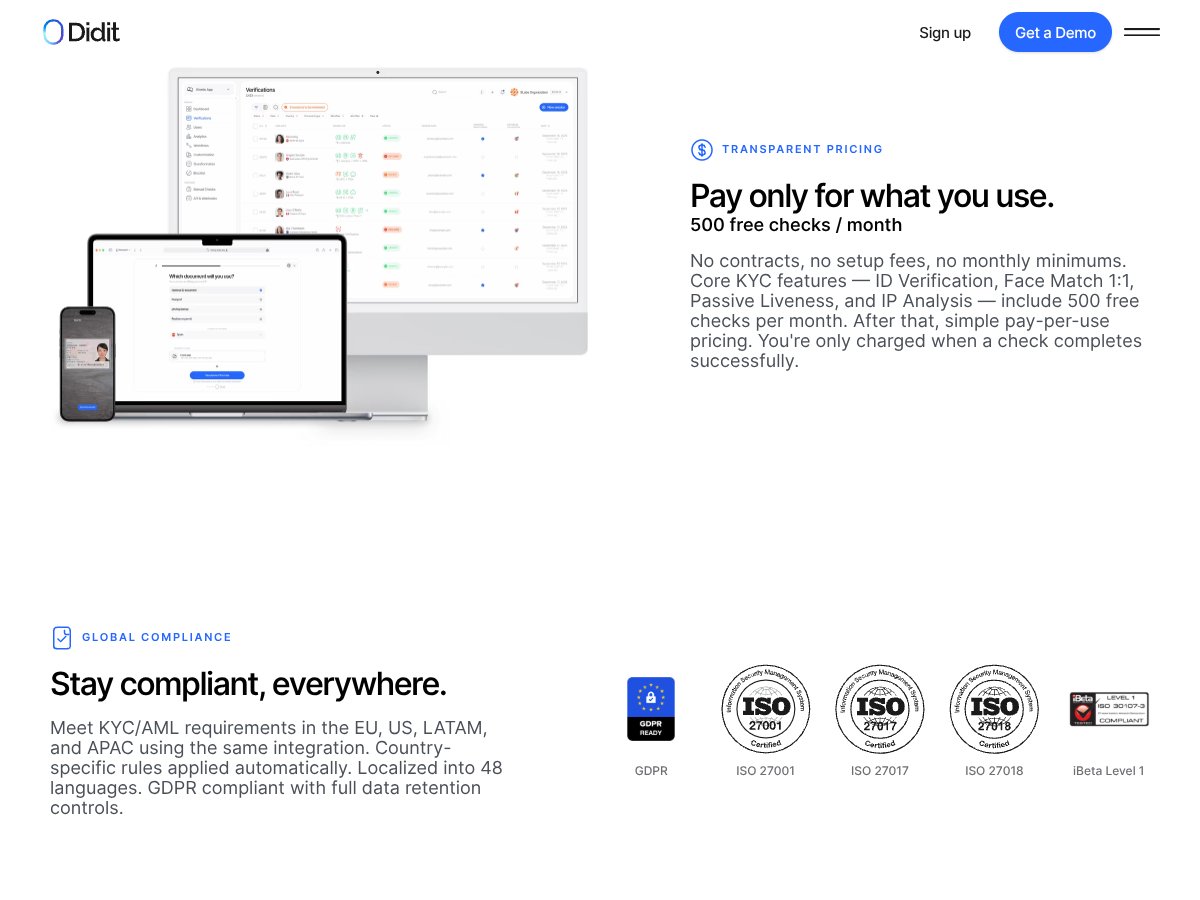
Didit v3 interface
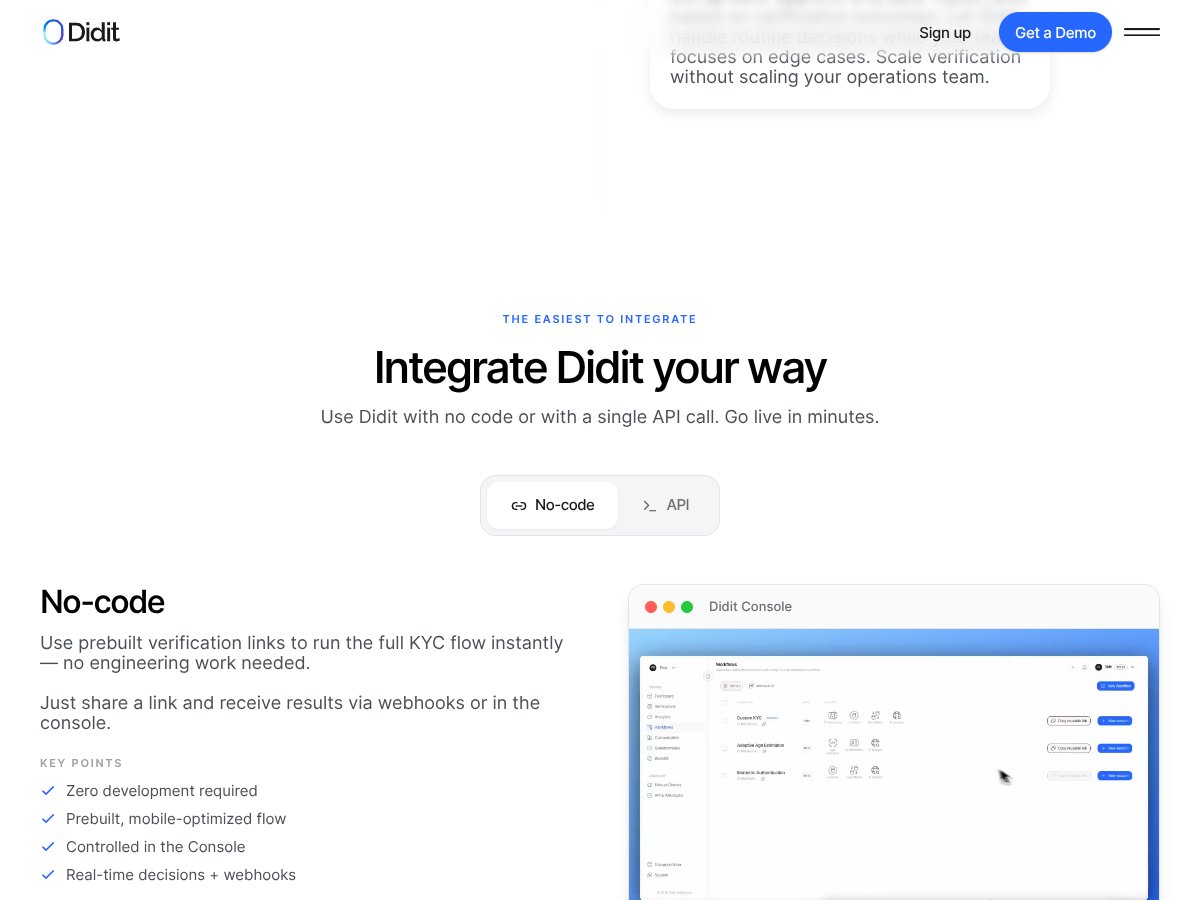
Didit v3 in action
Plan Price What You Get My Take
Free Tier 500 checks/month (core features) ID Verification, Passive Liveness, Face Match 1:1, IP Analysis Great for startups or low-volume needs, especially since you get 500 checks for free. But beware: it’s limited to core features, so if you need more advanced checks like active liveness or NFC, you'll need to upgrade.
Pay-Per-Use Approximately $0.03 - $0.15 per check, depending on feature Additional checks beyond free tier, including Active Liveness, NFC, White Label, etc. This transparent, no-contract model can be cost-effective if your volume is predictable. But costs can add up if you run many high-cost features regularly.
Enterprise Custom pricing Dedicated support, volume discounts, tailored integrations Designed for high-volume players or those with complex compliance needs. Pricing and features are negotiable, so it’s less transparent but potentially more flexible.

Here’s the thing about the pricing: it’s largely pay-per-use, which means you’re only billed for successful checks. That’s a huge plus in terms of transparency and flexibility. Compared to legacy providers that lock you into expensive monthly plans, Didit’s model can be very cost-effective, especially if your volume fluctuates.

What they don’t tell you on the sales page is that if you need to use a lot of premium features — say, NFC verification or active liveness — the per-check costs can add up quickly. Also, some of the more advanced features aren’t included in the free tier, so you’ll want to keep an eye on your usage to avoid surprises. For small startups or projects just getting started, the free tier is a no-brainer. But if you’re scaling up, do a quick calculation of your expected volume and feature needs before committing.

Fair warning: the enterprise plans aren’t fully detailed publicly. If you’re a large organization with complex needs, you’ll need to contact sales for a quote. That’s typical, but it’s worth noting if you prefer total transparency upfront.

The Good and The Bad

What I Liked

  • Global Coverage: Supporting ID verification from over 220 countries is a big deal, especially if you’re dealing with international customers. Many competitors struggle outside North America and Europe, but Didit claims to handle that seamlessly.
  • Transparent Pricing: The pay-per-use model with a free monthly quota is refreshingly straightforward. No hidden fees or long-term commitments, which is rare in this space.
  • Ease of Integration: The API is designed to be developer-friendly—simple webhook setup, quick onboarding, and even no-code options. From what I gather, you can go live in less than an hour, which is a massive plus for teams eager to deploy fast.
  • Unified Platform: Instead of juggling multiple vendors for identity checks, Didit consolidates ID verification, face match, AML, and fraud detection in one dashboard. That reduces complexity and data silos.
  • Flexible Flows: The ability to customize verification flows—from a simple face scan to complex KYC processes—is a big win. If your onboarding process varies by user segment, Didit seems capable of handling that.
  • Support & Compliance: Positive user feedback indicates strong support and adherence to global standards like GDPR, ISO certifications, and local regulations. That’s crucial for compliance-heavy industries.

What Could Be Better

  • Limited Out-of-the-Box Features: The platform’s core seems robust, but the lack of pre-built integrations with popular CRMs or workflows (beyond Jira) might be a hurdle. You’ll likely need to build custom connectors for some tools.
  • Pricing Transparency for Larger Plans: While the pay-per-use model is clear, detailed enterprise pricing isn’t public. For high-volume or complex needs, you’ll have to reach out and negotiate, which might be a barrier for some teams.
  • No Clear User Management UI: The platform emphasizes API and workflows, but it’s not explicit how user management and team permissions are handled. That could be a concern for larger organizations.
  • Limited Testimonials or Case Studies: The absence of detailed user stories makes it harder to gauge real-world performance at scale. While the reviews are positive, more concrete examples would help.
  • Feature Gating & Upsells: Some features, like NFC or white-labeling, come at additional costs. If you need a full suite of checks, expect to pay a premium, which might be less competitive against all-in-one solutions that bundle everything at a fixed price.

Who Is Didit v3 Actually For?

Didit v3 interface
Didit v3 in action

If you’re a compliance officer or product manager at a mid-sized to large company dealing with international users, Didit could be a game-changer. Its modular, customizable approach means you can tailor verification flows without heavy engineering work, making it ideal for teams that want control but don’t want to build from scratch.

Particularly, if you’re handling high volumes of KYC checks across multiple countries, Didit’s global coverage and compliance features are a strong fit. For example, a fintech startup expanding into Latin America and Southeast Asia will appreciate the localized rules, GDPR compliance, and multi-language support.

Additionally, if your team is already familiar with API-driven workflows and wants to avoid vendor lock-in, the pay-as-you-go model plus quick integration makes it appealing. It’s also well-suited for companies that prioritize transparency and cost control—since you only pay for successful checks and can scale up or down easily.

However, if you’re a small business just starting out with limited technical resources, or if your verification needs are very simple (like basic email or phone validation), you might find Didit overkill or not as cost-effective compared to simpler tools or free solutions.

Who Should Look Elsewhere

If your primary need is a basic email or phone verification for low-volume use, Didit’s advanced features and global compliance might be unnecessary. Tools like Twilio Verify or simple email validation services could suffice and be more cost-effective.

Large enterprises requiring dedicated onboarding portals, extensive integrations with existing CRM/ERP systems, or a fully turnkey compliance solution might find Didit’s current feature set lacking. They often need more out-of-the-box integration and detailed SLA guarantees, which aren’t explicitly outlined here.

Moreover, if you rely heavily on a specific regional provider with deep local integrations or prefer a vendor with a long-standing presence in your market, Didit’s newer Y Combinator backing may not outweigh established players for your use case.

Finally, if you need detailed analytics, audit trails, or user management dashboards that are easy to access without API calls, you might want to explore platforms that focus more on user interface and reporting rather than just API-driven workflows.

{"pros": ["Global coverage from over 220 countries, supporting international businesses","Transparent pay-per-use pricing with free monthly checks for core features","Fast, developer-friendly API with no-code options for quick onboarding","Unified platform reducing vendor complexity and data silos","Customizable verification flows that adapt to different user scenarios","Strong compliance standards and support for local regulations"], "cons": ["Limited out-of-the-box integrations with popular business tools", "Enterprise pricing details are not publicly available, requiring direct negotiations", "Lack of detailed user management or team permission features", "Few publicly available case studies or real-world success stories", "Premium features like NFC and white-label options come at additional costs"], "useCases": ["International fintech or crypto platforms needing global KYC compliance","High-volume onboarding processes for marketplaces or gig economy apps","Companies requiring a unified platform for ID verification, AML, and fraud detection","Organizations seeking flexible, modular verification flows without vendor lock-in"]}

How Didit v3 Stacks Up Against Alternatives

Persona

  • What it does differently: Persona focuses heavily on customizable onboarding workflows and deep integrations with CRMs and identity platforms. They offer a modular API that allows for tailored user experiences.
  • Price comparison: Persona’s pricing is typically quote-based, often starting around $300/month for basic plans, which can get pricey for startups. Didit v3’s pay-per-use model with a generous free tier is often cheaper for low to medium volume needs.
  • Choose this if... you need a highly customizable onboarding process with complex integrations and are okay with potentially higher costs.
  • Stick with Didit v3 if... you want straightforward, global KYC checks with transparent pay-as-you-go pricing, especially if volume is moderate or fluctuates.

Entrust IDV

  • What it does differently: Entrust IDV offers enterprise-grade security with a focus on financial services, providing advanced fraud detection tools and dedicated onboarding support.
  • Price comparison: Usually more expensive, often requiring custom quotes that can run into thousands per month. Didit v3’s transparent and affordable pricing makes it better for smaller teams.
  • Choose this if... you need enterprise-level security, compliance, and dedicated support, and your budget isn’t a primary concern.
  • Stick with Didit v3 if... cost-efficiency and flexibility are priorities, and your verification needs are scalable but not enterprise-only.

YouVerify

  • What it does differently: YouVerify emphasizes user-friendly onboarding, often tailored for markets in Asia and Africa, with a focus on mobile verification and document authenticity.
  • Price comparison: Pricing can be similar or slightly higher depending on features and volume, but less transparent. Didit v3 offers clear per-check costs and a free tier.
  • Choose this if... your user base is concentrated in emerging markets and mobile-first verification is key.
  • Stick with Didit v3 if... you want a global provider with broad coverage and predictable costs.

Jumio

  • What it does differently: Jumio is a well-established player with a focus on AI-driven ID verification, offering a suite of compliance tools and global ID coverage.
  • Price comparison: Generally more expensive, especially for large volumes, with custom enterprise pricing. Didit v3’s pay-per-use model is more budget-friendly for growing teams.
  • Choose this if... you need enterprise-grade, highly trusted verification with extensive compliance features.
  • Stick with Didit v3 if... your budget is limited, and you prefer flexible, transparent pricing over enterprise-only solutions.

Bottom Line: Should You Try Didit v3?

Overall, I’d give Didit v3 a solid 8/10. It’s a straightforward, cost-effective option that covers the essentials—ID verification, liveness, face matching, and AML—without the complexity or high costs of legacy systems. The free tier is generous enough to test quite a bit, and the pay-per-use model keeps things flexible.

If you run a small to medium-sized business needing reliable, global KYC checks with transparent pricing, Didit v3 is worth trying out. It’s especially good if you have fluctuating verification needs or want to avoid locked-in subscriptions.

However, if your business requires deep integrations, custom onboarding workflows, or enterprise-grade support, you might find better options with Persona or Jumio, which cater more to high-end, highly bespoke needs.

Personally, I’d recommend giving the free tier a shot—see how well it integrates with your platform and whether the user experience is smooth. If it checks all your boxes, upgrading to paid checks makes sense. If you need advanced features or dedicated support, consider other providers.

If global coverage, affordability, and ease of use matter most for your verification process, give Didit v3 a try. Otherwise, your money might be better spent on more enterprise-focused solutions.

Common Questions About Didit v3

Is Didit v3 worth the money?
For small to medium businesses, yes—especially given its transparent, pay-per-use pricing and free tier. It offers good value without locking you into subscriptions.
Is there a free version?
Yes, the free tier includes 500 checks per month for core features like ID verification, passive liveness, face match, and IP analysis. Additional checks are paid per use.
How does it compare to Jumio?
Jumio is more enterprise-focused and typically pricier, but offers more advanced features. Didit v3 is more budget-friendly and flexible for smaller teams.
Can I get a refund?
Refund policies depend on the payment method and volume; generally, prepaid credits are non-refundable. Check with their support for specific cases.
What integrations does Didit v3 support?
It’s primarily API-based, with some integrations like Jira. For complex workflows, you'll need to build custom integrations.
Is it suitable for high-volume verification?
Absolutely, especially with volume discounts and the enterprise plan, though detailed support is available upon contact.
How secure is Didit v3?
It uses AI-powered verification, liveness detection, and AML checks, complying with global standards to ensure user data is protected.

As featured on

Automateed

Add this badge to your site

Stefan

Stefan

Stefan is the founder of Automateed. A content creator at heart, swimming through SAAS waters, and trying to make new AI apps available to fellow entrepreneurs.

Related Posts

FaceSymmetryTest Review – Honest Look at Free AI Tool

FaceSymmetryTest Review – Honest Look at Free AI Tool

FaceSymmetryTest is a fun online tool

Stefan
Sweep Review – An AI Assistant for JetBrains IDEs

Sweep Review – An AI Assistant for JetBrains IDEs

Sweep enhances productivity in JetBrains IDEs

Stefan
AI Song Maker Review – Simple & Creative Music Generation

AI Song Maker Review – Simple & Creative Music Generation

easy way to create music with AI

Stefan

Create Your AI Book in 10 Minutes