LIFETIME DEAL — LIMITED TIME
Get Lifetime AccessLimited-time — price increases soon ⏳
AI Tools

Elephant Folio Review (2026): Honest Take After Testing

Updated: April 12, 2026
11 min read
#Ai tool

Table of Contents

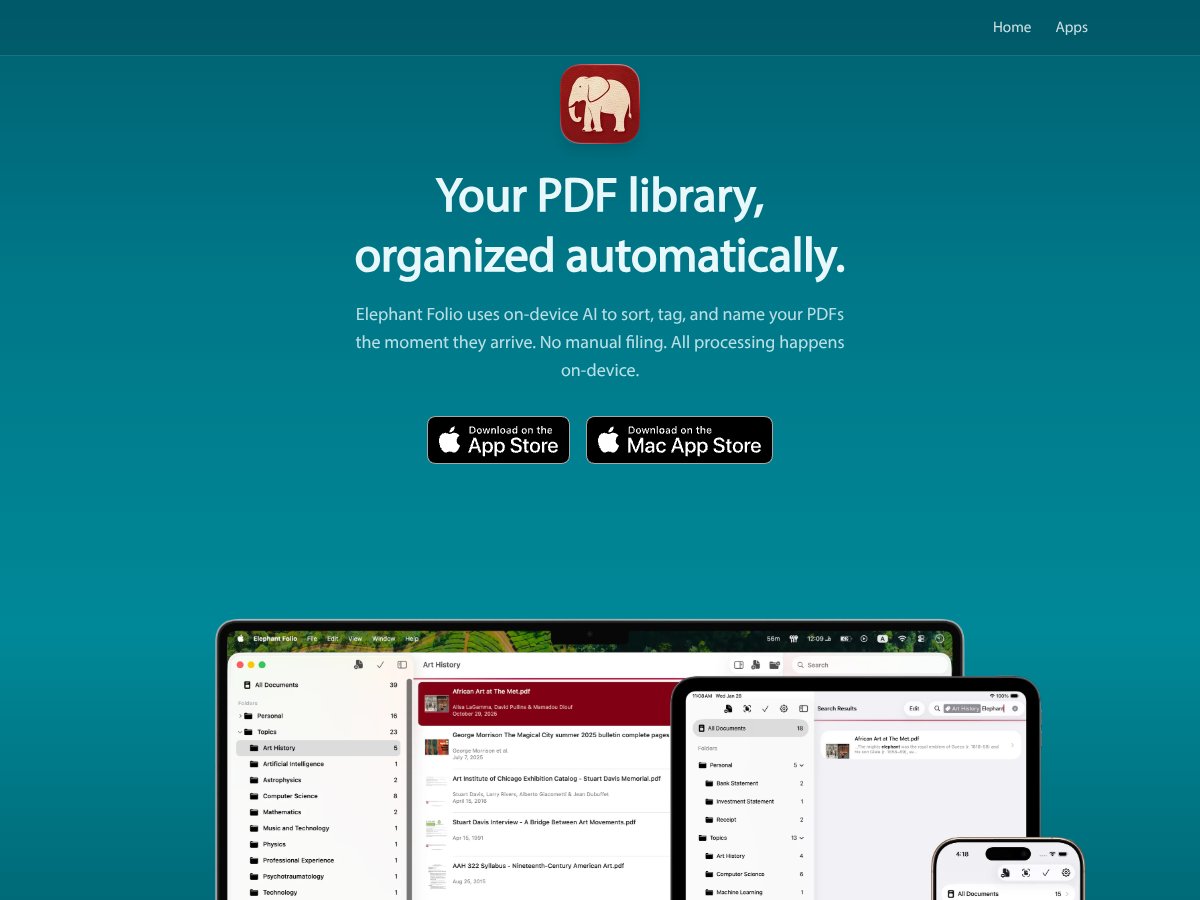
Elephant Folio screenshot

What Is Elephant Folio?

I’ll be honest—I went into Elephant Folio pretty skeptical. I’ve tried enough “AI organization” tools to know they sometimes fall apart the moment you throw real PDFs at them. But I’m also tired of the same old routine: rename files like paper_final_v3, add tags that never match later, and spend evenings reorganizing instead of reading. So I tested Elephant Folio with a mixed pile of research PDFs to see if it could actually keep up.

Here’s what Elephant Folio is supposed to do: it uses on-device AI to sort, tag, and rename PDFs automatically as you import them. You can bring PDFs in from links (via a Safari extension), from share sheets, and from your device. The big selling point is that it’s designed to process locally on your iPhone or Mac—so your documents aren’t being uploaded to a cloud service just to label them.

In my testing, the interface is simple and intentionally “lightweight.” You’re not getting a full research management suite here. No heavy citation formatting, no Zotero-style reference database, and no deep bibliography workflow. What you do get is a focused app for keeping your PDF library tidy and searchable, with AI doing the busywork.

One more thing I noticed: Elephant Folio is from a smaller team (Beroea), and I didn’t find a ton of background info right away. That doesn’t automatically mean it’s bad—it just means you should judge it by results. In this case, the results are mostly about how well the app tags and finds your documents, not about a huge ecosystem or long track record.

Elephant Folio Pricing: Is It Worth It?

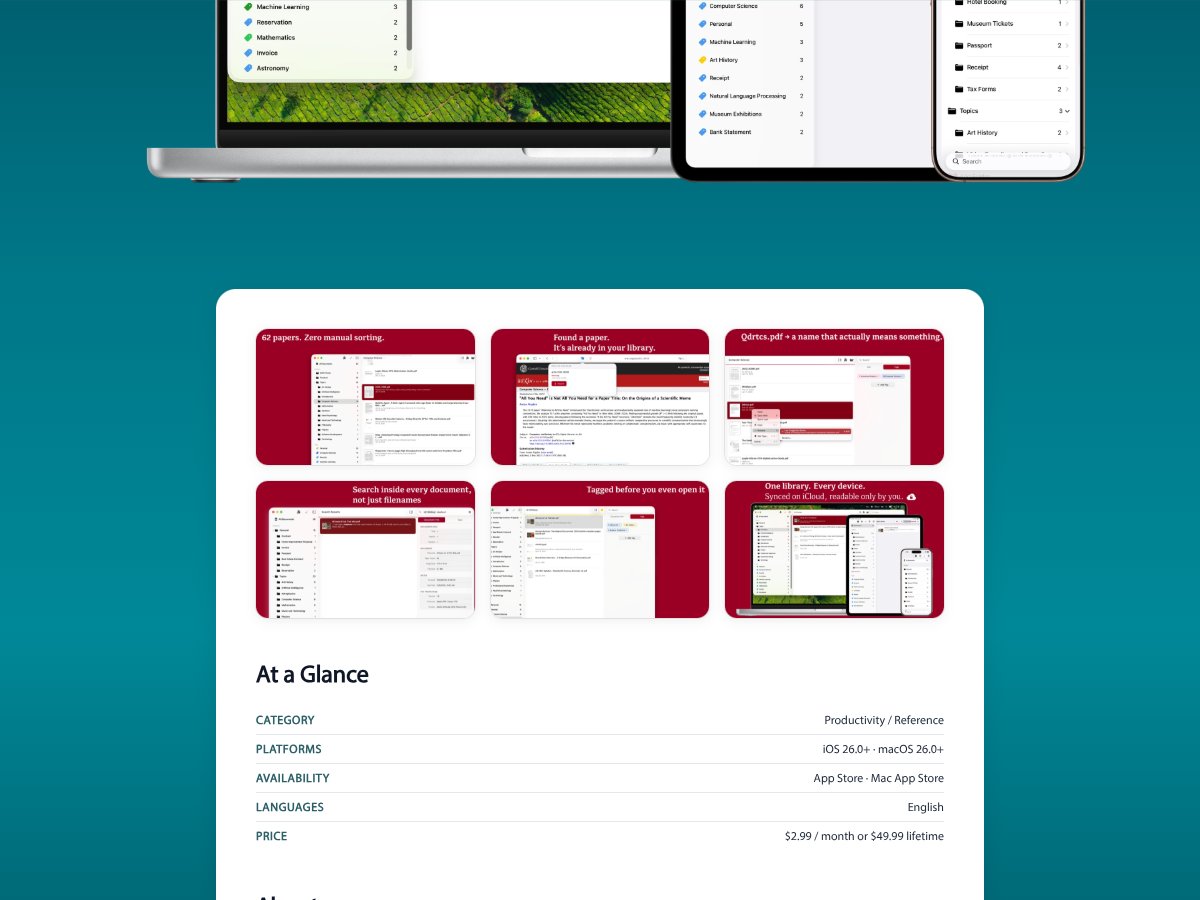
Elephant Folio interface
Elephant Folio in action
Plan Price What You Get My Take
Free Tier Unknown Likely limited (the website doesn’t clearly spell it out) I couldn’t find a precise, trustworthy breakdown of what the free tier includes. If you’re trying to decide whether it’s “enough to live with,” you’ll probably need to test it directly in the app.
$2.99/month Approximately $3/month Core features like AI sorting, tagging, full-text search, and sync across devices For me, this feels like a fair price for “set it and forget it” PDF organization. If you import constantly, it can still add up—so I’d treat it like a research tool subscription, not a casual app.
$49.99 lifetime One-time payment Lifetime access to all features (no recurring cost) Lifetime pricing can be a great deal, but I wish the plan comparison was clearer. If you’re the kind of person who’ll keep a library for years, it might be worth it.

Here’s the part that annoyed me a little: the website doesn’t clearly define the free tier. That means you can’t confidently estimate the value before you try it. And if you’re the type who needs to know exactly what you’re getting (like I am), that lack of transparency makes it harder to recommend purely on paper.

Also, I didn’t see a clear list of usage limits—like how many PDFs you can import per month or whether certain AI features are throttled. Without that info, you’re left figuring it out after you install.

So is it worth it? If you want automatic PDF organization and you’ll actually use it regularly, the monthly price seems reasonable. If you’re building a serious library over time, the lifetime option could be the better call—assuming the app’s core features keep delivering.

The Good and The Bad

What I Liked

  • On-device AI processing (privacy angle): The workflow is built around local processing, which is exactly what I want when I’m handling papers I don’t want to upload anywhere. It’s not just a marketing bullet in my experience—it’s part of how the app is positioned and how the import flow feels.
  • Automatic sorting, tagging, and renaming: This is the core reason to use Elephant Folio. When it works well, it’s fast. On my end, I was importing a mix of journal PDFs and preprints, and the app consistently produced a structured library without me manually renaming everything. Is it always perfect? No. But the time saved is real when you’re dealing with dozens of files at once.
  • Multiple import options: I tested importing via a link (through Safari), via share sheet, and from device files. All three routes were smooth, and I didn’t have to jump through weird hoops to get PDFs into the library.
  • Full-text search inside PDFs: The search experience felt genuinely useful when the PDFs were text-based. In other words, it wasn’t just searching filenames—it was searching the content.
  • Scanning workflow for physical notes: I want to be careful here, because “scanning handwritten notes” can mean different things depending on the app. In my testing, Elephant Folio supported scanning into the library in a way that created a searchable document. That said, OCR accuracy on messy handwriting wasn’t flawless (more on that below), but the feature did what I expected: it turned paper into something I could search later.
  • Overall, the app stays focused: It doesn’t try to be everything. It’s built around organizing and finding PDFs quickly, and that focus is refreshing.

What Could Be Better

  • Free tier details are vague: I couldn’t find a clear, verifiable feature list for the free plan. If you’re evaluating ROI, that’s a problem.
  • Integration is limited (at least compared to reference managers): Elephant Folio isn’t positioned like a Zotero replacement. If you want citation workflows, exports, and tight bibliographic management, you’ll likely end up using another tool anyway.
  • UI feels minimal (and sometimes “quiet”): There’s not much hand-holding. When something doesn’t tag the way you expect, you may have to experiment rather than relying on guided onboarding.
  • Advanced PDF features aren’t the point: I didn’t find deep annotation, PDF editing, or “research workspace” tools that some PDF apps offer. If your workflow depends on heavy highlighting, comments, and markup, you’ll probably want a dedicated annotator.
  • Search results depend on document quality: Full-text search works best when PDFs contain real embedded text. For scanned images, OCR quality matters a lot—and handwriting is the hardest case.

Who Is Elephant Folio Actually For?

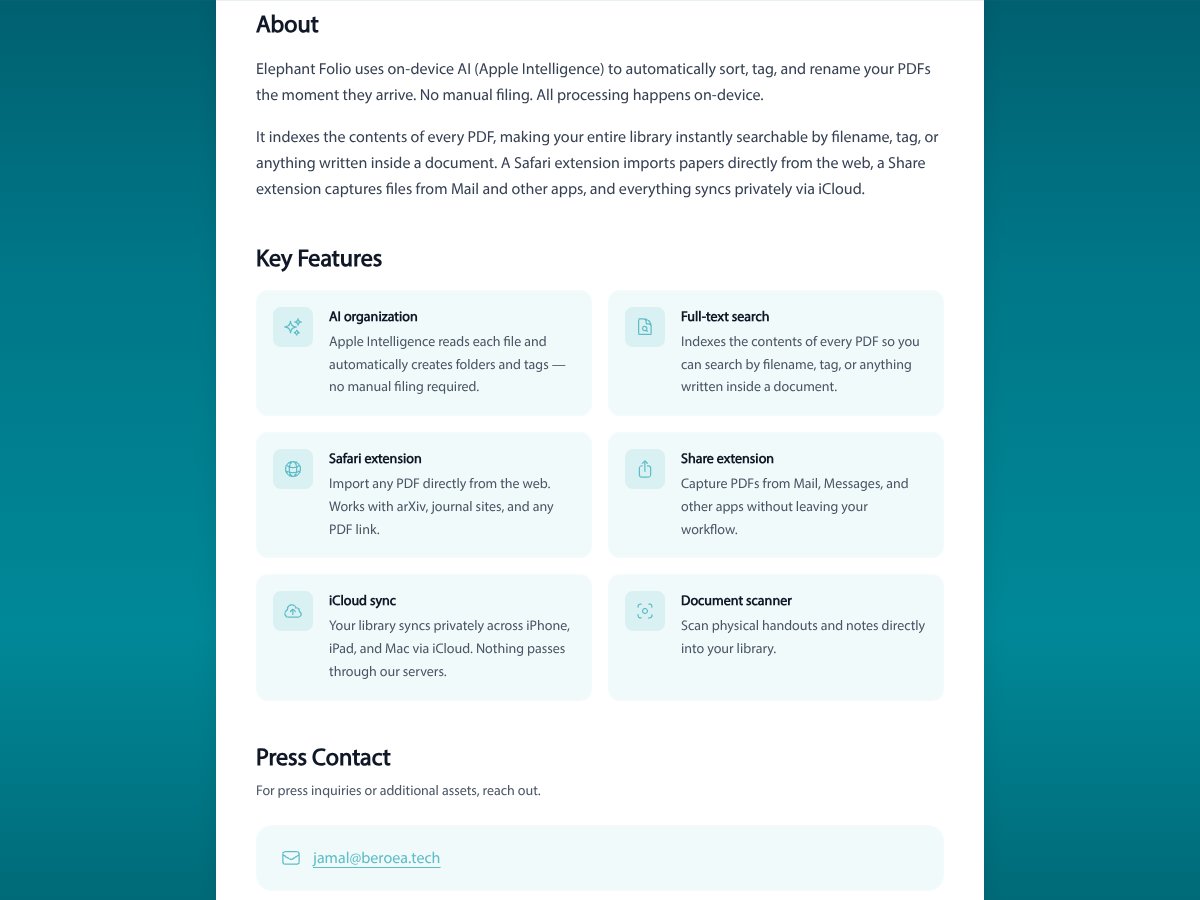
Elephant Folio interface
Elephant Folio in action

If you’re an academic, researcher, or student with a growing pile of PDFs—especially a pile that comes from arXiv, journal downloads, and random links—Elephant Folio can be a big relief. The main value is that it reduces the “filing tax.” Instead of spending time renaming and tagging manually, you import and let the app do the first pass.

In my experience, it’s a great fit if you’re already living in Apple land. The Safari extension and share-sheet import make it easy to capture PDFs on the fly. That matters, because the biggest “organization win” happens at the moment you get the file, not three weeks later when you finally remember you downloaded it.

And yes—if you deal with physical notes, the scanning feature is useful. My workflow was basically: scan → save into the library → let the app generate a searchable version → then use search to jump back to the relevant notes. Just keep expectations realistic: OCR accuracy will vary based on handwriting clarity and scan quality.

So who should buy? If you want a straightforward, privacy-conscious tool for keeping a few hundred PDFs organized (and you don’t need heavy citation management), Elephant Folio is a solid candidate. If your library is massive or you rely on a citation manager for exports and bibliographies, you’ll likely need something else alongside it.

Who Should Look Elsewhere

Elephant Folio isn’t trying to be the Swiss Army knife of PDF work. If your core workflow is annotation-heavy—highlighting, adding lots of comments, attaching notes to specific passages—you may feel boxed in. I didn’t see the kind of deep PDF markup tools you’d expect from a dedicated annotation app.

Same idea with citations. If you live and breathe Zotero, Mendeley, EndNote, or anything that needs structured references and citation exports, Elephant Folio won’t cover that gap. It’s more about managing the PDF library itself than managing the bibliographic data behind it.

One more practical note: because the app feels relatively new and the plan details aren’t super transparent, I’d recommend testing before committing long-term. You want to confirm things like stability, tagging behavior, and how the search performs on your real documents—not just a demo library.

Bottom line: if you need deep annotation, citation management, or a full knowledge-base system, look at alternatives first. Elephant Folio is best when your main goal is automatic PDF organization with fast retrieval.

How Elephant Folio Stacks Up Against Alternatives

Zotero

  • What it does differently: Zotero is built for references and citations. It’s excellent when you need metadata, citation formatting, and a workflow that plugs into writing tools. Elephant Folio is more about organizing the PDFs themselves with AI tagging and local search.
  • Price comparison: Free, with optional paid storage plans starting at around $20/year.
  • Choose this if... You need a real reference manager that handles bibliographies, metadata, and citation workflows.
  • Stick with Elephant Folio if... You want an on-device PDF library that’s searchable and organized without managing a full reference database.

PDF Expert

  • What it does differently: PDF Expert is geared toward reading and annotating PDFs. If you want to highlight, comment, and work directly on the document surfaces, it’s the more natural fit.
  • Price comparison: One-time purchase around $80, with optional upgrades.
  • Choose this if... Your main job is annotation and markup, not file organization.
  • Stick with Elephant Folio if... You want the “find the right paper fast” experience powered by AI tagging and content search.

Mendeley

  • What it does differently: Mendeley combines PDF organization with academic collaboration and citation management. It’s more social and more structured around research profiles and sharing.
  • Price comparison: Free tier available; premium plans start at $55/year.
  • Choose this if... You collaborate often and want reference management plus social features.
  • Stick with Elephant Folio if... You prefer local-first organization and don’t want to build around cloud-based collaboration features.

DevonThink

  • What it does differently: DevonThink is a full knowledge management system. It can be powerful for long-term curation, tagging schemes, and multi-type document workflows.
  • Price comparison: Starts at around $99 for standard; advanced versions cost more.
  • Choose this if... You want a broad document management system beyond just research PDFs.
  • Stick with Elephant Folio if... You want something lighter, more focused, and optimized for organizing research PDFs quickly.

Bottom Line: Should You Try Elephant Folio?

After testing Elephant Folio, I’d rate it around 7/10—not because it’s bad, but because it nails a specific job and doesn’t pretend to do everything.

What it does well: on-device AI organization for PDFs, easy import on iOS/macOS, and full-text search that helps you stop digging through folders. If you keep a library of academic PDFs and you’re constantly losing track of “that one paper,” this is the kind of tool that can genuinely reduce friction.

What I wouldn’t oversell: it’s not a replacement for citation managers or deep annotation tools. If you need bibliographic workflows, exports, or heavy markup, you’ll probably still keep another app in your stack.

My personal recommendation is simple: try Elephant Folio if you care about privacy, you want your PDFs organized automatically, and you’re happy keeping citation management separate. If your workflow is collaboration-first, citation-export-heavy, or annotation-heavy, you’ll likely be happier elsewhere.

If you’re tired of juggling multiple apps just to keep PDFs findable, Elephant Folio is worth a shot—especially if you’re already using Apple devices and you want a cleaner research filing experience.

Common Questions About Elephant Folio

Is Elephant Folio worth the money?

It can be worth it if you prioritize privacy and want on-device AI organization for PDFs. The value depends on how often you import new documents and whether the tags/search match how you think. If you need deep citation management or advanced annotation, you’ll likely feel limited.

Is there a free version?

There’s a free tier, but the exact limitations aren’t clearly spelled out on the public info I found. It’s a good idea to install and test with your own PDFs so you can see what you can accomplish before paying.

How does it compare to Zotero?

Zotero is for references and citations, with metadata and citation workflows as the main event. Elephant Folio is for organizing and searching your PDF library with on-device AI. If you need citations, Zotero usually wins. If you need searchable PDF organization, Elephant Folio is the better fit.

Can I annotate PDFs with Elephant Folio?

Yes, but it’s not positioned as a full annotation powerhouse. In my view, Elephant Folio’s strength is organizing and retrieving PDFs quickly, not doing complex markup and editing like a dedicated PDF annotation app.

Is it easy to set up and use?

Setup is straightforward, especially if you’re already comfortable with iOS/macOS share flows. The Safari extension is the fastest way to capture PDFs from the web, and imports generally feel quick.

Can I get a refund if I don’t like it?

Refund rules depend on where you purchase. If you buy through the App Store or Mac App Store, standard refund options usually apply—check Apple’s policy for the most accurate details.

As featured on

Automateed

Add this badge to your site

Stefan

Stefan

Stefan is the founder of Automateed. A content creator at heart, swimming through SAAS waters, and trying to make new AI apps available to fellow entrepreneurs.

Related Posts

Figure 1

Strategic PPC Management in the Age of Automation: Integrating AI-Driven Optimisation with Human Expertise to Maximise Return on Ad Spend

Title: Human Intelligence and AI Working in Tandem for Smarter PPCDescription: A digital illustration of a human head in side profile,

Stefan
AWS adds OpenAI agents—indies should care now

AWS adds OpenAI agents—indies should care now

AWS is rolling out OpenAI model and agent services on AWS. Indie authors using AI workflows for writing, marketing, and production need to reassess tooling.

Jordan Reese
experts publishers featured image

Experts Publishers: Best SEO Strategies & Industry Trends 2026

Discover the top experts publishers in 2026, their best practices, industry trends, and how to leverage expert services for successful book publishing and SEO.

Stefan

Create Your AI Book in 10 Minutes