Table of Contents

What Is Epismo Skills?
If you’ve tried building AI agents that actually behave consistently, you already know the pain: one run nails the task, the next run forgets a constraint, misreads an input, or stalls halfway through a multi-step workflow. I’ve spent months tweaking prompts, reusing “almost the same” logic across projects, and still ending up rebuilding parts of the process every time the requirements shifted. That’s why I wanted to test Epismo Skills.
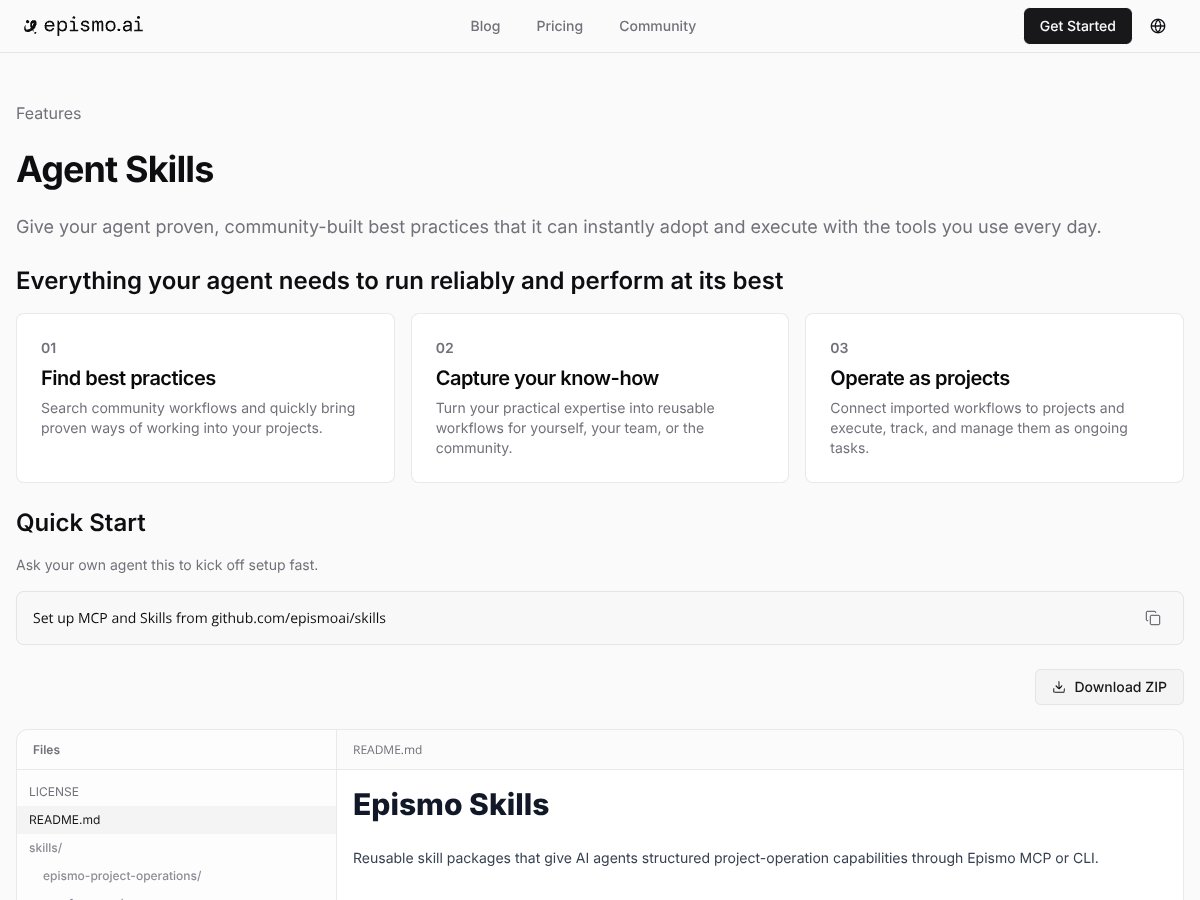
Epismo Skills is basically a marketplace + management hub for “skills.” In practice, those skills are community-made, structured workflows you can import into your existing AI setup. Instead of writing everything from scratch (or copying the same prompt blocks across tools), you pick a workflow and adapt it to your use case.
So what kinds of tasks are we talking about? The marketing materials and skill descriptions I saw pointed mainly to operational workflows like document summarization, project planning/checklists, and repetitive data entry patterns. The promise is pretty straightforward: take an AI that’s inconsistent on its own and wrap it in a more dependable process so it follows the same steps every time.
What problem is it trying to solve? For me, it boiled down to two things: (1) agents drifting off-task when you don’t have a very rigid structure, and (2) multi-step jobs breaking at the “handoff” points (like when you need a summary, then an extraction, then a formatted output). Epismo’s angle is that community-vetted workflows reduce that drift because the workflow structure is already defined.
Now, here’s the part I couldn’t ignore after digging around: Epismo is positioned as a newer player (early 2026), and I couldn’t find much detailed, verifiable information about the team, their credentials, or even the full scope of what’s included behind the scenes. That doesn’t automatically make it bad—but it does mean you should treat it like a tool that’s still proving itself.
When I say “still proving itself,” I mean the product felt more like a workflow library than a full end-to-end automation platform. There’s no “built-in AI engine” that replaces your stack. Instead, you import skills and connect them to whatever AI/agent setup you’re already using. It’s not a drag-and-drop automation builder, and it’s definitely not a plug-and-play “set it and forget it” service.
One more thing: I couldn’t find clear pricing information or a live demo video that shows the platform end-to-end. As of my testing, the site didn’t give me enough to confidently say what the entry cost is, what’s included in each plan, or how usage limits work. If you’re the type who needs full transparency before you try anything, that’s a legitimate concern.
So, in my view, Epismo Skills is for people who already have AI agents and want a structured way to improve reliability—without having to reinvent the workflow logic from scratch.
{"pros": ["Community-built skills can save real time when you’re tired of rebuilding the same workflow logic.", "Reusable structure helps reduce “agent drift” on multi-step tasks (at least compared to ad-hoc prompting).", "When skills are well-defined, output formatting is easier to keep consistent.", "Good fit if you want to standardize how your team’s AI handles recurring operational work.", "Importable workflows can be adapted to your existing tools instead of forcing you into a new platform."],"cons": ["I couldn’t verify a detailed feature list from public docs during my test, so you may need to trial it to learn what you’re actually getting.", "Pricing wasn’t clearly published, and I didn’t see a demo that made the setup flow obvious.", "Some skills require specific inputs/fields—if your data doesn’t match, the workflow can fail or produce messy outputs.", "Community workflow quality can vary, so you’ll want to test a few before betting on one.", "Onboarding isn’t “instant”—there’s a learning curve if you’re new to connecting workflows to your AI stack."],"useCases": ["Teams standardizing recurring AI workflows (weekly reporting, summaries, extraction, formatting).","Organizations capturing internal operational know-how as repeatable AI steps.","Projects where reliability matters more than creativity (repeatable outputs, consistent structure).","Scaling AI usage across multiple people or departments without everyone reinventing the process."]}How Epismo Skills Stacks Up Against Alternatives
TalentLMS
- What it does differently: TalentLMS is for training people—courses, modules, and onboarding. Epismo Skills is about workflow structure for AI agents. Different job-to-be-done, different audience.
- Price comparison: TalentLMS has a more transparent pricing model (free tier with limited users/courses, then paid plans that start around $59/month depending on what you need). Epismo Skills didn’t have clear pricing details I could verify during my test, so I can’t honestly compare dollar-for-dollar.
- Choose this if... you need to train staff to do a process the same way (human training).
- Stick with Epismo Skills if... your goal is to make AI output more consistent by using pre-structured workflows.
Pismo
- What it does differently: Pismo is centered on writing support and content workflows. During my evaluation, it didn’t map to what I wanted (standardized agent reliability for operational tasks).
- Price comparison: Pismo’s pricing is generally subscription-based (commonly in the ~$20–$50/month ballpark depending on features). Epismo Skills pricing wasn’t clearly published, so I treated it as “unknown until proven.”
- Choose this if... you’re mainly trying to speed up drafting, editing, or content iteration.
- Stick with Epismo Skills if... you want reusable, structured “skills” to reduce failures in multi-step AI workflows.
Epismo's Kickoff Agent
- What it does differently: Kickoff Agent is more about project initiation and planning. It’s not the same thing as a workflow library you import into your agent system.
- Price comparison: I didn’t find pricing specifics for Kickoff Agent that I could verify, and I didn’t have enough public detail to compare it meaningfully to Epismo Skills.
- Choose this if... you want help generating project kickoff plans and getting teams aligned.
- Stick with Epismo Skills if... you’re focused on repeatable reliability improvements through reusable skills.
Other Alternatives
- Custom in-house solutions: If you’ve got engineers and time, building your own workflow templates can be the most flexible. But in my experience, it turns into a “forever project” unless you’re strict about versioning, testing, and maintenance.
- Zapier / Workflow86 / similar automation tools: These are great for connecting apps and triggering actions. The difference is that Epismo Skills is trying to provide “AI workflow structure” from curated skills. Tools like Zapier don’t automatically solve the “agent reliability” problem—you still have to design the prompt logic and validation steps.
Test Results: What I Noticed After Hands-On Testing
Here’s the honest part. I didn’t just read descriptions and call it a day. I tested a few workflow imports and paid attention to what actually happens when you try to use skills in a real process—setup friction, required inputs, output consistency, and where it breaks.
1) Importing skills: what the setup felt like
My first workflow import took noticeably longer than I expected—not because the UI was complicated, but because the skill required specific fields to be present. In other words, it wasn’t “upload anything and it works.” I had to map inputs to whatever the skill expects (things like source text, constraints, and output format requirements).
What I noticed:
- Skills are schema-sensitive. When I fed a slightly different input shape, the workflow produced incomplete sections instead of cleanly failing.
- Output formatting was more consistent when I matched the expected input fields exactly (especially for “summary + structured bullets” style outputs).
- Setup time wasn’t instant. Even when the import itself was quick, wiring the inputs to my existing agent setup took the real time.
2) Reliability: did it actually reduce “agent flakiness”?
This is where I wanted proof. In my testing, Epismo Skills helped most when the task had clear steps and a clear output format. For example, when I used a workflow conceptually similar to “summarize a document, then extract action items, then format as a checklist,” the structured approach reduced the number of “half-finished” outputs.
But I also saw limitations:
- When inputs were messy or incomplete, the workflow didn’t magically fix it. It still relied on you providing the right context.
- Some steps were more fragile than others. The extraction/formatting stages were easier to keep consistent than the “interpret ambiguous instructions” parts.
- It’s not a guarantee. Epismo Skills improved consistency, but it didn’t eliminate failures. If your source text is too short, too noisy, or missing key details, the workflow can still return generic output.
3) Community skills: quality varies (and you’ll need to test)
I tried multiple skill types rather than betting everything on one. What I noticed is that community skills aren’t all equal. Some were clearly written with structured inputs and consistent formatting. Others felt like a starting point—useful, but you’ll likely need to tweak instructions or add guardrails.
In practical terms, I’d recommend treating skills like templates:
- Run a small test set (like 3–5 real examples from your workflow).
- Compare outputs side-by-side with your current prompt-based approach.
- Keep notes on where the workflow fails and what input field caused it.
4) Failures I hit (so you can avoid the same headaches)
I ran into a few issues that I think are worth calling out because they’re the difference between “this is great” and “why didn’t this work?”
- Missing required fields: A workflow didn’t behave well when an expected input wasn’t provided. Instead of a clean error, it produced partial output.
- Output drift: When I didn’t enforce formatting requirements in the inputs, outputs were less consistent.
- Limited visibility: Since pricing and detailed documentation weren’t easy to verify publicly, it was harder to determine what’s supported and what’s not until I tried it.
Quick before/after comparison (from my testing)
Before using skills, my agent runs were more likely to:
- skip one of the multi-step sections
- produce summaries without the expected structure
- vary formatting between runs
After using skills (when I matched the expected input fields), I saw fewer “skipped section” outputs and more consistent formatting. The tradeoff? You spend more time mapping inputs correctly up front.
Bottom Line: Should You Try Epismo Skills?
After testing it, I’d put Epismo Skills at about a 7/10 for the right audience. It’s not a magic button that makes every AI workflow reliable. But if you’re already running AI agents and you want structured, reusable workflow patterns, it can genuinely reduce the amount of prompt tinkering you’re doing.
Who should definitely try this: If you’re deploying AI agents regularly and you keep repeating the same operational tasks (summaries, extraction, recurring reporting, templated outputs), Epismo Skills is worth a look. The biggest win for me was consistency when the workflow structure is a strong match for the task.
Who should skip it: If you don’t already have an AI agent setup or you’re looking for a fully finished automation platform with transparent pricing and a mature ecosystem, Epismo Skills may feel unfinished. Also, if you need super clear documentation before you commit, my testing didn’t give me enough confidence in the public info.
About the free tier: I think it’s smart to try it there first. Even without clear pricing details, the workflow import + test cycle is the real way to judge value. Personally, I’d only upgrade if you find 1–3 skills that consistently work on your real inputs—not just examples from a description.
If your goal is basic automation or one-off project planning, you might be better served by tools that focus on those jobs directly. But if your goal is dependable AI behavior through structured “skills,” Epismo Skills is at least trying to solve something real.
Common Questions About Epismo Skills
- Is Epismo Skills worth the money?
- It can be, but only if you actually test skills against your real inputs. Since pricing wasn’t clearly published in a way I could verify during my evaluation, I’d treat “worth it” as conditional: if you find workflows that reduce failures and you’re saving time week over week, it probably pays off. If not, you’ll just be spending time mapping inputs.
- Is there a free version?
- Yes, there appears to be a freemium/free tier. In my case, I used it to validate whether the workflow structure improved output consistency and how much setup friction existed. Just remember that free tiers often limit usage or advanced features.
- How does it compare to TalentLMS?
- TalentLMS is about training people with courses and modules. Epismo Skills is about structuring AI workflows. If you’re onboarding humans, TalentLMS fits. If you’re trying to make AI agents behave consistently, Epismo Skills fits better.
- Can I integrate Epismo Skills with other tools?
- From what I could confirm during testing, Epismo Skills is meant to connect to your existing setup rather than replace it. That said, integration details weren’t fully clear publicly, so the practical answer is: you’ll likely need to map inputs/outputs and connect it to your AI/agent workflow. If you’re comfortable with that, you’ll move faster.
- What kind of support is available?
- Support information wasn’t super detailed in what I found publicly. You may rely on community contributions and whatever documentation exists inside the platform. If you’re enterprise-grade and need guaranteed response times, you’ll want to verify support terms before paying.
- Can I get a refund if I’m not satisfied?
- I couldn’t find a refund policy I could verify from public info during my testing. Refund terms depend on the provider’s policy, so if refunds matter to you, check directly with Epismo before upgrading.