LIFETIME DEAL — LIMITED TIME
Get Lifetime AccessLimited-time — price increases soon ⏳
AI Tools

Flowdy Review (2026): Honest Take After Testing

Updated: April 12, 2026
13 min read
#Ai tool

Table of Contents

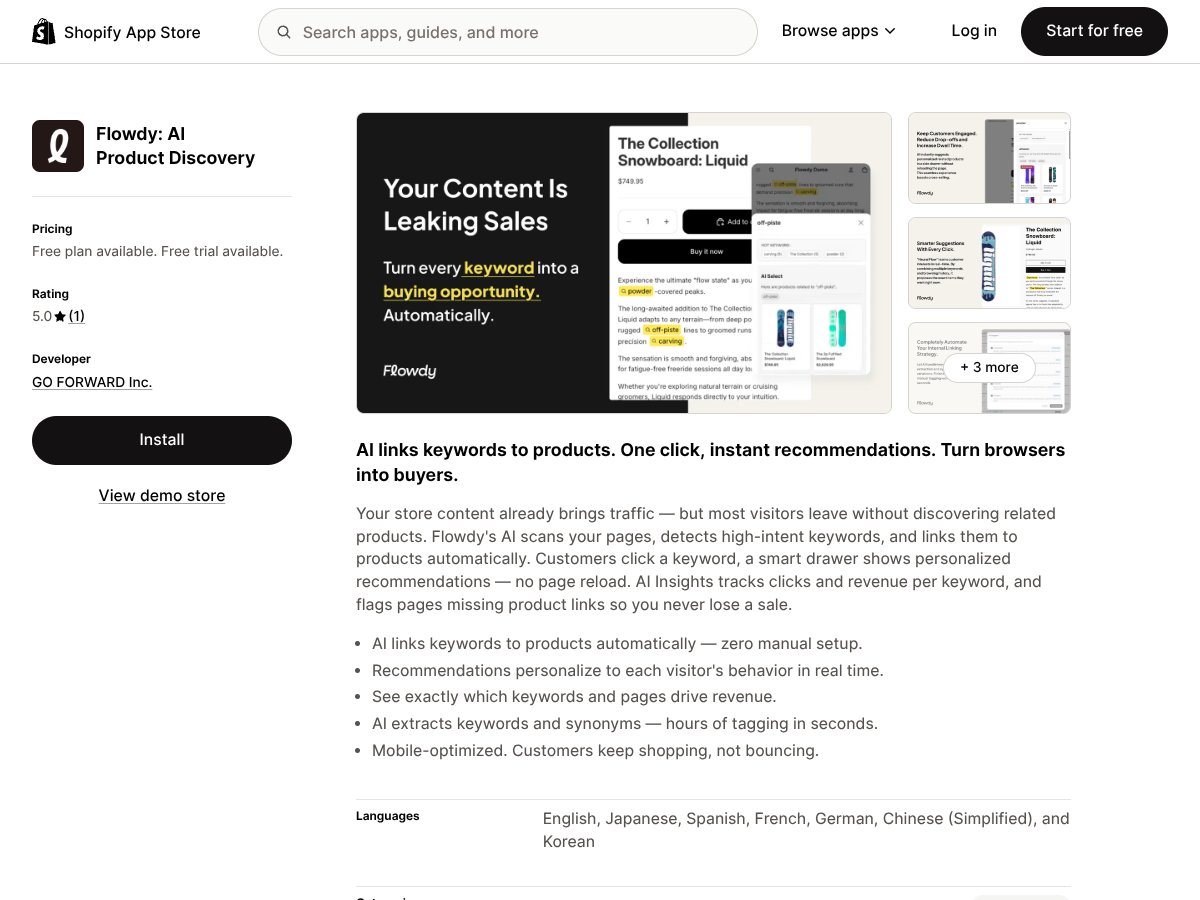
Flowdy screenshot

What Is Flowdy? (My Real Take After Testing)

I’ll be honest—I was skeptical when I first heard about Flowdy. The pitch sounds almost too clean: an AI tool that scans your Shopify pages, highlights “high-intent” keywords, and then lets shoppers click those highlights to see related products. I’ve tried enough “AI for Shopify” apps to know that some of them look great on screenshots but don’t actually change anything once they’re live.

So I tested Flowdy myself to see what it really does on a real store, not just in a demo. I’m not going to pretend it’s magic, but I can tell you exactly what I saw during setup, what the highlights looked like on live pages, and where the limits showed up.

Flowdy’s core idea is pretty simple: it analyzes your product pages, collections, and (depending on your settings) other store pages, then identifies keywords that shoppers are likely searching for. After that, it highlights those keywords on the page and connects them to relevant products. The click interaction is the important part—visitors don’t have to leave the page to find the “next thing.”

What I noticed right away is that Flowdy isn’t trying to replace your existing Shopify merchandising. It’s more of an add-on layer. Your current product recommendations, bundles, and upsells still exist. Flowdy just adds keyword-driven cross-sell moments inside the actual text content—basically turning your page copy into a shopping shortcut.

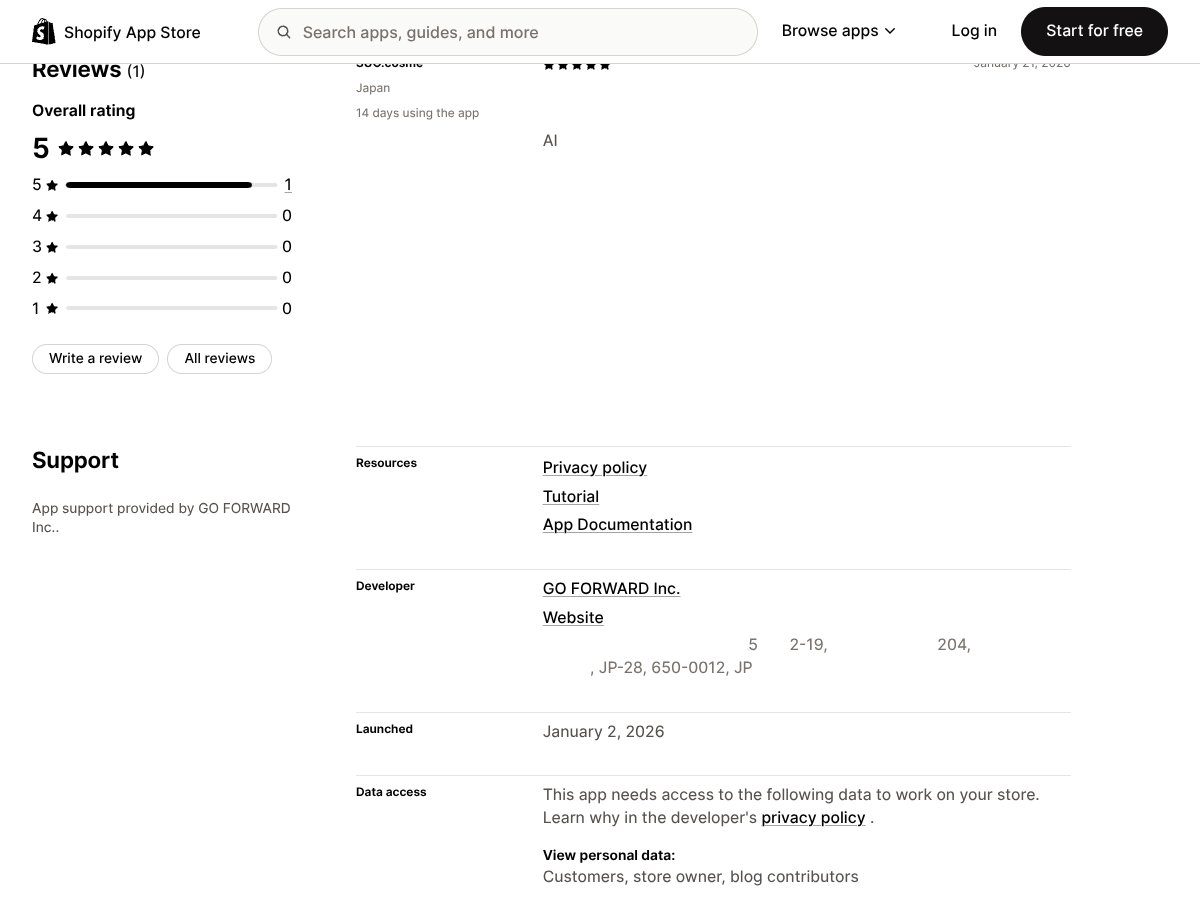
One more detail: Flowdy is made by GO FORWARD Inc. Their site is pretty minimal, and I couldn’t find a ton of team background or long-running case studies. That’s not automatically a deal-breaker, but it did make me pay closer attention during testing—because you want to be sure the “AI” part is doing real work, not just styling text.

In practice, the app’s value came down to two things: (1) how accurately it highlighted keywords, and (2) whether those highlights led to product clicks that made sense for the page content. That’s the real test, right?

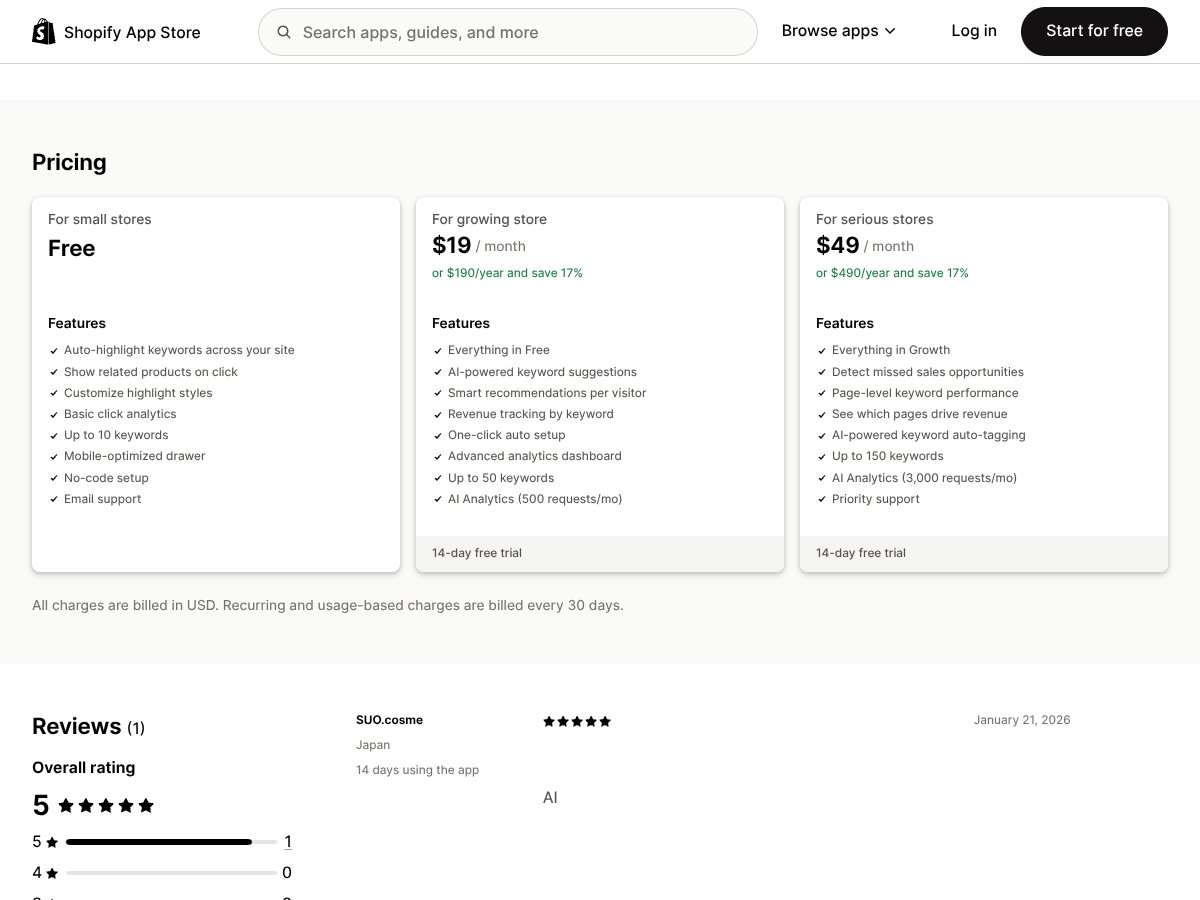
Flowdy Pricing: Is It Worth It?

Flowdy interface
Flowdy in action
  • Auto-highlight keywords across your site
  • Show related products on click
  • Customize highlight styles
  • Basic click analytics (up to 10 keywords)
  • Mobile-optimized drawer
  • No-code setup
  • Email support
  • All Free features
  • AI-powered keyword suggestions
  • Smart recommendations per visitor
  • Revenue tracking by keyword
  • Up to 50 keywords
  • Advanced analytics dashboard
  • AI analytics (500 requests/mo)
  • 14-day free trial
  • Everything in Growth
  • Detect missed sales opportunities
  • Page-level keyword performance
  • See which pages drive revenue
  • AI-powered keyword auto-tagging (up to 150 keywords)
  • AI analytics (3,000 requests/mo)
  • Priority support
  • 14-day free trial
Plan Price What You Get My Take
Free Free Good for testing the core experience: do the highlights look right, and do clicks actually surface relevant products? If you’re a small store just trying it out, the free plan lets you judge without committing.
Growth $19/month or $190/year (save 17%) This is the plan I’d pick if you actually want to know what’s working—especially if you’re trying to connect keyword highlights to revenue, not just clicks. Just keep an eye on request limits if you publish a lot or drive heavy traffic.
Pro $49/month or $490/year (save 17%) If you’ve got enough product pages that you need better visibility (and you want more automation), Pro is where it starts to feel “serious.” The main limitation is still usage—traffic and page count can make request caps matter.

Here’s the real pricing story: Flowdy is set up for small to mid-sized stores. The free tier is enough to validate the on-page behavior, but it’s intentionally limited (like the keyword count and analytics depth). Once you pay, you get more analytics and higher keyword/request limits, which is what you need if you want to optimize instead of guessing.

One thing I didn’t love is that usage caps can become a bottleneck if you scale fast. I didn’t hit the ceiling during my test window, but I did notice how the system behaves when you have a lot of pages and content changes—there’s a “reprocess” feel to it, and you don’t always see every update instantly across the entire site.

The Good and The Bad (What I Actually Liked vs. What Stood Out as Weak)

What I Liked

  • Keyword highlighting that doesn’t require manual tagging: I didn’t have to go page-by-page and add links. Flowdy identified phrases in the content and turned them into clickable highlights.
  • The click experience is smooth: When a shopper taps a highlighted keyword, the related products appear in a drawer-style UI (and it’s mobile-friendly). In my experience, that matters because mobile shoppers don’t want to bounce to another page.
  • Highlight styling is actually customizable: I was able to adjust the look so the highlights didn’t clash with the theme. That’s one of those details that sounds minor until you see it on your actual store.
  • Analytics show more than “it was clicked”: On the paid tier, you get deeper reporting tied to keywords and revenue (not just engagement). I’ll get specific in the next section.
  • Multilingual support: Flowdy supports multiple languages. I didn’t test every language pair end-to-end, but the option is there, and it’s a big deal if your store isn’t English-only.
  • Setup is genuinely easy: No-code install and quick configuration. I was up and running fast enough that I could test within the same day.

What Could Be Better

  • Use-case clarity is weaker than I expected: The marketing is clear about the concept, but it doesn’t walk you through the gritty “what happens on a short product description?” scenario. That’s where you really learn whether it works.
  • Social proof is limited: I didn’t find a lot of credible testimonials or detailed case studies. That’s not a technical flaw, but it does make evaluation harder.
  • Integrations aren’t front-and-center: Flowdy installs cleanly on Shopify, but I didn’t see a big list of integrations with analytics/marketing tools. If you rely on very specific stacks, you’ll want to confirm compatibility before committing.
  • Limits exist (and they’re not just theoretical): Keyword caps and request caps can matter. If you have a large catalog, frequent content updates, or high traffic, you’ll want to understand how quickly you’ll consume requests.
  • Recommendation control is not “manual merchandising”: You can influence the experience through keyword detection and settings, but you’re not getting the same level of hand-tuned rule control you’d expect from some recommendation engines.

Who Is Flowdy Actually For? (Based on How It Performed in My Test)

Flowdy interface
Flowdy in action

Flowdy is best for Shopify stores that want on-page cross-sells without building a complex recommendation system. In my opinion, it’s especially useful if you already have decent product content (titles, specs, descriptions, and collection text) because Flowdy needs text to find meaningful keywords.

Here are the real scenarios I tested:

Use case #1: Product detail pages with strong descriptions (what I expected)

  • Page type: Product pages where the description actually talks about features and use cases (not just a few lines).
  • What Flowdy did: Highlighted multiple relevant phrases, and clicking those highlights opened a related products drawer.
  • What I noticed: The best results happened when the product description contained specific terms that matched other items in the catalog (like use-case keywords rather than generic words).
  • Edge case: If the description was too short, highlights were fewer and sometimes felt more “generic.”

Use case #2: Collections pages (where cross-sell can either shine or annoy)

  • Page type: Collection pages with collection copy plus product cards.
  • What Flowdy did: It highlighted keywords inside the text content and offered related products from your catalog.
  • What I noticed: It worked best when the collection description was specific (materials, styles, intended audience). If the collection copy was vague, the keyword matches were weaker.
  • Potential downside: If you already have a lot of on-page elements, too many highlights can feel visually busy. You’ll want to tune highlight density/style.

Use case #3: Variant-heavy products (where relevance can get tricky)

  • Page type: Products with multiple variants (sizes/colors) where the “main” product title is similar across variants.
  • What Flowdy did: It still highlighted keywords from the text, but I noticed that recommendations weren’t always perfectly variant-specific.
  • What I noticed: That’s not totally surprising—Flowdy is working from page text and catalog associations, not from a deep per-variant intent model.
  • Workaround I used: I improved the product descriptions with clearer variant-related terms (like “available in X” or “best for Y”), and the keyword relevance improved.

So, if your store has a decent amount of readable content and you want a lightweight AI layer that improves product discovery, Flowdy can fit nicely.

But if you’re running a huge catalog, need precision personalization, or you want deep integrations and advanced rule-based control, Flowdy may feel too limited. It’s not a full personalization suite. It’s closer to “keyword-driven recommendations.”

Who Should Look Elsewhere?

If you’re an enterprise store with complex merchandising rules, Flowdy probably won’t feel like the right tool. You might want something that supports deeper personalization logic, more granular targeting, and more control over recommendation placement.

I’d also look elsewhere if you’re expecting heavy A/B testing built into the recommendation logic, or if you want multi-channel personalization (email + onsite + retargeting) all tied to the same engine. Flowdy is focused on on-site keyword highlighting and recommendations.

And one practical warning: if you’re not comfortable with request/keyword caps, you could end up paying for a plan that hits limits sooner than you planned. That doesn’t mean it’s “bad”—it just means you should do the math based on your traffic and page count.

How Flowdy Stacks Up Against Alternatives

Flowdy interface
Flowdy in action

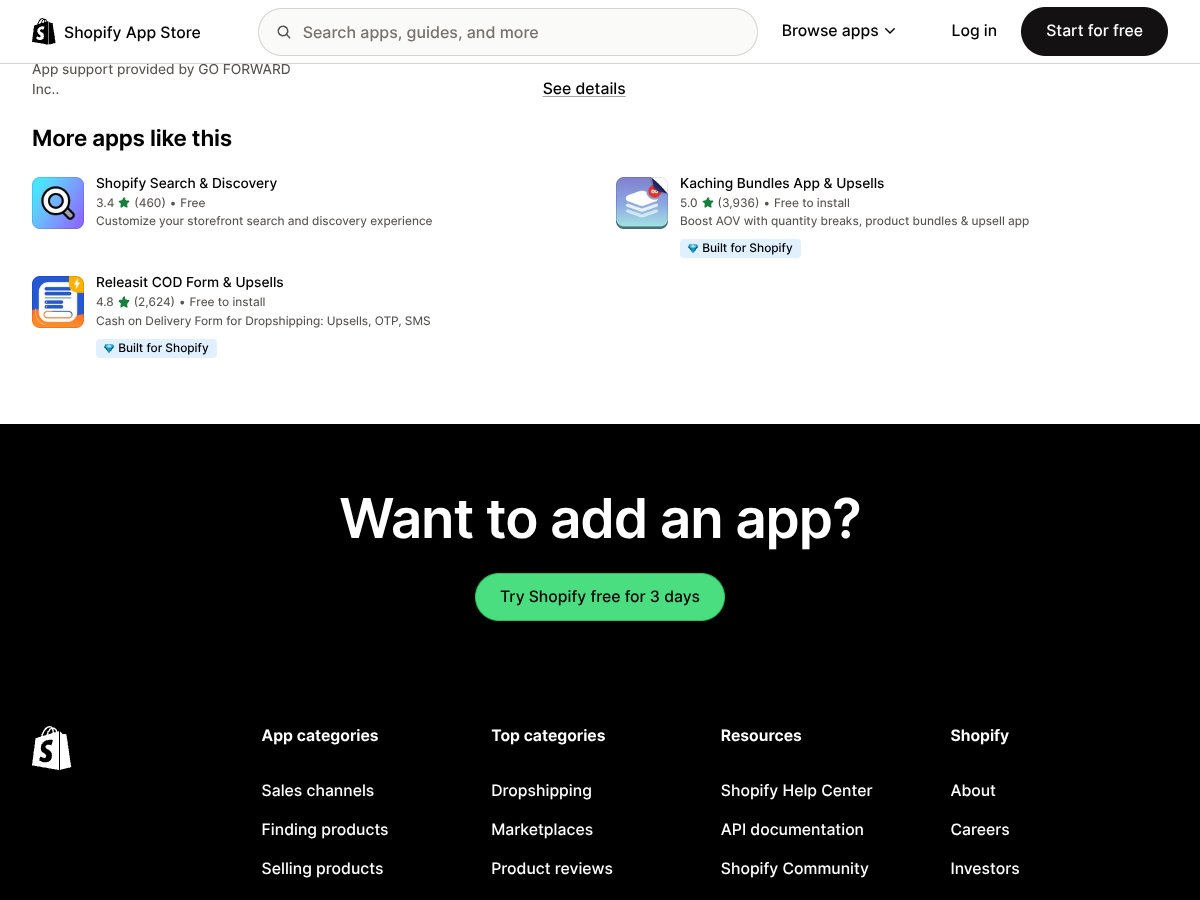
Here’s what I think matters when comparing these tools: how recommendations are generated, where they appear, and how you measure results. On that front, Flowdy’s approach is pretty clear—keyword-based highlights with on-page click recommendations.

Tool Recommendation Logic On-site Experience Analytics Depth Best For
Flowdy Text/keyword-driven matching from product/collection content Clickable keyword highlights + related product drawer Keyword + page-level performance (paid plans) + revenue tracking by keyword Stores that want quick cross-sells without heavy setup
LimeSpot Personalization based on browsing/purchase behavior More tailored experiences per customer Typically deeper personalization analytics (varies by plan) Large catalogs and stores that want behavior-based personalization
ReConvert Post-purchase upsells (thank-you page offers) After checkout, not on-page keyword highlights AOV-focused reporting (varies by plan) Stores optimizing average order value after purchase
Bold Product Recommendations Rule-based + some AI-driven display recommendations Dynamic modules across product/collection areas Module performance reporting Stores that want flexible recommendation modules and cross-sell placement
Nosto Full-suite personalization across onsite and beyond Personalized onsite experiences (often more comprehensive) Advanced personalization analytics Stores wanting an end-to-end personalization platform

Personalized Recommendations by LimeSpot

  • What it does differently: LimeSpot leans more heavily into customer behavior (browsing + purchase history) rather than keyword extraction from page text.
  • My honest take: If you’re trying to personalize per visitor, behavior-based tools usually make more sense. But that also means more complexity and often higher cost.
  • Choose this if... you want recommendations that adapt to how a specific shopper behaves.
  • Stick with Flowdy if... you want a simpler, content/keyword-driven way to create cross-sell moments.

ReConvert Upsell & Cross-Sell

  • What it does differently: ReConvert is about upsells after checkout (thank-you page offers), not real-time keyword highlights on the product page.
  • My honest take: Great if your biggest lever is AOV after purchase. Not the same problem Flowdy solves.
  • Choose this if... your goal is to increase average order value with post-purchase offers.
  • Stick with Flowdy if... your goal is to help shoppers discover related products while they’re still browsing.

Bold Product Recommendations

  • What it does differently: Bold focuses on recommendation modules and cross-selling with rule-based flexibility (and some AI depending on the setup).
  • My honest take: If you want more control over where recommendations appear (and you like module-based placement), Bold can feel more straightforward.
  • Choose this if... you prefer visual recommendation blocks integrated into product/collection layouts.
  • Stick with Flowdy if... you want keyword highlights embedded directly in the page text.

Nosto

  • What it does differently: Nosto is more of a full personalization suite (onsite experiences, often tied to broader targeting and messaging).
  • My honest take: It’s the “bigger machine.” If you want everything connected and you’ve got the budget, it can be worth it. If you just want a quick on-site boost, Flowdy is the lighter option.
  • Choose this if... you want a comprehensive personalization platform.
  • Stick with Flowdy if... you want a simpler, budget-friendly way to add instant product discovery.

Bottom Line: Should You Try Flowdy?

I’d rate Flowdy a 7/10 based on what I saw in my test. It’s not trying to be a full personalization engine. It’s a keyword-driven cross-sell layer, and when your product pages have useful text, it can genuinely improve discovery.

If you value simplicity and you want something you can set up quickly, Flowdy is worth trying—especially because there’s a free plan. I like that you can validate the experience (highlights + clickable drawer) before you commit to paid analytics.

That said, if your strategy depends on hyper-personalized recommendations based on browsing behavior, or you need more advanced experimentation and deep integration, Flowdy may feel like it’s missing pieces. In those cases, tools like Nosto or LimeSpot are more aligned with that bigger personalization vision.

My practical suggestion? Start with the free tier, test it on a handful of high-traffic product pages, and watch what happens in your analytics. If you see meaningful keyword-driven engagement (and ideally revenue lift), then upgrade. If not, you haven’t wasted weeks.

Common Questions About Flowdy

  • Is Flowdy worth the money? If you want simple keyword-based recommendations and you’re okay with usage limits, yes. It’s not the most advanced tool, but it can deliver real value for small to mid-sized stores.
  • Is there a free version? Yes. The free plan is limited, but it’s enough to test the core highlight + click experience.
  • How does it compare to Nosto? Nosto is more comprehensive and typically more expensive. Flowdy is simpler and more budget-friendly, focused on keyword-driven onsite discovery.
  • Can I customize recommendations? You can customize highlight styles and influence how keywords are detected via settings. But it’s not the same as manual, per-customer recommendation rules.
  • Does it work with all themes? In most cases, it displays correctly. Still, if your theme is heavily customized, you might need minor adjustments to get perfect placement.
  • Can I get a refund? Refunds depend on the app’s policy and Shopify billing rules. If there’s a trial, use it—don’t assume refunds will be automatic.
  • How fast does it work? In my experience, you’ll see recommendations after setup fairly quickly, but “instant” doesn’t always mean “instantly everywhere.” Some pages update as the app processes/crawls content, so expect a short delay on certain pages.

As featured on

Automateed

Add this badge to your site

Stefan

Stefan

Stefan is the founder of Automateed. A content creator at heart, swimming through SAAS waters, and trying to make new AI apps available to fellow entrepreneurs.

Related Posts

Figure 1

Strategic PPC Management in the Age of Automation: Integrating AI-Driven Optimisation with Human Expertise to Maximise Return on Ad Spend

Title: Human Intelligence and AI Working in Tandem for Smarter PPCDescription: A digital illustration of a human head in side profile,

Stefan
AWS adds OpenAI agents—indies should care now

AWS adds OpenAI agents—indies should care now

AWS is rolling out OpenAI model and agent services on AWS. Indie authors using AI workflows for writing, marketing, and production need to reassess tooling.

Jordan Reese
experts publishers featured image

Experts Publishers: Best SEO Strategies & Industry Trends 2026

Discover the top experts publishers in 2026, their best practices, industry trends, and how to leverage expert services for successful book publishing and SEO.

Stefan

Create Your AI Book in 10 Minutes