Table of Contents
I’ve been testing Folderr v2.5 for a bit, and honestly? It feels like one of those tools that’s trying to make AI less intimidating. Instead of starting with code, you start with a goal—like “help customers,” “summarize documents,” or “turn my files into something I can ask questions about.”
Folderr v2.5 is built around creating custom AI assistants and tying them into real workflows. If you’re not super technical, that’s a big deal. Even when I didn’t know exactly what I was configuring at first, the interface still guided me toward something usable.

Folderr v2.5 Review: What It’s Like to Build an AI Assistant
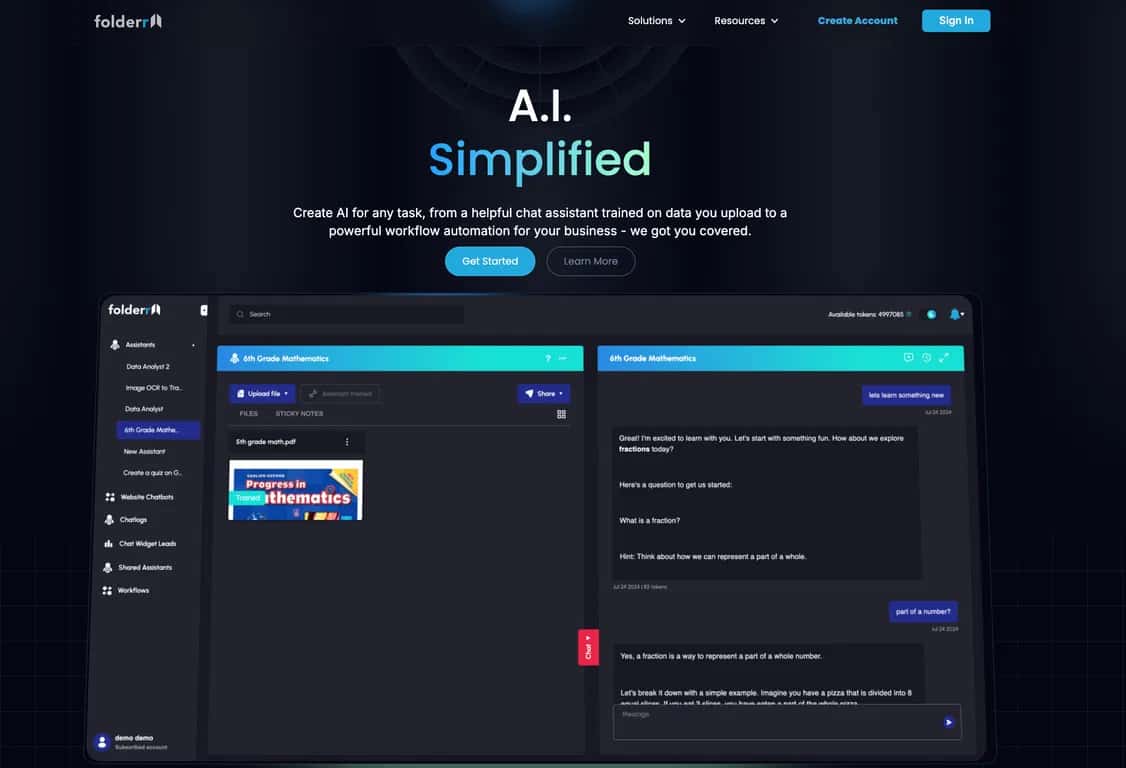
So what does Folderr v2.5 actually feel like in practice? It’s a platform for creating custom AI assistants without needing to jump straight into prompt engineering all day. You’re basically building a “chat experience” that can understand your content and then help with tasks—like answering questions, pulling details from documents, or guiding people through common support questions.
One feature that stood out right away is the Powerful Document Chat. The pitch is simple: upload files (PDFs, spreadsheets, and more) and let the assistant read and respond based on them. In my testing, this is the part that made it feel useful for real work, not just demo-style chatting. If you’ve ever tried asking an AI questions about a messy PDF and gotten vague answers, you’ll appreciate having your documents directly tied to the assistant.
Then there are the Generative Chat Tools. This is where Folderr gets more “do stuff” than “talk about stuff.” Depending on what you ask, you can trigger tasks like generating images or solving problems in-chat. I liked that it keeps everything in one place, instead of making you bounce between tools.
Another big selling point: over 100 integrations. That matters more than people think. If your data lives in Google Drive, email, or other connected apps, you don’t want to manually copy/paste everything. In my experience, the integrations are what turn the platform from “cool assistant” into “something I’d actually keep using.”
Quick question: do you want an AI assistant that’s generic, or one that actually knows your documents and workflows? Folderr v2.5 is clearly aimed at the second option.
Key Features That Matter (Not Just the Marketing)
- Powerful Document Chat for uploading and querying documents (PDFs, spreadsheets, etc.)
- Generative Chat Tools for tasks like image generation and in-chat problem solving
- 100+ third-party integrations to pull data from places you already use
- Flexible data uploading from multiple sources (so you don’t start from scratch every time)
- Chatbot creation for customer support geared toward building engaging, practical assistants
Pros and Cons From My Testing
Pros
- Beginner-friendly for the most part. I didn’t feel like I needed to be a developer to get a working assistant going.
- Document-based chatting feels practical. When you connect the assistant to your files, the responses are more grounded than generic chat.
- Integration ecosystem is a big win. If your workflow is spread across tools, this helps reduce manual work.
- Multiple AI model support. This is useful if you want different behaviors depending on the task (or just need flexibility).
- 7-day free trial so you can test it before committing.
Cons
- It can feel overwhelming at first. With lots of integrations and options, you might need a little time to figure out what to connect first.
- Response quality depends on your inputs. If your documents are messy, poorly formatted, or long without clear structure, you’ll notice it in the answers.
- Performance can vary. More complex uploads and larger document sets can lead to slower or less consistent results.
Pricing Plans (What You Should Know Before You Buy)
Folderr includes a 7-day free trial for new users. That’s genuinely helpful because it lets you test a couple of real scenarios—like uploading a few documents you actually care about and seeing how the assistant handles your questions.
For the current paid plans and exact pricing beyond the trial, you’ll want to check the Folderr pricing page (pricing can change, and I don’t want to guess here).
Wrap up
Overall, I think Folderr v2.5 is a solid choice if you want an AI assistant that’s tied to your documents and integrations—not just a generic chatbot. The Document Chat and Generative tools are the standout combo, and the fact that it supports a ton of integrations is what makes it feel “workflow-ready.”
If you’re curious, I’d start with the free trial and build something small first (one assistant, a handful of files, and a few questions you actually want answered). That’s the fastest way to see whether Folderr fits your needs—or if you’ll outgrow it quickly.
Promote Folderr v2.5