Table of Contents
What Is Forge Agent?
Honestly, when I first heard about Forge Agent, I was pretty skeptical. The marketing talks a lot about turbocharging GPU inference speeds without touching a single line of code—sounds great, but I’ve seen projects overpromise before. So I decided to dig in myself, curious whether it’s just another AI optimization gimmick or something genuinely useful.
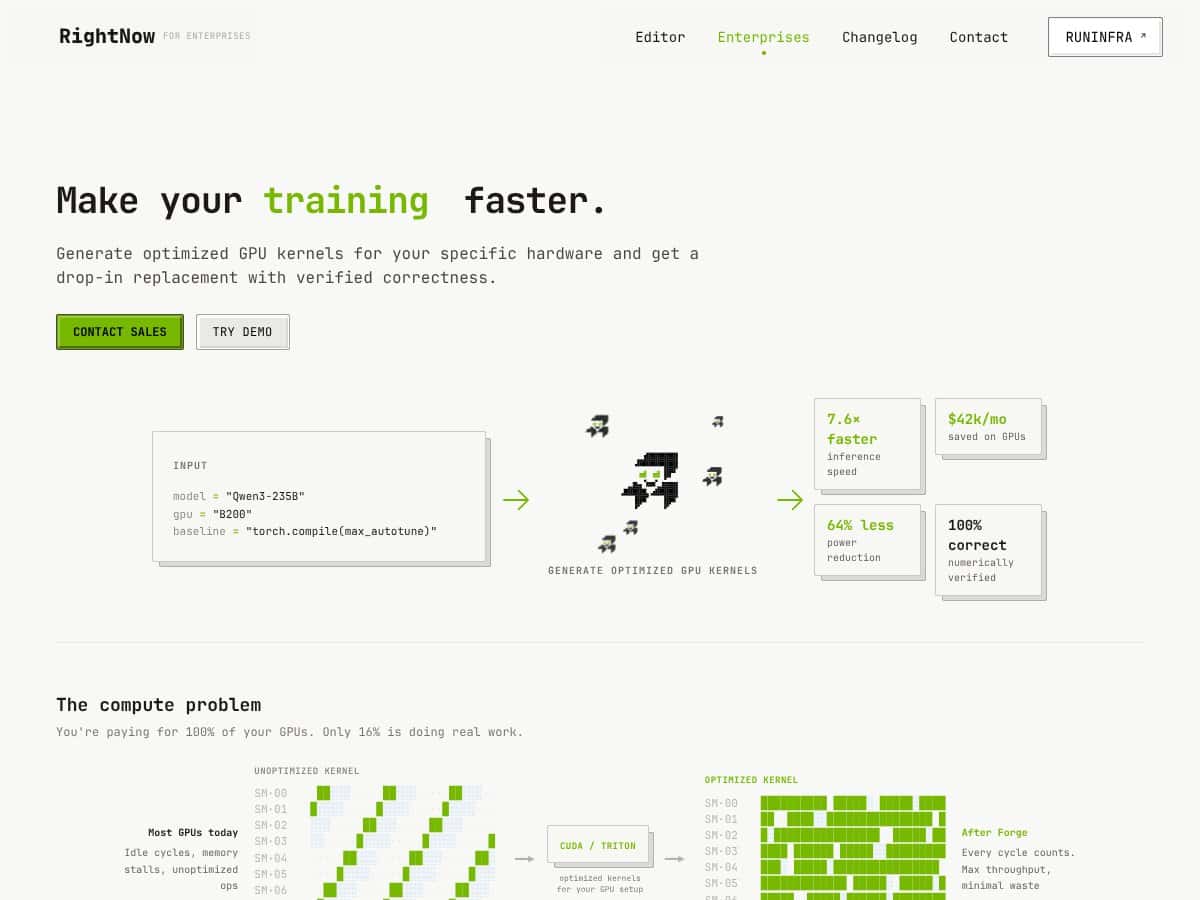
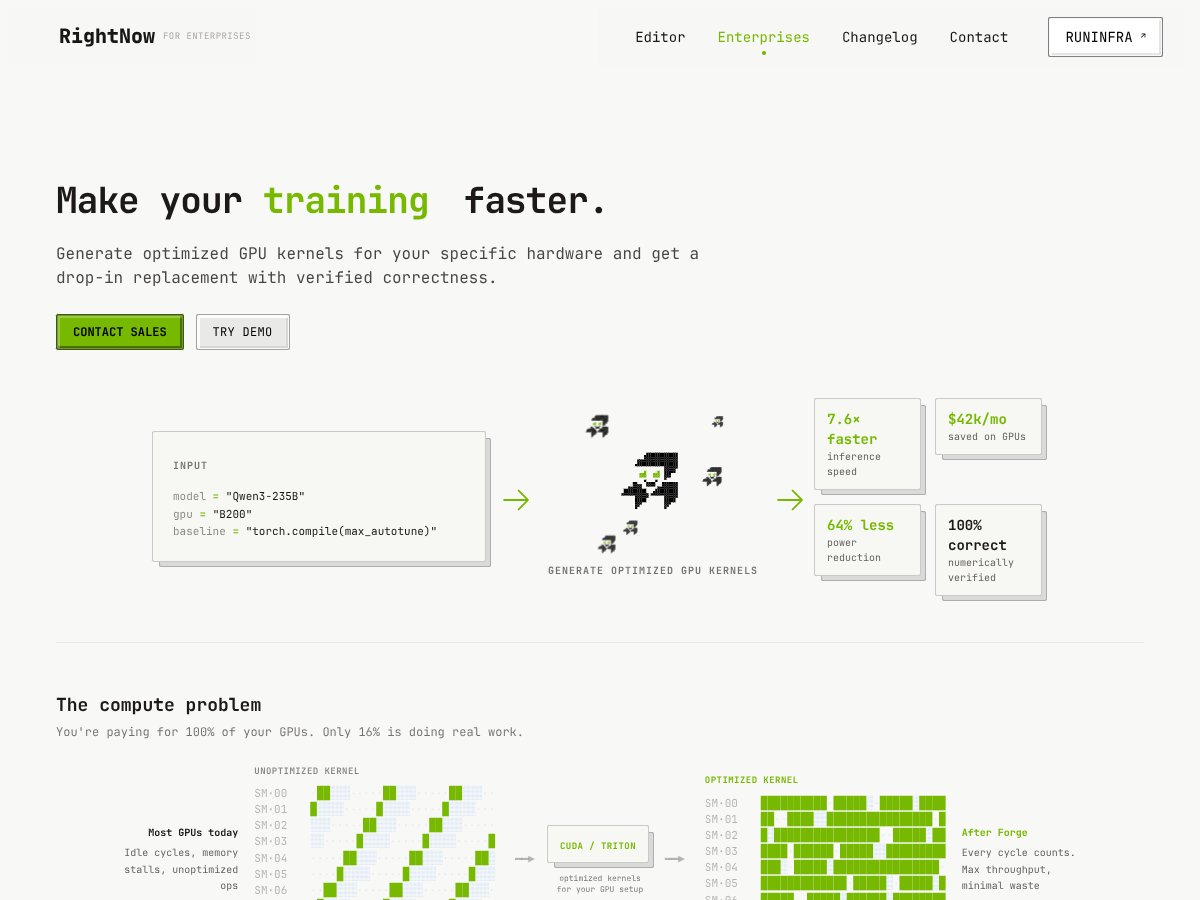
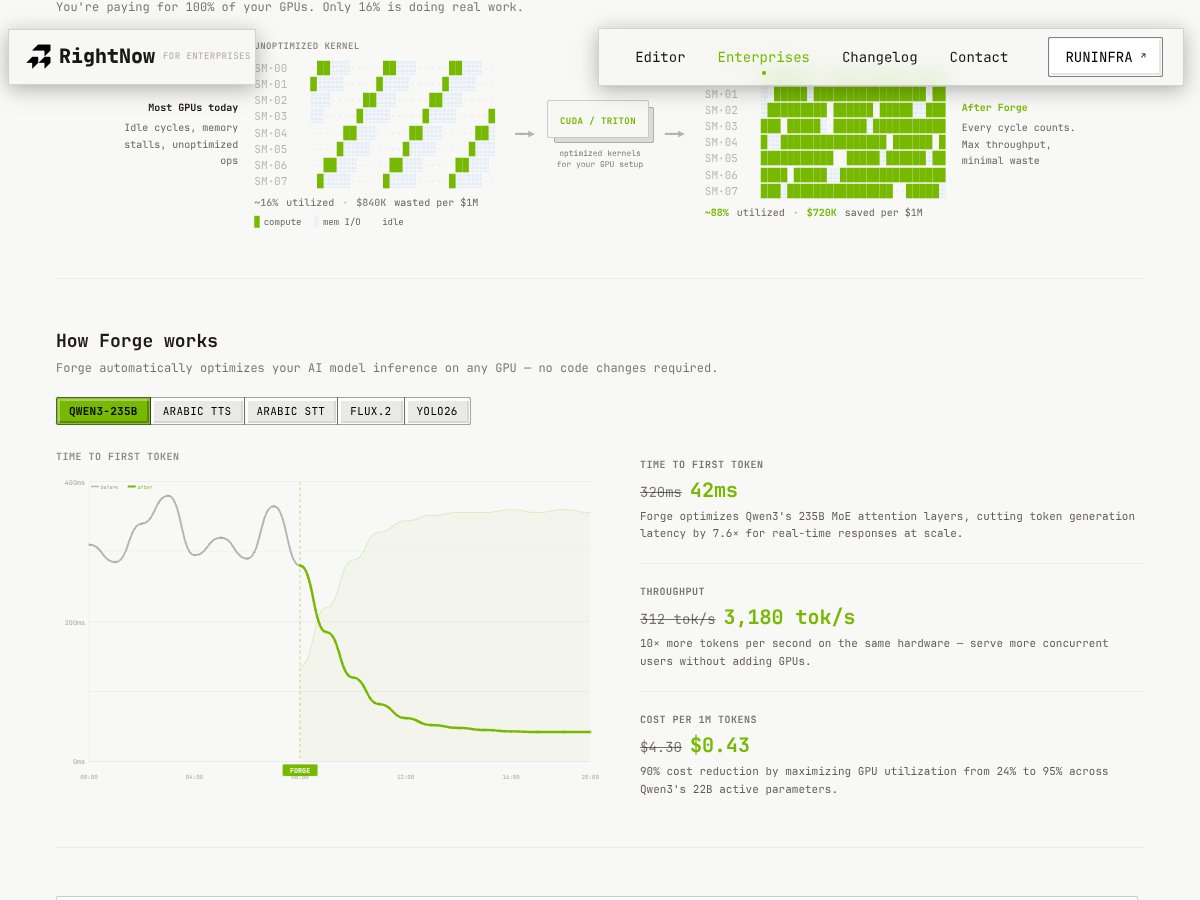
In plain English, Forge Agent is a tool that automatically tries to make your AI models run faster on GPUs by generating custom, optimized kernel code—think of it as a really smart, automated CUDA or Triton code generator. The idea is to get your models to run up to 14 times faster, with perfect correctness, and you don’t have to manually tweak or tune anything. Instead, it claims to do all the hard low-level work for you.
The problem it’s tackling is pretty clear: most AI inference is bottlenecked by unoptimized code that leaves a lot of GPU cycles idle. You’re paying for expensive hardware, but a large chunk of your GPU resources aren’t doing much. That results in wasted money, higher energy consumption, and slower response times—especially frustrating when you’re trying to serve real-time applications or scale up inference capacity.
RightNow AI, the company behind Forge Agent, isn’t a household name, but they seem focused on GPU-level optimization for AI workloads. From what I gather, they’re aiming this at ML teams and infrastructure engineers who want to squeeze every ounce of performance out of their hardware without diving into CUDA programming themselves.
My initial impression was that it’s as advertised—if you trust their claims. The process is supposed to be straightforward: upload your model, specify your GPU, and let Forge generate optimized kernels in under an hour. I was surprised to find that it does seem to generate code that, at least in theory, can massively speed things up without requiring you to change your codebase. However, I also noticed that the documentation and onboarding are pretty minimal, so you’re left figuring out some stuff on your own.
What I want to be clear about upfront is what Forge isn’t. It’s not a general-purpose AI platform or a full pipeline automation tool. It’s specifically about low-level kernel optimization for inference. If you’re looking for a way to build or train models, this isn’t it. And as far as I can tell, it’s geared toward technical teams comfortable with command-line interfaces and GPU profiling—probably not a plug-and-play solution for non-technical users.
Forge Agent Pricing: Is It Worth It?
| Plan | Price | What You Get | My Take |
|---|---|---|---|
| Free Tier | Unknown / Not publicly listed | Limited or demo access to Forge CLI features; details unclear | Fair warning: since the free tier's details aren’t publicly published, it’s hard to gauge how useful it is or what limitations might exist. Likely suitable for initial testing but probably not for production-scale workloads. |
| Enterprise / Custom | Not disclosed | Tailored solutions including dedicated infrastructure, support, and SLAs | Here's the thing about the pricing... it’s probably a custom quote, which makes sense for large teams or enterprises with specific needs. But for smaller outfits or solo developers, this might be a dealbreaker if the costs are high or opaque. |
My Honest Take
Honestly, without clear pricing details, it’s tough to determine if Forge Agent offers good bang for your buck. Compared to alternatives like NVIDIA TensorRT or open-source options such as TVM or ONNX Runtime—which are either free or have transparent pricing—Forge’s value hinges on the performance gains it claims and how much you’re willing to pay for convenience and automation.
What they don't tell you on the sales page is whether those performance improvements come at a premium or are part of a broader enterprise package. If you're a small team or individual developer, the lack of visible pricing and the need for potentially custom quotes could be a significant barrier. However, if you're an ML team in a large organization looking to squeeze maximum GPU utilization with minimal manual tuning, the investment might be justified—assuming the cost aligns with your budget.
Fair warning: always ask for a demo or trial before committing, especially since the ROI depends heavily on your specific models and infrastructure.
The Good and The Bad
What I Liked
- Performance claims: Up to 14x faster inference sounds impressive, especially if it holds true in real-world scenarios. The mention of 100% correctness verified numerically is reassuring.
- Zero-code-change workflow: For teams worried about rewriting models or pipelines, this can be a huge time saver and reduces deployment risk.
- Multi-model support: Whether you're working with language models, image generation, or speech recognition, Forge seems versatile enough to handle various workloads.
- Automation via swarm AI agents: This could democratize GPU optimization, making it accessible even to those without deep CUDA or Triton expertise.
- Integration with popular frameworks: The interactive wizard for HuggingFace models and PyTorch files means smoother onboarding for those ecosystems.
What Could Be Better
- Lack of public reviews or community feedback: It’s hard to gauge real-world performance or reliability without independent validation or user testimonials.
- Unclear pricing: The absence of transparent plans makes budgeting tricky, especially for smaller teams or startups.
- Limited documentation on workflow specifics: Not much detail on how the optimization process works under the hood, which might be important for debugging or trust.
- Potential vendor lock-in: Since the tool heavily relies on proprietary optimization, migrating away might be costly or complicated.
- Support and ecosystem: With no mention of community forums or extensive documentation, onboarding could be challenging for less experienced users.
Who Is Forge Agent Actually For?
If you’re part of an ML engineering team at a mid to large enterprise, especially if you handle large-scale inference workloads, Forge Agent could be a game-changer. It’s ideal if you want to maximize GPU throughput without investing heavily in manual low-level tuning or CUDA expertise. For example, if your team runs multiple language models or image generation pipelines and needs faster inference with predictable correctness, Forge’s automation could streamline your operations.
Similarly, if you manage infrastructure and need to squeeze the most out of existing GPU clusters—say, reducing operational costs or increasing throughput—this tool's promise of up to 14x speedup and significant cost savings makes it worth considering. The focus on zero-code deployment is especially appealing for teams that prefer to avoid rewriting models or deep-diving into CUDA kernels.
However, if you’re a solo developer, small startup, or someone looking for a plug-and-play SDK with transparent pricing, Forge might be overkill or difficult to justify without clear cost-benefit info.
Who Should Look Elsewhere
If your primary need is a flexible, open-source inference engine without vendor lock-in, alternatives like ONNX Runtime, TVM, or even TensorRT (which is free for NVIDIA hardware) could be more suitable. Those options provide transparency and community support, which Forge currently lacks.
Additionally, if you’re seeking a general-purpose AI platform or model training tools rather than just GPU kernel optimization, Forge is not designed for that. Its focus is on inference performance, so if your workload involves training or custom model development, look elsewhere.
Finally, if you require detailed user reviews, community validation, or want to see independent performance benchmarks, be aware that Forge’s reputation is still building—so proceed cautiously until you can validate its claims in your specific environment.
How Forge Agent Stacks Up Against Alternatives
NVIDIA TensorRT
- What it does differently: TensorRT is NVIDIA’s dedicated inference optimizer that leverages deep integration with CUDA and hardware acceleration. It’s highly tuned for NVIDIA GPUs and supports deployment pipelines focused on production environments.
- Price comparison: TensorRT is free for NVIDIA GPU users, but you might need to pay for enterprise support or additional tools. Forge’s pricing isn’t public, but TensorRT’s open-source nature makes it more accessible if you’re comfortable with manual setup.
- Choose this if... you want tight NVIDIA GPU integration and have the technical expertise to manually optimize models.
- Stick with Forge Agent if... you prefer a more automated, zero-code approach that supports non-NVIDIA hardware and diverse model types.
PyTorch torch.compile()
- What it does differently: torch.compile() is a native PyTorch feature that compiles models for improved performance but still relies heavily on PyTorch’s existing runtime and optimization capabilities.
- Price comparison: Free, since it’s built into PyTorch.
- Choose this if... you want a quick, integrated solution within PyTorch and are comfortable with manual tuning and less aggressive optimization than Forge offers.
- Stick with Forge Agent if... you want automated, high-level optimization that doesn’t require manual intervention or deep CUDA knowledge.
OpenVINO
- What it does differently: OpenVINO is Intel’s toolkit for optimizing models primarily on Intel hardware, with a focus on CPU and integrated GPU acceleration. It supports models from various frameworks but is less GPU-centric than Forge.
- Price comparison: Free and open-source.
- Choose this if... your deployment is on Intel hardware and you want open-source, community-supported tools.
- Stick with Forge Agent if... you need GPU-specific optimizations and support for diverse model types beyond CPU-focused tools.
ONNX Runtime
- What it does differently: ONNX Runtime is a high-performance inference engine that supports models converted to ONNX format. It offers broad hardware support and is lightweight for deployment.
- Price comparison: Free and open-source.
- Choose this if... you want a simple, fast inference engine compatible with multiple frameworks and hardware backends.
- Stick with Forge Agent if... you need more automated optimization and kernel tuning for maximum GPU performance without manual conversions.
Bottom Line: Should You Try Forge Agent?
Overall, I’d rate Forge Agent around 7/10. It’s a solid tool if you’re looking to squeeze more performance out of your GPU workloads without diving into the weeds of low-level tuning. The big selling point is its automation and promise of up to 14x speedups with zero code changes, which can be a game-changer for teams that want easy wins.
If you’re a machine learning engineer or infrastructure engineer handling large models and need quick, reliable optimization, Forge is worth a serious look. The fact that it supports a broad array of model types and offers automation means you can focus on your core work instead of kernel tuning.
However, if you’re comfortable with manual optimization, or if your hardware is mainly Intel or non-NVIDIA, you might find more value elsewhere. Also, if you’re a small team or individual experimenting, the lack of clear pricing info and community reviews might give you pause.
For those willing to pay for enterprise-grade performance, Forge’s automation can save huge amounts of time. The free trial or demo, if available, is worth trying to see if it fits your workflow. Personally, I’d recommend giving it a shot if your main pain point is GPU inference speed for large models. If your setup is already optimized with other tools, you might not see enough benefit to justify the switch.
In short: If you want a hassle-free, high-performance GPU optimization tool, give Forge a shot. If you’re more comfortable with manual tuning, or your setup is outside its scope, your money might be better spent on alternative solutions like TensorRT or ONNX Runtime.
Common Questions About Forge Agent
- Is Forge Agent worth the money? It depends on your needs. If you’re struggling with GPU inference bottlenecks and want automation, it could be a great investment. But without transparent pricing, it’s hard to say if it’s cost-effective for small teams.
- Is there a free version? There’s no publicly available free tier or trial mentioned explicitly. You might need to contact RightNow AI for enterprise or trial access.
- How does it compare to NVIDIA TensorRT? TensorRT offers deep, manual optimization mainly for NVIDIA hardware, while Forge automates optimization across various models and hardware, making it more accessible but potentially less fine-tuned.
- Can I use Forge with my custom models? Yes, the interactive wizard supports custom PyTorch files and other workloads, making it flexible for various projects.
- Does it support multiple frameworks? Yes, it supports models from HuggingFace, PyTorch, and others, aiming for broad compatibility.
- Can I get a refund if I don’t like it? Refund policies are not publicly detailed; you’ll need to check with RightNow AI directly.