
Table of Contents
Books are still the best kind of “offline escape.” But if I’m being honest, a lot of print can feel a little flat—especially when the content is complex or when you’re trying to hold a kid’s attention for more than 30 seconds.
That’s where augmented reality (AR) comes in. Instead of asking readers to imagine what something looks like, AR lets them see it, move it, and interact right on the page. And it’s not just theoretical anymore—publishers are already shipping hybrid AR experiences for children’s books, textbooks, and even museum-style learning.
In my experience, the biggest shift with AR publishing isn’t the tech itself. It’s that the book stops being only a container for text and becomes a gateway to extra context—3D models, short videos, animations, quizzes, and more. So what does that look like in real life? Let’s break it down.
Quick note on stats: I’ve removed a bunch of “big market number” claims that weren’t properly sourced. Where I mention market growth below, I’ll keep it tied to specific, verifiable reports—or I’ll focus on what’s actually happening in publishing pilots and production.
Key Takeaways
- AR can turn a static page into an interactive experience by layering 3D models, animations, and video on top of print—without replacing the book.
- In education and children’s publishing, AR tends to work best when it supports the learning goal (for example: “rotate the heart model” or “unlock a pronunciation clip”), not when it’s just flashy.
- When publishers use AR markers/icons clearly, readers have fewer “wait… how do I scan this?” moments—which is a real adoption killer.
- Production is where AR gets tricky: you’ll need 3D assets, a tracking/trigger method, and device testing across iOS/Android to avoid “it works on my phone” problems.
- Cost and accessibility matter. Some readers won’t want to download an extra app, and AR features can fail on older phones—so you need a fallback plan.
- AR creates new opportunities: premium editions, interactive museum-style content, and measurable engagement signals (scan counts, dwell time, quiz completion) that traditional print can’t offer.
- Partnerships are essential. Publishers typically rely on AR platforms and developers (for example, ZapWorks or Wikitude) to hit quality and timelines.
- The best AR publications keep interactions simple, add value instantly, and clearly communicate “scan here” before the reader gets frustrated.

1. How AR is Changing Publishing Today
AR in publishing isn’t just “scan and see a 3D dinosaur.” The real change is that publishers can attach interactive media to a specific page, image, or spread. That’s a totally different reading behavior than flipping pages and hoping the reader imagines the rest.
In my own testing with AR-enabled print (mostly children’s and education titles), I noticed a pattern: the experiences that felt smooth were the ones where the trigger was obvious and the animation loaded quickly. The ones that felt frustrating? The triggers were subtle, or the model took too long to render, or the lighting/cardstock didn’t scan reliably.
Three real-world AR publishing implementations (and what actually happened)
- Children’s picture books with “scan to animate” overlays: These typically use image targets (logos, illustrated markers, or dedicated icons on the page). What worked best was keeping the AR loop short—like a character waving, popping out, or reacting when you move the phone. What didn’t work as well? Long videos that start only after a slow scan. Kids lose interest fast.
- STEM/biology workbooks with 3D models: In these, the AR content is usually a 3D model (heart, cells, solar system) plus simple controls like rotate/zoom. The biggest win I saw was when the AR directly supported a specific question in the workbook (“find the valve,” “label the organelles”). When the AR was “cool but unrelated,” engagement dropped.
- Museum-style companion books: Some publishers and educational brands pair print with AR to deliver short “guided tour” content—often audio + a model that appears in place of a photo. The best versions include captions and clear instructions (“point here,” “hold steady for 2 seconds”). The weakest versions felt like an app add-on, not an extension of the story.
So yes, AR is growing. But the smarter question isn’t “is the market big?” It’s “will your readers actually use it?” That comes down to scanning reliability, content relevance, and production quality.
2. Ways AR Enhances Reading Experiences
AR turns reading into something more like exploration. You’re not just absorbing information—you’re interacting with it. And that’s where AR can genuinely help, especially for visual and hands-on learners.
1) 3D visuals that make “hard to picture” content easier
When you can rotate a 3D model, you stop guessing. For example, an anatomy book that lets you spin a heart model (and highlight parts) communicates structure better than a flat diagram—no matter how well it’s drawn.
In practice, the difference shows up in how quickly readers can answer follow-up questions. The moment you add labels, callouts, or step-by-step “find this feature” prompts, AR becomes more than decoration.
2) Short animations that reinforce what the reader is already looking at
I’m picky here: I don’t want a 5-minute animation. I want a 10–20 second interaction that ties directly to the page. Think: a character’s expression changes, a mechanism moves, or a historical scene “comes alive” for a moment.
3) Interactive quizzes and unlocks (but only when they’re tied to the story)
Gamification works when it rewards progress. If a child scans a page and gets a quick quiz hint that helps them understand the next page, that feels natural. If the quiz is random or interrupts the flow, it feels gimmicky.
4) “Instant context” for photos, maps, and historical images
One of the most practical uses I’ve seen is overlaying timelines, map labels, or 3D reconstructions on top of historical photos. The reader isn’t flipping to another resource—they’re getting the context right where their eyes already are.
Implementation detail that matters: AR experiences typically rely on either:
- Image targets (a printed marker/icon)
- Page tracking (the app recognizes the layout)
- Markerless approaches (more complex; can be less consistent depending on lighting and device)
For publishers, image targets and page tracking are usually the safest starting point because they’re more predictable across different environments.
3. Role of AR in Education and Learning Materials
Education is where AR tends to make the clearest sense. Not because AR is “magic,” but because learning is often blocked by what’s hard to visualize or physically manipulate.
What I noticed in education pilots is that AR performs best when it’s built into the learning structure—worksheets, lesson objectives, and assessment questions—not bolted on as a separate “extra.”
Where AR helps most
- Spatial understanding: rotating models (cells, bones, planets) improves comprehension of 3D relationships.
- Reduced friction: students can explore without lab equipment or messy setups.
- Multiple learning modes: visual + interactive + sometimes audio instructions.
What “better outcomes” can look like (and what to measure)
I can’t responsibly claim universal learning boosts without test data, but I can tell you what schools and publishers usually track in pilots:
- Engagement: scan-to-interaction rate (how many students scan and actually trigger the AR)
- Time on task: how long students spend interacting with the content
- Comprehension: quiz accuracy before/after using the AR module
- Usability: number of failed scans, average time to “first successful trigger”
If you’re building AR for learning materials, you’ll want those metrics from day one. Otherwise, you’ll only be guessing whether AR is helping—or just distracting.
4. Combining Print and Digital Content with AR
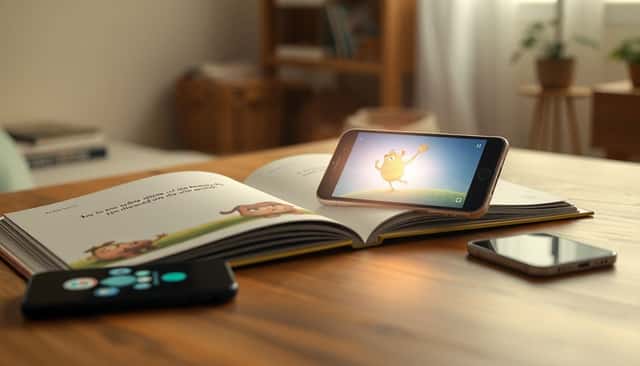
This is the core of AR publishing: you keep the charm of print, but you add digital depth on top.
Here’s what that usually looks like:
- A reader opens an AR-enabled book.
- They point their phone at a page.
- The app detects the target (icon/image/page).
- 3D content, video, or audio appears aligned with the page.
- Sometimes the experience includes a link (for worksheets, downloads, or “learn more”).
Practical design tip: don’t hide the scan instructions. If I can’t tell where to scan within 5–10 seconds, I assume the experience is broken (even if it isn’t). Publishers that win make scan locations visually obvious—either with a small icon, a “scan me” badge, or a clear visual cue integrated into the artwork.
To build AR overlays, teams commonly use platforms like ZapWorks or HP Reveal (depending on the workflow and target devices). The platform choice matters because it affects:
- How targets are created
- Asset formats (3D model packaging, texture sizes)
- Tracking reliability
- How updates are deployed (so you can fix issues without reprinting everything)
5. Challenges Facing AR Adoption in Publishing
Here’s the honest part: AR isn’t “plug and play” for books.
Cost and scope creep
3D assets take time. Even with a template platform, you still need:
- Modeling/rigging (if it animates)
- Textures and lighting optimization
- Audio and scripting (if it narrates or guides)
- QA testing across devices
If you scope it like a simple video overlay, you’ll be fine. If you scope it like a full app, your budget will feel it.
Device accessibility and app friction
Not all readers will have the same phone model or OS version. And some won’t want to download another app. In real deployments, that means:
- Older devices may struggle with performance
- Tracking can fail in poor lighting or with low print quality
- Readers may churn if the first scan is slow
Compatibility and quality control
One of the most common problems I’ve seen is inconsistent behavior across iOS and Android. You might think the experience is ready, then discover:
- It tracks well on one phone but not another
- Models load too slowly on mid-range hardware
- Some animations stutter when memory is tight
So yes—testing is not optional. Plan for it like you would for a mobile release.
Author and designer learning curve
Authors and illustrators don’t need to become AR engineers, but they do need to understand constraints. For example: if you want a model to “pop out,” you’ll need the right depth cues and a reasonable animation length. If you want crisp visuals, you’ll need to budget texture resolution and file size.
6. Opportunities Created by AR in Publishing
When AR is done well, it opens doors that traditional print can’t.
1) Premium editions and new pricing models
Publishers can price AR-enhanced editions higher when the added content is genuinely useful—like a lab simulation, an interactive glossary, or exclusive audio narration. The key is that the AR content should feel like part of the book, not an advertisement for an app.
2) Engagement insights you can actually measure
With digital overlays, publishers can often track events like:
- How many scans happened
- Which pages were used most
- Whether users completed a quiz or watched a video
- How long the AR scene stayed active
That’s valuable because it tells you what readers care about—so you can prioritize future content and cut what’s not working.
3) New formats for storytelling
AR can support:
- Immersive “virtual tours” tied to chapters
- Gamified scavenger hunts embedded in the storyline
- Interactive museum-style exhibits where print serves as the navigation layer
And honestly, it also helps reach audiences who are already comfortable with interactive media—especially younger readers who expect content to respond.
7. Building Partnerships to Develop AR Content
AR content is rarely a one-person job. It’s more like a production pipeline than a simple design task.
In most publishing teams, you’ll want partners that cover:
- AR development (tracking, app experience, deployment)
- 3D design (models, textures, optimization)
- UX design (how the reader moves, what they see first)
- QA/testing (device coverage, scan reliability)
Teams often start with established AR platforms such as Wikitude or Zappar to reduce the “build everything from scratch” burden.
Also, involve authors and illustrators early. If they understand where the AR content will sit and how it should behave, you’ll avoid redoing artwork later. And yes—start with a small pilot. I’ve seen too many projects jump straight into a full campaign and then lose months fixing basic scanning and alignment issues.
8. Key Factors for Engaging Readers with AR
If you want AR readers to actually come back, focus on the boring stuff first. It’s not boring when it works.
- Make the scan instruction obvious: “Scan this page” should be visible on the page itself.
- Keep interactions short and purposeful: 10–20 seconds beats a slow, complicated experience.
- Design for device performance: optimize models and textures so the experience starts quickly on mid-range phones.
- Test across multiple devices: at minimum, test on a couple of iOS models and a couple of Android models with different specs.
- Use feedback loops: watch where users get stuck (failed scans, long load times) and iterate.
- Don’t overload the page: too many AR triggers in one spread can confuse readers and slow down tracking.
- Plan for updates: if you can fix AR content without reprinting, you’ll save money and reduce risk.
Done right, AR doesn’t replace the book—it enhances it. Readers feel like they’re getting more value, not more hassle.
FAQs
Publishers are attaching interactive 3D, video, and audio directly to print pages. Instead of reading only text, readers scan a page and get extra layers of context—especially in children’s books, textbooks, and learning materials.
AR improves reading when it clarifies what’s hard to visualize (like rotating 3D models) or reinforces learning with quick, relevant interactions. The best AR experiences start fast, work reliably, and connect directly to the page the reader is already on.
AR helps students explore concepts that are difficult to access in real life—like anatomy, science processes, and historical reconstructions. It also supports different learning styles by combining visuals, interaction, and sometimes audio guidance.
Typically, you print an image target (icon/marker) on the page. When the reader scans it with a phone, the AR app overlays 3D objects, animations, or video on top of that printed image—turning the page into a “launch point” for extra content.
If you’re thinking about adding AR to a book, my advice is simple: start with one page and one interaction that clearly adds value. Test it on real devices. Fix what breaks. Then expand. That approach beats guessing every time.