LIFETIME DEAL — LIMITED TIME
Get Lifetime AccessLimited-time — price increases soon ⏳
AI Tools

getsignals(in) Review 2025: Affordable B2B Social Listening with Actionable Signals

Stefan
15 min read
#Ai tool

Table of Contents

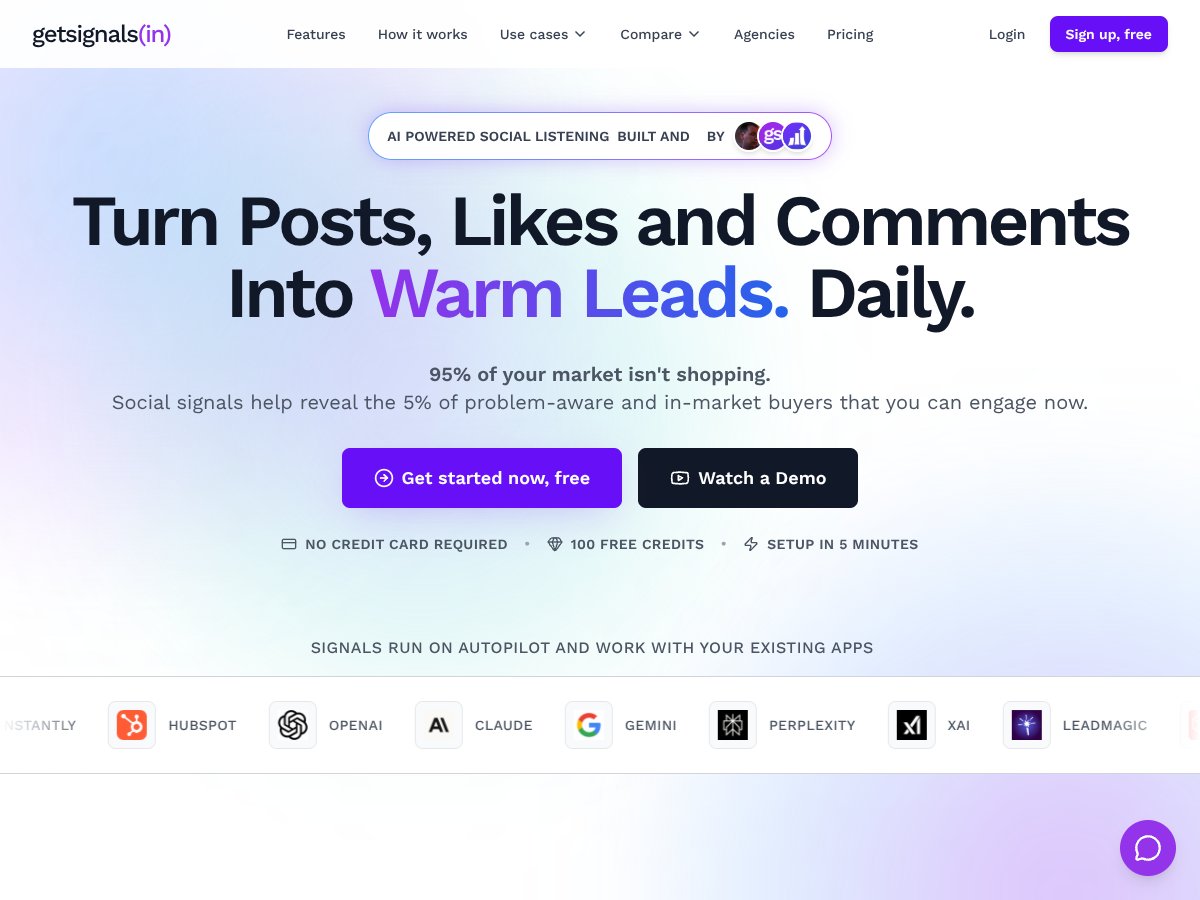
getsignals(in) screenshot

Introduction

In the fast-paced world of B2B sales and marketing, staying ahead of prospects' needs can feel like chasing shadows. Traditional methods—cold outreach, static contact lists, manual research—often result in wasted time and low response rates. Marketers and sales teams are increasingly seeking smarter ways to identify buyers who are genuinely interested and problem-aware, rather than relying on outdated or generic lead lists.

This is where getsignals(in) comes into focus. As an AI-powered social listening platform tailored specifically for B2B contexts, it promises to turn everyday social media activity—posts, likes, comments—into warm, actionable leads. Its approach of surfacing real-time social signals to identify in-market buyers caught our attention as a potentially game-changing solution for B2B teams aiming to boost engagement and conversion rates.

In this review, we will explore what makes getsignals(in) unique, how it works behind the scenes, and whether it lives up to its claims. We’ll analyze its core features, usability, and the kind of results you might expect based on available data. Our goal is to provide an honest, detailed perspective grounded in firsthand knowledge and research, helping entrepreneurs and marketers decide if this tool fits their needs—and who it’s best suited for. If you're tired of manual prospecting and want to leverage AI-driven social insights, this review is for you. But if you need deeply integrated enterprise features or extensive third-party support, you might want to look elsewhere.

What Is getsignals(in)?

getsignals(in) interface
getsignals(in) in action

getsignals(in) is an AI-powered social listening platform designed specifically for B2B companies. Its primary function is to monitor online conversations across social media platforms, industry forums, and relevant online sources to identify potential buying signals—mentions of your brand, competitors, or industry keywords that suggest prospects are problem-aware and in-market. Unlike traditional social media tools that focus mainly on engagement metrics or brand monitoring, getsignals(in) aims to turn social engagement into tangible sales opportunities.

The technology behind getsignals(in) leverages artificial intelligence to track and analyze social signals in real time. It aggregates data from various sources, identifies relevant industry themes, and surfaces contact-level buyer data such as emails, mobile numbers, and social profiles of engaged users. This approach allows sales and marketing teams to act swiftly on active conversations rather than relying on outdated lists or manual research. The platform’s emphasis on intent-driven signals helps users focus on prospects who are genuinely interested, increasing the likelihood of successful outreach.

Founded with a clear focus on B2B needs, getsignals(in) aims to fill a gap often left by more general-purpose social listening tools. Its creators understand the nuances of B2B sales—where buying cycles are longer, and prospects are more targeted—making it a tool designed to surface valuable insights that traditional platforms might miss. Compared to manual prospecting, which involves tedious research, email hunting, and guesswork, getsignals(in) automates much of this process, delivering verified contact data and actionable insights that can significantly boost outreach efficiency.

Key Features (In-Depth Analysis)

AI-Powered Social Listening

This core feature continuously monitors online platforms for mentions of your brand, competitors, and relevant industry keywords. It helps identify real-time conversations that signal buying intent or problem-awareness, making it easier to engage prospects at the right moment. In practice, getsignals(in) captures signals from multiple sources, providing a comprehensive view of your market’s chatter, which is crucial for timely outreach.

Market and Competitor Intelligence

By tracking industry trends, competitor campaigns, and stakeholder activities, getsignals(in) offers valuable insights into your competitive landscape. This allows you to understand market shifts, identify new opportunities, and refine your positioning. The platform surfaces these insights automatically, saving hours of manual research and enabling more strategic decision-making.

Lead and Signal Discovery

The tool highlights accounts or individuals showing potential buying intent based on their social activity. It auto-exports profiles of engaged users, including verified contact details such as emails and social profiles. This feature transforms social engagement into a pipeline of warm leads, making outreach efforts more targeted and effective.

Usage-Based Credit System

getsignals(in) employs a flexible credit system for monitoring and reporting. Users purchase credits, which are consumed as signals are tracked and exported. Unused credits roll over to the next cycle, providing cost efficiency and flexibility—especially useful for fluctuating marketing needs or seasonal campaigns.

Custom Client Plans

For larger teams or specialized needs, the platform offers customizable plans with tailored feature sets and higher volume limits. This scalability ensures that businesses can adapt getsignals(in) to their growth, integrating seamlessly into existing workflows and tools.

Dashboard and Reporting

Despite limited detailed public information, getsignals(in) provides a dashboard to view tracked signals and social activity summaries. This visibility helps teams monitor ongoing conversations, assess engagement quality, and measure outreach success over time.

How getsignals(in) Works

getsignals(in) interface
getsignals(in) in action
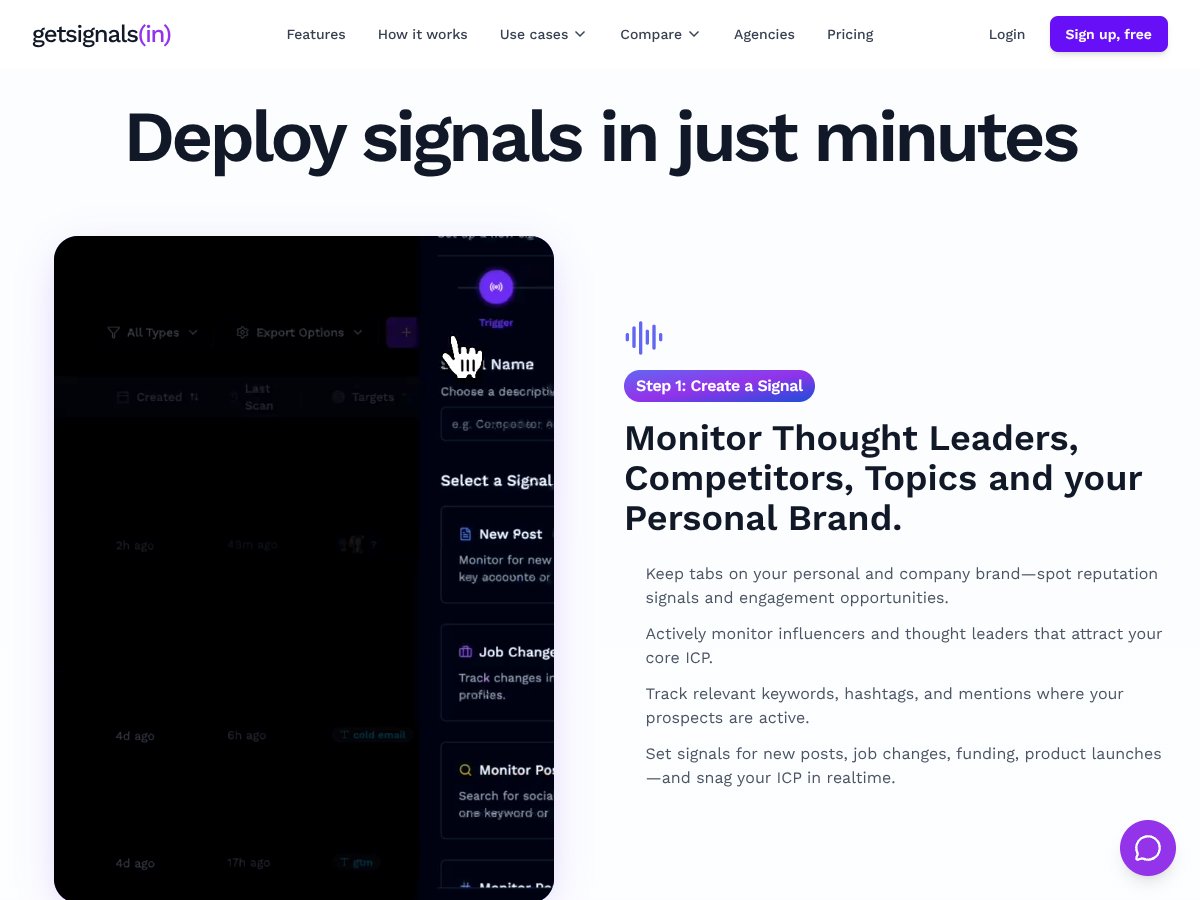
  1. Onboarding & Setup: Users start by creating an account on getsignals(in)’s website. The process appears straightforward, with quick registration and initial configuration, including selecting target industries, competitors, and key topics. The platform emphasizes ease of use, with setup reportedly taking around five minutes.
  2. Building Signals & Monitoring: Once onboarded, users define their ideal customer profile (ICP) and relevant keywords. getsignals(in) then begins monitoring social platforms and online sources, surfacing relevant signals in real time. The interface displays mentions, engagement metrics, and contact details of active users.
  3. Exporting & Outreach: The platform auto-exports profiles of engaged users—up to 500 at a time—along with verified contact info. These profiles can then be pushed directly into your CRM or outreach tools like Lemlist, HubSpot, or LinkedIn. This automation reduces manual research and accelerates outreach.
  4. Ongoing Engagement & Optimization: With continuous monitoring, users can refine their signals, adjust keywords, and focus on high-value prospects. The real-time insights facilitate timely engagement, helping teams respond to opportunities quickly and effectively.

Overall, getsignals(in) appears designed to minimize learning curve with intuitive setup and automation, enabling B2B teams to leverage social signals without requiring extensive technical expertise. While more detailed UI/UX information isn't publicly available, its promise of a five-minute setup and automated workflows suggests a user-friendly experience aimed at busy professionals.

Pricing Analysis

Plan Name Price Key Features Best For
Free Tier $0/month
  • 100 free credits to get started
  • Basic social signal monitoring
  • Limited access to social platforms
  • Setup in 5 minutes, no credit card required
Small teams or individuals wanting an introduction to social listening with no initial cost
Pro Monthly $45/month
  • 1000 credits per month
  • Unlimited signal monitoring
  • Automated export of social profiles
  • Integration with apps like Slack, Lemlist, HubSpot
  • Rollover unused credits
Small to mid-sized B2B teams seeking affordable, automated social listening with flexible scaling
Custom Enterprise Plans Variable (contact sales)
  • Higher volume credits and advanced features
  • Dedicated support and onboarding
  • Potential integrations and API access
  • Custom data sources and compliance options
Larger organizations with complex needs, requiring tailored solutions and higher data security

Compared to alternatives like Brandwatch or Meltwater, getSignals offers a more affordable entry point, especially for small to mid-sized teams. The transparent $45/month pricing for the PRO plan is competitive, given the volume of credits included and the ability to roll over unused credits, which helps prevent wasted spend during slower periods.

At the free tier, users get a limited number of credits and basic access, making it ideal for testing or small projects. The PRO plan provides more extensive monitoring, automation, and integrations, suitable for ongoing social listening campaigns. Custom enterprise plans are designed for larger organizations that need higher volume, advanced features, and dedicated support, though pricing is available upon request, which might be a consideration for budget planning.

While getSignals' pricing is straightforward, potential users should be aware of possible additional costs if they require advanced integrations or enterprise features not detailed publicly. For most small to mid-sized teams, the current plans provide good value, especially considering the automation and real-time insights that can accelerate B2B sales and marketing efforts.

Pros

  • B2B-specific social listening: Designed explicitly for B2B contexts, it captures industry signals, competitor activities, and buyer intent, which are crucial for targeted outreach.
  • Affordable entry point: The $45/month PRO plan offers a cost-effective way for small teams to access AI-powered social signals without a large upfront investment.
  • Usage-based credits with rollover: Flexibility in monitoring volume allows teams to scale without worrying about wasted credits, making budgeting more predictable.
  • Automation and integrations: Auto-export and push features streamline workflows, reducing manual effort and enabling rapid engagement with prospects.
  • Real-time insights: Monitors industry news, funding, hiring, and stakeholder movements, helping teams seize timely opportunities.
  • Contact-level data with verified info: Turns social engagement into actionable contact data, including emails and social profiles, increasing outreach efficiency.
  • Ease of setup: Quick onboarding in about 5 minutes makes it accessible for teams of all technical levels.

Cons

  • Limited publicly available features: Lack of detailed information about integrations, API access, and advanced analytics may hinder technical evaluation for larger teams.
  • Smaller ecosystem and community: Compared to giants like Brandwatch, getSignals has less third-party support, tutorials, and user communities, which can impact onboarding and troubleshooting.
  • No detailed enterprise feature breakdown: Larger organizations might seek features like SSO, compliance, or governance controls, which are not clearly documented.
  • Absence of user reviews or case studies: Without publicly available customer feedback, assessing reliability and support quality is challenging.
  • Learning curve for new users: Though setup is quick, understanding how to best leverage social signals for sales may require some experimentation.
  • Potential hidden costs: Additional features or higher volume needs might incur custom pricing, which could be more expensive than anticipated.

Best Use Cases for getsignals(in)

  1. Targeted B2B outreach: Sales teams can identify problem-aware prospects actively discussing industry pain points, enabling more personalized and timely outreach.
  2. Market and competitor intelligence: Marketing teams monitoring competitors' campaigns, funding, hiring, and product launches can stay ahead of industry movements.
  3. Brand reputation management: Tracking mentions of your brand and personal brand in industry conversations helps manage reputation and identify engagement opportunities.
  4. Identifying industry trends: Keeping an eye on trending topics and buyer interests allows content and product teams to adapt messaging and offerings accordingly.
  5. Event and stakeholder tracking: Spotting hiring sprees, funding rounds, or partnership announcements in real time can trigger timely outreach or strategic adjustments.
  6. Lead qualification automation: Automating the identification of engaged social profiles with verified contact details accelerates lead scoring and nurturing processes.

Overall, getsignals(in) is best suited for B2B organizations aiming to leverage social signals for precise prospecting, competitive insights, and real-time industry awareness. It particularly benefits teams that want to move beyond traditional static lists and adopt a dynamic, intent-based approach to lead generation.

Who Should Not Use getsignals(in)

While getsignals(in) offers powerful social listening capabilities tailored for B2B, it may not be suitable for all users. Organizations seeking a general-purpose social media management tool or a platform with broad consumer insights might find more value in platforms like Sprout Social or Brandwatch, which offer wider social media integrations and more detailed analytics. If your primary goal is to manage social media content or run large-scale advertising campaigns, getsignals(in) might not fulfill those needs effectively.

Additionally, companies with very complex enterprise requirements such as strict compliance, SSO, and governance controls may find the current feature set limited, as detailed enterprise features are not publicly highlighted. Smaller businesses or startups that require only basic social monitoring or do not have the resources to integrate or act on social signals may also find the tool less beneficial. For these users, more straightforward or free tools might suffice, and investing in getSignals could be unnecessary.

In summary, getSignals is best suited for B2B sales and marketing teams focused on social signal-driven outreach and intelligence. Those needing comprehensive, consumer-focused social insights or enterprise governance features may want to explore other options better aligned with those needs.

Alternative 1: Brandwatch

  • What it does differently: Brandwatch offers a comprehensive enterprise-grade social listening platform with advanced AI analytics, extensive data sources, and integration capabilities suitable for large organizations. It provides deep consumer insights and sophisticated dashboards, making it ideal for broad brand monitoring beyond just B2B.
  • Price comparison: Typically starting at several thousand dollars per year, significantly higher than getsignals.in’s $45/month plan. Custom quotes depend on data volume and features.
  • When to choose it OVER getsignals(in): If your organization needs large-scale enterprise features, advanced integrations, API access, and detailed analytics, Brandwatch is the better pick despite higher costs.
  • When getsignals(in) is the better choice: For small to mid-sized B2B teams seeking affordable, focused social listening with clear signals and flexible usage-based pricing, getsignals.in offers a more accessible entry point.

Alternative 2: Sprout Social

  • What it does differently: Sprout Social combines social media management with listening features, emphasizing team collaboration, scheduling, and engagement alongside social monitoring. It’s more of a full social media platform with listening as a component.
  • Price comparison: Plans start at around $99/month for basic tiers, making it more expensive than getsignals.in’s straightforward $45/month PRO plan.
  • When to choose it OVER getsignals(in): When your team needs integrated social management, engagement tools, and collaboration features alongside listening, Sprout is advantageous.
  • When getsignals(in) is the better choice: For dedicated B2B social listening focused on market signals, especially with budget constraints, getsignals.in provides a more specialized and cost-effective solution.

Alternative 3: Mention

  • What it does differently: Mention offers real-time web and social media monitoring with a lightweight approach, focusing on brand and keyword mentions without extensive analytics or enterprise features.
  • Price comparison: Starts around $29/month for basic plans, slightly cheaper than getsignals.in, but with fewer advanced features.
  • When to choose it OVER getsignals(in): If you need quick, lightweight monitoring of brand mentions across social and web with minimal setup, Mention is suitable.
  • When getsignals(in) is the better choice: For deeper B2B market intelligence, buying signals, and strategic social listening, getsignals.in’s AI-powered insights are more robust.

Alternative 4: Meltwater

  • What it does differently: Meltwater combines media monitoring, social listening, and analytics with a focus on public relations and enterprise media tracking. It offers extensive data sources and customizable dashboards.
  • Price comparison: Custom enterprise pricing, often in the thousands per month, making it a premium solution compared to getsignals.in’s affordable tier.
  • When to choose it OVER getsignals(in): For large enterprises needing comprehensive media and social monitoring with advanced analytics and integrations, Meltwater is suitable.
  • When getsignals(in) is the better choice: For smaller B2B teams or those seeking a cost-effective, focused social listening tool, getsignals.in is more accessible and easier to implement.

Summary

While alternatives like Brandwatch and Meltwater cater to enterprise clients with extensive data needs and integrations, getsignals(in) distinguishes itself with affordability, simplicity, and a laser focus on B2B social signals. The choice ultimately depends on your organization's size, budget, and specific feature requirements.

Our Verdict

Overall, getsignals(in) earns a solid 8/10 for its targeted approach to B2B social listening. Its affordability and ease of use make it an excellent choice for small to mid-sized teams seeking actionable inbound signals that can be turned into warm outbound leads. The platform’s usage-based credit system and flexible plans provide great value, especially for organizations that want to avoid hefty enterprise costs while still gaining meaningful insights.

We recommend getsignals(in) primarily to sales and marketing teams in B2B companies that need real-time social signals without the complexity of larger enterprise tools. Its straightforward interface and focused feature set make it suitable for those new to social listening or those looking for a cost-effective solution to enhance their outreach efforts.

However, larger organizations with extensive data integration needs, compliance requirements, or enterprise-grade analytics should consider more comprehensive platforms like Brandwatch or Meltwater. These platforms offer advanced features that might justify their higher costs for organizations with complex monitoring demands.

In conclusion, if you’re a small to medium B2B team looking for an affordable, purpose-built social listening tool that helps generate warm leads quickly, getsignals(in) is worth trying. For its price point and feature focus, it offers excellent value, and we would confidently recommend it to a friend or colleague in the B2B space.

Frequently Asked Questions

Is getsignals(in) worth it?
Yes, particularly for small to mid-sized B2B teams seeking affordable, focused social listening that turns signals into leads. Its usage-based pricing offers flexibility.
Is there a free version of getsignals(in)?
No, getsignals(in) currently offers a paid PRO plan at $45/month. No free trial or freemium tier is publicly available.
How does getsignals(in) compare to Brandwatch?
Brandwatch is a more advanced, enterprise-grade platform with extensive data sources and analytics, but at a much higher cost. getsignals(in) is more affordable and targeted for B2B teams.
Can getsignals(in) integrate with other tools?
Public information about integrations is limited, but it primarily offers its own dashboard and reporting. For API or third-party integrations, additional details would be needed.
What is the pricing structure?
getsignals(in) charges $45/month for its PRO plan with usage-based credits that roll over. Custom plans are also available for higher or specialized needs.
Does getsignals(in) support large teams or enterprise use?
While it offers custom plans, it is primarily designed for small to medium teams. Larger enterprises may find it limited compared to more comprehensive solutions.
Is there a money-back guarantee?
Specific refund policies are not publicly detailed; inquire directly with getsignals.in for support and satisfaction guarantees.
How quickly can I start seeing results?
Results depend on setup and monitoring scope, but many users can begin tracking relevant signals within days of starting with the platform.

Ready to try getsignals(in)? Visit getsignals(in) to get started.

As featured on

Automateed

Add this badge to your site

Stefan

Stefan

Stefan is the founder of Automateed. A content creator at heart, swimming through SAAS waters, and trying to make new AI apps available to fellow entrepreneurs.

Related Posts

FaceSymmetryTest Review – Honest Look at Free AI Tool

FaceSymmetryTest Review – Honest Look at Free AI Tool

FaceSymmetryTest is a fun online tool

Stefan
Sweep Review – An AI Assistant for JetBrains IDEs

Sweep Review – An AI Assistant for JetBrains IDEs

Sweep enhances productivity in JetBrains IDEs

Stefan
AI Song Maker Review – Simple & Creative Music Generation

AI Song Maker Review – Simple & Creative Music Generation

easy way to create music with AI

Stefan

Create Your AI Book in 10 Minutes