Table of Contents
If you’ve ever finished a sales call and thought, “Cool… now I have to rewrite all of that into Salesforce,” then yeah—you’re definitely not alone. I’m in sales ops / enablement-adjacent work, and I’ve watched reps lose real momentum to the admin part of the job: taking notes, cleaning up CRM fields, and making sure the next person has the right context.
I tested Goelo specifically to see if AI meeting insights could do more than just “generate text.” Could it actually turn a meeting into useful CRM updates with less manual work?
Goelo Review: AI meeting insights that actually reduce CRM work
Here’s the honest version of what I wanted from Goelo: I didn’t just want “notes.” I wanted the meeting to turn into (1) a clean summary I could skim in 30 seconds, and (2) CRM updates that don’t require me to retype everything after the call ends.
In my test, I ran Goelo through a short trial window and focused on a pretty common sales motion: discovery calls where reps usually capture pain points, stakeholders, timeline, and next steps. I also paid attention to what happens right after the meeting—because that’s where time gets lost.
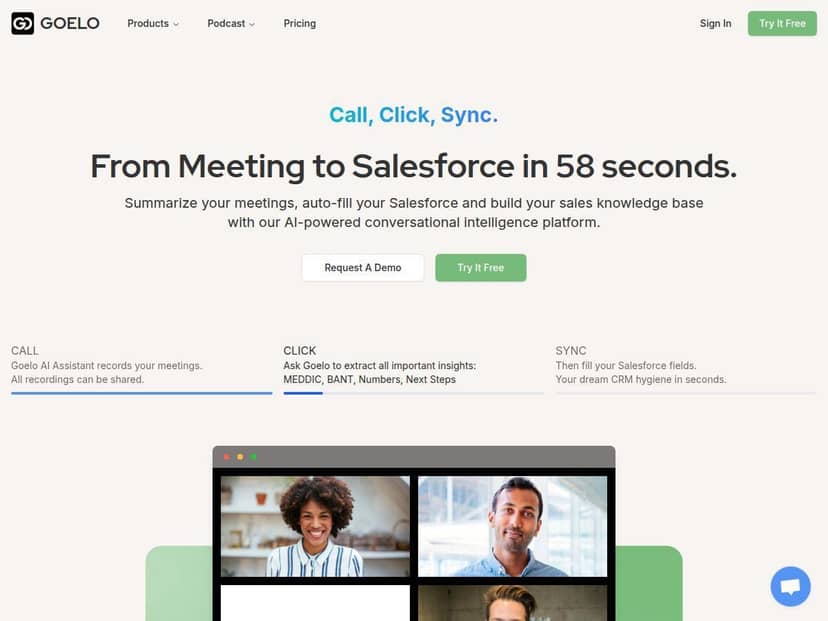
What I noticed immediately: the AI Meeting Assistant handles recording/transcription and then produces a structured summary. That part matters, but the real win is the follow-through—Salesforce Auto-fill and the “Sales Second Brain” concept that keeps customer context from disappearing between calls.
Before vs. after (what changed for me):
- Before: I’d write a quick call recap, then manually enter key details into CRM fields. It’s not always “hard,” but it’s repetitive—and it’s easy to miss something.
- After: I could review the generated summary, confirm the key points, and let the CRM update do the heavy lifting. The amount of manual typing dropped noticeably.
Now, I’ll be straight with you: I still checked the outputs. AI can get things wrong—especially names, acronyms, or when multiple people talk over each other. But the workflow was fast enough that correcting a couple details didn’t feel like starting over.
Key Features
- AI Meeting Assistant for automatic recording, transcription, and summaries
- Salesforce Auto-fill to push conversation data into CRM fields
- Sales Second Brain for storing customer info and useful context over time
- Multi-language support (Goelo supports 30+ languages, which matters for global teams)
- Integrations with Google Workspace, Microsoft 365, Zoom, and Google Meet
How it works (my workflow)
Setup is where a lot of “AI meeting tools” either win or lose. I didn’t want something that requires a ton of tinkering just to get a basic meeting captured.
Here’s what my day-to-day looked like:
- Step 1: Connect your meeting + calendar ecosystem. I used the integrations with tools I already had (Google Meet / Microsoft 365-style workflow). Once it was connected, it didn’t feel like I was constantly switching contexts.
- Step 2: Run the meeting like normal. I didn’t have to change how the rep talks. The assistant handled the recording and transcription.
- Step 3: Review the summary after the call. Instead of hunting for notes, I skimmed the AI-generated recap for pain points, decisions, and next steps.
- Step 4: Confirm CRM updates. Salesforce Auto-fill pulled the conversation context into relevant fields. I still did a quick sanity check, but it was more like editing than rewriting.
- Step 5: Use the “Second Brain” for follow-ups. The value shows up in later calls—when you don’t have to reconstruct everything from scratch.
One small tip: if you care about CRM cleanliness, make sure your CRM field mapping is set up the way your team actually uses it. The tool can only populate what it knows how to populate.
Summary quality test
I’m picky about summaries. If it’s vague, it’s useless. If it’s too long, it’s also useless. So I looked for three things: structure, specificity, and whether it captured the “next step” portion of a sales call.
What was good:
- Skimmable structure: The recap wasn’t just a wall of text. I could quickly find the main points.
- Action-oriented details: It tended to include the “where are we going next” type info that reps usually have to add manually.
- Consistency: Across multiple meetings, the output stayed in a predictable format.
Where it struggled a bit (real-world stuff):
- Noisy moments / overlapping speakers: Like most transcription-based systems, messy audio can reduce accuracy. When that happened, I had to correct a detail or two.
- Names and acronyms: If someone uses a lot of industry shorthand, I’d recommend a quick review before the CRM update goes out.
Bottom line: the summary was strong enough that I stopped rewriting from scratch. But I didn’t treat it as “set and forget” on day one.
Pros and Cons (based on what I saw)
Pros
- Less time spent on meeting notes: The auto-summary reduced the “post-call writing” burden.
- Cleaner CRM updates (when you review): Salesforce Auto-fill helped keep key details from slipping through the cracks.
- Easy to learn: I didn’t need a training session to understand the flow.
- Helpful for international teams: Multi-language support is a real advantage if you’re running calls across regions.
- Works with common meeting setups: Integrations with Google Meet / Microsoft-style workflows made it feel practical.
Cons
- Depends on digital meeting quality: If your audio is bad or people talk over each other constantly, you’ll spend more time correcting outputs.
- Best fit for digital meetings: If you’re mostly in-person, you’ll either need a workflow that captures audio cleanly or you won’t get the same value.
- Internet reliability matters: For smooth transcription and syncing, you’ll want a stable connection.
- Still requires a quick review: I wouldn’t recommend blindly trusting CRM field updates without a spot-check, especially for names, dates, and acronyms.
Pricing Plans
Pricing can change, so I’ll stick to what’s clearly stated in the available info and point you to the source for the latest tiers.
Free trial: Up to 5 meetings with no credit card required.
Paid plans: Paid plans start around $39 per user per month, with advanced features like deeper Salesforce sync and AI capabilities.
What I’d verify on the pricing page before you commit:
- Which plan includes full Salesforce sync vs. partial field updates
- Any meeting limits (per month or per user)
- Language limits / supported languages by plan
- Whether integrations like Google Meet and Microsoft 365 are included on all tiers
If you want the exact plan names and what each tier includes, check the latest pricing details directly on Goelo’s site (the trial + plan structure is usually the fastest way to confirm limits for your team size).
Wrap up
Goelo impressed me most for one reason: it doesn’t just “write notes,” it helps turn meetings into usable CRM context. That’s exactly what sales teams need when the admin work starts eating into pipeline time.
If your team lives in Google Meet, Zoom, or Microsoft-style meetings and you care about keeping Salesforce accurate without spending an extra 30–60 minutes per call on manual updates, it’s worth a test run. Just don’t skip the quick review step—AI summaries are great, but your judgment is still the final quality control.