Table of Contents
I tested HayaiLearn for a full week to see if it’s actually useful for learning Japanese—or just another “watch videos, hope it sticks” app. For context: I’m around the N4/N3 range (I can follow basic conversations, but I still need help with grammar and faster speech). I used it on a laptop with Chrome, and I mostly focused on everyday conversation-style clips pulled from YouTube.
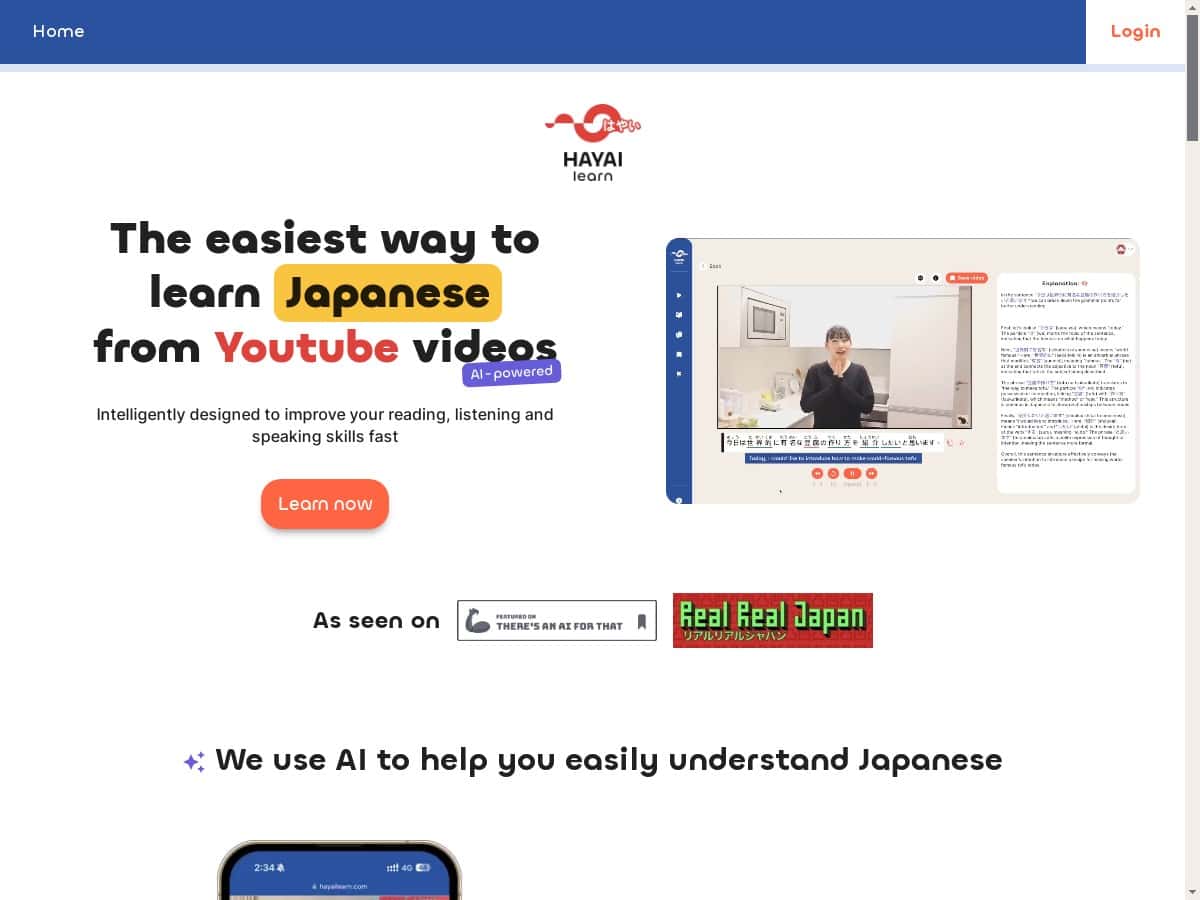
What I noticed right away is that HayaiLearn tries to remove the usual friction: you don’t have to pause, rewind, and manually look things up every five seconds. Instead, the app overlays help right on the video. That’s the whole pitch—and in my experience, it mostly delivers. The big question is whether the AI subtitles/translations and pop-up dictionary are accurate enough to genuinely learn from, not just “get by.”

HayaiLearn Review: What I Actually Liked (and Where It Struggled)
Here’s what my week looked like in practice. I picked a handful of Japanese videos (mostly short clips, 5–15 minutes). Then I relied on three things constantly: the AI subtitles, the pop-up dictionary, and the way HayaiLearn connects what you’re hearing to sentence/word learning.
AI subtitles + translations: This is the heart of the app. When I clicked on words (or hovered, depending on the video), the subtitle line would show up with an explanation. I found it helpful for catching grammar patterns I wouldn’t notice just by listening. But accuracy wasn’t perfect. Sometimes the translation felt “technically correct” while still missing tone.
Example of what worked well: In one clip, a sentence included the kind of casual “explanation” phrasing that’s common in everyday speech. The app’s subtitle translation matched the meaning, and the pop-up dictionary helped me break down the vocabulary without digging through a dictionary app. That made it easier to keep watching instead of stopping every time.
Example of where it got awkward: I saw cases where honorifics and nuance got flattened. For instance, if the speaker used a polite form or a softened request, the English output sometimes came out too blunt—like it translated the grammar but not the social context. It’s the difference between “Please do X” and “Would you mind doing X?” A machine can translate words; it doesn’t always translate intent.
Listening improvement: After a few sessions, I noticed I was rewinding less. Not because I suddenly became fluent—more because the subtitles helped me predict what would come next. I’d estimate that after about 3–4 days (roughly 20–30 minutes per day), my listening comprehension improved on the same kind of conversation style. I started recognizing common sentence endings faster.
Key Features That Matter (Not Just Buzzwords)
- AI-powered Subtitles and Translations
- The subtitles are the main reason I kept using it. Instead of relying only on YouTube auto-captions, HayaiLearn’s overlay is designed to be “learning-first.” In my experience, it’s best when the audio is clear and the speaker isn’t too fast. When the clip is messy or background noise is heavy, the subtitles can lag or miss phrasing.
- Instant Pop-up Dictionary
- This one is surprisingly practical. When a word shows up in the subtitle, I can tap/click it and get a quick breakdown. I used it mainly for verbs and particles—things that are easy to misunderstand if you only look at a single translation.
- What I noticed: The pop-up is fast enough that you don’t lose momentum. Still, it can occasionally choose one meaning when the context would suggest another. That’s not a deal-breaker, but it’s why I still double-checked tricky words instead of trusting every single pop-up blindly.
- Video Examples and Sentence Mining
- HayaiLearn doesn’t just throw vocabulary at you. It tries to keep the word tied to the sentence you heard. That’s the difference between “I learned a word” and “I can recognize it in real speech.” I liked that it encourages sentence-level learning rather than random vocab lists.
- Spaced Repetition System (SRS)
- Yes, SRS is in there. In my week, I found myself reviewing learned items more consistently because the app nudges you with repeats. It’s not magic, but it does help with retention—especially for words that show up repeatedly across videos.
- Custom Video Library and Playlists
- This is one of those features you don’t appreciate until you try to learn without it. I saved a few clips by theme (conversation, explanations, daily life). Coming back later was easier because I wasn’t hunting for the same type of content again.
- Grammar Breakdowns Linked to Videos
- When grammar explanations are tied to the exact sentence you saw, it sticks better. I used these breakouts to understand why a sentence “felt off” when I was reading only the English.
- Shadowing Practice with Pronunciation Feedback
- Shadowing is where I had mixed feelings. The idea is great, but the feedback quality depends a lot on the mic quality and how clean the audio is. If you’re in a quiet room and your speech is reasonably clear, it’s helpful. In noisier environments, it can be frustrating because it may judge your pronunciation harshly.
- Personalized Learning Paths
- The app tries to guide you based on what you’ve learned. I liked having a “next step” instead of wondering what to study. That said, if you want a very structured textbook-style path, you may still need outside resources.
Pros and Cons (With Real Examples)
Pros
- Learning feels interactive: Watching videos is normally passive. Here, you click/tap for meaning and keep moving, which makes it feel more active.
- Subtitles help you catch grammar patterns: I noticed I could identify sentence endings and particles faster after a few days.
- Pop-up dictionary is quick: It doesn’t force you to leave the video constantly.
- Retention improves with SRS: Words and short phrases I reviewed showed up again in later clips and felt more familiar.
- Great for media-based learners: If you’d rather learn from real speech than worksheets, this fits that style.
Cons
- Only Japanese: That’s obvious, but it matters if you’re trying to study more than one language.
- YouTube dependence: If the video you want isn’t available or the captions/audio quality is poor, the experience drops.
- Translations can lose nuance: In polite vs casual speech, the AI sometimes picks the “word meaning” but misses the tone (honorifics, softening, implied context).
- Tech-friendly required: You’re basically using a web video workflow. If you want offline study or zero tech setup, this may feel annoying.
- Subscription may not fit everyone: If you only use it for a couple videos a month, the cost could feel hard to justify.
Pricing Plans (What I Can Confirm)
HayaiLearn uses a subscription model and includes a free one-week trial. I can’t reliably quote exact current tier prices from the HTML you provided, and pricing can change fast. The best move is to check the HayaiLearn deal page for the latest plan details (currency, monthly vs yearly, and what’s included).
What I recommend you verify during the trial:
- Whether SRS/review features are fully available for all plans or if they’re gated.
- Whether shadowing/pronunciation feedback is included during the trial (and how many attempts you get).
- How much of the translation/subtitle experience is “full access” vs limited.
- Whether you can save/play playlists normally without hitting feature limits.
Who HayaiLearn Is Best For (and Who Should Skip It)
If you’re learning Japanese through immersion and you like using videos, HayaiLearn makes a lot of sense. It’s especially strong for N5–N4 learners who need help understanding speech in real time, and for N4–N3 learners who want to sharpen listening and vocabulary through sentence context.
If you’re the type who wants a strict grammar curriculum, this probably won’t replace a textbook or a structured class. Also, if you’re super sensitive to translation tone (honorifics/politeness levels), you’ll want to double-check the trickiest lines instead of trusting every AI rendering.
Wrap-up: Worth Trying for a Week
Overall, HayaiLearn is a solid “learn from Japanese videos” tool. The combo of AI subtitles, pop-up dictionary, and SRS is what makes it feel more than just a caption overlay. In my week of testing, I kept using it because it reduced the stop-start grind—and I actually felt my listening improve.
If you can, start with the free trial and test the exact things you care about: subtitle accuracy on a fast clip, pop-up dictionary behavior on particles/verbs, and whether shadowing feedback is usable on your setup. If those work for you, you’ll probably enjoy this style of learning. If not, at least you’ll know quickly.


