
Table of Contents
I am going to keep this short and sweet, just because I strongly believe there’s no science behind selecting the Amazon KDP keywords. So, if you want to learn how to choose keywords for KDP that increase your visibility, keep reading.
I’ll go through exact process how I select those 7 keywords, and how they help our books increase their presence and simply convert better.
How to Choose Keywords for KDP – Fast Way
The simplest way to finding your keywords is through one of the tasks in our app. We specifically designed this app for Amazon KDP publishers so I believe it’s the fastest way. We optimized the task to align with KDP’s guidelines while having in mind.
So basically, this is a kdp keywords generator that you can use to do it the fast way. The quality of the outputs (keywords) does not suffer, and is probably better than the research of 90% of the people out there.
Here’s a video of how we do it:
Also, broken down in steps:
Step 1: Register on automateed.com
By clicking on the “get a sample for free” button you’ll get to the register page where you can create your free account.

Step 2: Register and log in, go to “tasks” tab, and locate “Keyword Research for Amazon KDP”
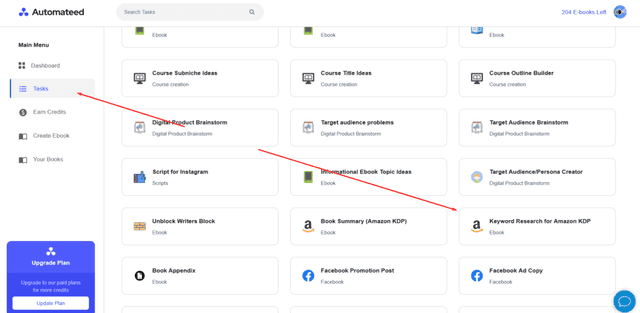
This task acts as a KDP keywords generator, and it will help you generate 7 keywords that are highly transactional and related to your book.
Step 3: Put in your outline
Now, the way this KDP keywords generator works is by scanning your outline and figuring out what’s your target audience and potential keywords. So, you’ll have to paste in your outline over here:
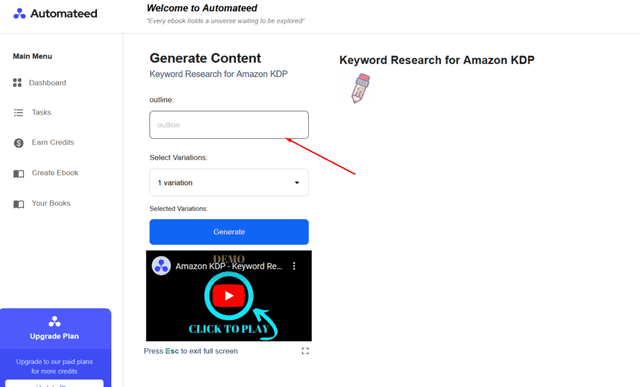
Step 4: Then, select 3 variations, then click on a “generate” button
Step 5: Choose from one of the 3 variations
You’ll get 7 keywords that are highly optimized for Amazon searches, and that people are actually browsing frequently.
These will help Amazon algorithm understand what your book is about and it will help your book show up on Amazon searches.
So, this was the faster way of finding your keywords. There’s a traditional way that includes more of a “manual” approach, and I’ll cover it over here – just for the sake of people willing to learn the old ways.
How to Choose Keywords for KDP – Old and Slower Way

Now, here are some steps to what I consider important when coming up with the list of magnificent 7 keywords.
Step 1: Brainstorm Initial Keyword Ideas
When I start with keywords, I always begin by looking at my book. I ask myself about the genre, the themes, who my characters are, and what makes my book special. It’s like putting myself in my readers’ shoes and thinking about what I would search for if I were looking for a book like mine.
I also have a little trick up my sleeve—I go to Amazon and start typing related words into the search bar to see what Amazon suggests. These suggestions are gold because they’re what real people are searching for.
Step 2: Expand Your Keyword List
Once I have a basic list, I turn to keyword research tools to broaden my horizons. Publisher Rocket is my go-to because it’s made for us KDP authors. It tells me everything I need to know about search volumes and how stiff the competition is.
Sometimes, I’ll also play around with Ubersuggest or even Google Keyword Planner. They’re more general but still quite useful in getting a feel for what people are searching for beyond Amazon.
Step 3: Analyze Keyword Metrics
This part gets a bit technical, but stick with me. I look for keywords that enough people are searching for but not so many that I’m a small fish in a big pond. It’s all about finding that sweet spot.
Publisher Rocket really shines here, showing me the numbers behind the competition. But the most important thing I keep in mind is relevance. If the keyword doesn’t match what my book is about, it’s not going to do me any good.
Step 4: Refine Your List
I’ve learned that long-tail keywords—those longer, more specific phrases—are my best friends. They might not get thousands of searches, but the people who search for them are the ones I want.
They’re looking exactly for what I’m offering. So, I balance between broad terms that cast a wide net and the niche terms that catch the right kind of fish. By the end, I have a diverse set of keywords ready to go.
Step 5: Keyword Placement Strategy
Here’s where I put my plan into action. I weave the most important keywords into my book’s title and subtitle because that’s what makes people click.
But there’s also a secret space—the backend keywords in the KDP dashboard where I can sneak in all the keywords that didn’t fit elsewhere. It’s like a behind-the-scenes magic trick to make sure my book gets seen by the right eyes.
What are the most searched keywords on Amazon KDP?
The most searched keywords on Amazon KDP vary widely depending on the genre, current trends, and reader interests. Popular keywords often include genre-specific terms like “romance,” “mystery,” “thriller,” “self-help,” “fitness,” and “cookbook,” among others. Checking Amazon’s bestseller lists and using tools like Publisher Rocket can provide up-to-date insights.
How many keywords should I use for KDP?
For KDP, you are allowed to use up to 7 keywords or keyword phrases. It’s important to use all 7 slots to maximize your book’s visibility and reach a broader audience by covering different relevant search queries.
How do I find SEO keywords?
To find SEO keywords, start by brainstorming terms related to your content. Use keyword research tools like Google Keyword Planner, SEMrush, Ahrefs, or Ubersuggest to analyze search volume and competition. Look at competitors’ sites to see what keywords they target. Finally, consider long-tail keywords for more specific searches with less competition. Ideally, you can use our tool to do this, since the keywords tool suggests are SEO optimized.