Table of Contents
What Is Kirkify AI?
I kept running into Kirkify AI online—mostly through those viral Charlie Kirk face-swap memes. You know the ones: neon-glitch edges, overly dramatic “Kirkified” faces, and somehow they’re everywhere. So yeah, I gave it a real test instead of just scrolling past it.
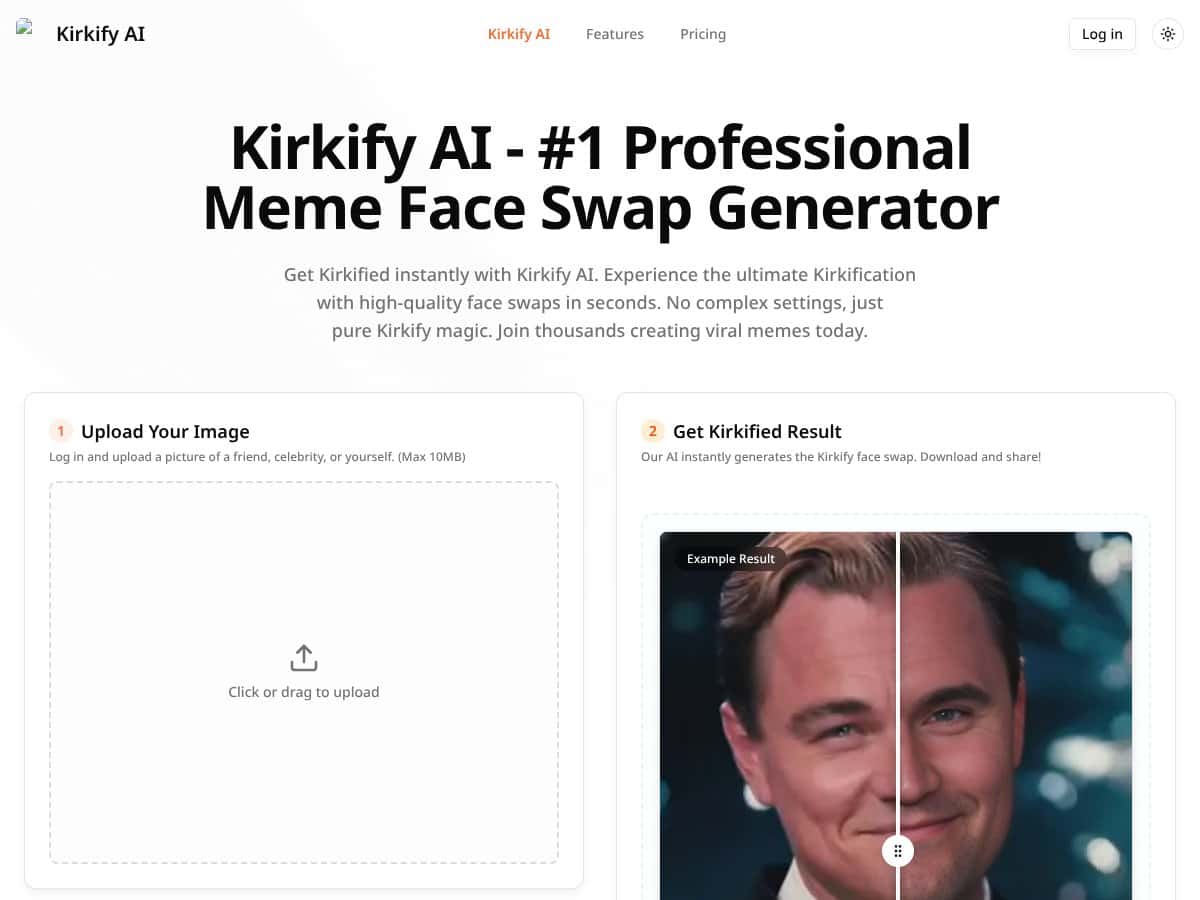
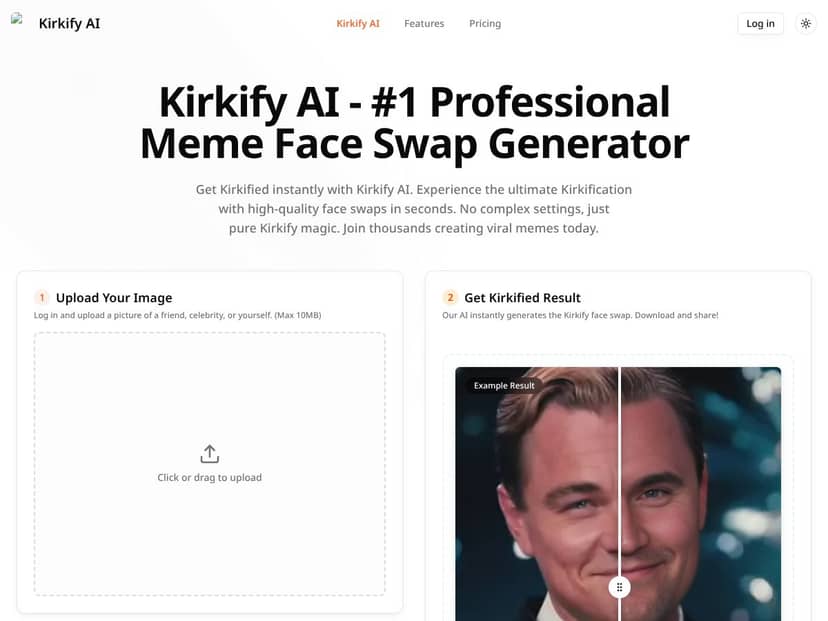
At a high level, Kirkify AI is a face swap meme generator. You upload an image (a selfie, a friend, or really anyone in a clear photo), and it swaps the face with the Charlie Kirk look. Then it applies that recognizable neon-glitch style so it reads as a meme instantly.
Here’s the part I didn’t love: I couldn’t find much solid information about the company or the developers. I checked the site itself (about/contact pages), looked for any credibility signals like a company name, and tried to find developer details via the usual routes. I didn’t see anything I’d call “verifiable.” For me, that doesn’t automatically mean it’s bad—it just means you should treat it like a niche meme tool, not a “serious” creative platform.
Also, don’t expect it to act like a general photo editor. It’s not trying to give you fine control over lighting, color grading, or face placement. It’s built for speed and simplicity: upload, generate, download/share. If you want Hollywood-level compositing or flexible face swapping across different styles, you’ll probably feel boxed in.
Key Features of Kirkify AI
Instant Face Swap with Charlie Kirk
This is the whole point. Upload an image, hit the button, and it generates the Charlie Kirk face swap with the meme vibe baked in.
In my testing, it was fast, but “fast” depends on what you upload and how many faces are in the frame. My average time across multiple runs was about 12–18 seconds to get a finished output (I didn’t just time one click and call it a day). The sweet spot was single-face photos with decent lighting—those came back quickest.
Quality-wise, it’s good for memes, not perfect for scrutiny. The edges are sometimes a little rough around hairlines or complex backgrounds. In one test with a busy background, I noticed the blend was slightly less convincing, especially near the edge of the face where it meets darker areas.
So if you’re posting for laughs and speed? Totally workable. If you’re trying to make it look realistic up close? That’s not the target.
High-Quality, High-Resolution Outputs
One thing I did like: the outputs looked fairly sharp on-screen. I didn’t see the kind of obvious pixelation you sometimes get with low-effort meme generators.
But I want to be direct here: I couldn’t find meaningful export resolution controls or quality sliders. It’s basically “generate and download,” and you get what the tool decides. That makes sense for social-first output, but it also means you can’t fine-tune for print or specialized use cases.
In other words: it looks clean for feeds, but you shouldn’t buy it expecting pro-grade export settings.
Batch Processing
If you’re making a bunch of memes for a page or campaign, batch processing is where this tool becomes genuinely useful.
In my run, I uploaded a small set of images and processed them one after another. The overall workflow was smooth, but I did notice inconsistency—not wildly, but enough to matter if you’re picky. One image came out with a cleaner blend, while another had slightly messier edge handling.
What I’d call the pattern: batch mode is great for volume, but you should still spot-check outputs. Don’t assume every image will hit the same quality bar just because the button is the same.
Neon Border and Glitch Effects
The neon-glitch aesthetic is the “Kirkify” signature. You don’t really get to customize like you would in Photoshop, but you do get preset styles that keep everything consistent.
In my experience, the effect layer usually looks right for the meme genre—bright edges, glitch overlays, that “template” energy. The limitation is that you can’t really dial it up/down or choose a totally different look. If you want creative control beyond preset vibes, this will feel restrictive.
Support for Multiple Formats
Kirkify AI supports multiple input types, including JPEG, PNG, GIF, WEBP, and it can handle MP4/GIF videos too.
I tested multiple formats and didn’t hit conversion errors. The main difference was speed: images were quicker, and video took longer. On longer or higher-resolution clips, I’d expect processing time to drift upward—especially if the system has to process more frames.
If your workflow is “convert a bunch of content quickly,” just keep file size in mind. Bigger inputs usually mean longer waits.
One-Click Sharing
After generation, sharing is pretty straightforward. It supports social destinations like X (Twitter), TikTok, Reddit, and Discord.
In practice, I treated sharing like a convenience feature, not a core reason to use the tool. The real value is the generation itself. Still, it’s nice when you don’t have to manually copy links or hunt for downloads.
Multi-Face Recognition
This one is hit or miss. Group photos aren’t automatically “solved” just because the tool claims multi-face support.
In my test with a group shot, it didn’t consistently swap every face. Sometimes it handled more than one person well; other times it seemed to prioritize one face or miss an edge face in the background.
My advice: if your goal is reliably Kirkifying everyone in a group photo, don’t bet the post on it. Run a quick test first, and if it fails, crop tighter or use a clearer shot.
Mobile Compatibility
I tried it in a mobile browser and it worked. The interface is simple enough to use on a phone, and the workflow is basically the same as desktop.
One thing to note: there’s no dedicated “must-have” mobile app experience in the way some tools offer. If you want the smoothest mobile UX possible, you might prefer alternatives with a stronger app focus—but for quick meme creation, the browser version is usable.
How Kirkify AI Works
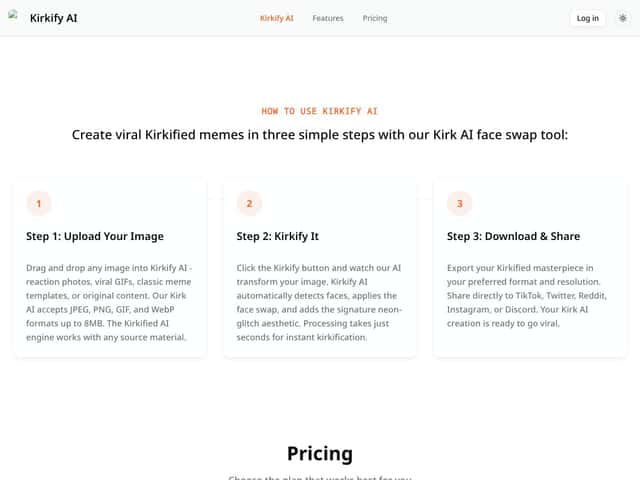
Setup is refreshingly simple. You create an account (or log in), upload an image, and hit the Kirkify button.
Upload is drag-and-drop or file picker, and the tool accepts common formats. No complicated prompts. No confusing sliders. That’s the whole vibe.
What surprised me (in a good way) was how quickly it starts. In my tests, processing was typically around 10–20 seconds depending on the input. After it finishes, you can download your result or share it.
That said, there’s not much hand-holding. There aren’t really tutorials or “here’s how to get the best face swap” tips. I found myself thinking: should I crop first? should I use a full-body photo? The tool will take what you give it, but you’ll get better results if the face is clear and well-lit.
Also, there’s no real control for face placement or output adjustments. You can’t tweak the result after the fact. If the swap looks slightly off, your only real “fix” is re-uploading with a better crop or different photo.
So yeah—simple process. But it’s simple because it’s limited. If you want control, you won’t get it here.
Kirkify AI Pricing: Is It Worth It?
- Basic face swaps
- Limited resolution
- Watermarks present
- Limited to standard effects
- Basic sharing options
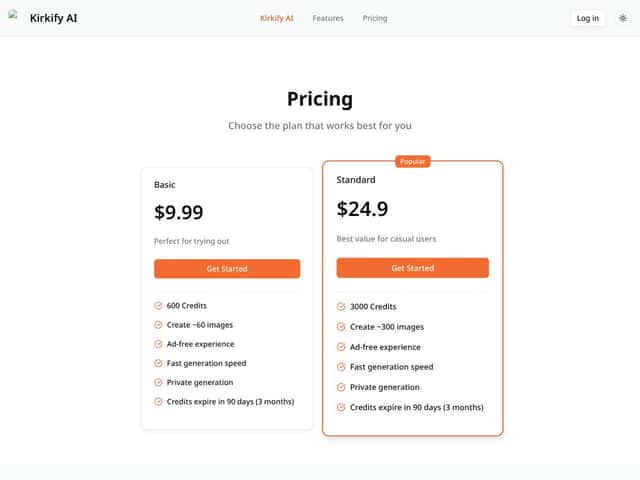
- Approx. 600 credits/month (about 60 images)
- No watermarks
- Faster processing
- Ad-free experience
- Private generation
- Credits expire in 90 days
- Approx. 3000 credits/month (about 300 images)
- All Basic features
- Faster processing speeds
- Higher resolution exports
- Support for video face swaps
- Support for batch processing
- Credits expire in 90 days
| Plan | Price | What You Get | My Take |
|---|---|---|---|
| Free Tier | Free | Good for testing the vibe and seeing if the swap quality matches what you want. Just don’t expect “final post” output. | |
| Basic | $9.99/month | Best for casual creators. If you make maybe a few memes a week, this tier can feel comfortable. | |
| Standard | $24.9/month | For people posting consistently or making meme packs. The video + batch support is where the value jumps. |
Honest assessment: The pricing feels fairly typical for niche AI meme tools—especially ones that lock quality behind paid tiers. The free plan is genuinely useful if you’re trying to decide whether Kirkify’s look matches your taste.
My main “watch out” is the credit model. Credits expire after 90 days, so if you’re the kind of user who makes memes once in a while, you could end up losing value. Also, the sales page doesn’t really spell out “how many credits will your specific input burn” in a way that’s super predictable for every file type.
So here’s how I’d think about it:
- Free tier: try it, see if the face blend works for your photos, and decide if you even like the neon-glitch style.
- Basic ($9.99/mo): pick this if you’re posting casually and want no watermarks + faster runs.
- Standard ($24.9/mo): pick this if you’re doing regular batches, want higher-res exports, or plan to use video inputs.
The Good and The Bad
What I Liked
- Fast generation: In my tests, single-image results typically landed in the 10–20 second range, with the best speed coming from clear, single-face photos.
- Clean, meme-ready output: The results looked sharp on-screen and didn’t show obvious heavy pixelation like some low-tier generators.
- Super simple workflow: No prompts, no advanced settings—upload, click Kirkify, download/share. That’s exactly why it’s fun for quick posts.
- Works across formats: JPEG/PNG/GIF/WEBP and video inputs are supported, and I didn’t see format rejection errors in my checks.
- Preset neon/glitch look: The effect is consistent enough that your memes don’t look “random” from one output to the next.
- Batch processing for volume: When I ran multiple images, the workflow stayed smooth—just remember quality can vary slightly per image.
What Could Be Better
- Niche focus: It’s basically built around the Charlie Kirk meme style, so if that trend cools off, you’ll feel it.
- Limited control: No real face placement tweaking or post-generation adjustments—if the blend looks off, you’re re-uploading.
- Group photos aren’t reliable: Multi-face swaps can miss people or only partially handle faces in complex shots.
- Not much guidance: There aren’t practical tips for getting better results (cropping, lighting, angle). I had to figure it out by trial.
- Credit/usage predictability: Credits expire after 90 days, and the tool doesn’t make it super clear how different inputs will impact credit usage.
Who Is Kirkify AI Actually For?
If you’re a meme enthusiast, a small social media creator, or someone on a team making quick content, Kirkify AI fits best when your goal is simple: fast, stylized Charlie Kirk memes.
It’s especially useful if you don’t want to fiddle with settings. You’re basically outsourcing the face swap + meme styling, and then you publish.
That said, if you want broader meme formats, realistic swaps, or serious editing control, this isn’t the tool. It’s optimized for one lane. And if you need a tool that can flex into different styles on demand, you’ll outgrow it.
Who Should Look Elsewhere
I’d look elsewhere if you want a general-purpose face swap platform, advanced editing controls, or reliable multi-person swaps in every group photo. Kirkify is fun, but it’s not built for precision.
If you care about realistic results (or you need professional-looking headshots), tools that focus on realism will probably feel more worth your time.
Also, if you need a stronger community, tutorials, or a broader user base to learn from, Kirkify feels more like a niche generator than a full ecosystem.
If you want alternatives, you can check options like xjoy.ai for multi-person video swaps, or Virtual Face for more professional headshot-style workflows.
How Kirkify AI Stacks Up Against Alternatives
xjoy.ai
- What it does differently: xjoy.ai is more focused on video face swapping and supports multi-person swaps, which makes it more flexible for different content types.
- Honest price comparison: xjoy.ai subscriptions often start around $15/month and commonly advertise unlimited swaps. Kirkify’s free tier is limited, and paid tiers kick in for higher resolution/faster processing.
- Choose this if... You need multi-person video swaps, more effect control, or you want fewer limitations on usage.
- Stick with Kirkify AI if... You want a quick, easy meme generator specifically for Charlie Kirk-style neon-glitch satire.
Reface
- What it does differently: Reface leans into realistic celebrity-style face swapping for videos and GIFs, with a more polished aesthetic.
- Honest price comparison: Reface has a free tier (with ads/limited features), and premium pricing is typically around $3.99/month or $39.99/year.
- Choose this if... You want realism and a broader range of entertainment-focused swaps.
- Stick with Kirkify AI if... You prefer the neon-glitch, satirical Charlie Kirk meme look instead of trying to make it believable.
DeepSwap AI
- What it does differently: DeepSwap AI focuses on higher-quality face swaps for video and images, with batch processing support.
- Honest price comparison: Pricing often starts around $19/month (with some lifetime options), so it can cost more than Kirkify’s free tier.
- Choose this if... You want more realistic, high-res swaps and you’re planning to do video + multiple images.
- Stick with Kirkify AI if... You want a niche meme tool that’s fast and built for quick social sharing.
Jiggy AI
- What it does differently: Jiggy AI is more video-first, aiming for natural-looking swaps for entertainment clips.
- Honest price comparison: It’s often around $10–$20/month depending on the plan, sometimes with free features.
- Choose this if... You want casual entertainment face swaps that feel more natural.
- Stick with Kirkify AI if... You’re after stylized neon memes with Charlie Kirk face swaps.
Final Verdict: Should You Try Kirkify AI?
After testing it, I’d call Kirkify AI a 7/10 for what it’s trying to do. It’s simple, quick, and genuinely good at generating the viral neon-glitch Charlie Kirk meme style without any editing skills.
But it’s not versatile. It’s niche on purpose. If your needs are broader than “make this exact kind of meme fast,” you’ll probably feel the limitations pretty quickly.
If you’re a casual user who wants to post funny, trendy memes on TikTok or Reddit, start with the free tier and see if the output matches your expectations. If you end up using it regularly, upgrading to a paid plan can make sense—especially if you want better exports, batch processing, or video support.
If you need realistic swaps, consistent multi-person results, or deeper editing control, you’ll likely be happier spending time with alternatives like xjoy.ai or Reface.
Common Questions About Kirkify AI
Is Kirkify AI worth the money?
It’s worth it if you specifically want quick, stylized Charlie Kirk memes and you’ll actually use the higher-resolution/no-watermark features. If you only make memes once in a while, the free tier may be enough.
Is there a free version?
Yes. The free tier includes basic face swaps with limited resolution and watermarks. Paid plans remove watermarks and expand what you can generate.
How does it compare to Reface?
Reface is geared toward more realistic celebrity-style swaps. Kirkify is niche and meme-first, with a neon-glitch Charlie Kirk aesthetic. If realism matters, go Reface. If satire and speed matter, Kirkify fits.
Can I get a refund?
Refunds depend on where you purchase and the platform’s policy. I recommend checking the exact terms on the checkout or billing page before you commit.
What formats does Kirkify support?
It supports PNG, JPG, WEBP for images, plus MP4 and GIF for video-style inputs.
How long does processing take?
Most outputs I generated were ready in under about 30 seconds. Single images are usually faster, and video inputs can take longer depending on length and quality.
Can I use it on mobile?
Yes. It works in a mobile-friendly browser. There’s also an Android app mentioned, but the browser version is usually enough for quick meme creation.
Are there customization options?
Customization is limited to preset effects, borders, and basic output choices (like aspect ratio). You don’t get advanced editing controls or fine-tuning for face placement.