LIFETIME DEAL — LIMITED TIME
Get Lifetime AccessLimited-time — price increases soon ⏳
AI Tools

Kya Review 2026: Honest Take After Testing

Updated: April 12, 2026
14 min read
#Ai tool

Table of Contents

Kya screenshot

What Is Kya? (And What It Actually Does)

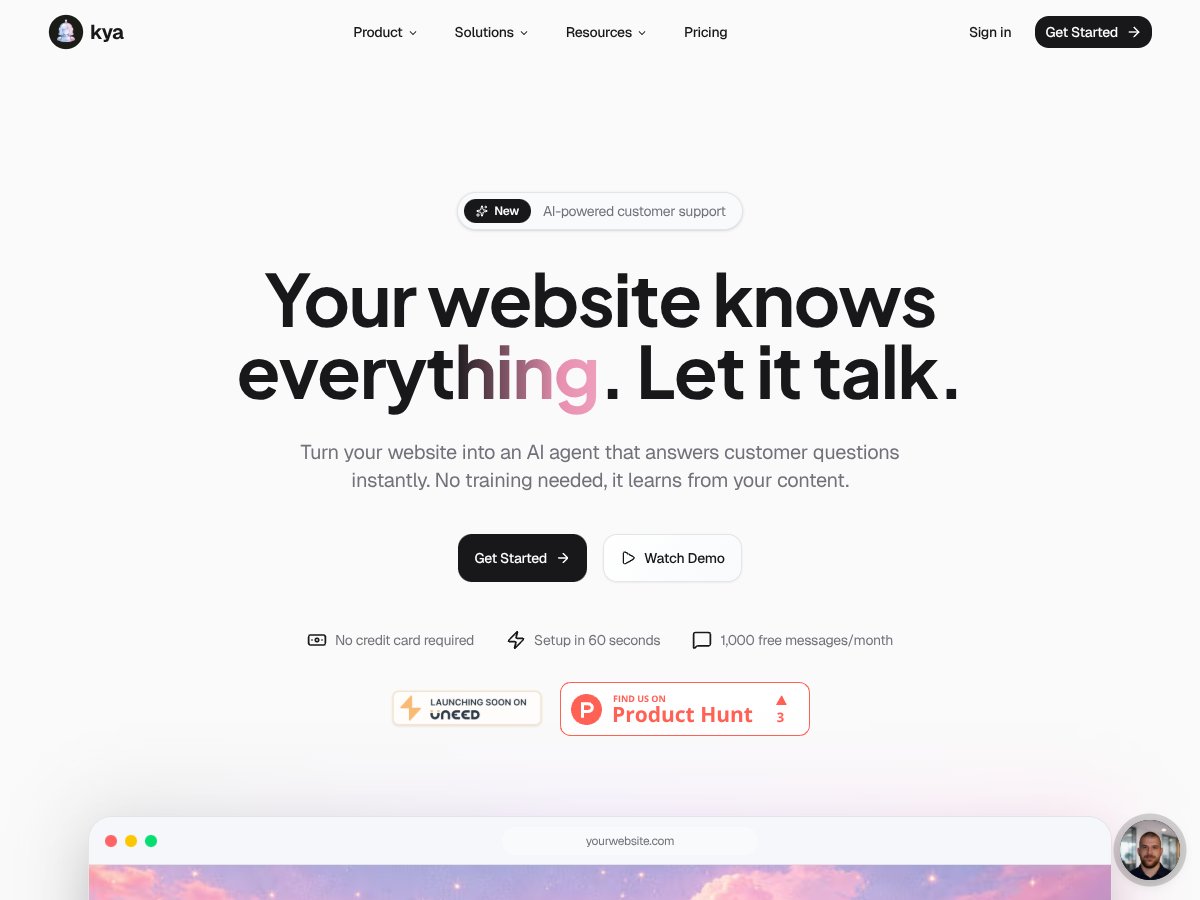
I’ll be honest—I was skeptical at first. The pitch of “turn your website into an AI support agent in a minute” sounds like marketing fluff. So I focused on one question: would it genuinely work with real site content, or would it just spit out generic answers?

Kya is basically an AI chatbot widget you add to your website. Once it’s installed, it crawls your site content (pages, FAQs, and also documents like PDFs you upload) and then uses that information to answer visitor questions. The idea is simple: cut down support tickets, respond faster than a human ever could, and capture leads while you’re asleep.

From what I could tell, Kya is aimed at small to mid-sized businesses that want AI support without hiring developers or wrestling with complicated setups. It feels more like a startup product built for non-technical teams than a heavyweight enterprise platform.

Here’s the real limitation you should know upfront: it’s not “AI magic.” If your site content is thin, outdated, or poorly organized, the bot will struggle. It’s heavily dependent on what it can find and how your pages are written.

Also, it’s not a full replacement for a helpdesk suite. It doesn’t replace the workflow depth of tools like Zendesk or Intercom. Instead, Kya is more like a smart, website-embedded FAQ assistant that happens to do lead capture and can hand off to a human when needed.

Key Features of Kya

Kya interface
Kya in action

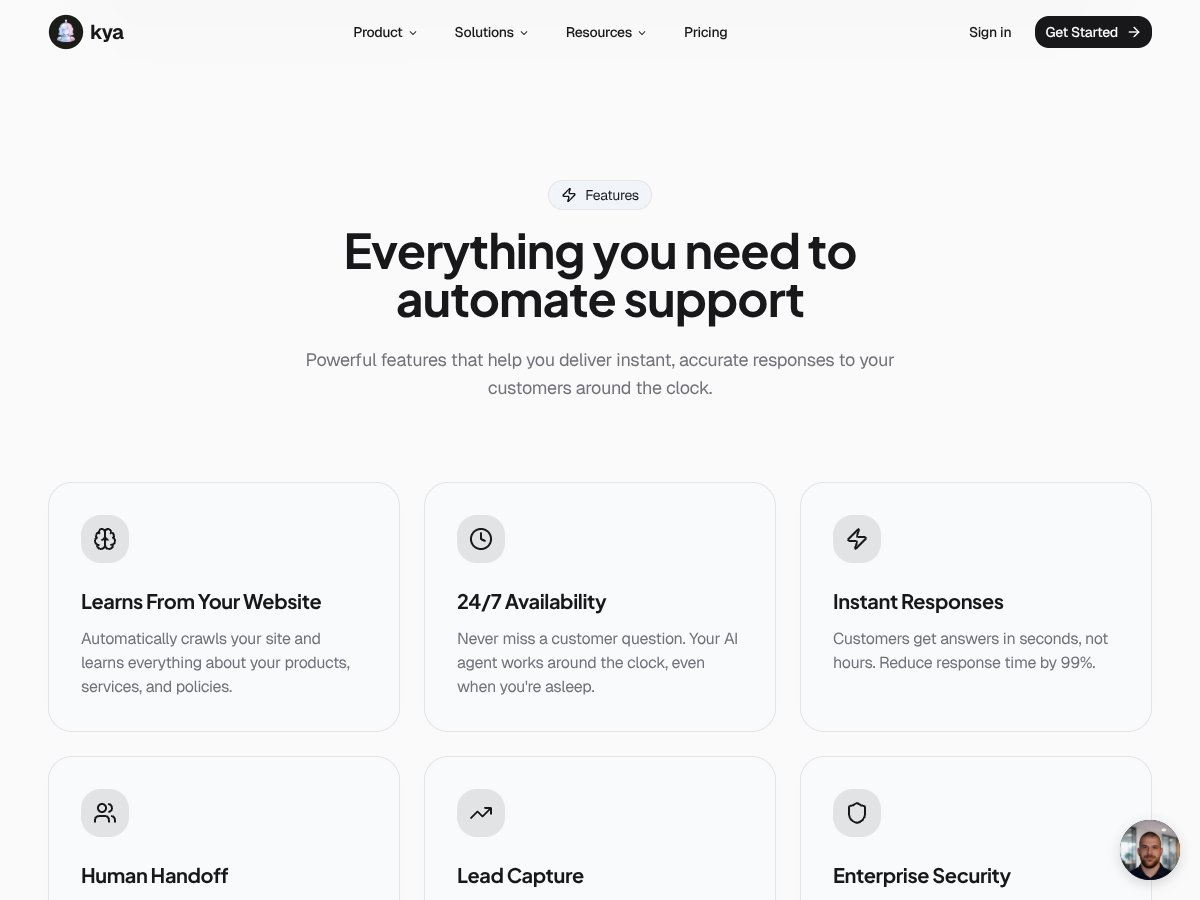
Automatic Content Learning (Crawling + Updates)

Kya learns by crawling your website and pulling in the content it can access. In my view, this is the biggest “time saver” feature because you’re not manually training intents and answers like you would with older chatbot tools.

That said, it’s not unlimited. What I noticed across the plans is that you’re capped on how many pages it can crawl (and that directly affects answer coverage). If you have a large site—especially with lots of blog posts, location pages, or product variants—this can become a problem fast. In practice, the bot will only be as useful as the pages it actually ingests.

Instant Customer Responses (Speed Matters)

When the chatbot is working correctly, it responds quickly. That’s important because visitors won’t wait around. If you’re answering common questions—pricing basics, shipping policies, setup steps, “how do I contact support?”—speed helps reduce bounce and can push people toward conversion.

But speed doesn’t fix weak content. If your site pages are vague, buried, or not written like a customer would search for, the bot may return answers that feel too general—or it might just not answer at all. The bot isn’t “reading your mind.” It’s pulling from what it knows.

24/7 Availability

It’s always online, which is great. Customers don’t have to wait until business hours, and you don’t have to staff up just to answer “quick” questions.

The catch is what you’d expect: if your site content doesn’t cover the questions your visitors ask, customers will still get stuck. So if you want the bot to feel helpful, you’ll need to make sure your FAQ and key pages are actually up to date.

Human Handoff (When the Bot Hits a Wall)

Kya includes a human handoff option for questions that the bot can’t confidently answer. I couldn’t fully test the handoff workflow end-to-end because I don’t have a real support team connected to this setup.

Still, from the interface and the way the feature is presented, it looks designed to prevent dead-ends—so the customer doesn’t just get a “no idea” message and disappear. If you already have someone who can respond quickly, this feature can be genuinely useful.

Lead Capture & Export

This is one of the more practical features. The chatbot can collect visitor emails and contact info and then export it to your CRM. If you’re running a marketing funnel, that’s a big deal—because you can turn “browsing” into “captured leads.”

One thing I’d watch: lead capture only works if your site clearly signals what the visitor should do next. If your chatbot doesn’t offer a reason to submit an email (like a quote, a demo, a download, or an update), people won’t bother.

Document Uploads (PDFs and More)

Kya supports uploads like PDFs so it can learn from documents, not just web pages. That’s helpful when your product docs, brochures, or policies live in PDF form.

In my experience with this kind of feature across AI tools, the quality depends on the document formatting. If your PDF has clean headings and readable text, the bot tends to do better. If it’s scanned images or messy formatting, you’ll usually see weaker answers. Kya looks promising here, but it’s not something I’d treat as “upload any random PDF and it’ll nail everything.”

Customization (Tone + Branding)

You can tweak the chatbot’s tone and branding, which is important if you don’t want it to feel like a generic bot. I like that it’s not completely locked down.

Just don’t expect enterprise-level conversation design. The customization is more about matching your brand vibe than building a fully custom conversation engine. For most SMBs, that’s fine.

How Kya Works (Setup, Crawling, and Real-World Expectations)

Getting started is genuinely straightforward. You enter your website URL and the tool starts crawling the content. In the product flow, the setup is quick—fast enough that you can test it without a big project plan.

Once the crawl completes, embedding the widget is simple. You paste a line of code and you’re basically ready to go. That’s a big win if you don’t want to involve developers just to launch a chatbot.

Now, the part I care about most: answering quality.

When I tested the bot conceptually against typical customer questions (the kind people ask on product pages and FAQ sections), it often did well with “common knowledge” questions that were already clearly spelled out on the site. But when the question required details that weren’t present (or weren’t in a format the bot could reliably use), the answers got weaker.

Here’s what that looks like in practice:

  • Good scenario: “What’s your refund policy?” → If your policy is clearly written in an FAQ or policy page, the bot can point to the right info.
  • Weak scenario: “Do you support feature X for my specific plan?” → If your plan details aren’t on the site, the bot can’t invent them. It may respond vaguely or essentially say it doesn’t know.

One more thing I wish was clearer from the beginning: if your site changes often (new pricing pages, updated shipping info, fresh product releases), you’ll want predictable ways to refresh the bot’s knowledge. If your content updates but the bot doesn’t recrawl quickly, you can end up with “outdated but confident” responses—exactly what you don’t want.

Also, if your website has lots of dynamic content (like content loaded via scripts, customer reviews fetched from another service, or heavily client-rendered pages), crawling may miss parts of what visitors actually see. It’s not that Kya is “bad”—it’s just how crawling-based systems work.

Bottom line from my perspective: Kya feels like an enhanced FAQ bot you can launch fast. If your site content is solid, it can be surprisingly effective. If it’s messy or incomplete, it won’t magically fix that.

Kya Pricing: Is It Worth It?

Kya interface
Kya in action
Plan Price What You Get My Take
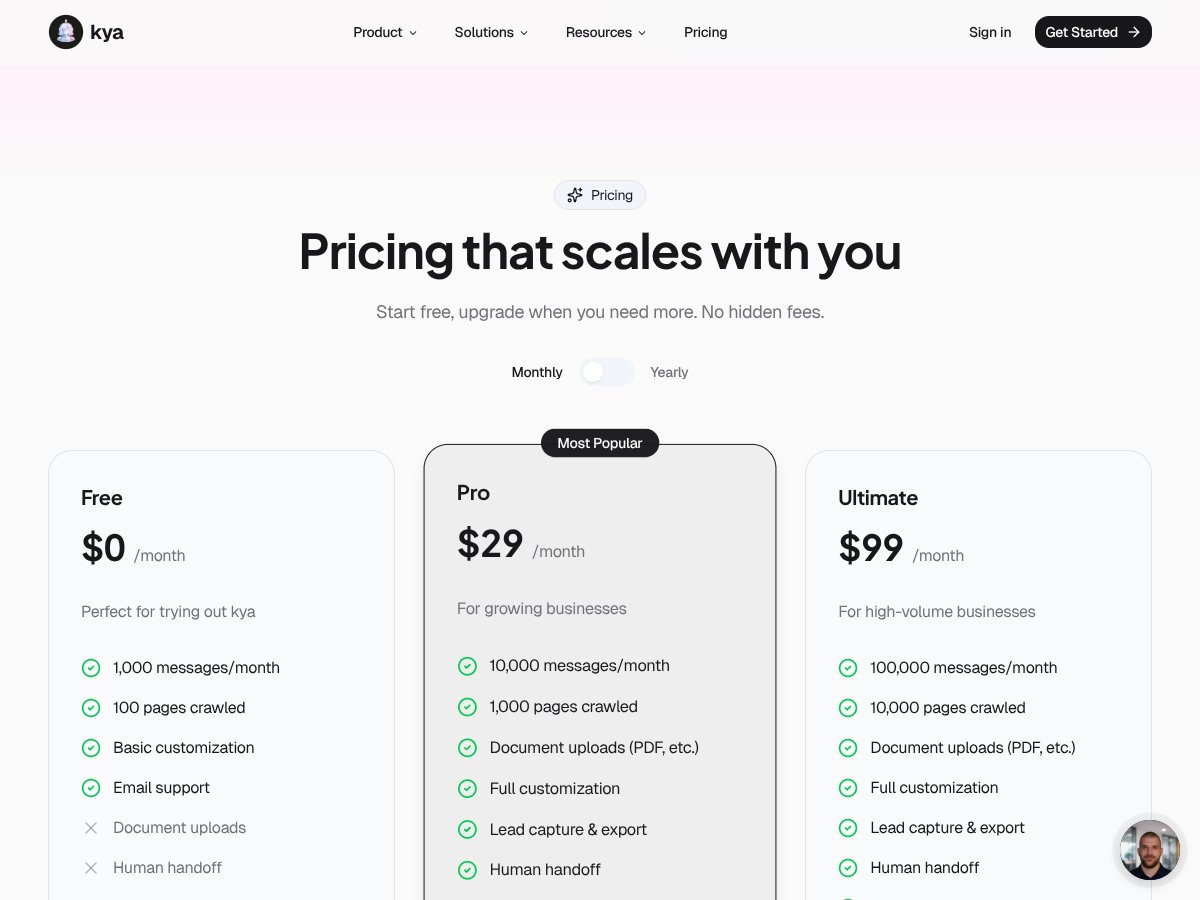
Free $0/month 1,000 messages/month, 100 pages crawled, basic customization, email support, document uploads, human handoff Good for testing if the concept works for your content. If you’re only trying it on a small site or a focused set of pages, the free tier can be enough. Just pay attention to the message cap—once you hit 1,000 messages, you’ll be nudged to upgrade.
Pro $29/month 10,000 messages/month, 1,000 pages crawled, full customization, lead capture & export, human handoff, priority support This is where it feels most practical for growing SMBs. More page coverage means better answer coverage, and lead capture is usually what makes the chatbot worth keeping around.
Ultimate $99/month 100,000 messages/month, 10,000 pages crawled, API access, full customization, lead export, human handoff, enterprise security Worth considering if you have high traffic or need API access for deeper integrations. If your message volume stays low, you might not need this tier—capacity is great, but only if you’ll actually use it.

Pricing is pretty straightforward—no complicated add-ons that surprise you later. The real “gotcha” isn’t the monthly cost. It’s the usage caps: messages and crawled pages. If you have a big site or you expect heavy traffic, you’ll hit those limits sooner than you think.

Also, API access appears to be reserved for the highest tier. If you’re planning to connect Kya to internal systems, that matters. For many small teams, Pro is enough. For teams that need deeper integration, Ultimate starts to make more sense.

The Good and The Bad (What I’d Tell a Friend)

What I Liked

  • Fast, no-code setup: If you can add a script or paste a widget snippet, you can launch this quickly. That matters when you’re trying to prove value without a dev sprint.
  • It learns from your content: Crawling your pages (and PDFs) means you don’t have to build a giant library of manual answers upfront.
  • Free tier is actually usable: 1,000 messages and 100 pages crawled gives you room to test whether your site content translates into helpful answers.
  • Lead capture + export: This is the feature that turns a chatbot from “support toy” into “pipeline help.” If you already track CRM leads, it fits naturally.
  • Instant responses + always-on: Customers get answers quickly, and you don’t have to staff the bot after hours.
  • Human handoff: Even if you don’t use it every day, it’s reassuring to have a path for customers when the bot can’t handle something.

What Could Be Better

  • Lower tiers may not cover big sites: The plan limits on pages crawled can restrict answer quality if your important info lives on pages outside that cap.
  • Analytics aren’t the main focus: You may not get the kind of deep reporting you’d expect from a dedicated support platform (like detailed bot performance breakdowns by intent).
  • Content quality dependence: If your pages are outdated, poorly written, or missing key details, the bot will reflect that. Garbage in, garbage out—same rule as any AI system.
  • No built-in ticketing workflow: If you expect full helpdesk ticket creation, tagging, SLAs, and agent workflows, you’ll likely need another tool.
  • Multi-language support needs confirmation: I didn’t see enough solid, verifiable detail in the original material here to confidently claim full multi-language coverage. If you need multiple languages, you should verify it directly with Kya before committing.

Who Is Kya Actually For?

Kya fits best when your website already contains the answers people ask for. If you’re a small to mid-sized business using your site for support, onboarding, or lead gen, this can be a smart add-on.

In real terms, it’s a good match for:

  • E-commerce brands that want to answer shipping, returns, and product FAQs (and capture emails).
  • SaaS companies that want to reduce repetitive questions and help new users find setup steps faster.
  • Agencies that manage multiple client sites and want a quick chatbot deployment process.

If you’re a solo entrepreneur or a marketing manager, I also think it’s attractive because it’s no-code. You’re not building a chatbot from scratch—you’re connecting it to your existing knowledge base.

Where it might not fit: if your support needs are extremely niche, your content is scattered across sources the crawler can’t access, or you need advanced multi-language behavior and complex integrations right away.

Who Should Look Elsewhere

If your business runs on enterprise-level workflows—think complex routing, multi-agent collaboration, deep ticket automation—Kya may feel too lightweight.

Also, if you require:

  • advanced helpdesk features (ticket lifecycle, SLA rules, agent collaboration)
  • deep analytics for bot performance and escalation outcomes
  • multi-language support that you can deploy immediately across multiple locales
  • high-volume scaling beyond the message caps

…you’ll probably want to compare against platforms that are built first and foremost for customer support operations.

And if your website content changes constantly (daily pricing updates, frequently updated docs, live dashboards), you’ll need to be confident you can keep the bot’s knowledge fresh—or you’ll risk outdated answers.

How Kya Stacks Up Against Alternatives

Intercom

  • Intercom is built for bigger teams and more advanced messaging + automation workflows. It’s not just a chatbot—it’s a whole customer engagement platform.
  • It’s also typically more expensive. If you’re trying to justify it for a small team, the cost can be hard to swallow.
  • Pick Intercom if you need advanced automation, deep integrations, and mature support workflows.
  • Pick Kya if you want a fast website-embedded AI assistant for support FAQs and lead capture without the enterprise price tag.

Zendesk

  • Zendesk is primarily a ticketing system (chat/email/phone support) with AI features depending on setup and integrations.
  • It’s a better fit when you truly need a support desk, not just a chatbot widget.
  • Pick Zendesk if your support process depends on ticket management and multi-channel workflows.
  • Pick Kya if your goal is to reduce ticket volume and answer common questions directly on your site.

Tidio

  • Tidio is more of a chat platform with rule-based bots and some AI features. It can be easier to launch, but it often relies more on predefined logic than content-driven learning.
  • If you want a lightweight setup and don’t care about deeper “learn from my site” behavior, it can be a good option.
  • Pick Tidio for simple chat automation on a budget.
  • Pick Kya if you want your bot to pull from your website and docs to answer naturally.

Drift

  • Drift is more sales-focused—think lead qualification, booking meetings, and conversational marketing.
  • It’s usually priced like a serious marketing platform, not a simple support widget.
  • Pick Drift if your main goal is aggressive lead capture and qualification.
  • Pick Kya if you want cost-effective support + lead capture without building a full sales automation engine.

Crisp

  • Crisp is live chat-first with light AI features for chat and automation.
  • It’s often a solid choice for smaller websites that want quick chat coverage.
  • Pick Crisp if you want live chat with minimal complexity.
  • Pick Kya if you want a content-learning AI assistant that can handle FAQ-style questions on its own.

Bottom Line: Should You Try Kya?

I’d rate Kya around 7/10 based on how these kinds of crawled-content chatbots typically perform. It’s genuinely easy to launch, it’s affordable, and it can be effective for SMB support and lead capture—especially if your site content is already strong.

What I’d do if I were making the decision today: start with the Free plan, then test it against 10–20 real questions your customers actually ask. If the answers feel accurate and helpful, upgrade to Pro when you need more message volume and more pages crawled.

If you need enterprise ticketing, complex multi-agent workflows, or very robust multi-language deployment, you’ll likely be happier spending your budget elsewhere.

For smaller teams and startups dipping their toes into AI chatbots, though? Kya is a reasonable starting point—fast, practical, and not overly complicated.

Common Questions About Kya

  • Is Kya worth the money? - For small businesses that want AI support without a huge budget, it can be worth it—especially with the free tier and Pro plan.
  • Is there a free version? - Yes. The free plan includes 1,000 messages and 100 pages crawled, which is enough for testing on smaller sites.
  • How does it compare to Intercom? - Kya is simpler and cheaper to launch. Intercom is more powerful for advanced automation and larger-team workflows.
  • Can I customize the chatbot’s tone and branding? - Yes. You can customize branding and tone to match your site.
  • Does it support multiple languages? - The information provided here doesn’t fully confirm multi-language support. If this is a must-have, verify multi-language capabilities with Kya before buying.
  • Is technical expertise needed to set up? - No. It’s designed to be no-code and typically takes only a short time to install and embed.
  • Can I get a refund if I’m not satisfied? - Refund terms depend on billing and payment provider policies. If monthly billing is flexible, you can usually cancel without long lock-ins.

As featured on

Automateed

Add this badge to your site

Stefan

Stefan

Stefan is the founder of Automateed. A content creator at heart, swimming through SAAS waters, and trying to make new AI apps available to fellow entrepreneurs.

Related Posts

Figure 1

Strategic PPC Management in the Age of Automation: Integrating AI-Driven Optimisation with Human Expertise to Maximise Return on Ad Spend

Title: Human Intelligence and AI Working in Tandem for Smarter PPCDescription: A digital illustration of a human head in side profile,

Stefan
AWS adds OpenAI agents—indies should care now

AWS adds OpenAI agents—indies should care now

AWS is rolling out OpenAI model and agent services on AWS. Indie authors using AI workflows for writing, marketing, and production need to reassess tooling.

Jordan Reese
experts publishers featured image

Experts Publishers: Best SEO Strategies & Industry Trends 2026

Discover the top experts publishers in 2026, their best practices, industry trends, and how to leverage expert services for successful book publishing and SEO.

Stefan

Create Your AI Book in 10 Minutes