LIFETIME DEAL — LIMITED TIME
Get Lifetime AccessLimited-time — price increases soon ⏳
AI Tools

Livedocs Review: Is It Worth It in 2026?

Stefan
7 min read
#Ai tool

Table of Contents

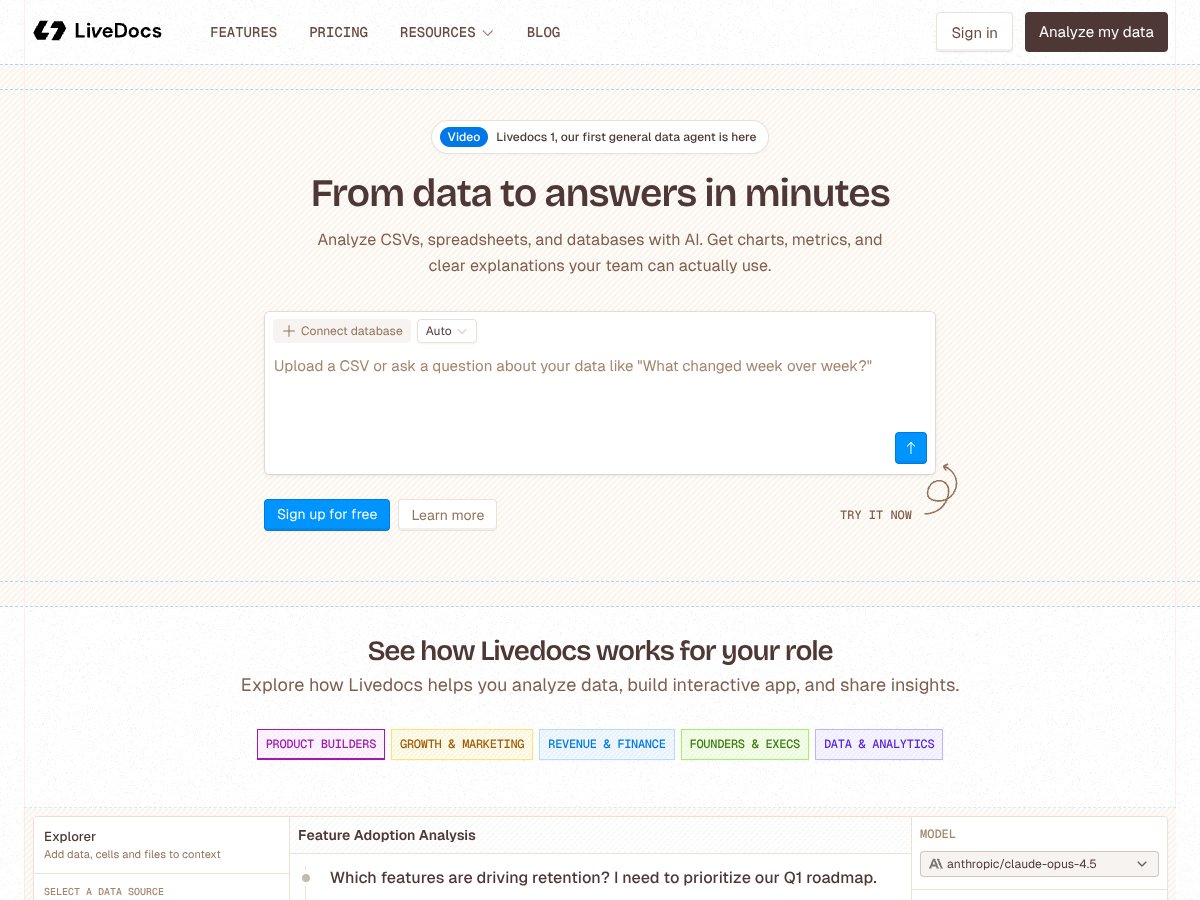
Livedocs screenshot

Introduction

In today’s data-driven world, the ability to quickly analyze and interpret complex datasets is crucial for creators, entrepreneurs, and data teams alike. Enter Livedocs, an AI-powered tool designed to turn your raw data—be it CSVs, spreadsheets, or databases—into meaningful insights within minutes. If you’re looking for a way to streamline your data analysis process without heavy coding or complex BI tools, this Livedocs review will give you a detailed look into what it offers, its strengths, limitations, and whether it’s the right fit for your needs.

Table of Contents

  1. What is Livedocs?
  2. Key Features
  3. How Livedocs Works
  4. Pricing Plans
  5. Pros and Cons
  6. Best Use Cases
  7. Livedocs Alternatives
  8. Our Verdict
  9. Frequently Asked Questions

What is Livedocs?

Livedocs is an AI-driven data analysis tool that specializes in transforming raw data from CSV files, spreadsheets, and databases into actionable insights. Its core promise is to provide users with instant charts, metrics, and plain-English explanations, making data accessible even for those without advanced analytical skills. By connecting to various data sources or simply uploading files, users can query their data in natural language or through predefined questions, receiving instant visualizations and summaries.

Launched at livedocs.com, the platform positions itself as a one-stop solution for teams that want quick, reliable insights without the need for extensive setup or coding. Whether you’re a product manager analyzing feature adoption, a marketer tracking campaign performance, or a finance team forecasting revenues, Livedocs aims to simplify your data analysis workflow.

Key Features

1. AI-Powered Data Analysis

Livedocs leverages AI to analyze your data and generate insights, reducing the need for manual querying or scripting. It can automatically identify patterns, trends, and anomalies in your datasets.

2. Multi-Source Data Integration

The platform supports data uploads from CSVs, spreadsheets, and databases. It also offers the ability to connect to cloud storage solutions like Google Drive or S3 buckets, enabling seamless data integration.

3. Instant Visualizations

With built-in charting capabilities, users can generate visual representations of their data—such as bar charts, line graphs, and more—without any prior design experience.

4. Plain-English Insights and Explanations

One of Livedocs’ standout features is its ability to produce clear, plain-English explanations of complex data points and trends, making insights accessible to non-technical stakeholders.

5. Natural Language Querying

You can ask questions about your data in natural language, such as “What changed week over week?” or “Which features are driving retention?” and receive instant responses.

6. Collaborative Workspace

The platform aims to replace traditional BI tools with a collaborative environment where teams can analyze, visualize, and share insights effortlessly.

7. No-Code Environment

Livedocs emphasizes a no-code approach, enabling users without coding skills to perform complex data analysis tasks easily.

8. Speed and Performance

Powered by fast data processing engines like Polars and DuckDB, Livedocs promises rapid response times even with large datasets.

How Livedocs Works

While specific step-by-step details are limited, here's a general overview of how Livedocs operates based on available information:

  1. Data Upload or Connection: Users upload CSV files, spreadsheets, or connect to databases and cloud storage solutions like Google Drive or S3 buckets.
  2. Data Processing: Once connected, Livedocs processes the data using its AI engine, identifying key patterns, metrics, and potential insights.
  3. Query or Question: Users can ask questions in natural language or select predefined queries, such as “What changed week over week?”
  4. AI-Generated Insights: The platform instantly generates charts, metrics, and plain-English explanations based on the query.
  5. Visualization & Sharing: Users can visualize insights with built-in charts and share these as interactive reports or apps, replacing static screenshots or complex BI dashboards.

While there are no detailed tutorials publicly available, the emphasis is on speed, simplicity, and ease of use.

Pricing Plans

Details about Livedocs’ pricing are limited. The platform offers a free tier, but specific features, limits, or costs of paid plans are not publicly disclosed. For the most current information, it's best to visit their official website and check their pricing section.

Plan Details
Free Tier Available—check website for current features and limitations
Paid Plans Check their website for current pricing details and plans

Pros and Cons

Pros

  • Quickly turns raw data into insights without coding
  • Supports multiple data sources and easy uploads
  • Generates clear, plain-English explanations
  • Fast processing with powerful hardware engines
  • Visualizations are built-in and easy to generate
  • Ideal for teams seeking collaboration and sharing

Cons

  • Limited publicly available information on detailed features
  • No specific mention of integrations with other BI tools
  • Pricing details are not transparent—check the website for updates
  • Lacks testimonials or case studies publicly shared
  • Potential limitations in handling extremely large datasets or complex queries (not explicitly stated)

Best Use Cases

  • Quickly analyzing feature adoption and retention patterns for product teams
  • Marketing teams tracking campaign performance across channels
  • Finance departments forecasting revenues and analyzing financial metrics
  • Data teams seeking a no-code, collaborative environment for data exploration
  • Entrepreneurs needing fast insights to inform decision-making

Since Livedocs emphasizes speed and ease of use, it’s especially suitable for teams that want to avoid complex setup or heavy engineering, making it a good choice for non-technical stakeholders too.

Livedocs Alternatives

If you’re exploring options beyond Livedocs, here are some similar tools:

  • Tableau – A popular BI platform with extensive visualization capabilities, but more complex and expensive.
  • Power BI – Microsoft’s BI solution that integrates well with other Microsoft products.
  • DataRobot – Focuses on automated machine learning and insights.
  • Zoho Analytics – Affordable and user-friendly data analytics platform.

Compared to these, Livedocs aims to offer faster, more accessible insights tailored for teams that prefer minimal setup and no-code interaction.

Our Verdict

Livedocs is a promising tool for teams and individuals seeking rapid, straightforward data analysis without the need for coding or complex BI setups. Its strengths lie in quick data processing, plain-English insights, and collaborative features. However, the lack of detailed information about integrations and pricing transparency makes it harder to evaluate its suitability for larger or more complex data needs.

If you’re a creator, entrepreneur, or part of a team that wants to understand your data fast and communicate insights easily, Livedocs could be a valuable addition to your toolkit. It’s especially appealing for those who prefer a no-code, AI-powered approach to data analysis.

For those interested in content creation, Automateed’s own AI tools for ebook and content generation can complement your data insights, helping you craft reports, articles, or marketing content based on your data findings. Check out Automateed for powerful AI tools to streamline your content creation process.

Visit Livedocs.com today to explore the platform and see if it fits your data analysis needs.

Frequently Asked Questions

1. Is Livedocs free?

It offers a free tier, but specific features and limitations are not publicly detailed. Check their website for current pricing and plans.

2. Can I connect Livedocs to my existing databases?

Yes, Livedocs supports connecting to databases and cloud storage services like Google Drive and S3 buckets.

3. Do I need coding skills to use Livedocs?

No, Livedocs is designed as a no-code platform, allowing users to perform data analysis through natural language questions and visualizations.

4. What types of data can Livedocs analyze?

The platform can analyze CSV files, spreadsheets, and databases, making it versatile for various data formats.

5. How fast is Livedocs?

Powered by fast engines like Polars and DuckDB, it promises quick responses even on large datasets.

6. Is there any support or tutorials available?

Currently, detailed tutorials or support information are limited. Visit their website for updates and resources.

To experience fast, AI-driven data analysis, visit Livedocs today and see how it can help you turn data into answers in minutes!

As featured on

Automateed

Add this badge to your site

Stefan

Stefan

Stefan is the founder of Automateed. A content creator at heart, swimming through SAAS waters, and trying to make new AI apps available to fellow entrepreneurs.

Related Posts

FaceSymmetryTest Review – Honest Look at Free AI Tool

FaceSymmetryTest Review – Honest Look at Free AI Tool

FaceSymmetryTest is a fun online tool

Stefan
Sweep Review – An AI Assistant for JetBrains IDEs

Sweep Review – An AI Assistant for JetBrains IDEs

Sweep enhances productivity in JetBrains IDEs

Stefan
AI Song Maker Review – Simple & Creative Music Generation

AI Song Maker Review – Simple & Creative Music Generation

easy way to create music with AI

Stefan

Create Your AI Book in 10 Minutes