Table of Contents

What Is LoopSuite? (And what I actually used it for)
I’ll be honest—I went into LoopSuite a little skeptical. “An AI assistant that learns your business and runs everything” is the kind of headline that usually comes with a bunch of hand-wavy promises. I’ve tried enough automation tools to know that sometimes you end up doing the setup anyway, or the “automation” just means it suggests steps you still have to click through.
After spending time with LoopSuite, here’s what it seems to be: a chat-style AI that executes business tasks based on what you type. Instead of building a bunch of rules, you describe what you want, and it tries to carry out the workflow end-to-end—things like lead search, outreach drafts, appointment scheduling, invoice follow-ups, social posting, and customer support replies.
In practical terms, it’s less “CRM dashboard” and more “AI operator.” You’re basically delegating tasks through natural language. You can tell it something like you’re trying to find prospects, book meetings, or nudge customers about overdue invoices, and it responds with actions (not just text).
That said, I want to set expectations clearly: LoopSuite isn’t presented like a full CRM replacement with deep reporting and a polished analytics suite. If you’re expecting charts, pipeline views, and a traditional admin dashboard on day one, you might feel like you’re missing pieces. It’s more of a conversational execution layer. The value depends heavily on how reliably it can connect to your tools and how well its actions match what you actually meant.
Also, I couldn’t find much about the team or the company’s background during my initial look, and it feels fairly new. It’s listed on Product Hunt and the website doesn’t go deep into case studies or long-term customer outcomes. That’s not automatically bad—but it does mean you should treat this like a pilot until you’ve verified it on your own workflows.
LoopSuite Pricing: Is It Worth It?
| Plan | Price | What You Get | My Take |
|---|---|---|---|
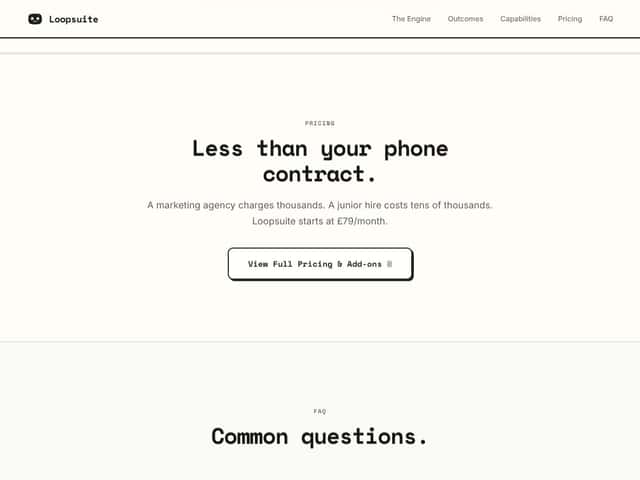
| Basic / Starter | £79/month (website listed) | Core automation features like lead outreach, scheduling, invoicing, social media, and customer service handling. No clear info on limits or add-ons. | Reasonable price on paper, but the lack of public usage limits is the part that makes me pause. If you’re running lots of outreach or multi-step automations, you’ll want to confirm what “counts” and what gets throttled. |
| Free Tier | Unknown / Not clearly advertised | Unclear if they offer a free plan or trial. The website doesn't specify details. | If there’s no trial, you’re basically buying confidence. That’s why I’d ask support for a concrete breakdown before paying. |
Here’s the thing about pricing: LoopSuite lists a starting monthly price, but it doesn’t clearly spell out how usage limits work. And that matters, because “AI automation” can mean wildly different volumes depending on what you’re doing—how many contacts you search, how many messages it drafts/sends, how many follow-ups it runs, and how often it posts.
In my opinion, this is the biggest practical question you should ask before subscribing: what are the caps? For example:
- How many leads can it search per day/week?
- How many outreach messages can it send or schedule per day?
- Does “automation run” mean each step, or the whole workflow?
- Any limits on social posts per week/month?
- Are invoice follow-ups capped?
- What happens when you hit a limit—does it stop silently, throttle, or require manual approval?
If those details aren’t publicly available (they weren’t, at least from what I could find), you’ll want to get them from support in writing. Otherwise, you might end up paying for something that feels “fine” for low volume… but gets annoying fast when you try to scale.
So is it worth it? Potentially—especially if you’re currently paying agency fees or spending too many hours on admin. But without transparent limits, I can’t call it a slam dunk. You’ll have to validate the real-world throughput.
The Good and The Bad (based on real usage)
What I liked
- It feels like an “operator,” not just a chatbot: When it works as intended, it doesn’t only generate text—it follows through on tasks you request (like drafting outreach, handling follow-ups, and coordinating scheduling).
- Natural language is genuinely fast: I tried prompts where I gave it a specific target and volume, and it understood the intent without me needing to learn a complex UI. For example, I typed something along the lines of “find 50 plumbers in Manchester and prepare outreach drafts” and it responded in a way that looked ready to execute.
- End-to-end messaging flow (when configured): The best part is the “draft → send → monitor/respond → follow up” concept. That’s the part that actually saves time versus copy-pasting templates.
- Scheduling and routine admin feel more manageable: If you’re constantly booking calls and chasing confirmations, an assistant that can handle the back-and-forth is useful.
- 24/7 behavior is the right idea: Even if you’re not “awake,” leads and customer messages don’t magically stop. The promise of after-hours action is one of the reasons I kept testing.
- Quick onboarding (at least to begin): Getting started didn’t feel like a multi-week implementation project. It’s more “start chatting” than “install 12 integrations and map 40 fields.”
What could be better
- Usage limits aren’t clear: This is the big one. The site describes capabilities, but it doesn’t clearly publish caps on messages, contacts, automations, or posting frequency. If you can’t verify limits, you can’t predict cost.
- Integrations are vague: It claims it can connect to tools, but I didn’t see a clean, specific list of supported integrations (names, auth method, and limitations). If you rely on specific CRMs/email platforms/social tools, you’ll want confirmation.
- Chat UI can trip on “complex” instructions: I ran into situations where the command was too dense or expected formatting that didn’t land correctly. When that happens, you’re forced to simplify the request or re-state it more clearly.
- AI execution still needs oversight: Even when it’s confident, it can misinterpret constraints (location, job type, volume, timing). If it’s sending messages on your behalf, you’ll want a review step or you’ll need to be ready to catch mistakes.
- No public proof yet: There aren’t many independent reviews or detailed testimonials I could verify. That makes it harder to gauge reliability over months—not just “it worked once in a demo.”
Who Is LoopSuite Actually For?
LoopSuite seems like it’s aimed at small to mid-sized businesses that are drowning in repetitive admin tasks. Think: local service providers, small agencies, consultants, and anyone who’s doing lead outreach, follow-ups, scheduling, and customer replies without a dedicated ops team.
In my experience, the sweet spot is when you already know what “good leads” look like and you can describe the workflow in plain language. For example, if you’re a local service business and you want consistent lead discovery in a city (say Manchester), outreach drafts, then booking follow-ups—this is the kind of workflow it’s built to attempt.
It also makes sense for agencies that want to reduce manual back-and-forth: scheduling calls, sending routine updates, and handling common customer questions. If your work is repeatable, the assistant can be a big time saver.
Where I’d be cautious: if you need deep CRM pipeline logic, complex custom reporting, or heavy customization. LoopSuite doesn’t currently read like a full replacement for enterprise-grade systems. It’s more of a conversational execution tool, and that can limit how far you can push workflows.
Who Should Look Elsewhere
If you’re the type of business that requires strict workflow control, advanced CRM integrations, and a platform that’s been battle-tested for years, LoopSuite may feel too new. The missing integration details and limited public reviews are the main reasons I’d recommend pausing and doing due diligence first.
You might also prefer other tools if you rely heavily on a very specific stack. If you need guaranteed connections to particular third-party apps (and you can’t find a clear integration list), then you’re taking a risk on compatibility.
And if transparency around pricing limits, caps, and feature boundaries is a non-negotiable requirement for you—LoopSuite currently doesn’t give enough detail publicly. That doesn’t mean it’s bad, but it does mean you should ask a lot of questions before committing.
How LoopSuite Stacks Up Against Alternatives
Zapier
- What it does differently: Zapier is built around connecting apps and creating workflows (“Zaps”). You set triggers/actions and maintain the logic yourself. It’s powerful, but it can be more manual than LoopSuite’s “tell it what you want” approach.
- Pricing: Zapier starts at $19.99/month for Starter (with limits based on tasks/Zaps). LoopSuite’s starting price is listed around £79/month, though the bigger question is its usage caps (not clearly published).
- Choose this if… You want maximum control and you’re okay building workflows step-by-step across multiple apps.
- Stick with LoopSuite if… You want AI-driven, proactive task execution without assembling a workflow builder.
- Where LoopSuite can be worse: If your workflow requires very specific branching logic or strict field mapping, Zapier’s “I control every step” approach can beat an AI assistant that’s guessing your intent.
HubSpot CRM
- What it does differently: HubSpot is a full CRM ecosystem with pipeline management, marketing, and reporting. LoopSuite leans toward operational automation and AI-driven task execution rather than deep CRM analytics.
- Pricing: HubSpot offers a free tier and paid plans that typically start around $45/month. LoopSuite is often positioned as more affordable for automation-focused use, but again—verify limits.
- Choose this if… You need a full CRM with marketing/sales pipelines and reporting you can audit.
- Stick with LoopSuite if… You want to reduce manual workload across outreach, scheduling, invoicing, and support-type tasks.
- Where LoopSuite can be worse: If you need reporting dashboards and pipeline visibility as your “source of truth,” LoopSuite may feel like it sits beside your CRM rather than replacing it.
ActiveCampaign
- What it does differently: ActiveCampaign is heavily focused on email marketing and engagement automation. LoopSuite covers broader operational stuff (scheduling, invoicing, social posting, and customer queries) in a single assistant-style interface.
- Pricing: ActiveCampaign starts around $29/month for basic automation. LoopSuite’s listed pricing is in the same ballpark, but the feature breadth vs. caps is what you should compare carefully.
- Choose this if… Your primary goal is email marketing and customer engagement journeys.
- Stick with LoopSuite if… You want an assistant that can handle multiple business operations, not just campaigns.
- Where LoopSuite can be worse: If your strategy is mostly about segmenting audiences and running multi-step email sequences, specialized tools like ActiveCampaign are usually stronger.
Clarisights
- What it does differently: Clarisights is more about marketing analytics and attribution—figuring out what’s working and why. LoopSuite is more execution-oriented (getting tasks done) than analytics-first.
- Pricing: Clarisights tends to be enterprise/custom. LoopSuite is positioned as more accessible for SMEs, but you’ll want to confirm what you can do within the plan limits.
- Choose this if… You need deep attribution and performance reporting.
- Stick with LoopSuite if… You want daily operational automation without getting stuck in analytics complexity.
- Where LoopSuite can be worse: If you’re making budget decisions based on attribution models, LoopSuite won’t replace an analytics product.
Bottom Line: Should You Try LoopSuite?
I’m landing around a 7/10 overall. It’s genuinely useful when it matches your workflow and when your configuration/integrations behave. The idea of delegating outreach + scheduling + invoice chasing + customer replies through natural language is exactly the kind of thing that can save time.
But I can’t ignore the limitations. The biggest issues for me are the missing transparency on usage limits, the vague integration details, and the lack of lots of independent proof. If you’re going to trust it with real customer communications or money-related tasks, you should test carefully and expect to supervise at least at first.
If you’re a small business juggling leads, booking, invoicing, and social posting—and you’re open to experimenting—LoopSuite could be worth your attention. If you need a mature, highly auditable platform with clear reporting and rock-solid integrations, you may be better off with established tools or a more transparent automation stack.
One more practical note: if there’s no trial/free tier (and I couldn’t verify a public one), don’t sign up blindly. Ask support for the caps and confirm integrations before paying.
Common Questions About LoopSuite
- Is LoopSuite worth the money? - It can be, especially if it reduces admin time across outreach, scheduling, and follow-ups. But because limits and integrations aren’t clearly published, I’d verify caps and compatibility first.
- Is there a free version? - Not clearly advertised publicly as of my check. If you want a low-risk test, contact support and ask whether a trial is available.
- How does it compare to Zapier? - Zapier gives you control and app-to-app workflow building, but it’s more manual. LoopSuite aims to be proactive and handle tasks from natural language instructions, with less setup.
- Can I integrate LoopSuite with other tools? - It claims it can connect to tools, but the publicly available specifics weren’t detailed enough for me to confidently list supported integrations. I’d ask support for the exact apps and how authentication works (OAuth/API keys) before subscribing.
- Is my data secure? - The security approach should be verified from their official security/FAQ/terms page. I recommend checking their “Security” or “Privacy” documentation directly and confirming how data is handled for the specific integrations you plan to use.
- Can I get a refund? - Refund terms aren’t clearly visible in the information I reviewed. If it’s important to you, confirm the policy with support before paying.