Table of Contents

What Is MACH AI?
Honestly, when I first heard about MACH AI, I thought it was just another AI-powered code generator promising to crank out boilerplate and make developers' lives easier. But what caught my interest was that it claims to be a full-blown development platform—combining code generation, database setup, authentication, and deployment all in one. Basically, it’s pitching itself as a one-stop shop for building and launching apps quickly, without the usual infrastructure headaches.
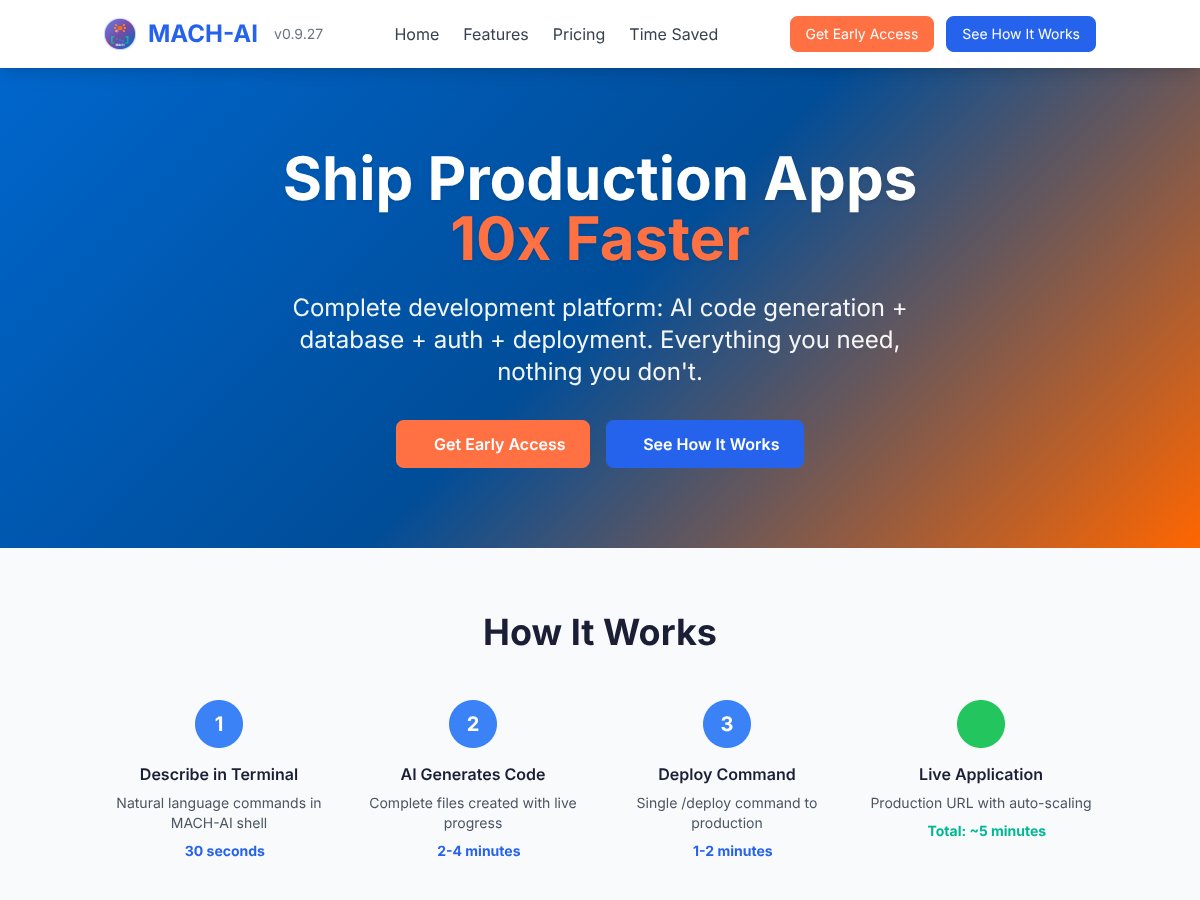
In plain English, MACH AI tries to do a lot of the heavy lifting for developers. You describe what you want in simple language—like “build a to-do app with user login”—and it generates the code, sets up the database, adds auth, and even deploys it to a live URL, all in minutes. The idea is to cut down on the time-consuming setup work that usually drags down projects, especially for solo developers, students, or small teams who want to iterate fast.
As far as I could find, MACH AI is a relatively new platform, and the company behind it isn’t widely known or established—at least not in the mainstream developer community. The website doesn’t reveal much about who’s running it or the team’s background, which is a bit of a red flag if you’re thinking long-term reliability. That said, the platform’s demo videos and descriptions seem straightforward, and it’s clear they’re targeting developers who want to skip the boilerplate and go straight to apps.
My initial impression? It’s as advertised—at least on the surface. The process they describe matches what I experienced during a test run: describe your app, wait a few minutes, and you get a deployable project. But I was skeptical about how flexible or complex these generated apps could be, and whether it’s truly a fit for anything beyond simple prototypes. So far, it’s not a platform you’d use for complex, production-grade systems without a lot of customization.
One thing I want to be clear about: MACH AI isn’t a general-purpose IDE or a tool to replace deep coding. It’s more like a very advanced code assistant that can bootstrap entire apps. It doesn’t seem to support external integrations or advanced workflows yet, and it’s not clear if it can handle niche features or very custom logic. So, if you’re looking for a tool to replace your entire stack or do complex backend work, this isn’t it.
MACH AI Pricing: Is It Worth It?

| Plan | Price | What You Get | My Take |
|---|---|---|---|
| Free Tier | Unknown / Not publicly disclosed | Likely limited access, maybe basic features | Since the exact details aren’t clear, it’s hard to gauge if it’s truly free or just a trial. Be cautious about hidden limits or feature caps. |
| Pro/Plus Plans | Pricing not publicly available | Additional features, higher usage limits, priority support, etc. | Without concrete prices, it’s tough to compare directly. Expect enterprise-level pricing if it follows typical SaaS models for such platforms. |
Here’s the thing about the pricing…
What they don’t tell you on the sales page is how much these plans actually cost. If you’re a solo developer or a student, the lack of transparent pricing could be a dealbreaker—especially if the premium tiers are aimed at large teams or organizations. I was honestly expecting some sort of clear, tiered pricing structure or at least a ballpark figure, but it seems to be kept under wraps for now.
This might be a dealbreaker for some if you’re trying to budget or compare it directly against competitors. The absence of details also raises questions about whether there are usage limits, restricted features behind paywalls, or additional costs for things like higher API calls or deployment slots. Fair warning: if you’re serious about using this platform professionally, you’ll want to reach out for a quote or wait for more transparency.
Which plan makes sense for who? Well, if they do offer a free tier, it could be a good way to test the waters—especially if you’re a student or hobbyist. But for serious production use, expect to pay a premium, and without concrete numbers, it’s a gamble. Keep an eye out for updates or contact their sales team for clarity before committing.
The Good and The Bad
What I Liked
- Integrated Platform: MACH AI combines code generation, database, auth, and deployment into a single platform, which simplifies the entire development cycle.
- Speed of Deployment: The demo showing a full app going live in under 4 minutes is impressive—if it holds up in real-world scenarios, that’s a game-changer for rapid prototyping.
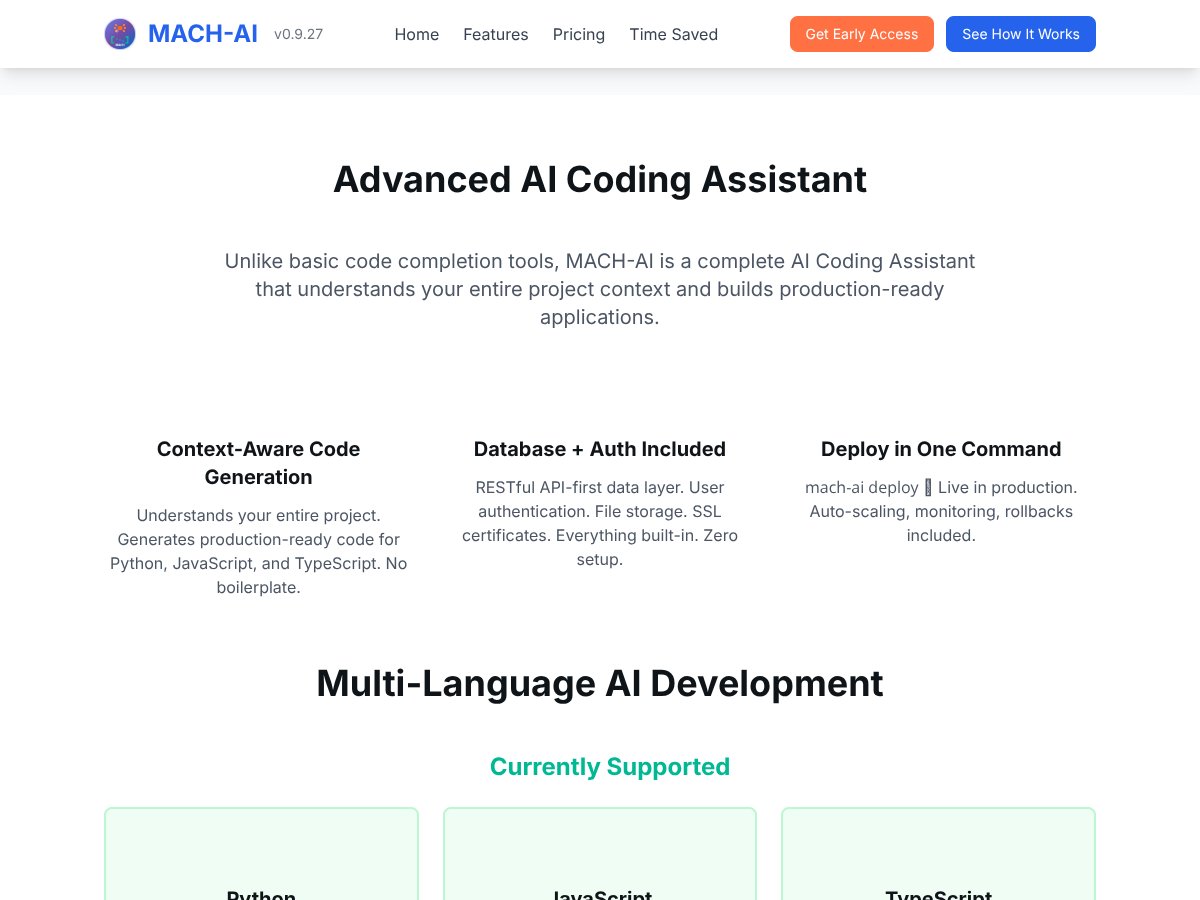
- Context-Aware Code Generation: Unlike basic code autocompletion, MACH AI claims to understand your project context, reducing boilerplate and manual edits.
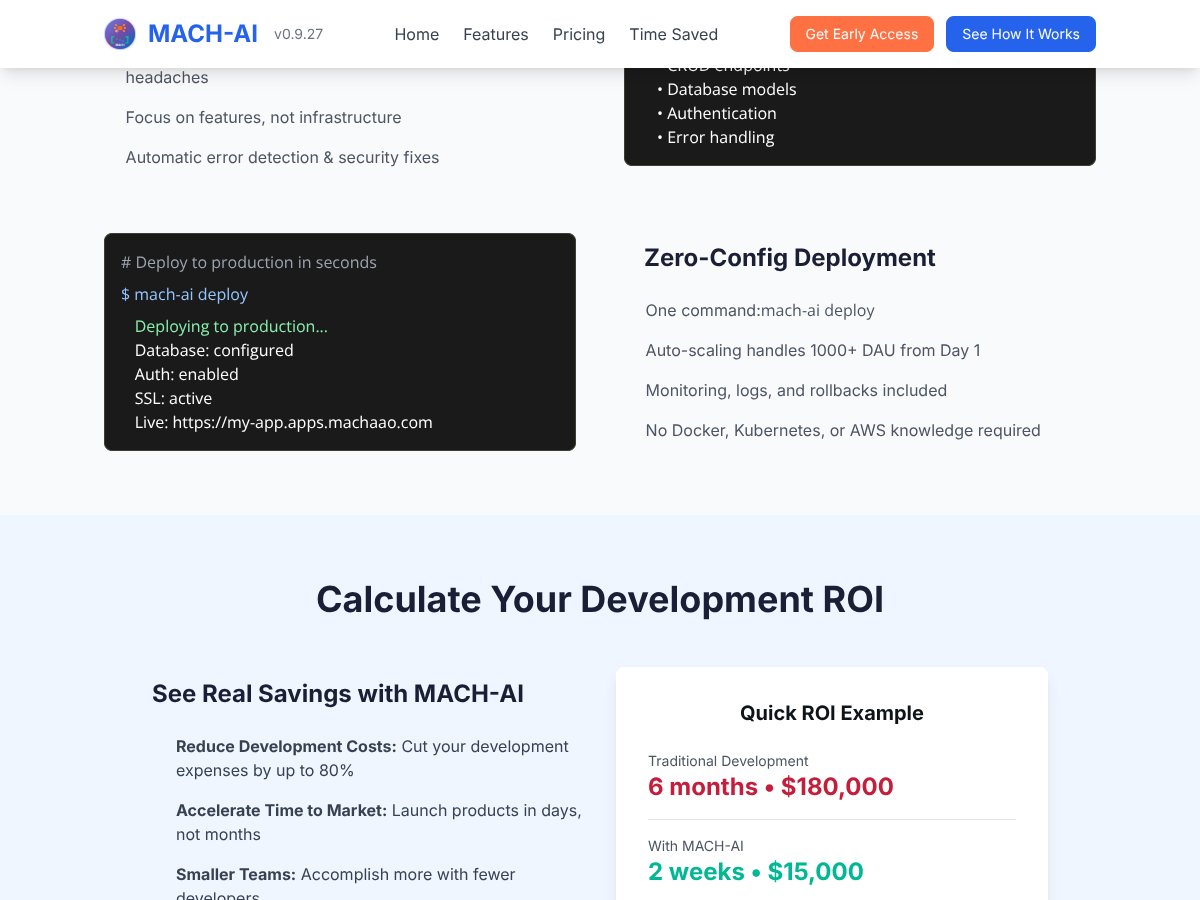
- One-Command Deployment: The ability to deploy instantly with a single command is a big time-saver and reduces deployment errors for non-ops folks.
- No External Setup: No need to configure databases, cloud accounts, or API keys—this lowers the barrier for entry and avoids typical cloud setup frustrations.
- Built-in Infrastructure: Auto-scaling, security, and monitoring are included, which is a huge plus for small teams or solo developers who don’t want to manage infrastructure.
What Could Be Better
- Lack of Transparency: The biggest issue is the opaque pricing and missing details about plans, limits, and feature tiers. This makes it hard to evaluate value upfront.
- Limited Use Case Documentation: Aside from the demo snippets, there’s little guidance on how to use it for different project types or industries, which could leave new users confused.
- Absence of Testimonials or Reviews: No user feedback or case studies are available, so it’s unclear how well it performs at scale or in complex scenarios.
- Feature Gaps: The platform sounds comprehensive, but without detailed feature lists or integrations, it’s hard to say if it can replace existing dev workflows or if it’s more of a prototype tool.
- Potential Lock-in: Since everything is built-in and proprietary, switching away later might be tricky—be sure to evaluate how portable your code is.
Who Is MACH AI Actually For?

If you’re a solo developer, a startup founder, or a small team looking to accelerate your MVP development without getting bogged down in infrastructure setup, MACH AI could be a good fit. It’s especially appealing if you want to generate production-ready code quickly—think rapid prototyping or demoing ideas to clients.
For example, if you’re a freelance web developer wanting to build and deploy a simple app with minimal hassle, MACH AI’s one-command deployment and integrated backend could save you hours. Similarly, educational users or students exploring full-stack development might find the platform useful as a learning tool, especially since no external setup is required.
However, if your project involves complex integrations, custom infrastructure, or enterprise-grade security and compliance, MACH AI might not yet meet your needs. It’s best suited for straightforward apps and rapid deployment scenarios rather than long-term, heavily customized solutions.
Who Should Look Elsewhere
If your focus is on highly customizable, scalable, and integrated enterprise solutions, this platform may fall short. Large organizations with existing cloud infrastructure and complex workflows might find the all-in-one approach too limiting or opaque, especially without detailed info on integrations and compliance features.
Also, if you’re someone who needs detailed control over deployment environments, API integrations, or multi-cloud management, MACH AI’s simplicity could be a drawback. The lack of transparency about pricing and limits might also deter budget-conscious startups or individual developers who prefer open-source or self-managed solutions.
Finally, if you rely heavily on existing tools like Jenkins, Kubernetes, or specific cloud providers, this platform’s integrated approach might not align with your workflow. In such cases, sticking with proven, customizable DevOps tools or cloud services could be a smarter choice.
How MACH AI Stacks Up Against Alternatives
Productboard
- Productboard is primarily focused on product management, helping teams prioritize features, gather customer feedback, and road-mapping. It’s more user-friendly for product teams but doesn’t offer the deep AI project optimization MACH AI claims. - Pricing isn’t publicly listed, but it’s generally more expensive, especially for larger teams. - Choose this if you need detailed customer feedback integration and road-mapping for product development. - Stick with MACH AI if you want AI-driven project portfolio optimization and automation rather than just road-mapping.Aha!
- Aha! offers comprehensive road-mapping and strategic planning tools, with some automation, but it’s more about high-level planning rather than AI-assisted project execution. - Pricing starts at around $59/month per user, which can add up for bigger teams. - Choose this if you prefer traditional planning tools with occasional automation. - Stick with MACH AI if you want AI to help automate project prioritization and resourcing.Roadmunk
- Roadmunk focuses on visual road-mapping and planning, with easy-to-understand timelines and stakeholder collaboration. - It’s more affordable, with plans starting at $19/month per user, but lacks the AI-driven features MACH AI touts. - Choose this if your main need is simple, visual project roadmaps. - Stick with MACH AI if you want AI-powered decision-making and automation.Jira Align
- Jira Align integrates deeply with Jira and is designed for enterprise-scale agile planning across portfolios, programs, and teams. - Pricing is typically enterprise-level, often requiring custom quotes, making it costly. - Choose this if you’re already embedded in Jira and need detailed agile planning. - Stick with MACH AI if you want AI-driven portfolio management without extensive Jira dependence.Planview
- Planview offers a broad suite for project and portfolio management, resource planning, and financial forecasting, suitable for large organizations. - Pricing varies and can be quite high, often suited for large enterprises. - Choose this if you need a comprehensive, all-in-one enterprise solution. - Stick with MACH AI if you prefer a more automated, AI-centric approach and smaller team focus.Bottom Line: Should You Try MACH AI?
Overall, I’d rate MACH AI around 7/10. It’s got a lot of potential for automation and saving time on project planning, especially if you’re dealing with complex portfolios. But since it’s focused on enterprise and hasn’t flooded the market with user reviews or detailed pricing, it’s a bit of a mystery whether it’s worth the investment for smaller teams or individual developers.
If you’re a project manager or product owner juggling multiple initiatives and want AI to help prioritize and allocate resources, give it a shot. The free tier’s a low-risk way to test the waters, and the AI features could genuinely save you time.
That said, if you’re looking for simple task management or a tool to help with individual coding projects, MACH AI isn’t designed for that—and tools like GitHub Copilot or Replit might be better bets. Also, if budget is tight and you need straightforward planning without AI, cheaper options like Roadmunk or basic Jira might be enough.
Personally, I’d recommend trying MACH AI if you’re already in a complex project environment and want to see how AI can optimize your portfolio. If you’re a solo developer or small startup, I’d probably pass and stick to more traditional tools.
If your main goal is AI-driven project automation and resource management, give MACH AI a shot. If you’re after simple task tracking or coding assistance, your money is better spent elsewhere.
Common Questions About MACH AI
- Is MACH AI worth the money? It depends on your needs. For enterprise portfolio management and automation, it could be valuable. For small teams, it might be overkill.
- Is there a free version? Yes, MACH AI offers a free tier, but details on limitations aren’t clear. It’s likely limited in features compared to paid plans.
- How does it compare to Productboard? MACH AI is more focused on AI-driven project and resource management, while Productboard centers on customer feedback and product roadmaps. They serve different needs.
- Can I get a refund? Refund policies aren’t publicly detailed; check their terms or contact support if considering a paid plan.
- What integrations does it support? Specific integrations aren’t well documented publicly. It’s likely designed to work with common project tools, but details may vary.
- Is it suitable for small teams or solo developers? It’s more tailored for enterprise environments. Small teams or solo developers might find it too complex or expensive for their needs.
- How secure is MACH AI? Security details are limited publicly; enterprise users should inquire directly for compliance and data safety assurances.