LIFETIME DEAL — LIMITED TIME
Get Lifetime AccessLimited-time — price increases soon ⏳
AI Tools

Muntze Review (2026): Honest Take After Testing

Updated: April 12, 2026
10 min read
#Ai tool

Table of Contents

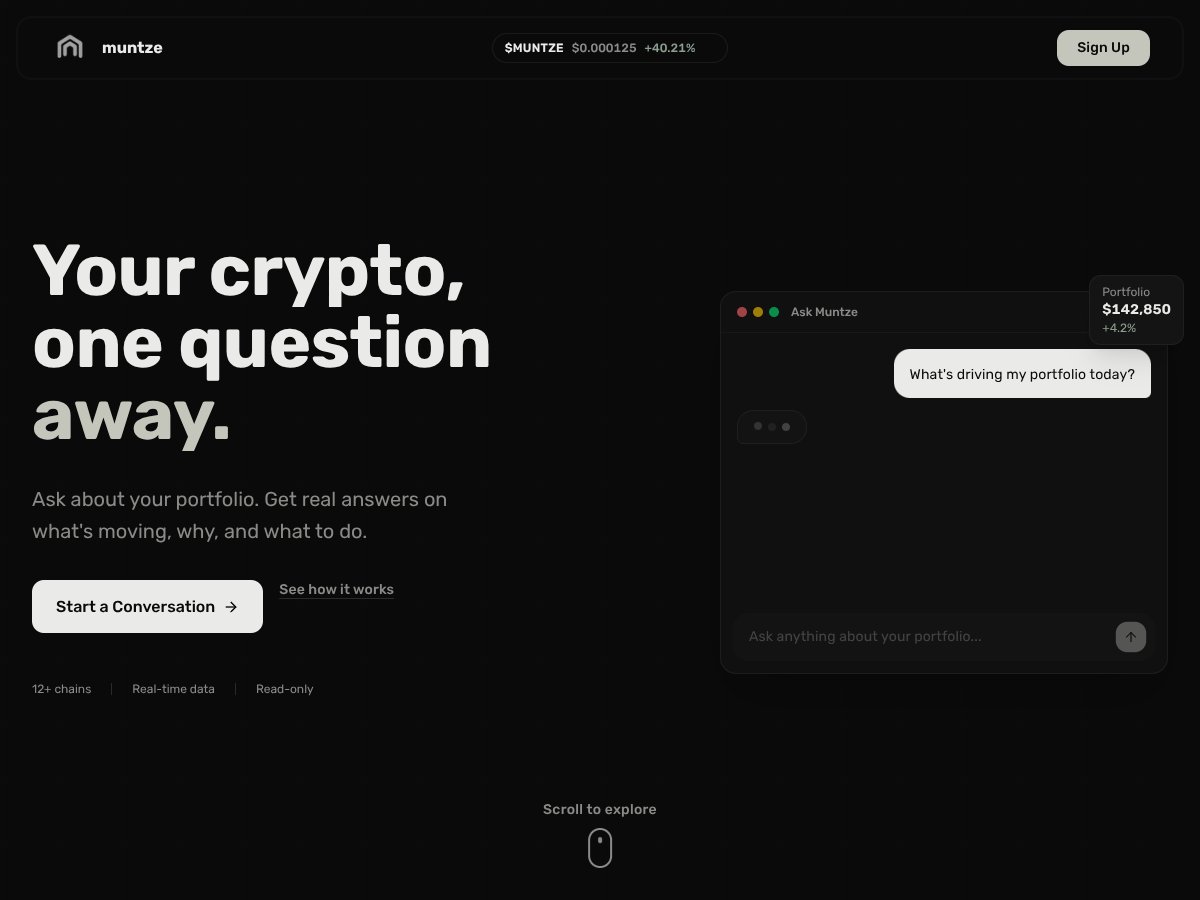
Muntze screenshot

What Is Muntze?

I first heard about Muntze because I’m always bouncing between tabs—one for prices, one for token balances, another for DeFi positions—then I end up asking myself the same question: “Okay, but why did this move?” That’s the gap Muntze is trying to fill with a “hyper-personalized AI co-pilot” vibe.

Here’s what I found it does in practice: you connect your crypto wallets and/or exchange accounts, then you can ask questions in plain language. Muntze responds with portfolio-focused explanations that reference what’s happening in your holdings (price changes, on-chain activity signals, and news-style context). The goal isn’t to replace every dashboard—it’s to give you a conversational way to understand your portfolio without manually piecing everything together.

To ground this, I tested it on Apr 2026. My setup was simple: I created an account, went through the connection flow, and linked two wallets (one EVM wallet and one additional wallet on a different chain). After linking, the UI let me view a consolidated snapshot of balances and positions, and then I could ask follow-up questions rather than restarting from scratch. I didn’t see a “guided tour” that walks you through what each screen means step-by-step—more like “connect, then ask.”

What I asked (and what I noticed):

  • Prompt: “Why is my Ethereum up today?”
    What I got: A breakdown that pointed to price movement and portfolio-level drivers tied to my ETH exposure. The answer wasn’t just “ETH went up”—it tried to connect the move to what was relevant to my holdings at that moment.
  • Prompt: “Should I rebalance?”
    What I got: A recommendation-style response that compared allocation changes and suggested a direction. It read like an assistant, not a trading bot—so it gave guidance, not an automatic trade.
  • Prompt: “What’s changing in my portfolio this week?”
    What I got: A summary that referenced recent movement rather than forcing me to manually compare charts across apps.

One thing I’m keeping expectations realistic about: the site doesn’t clearly spell out every data source, how “real-time” is measured, or how frequently it refreshes. During my testing, responses felt current enough to be useful, but I can’t honestly claim “real-time” in a technical sense without seeing refresh intervals or a documented update policy.

Also, the website doesn’t provide much in the way of trust signals. I couldn’t find obvious team bios, a clear “company behind it” section, or backing firm details. I also checked for public user reviews/social mentions (and didn’t find anything solid). So yeah—my testing helps, but it’s still a limited view of real-world adoption.

My initial impression? It matches the marketing fairly well for the core promise: ask about your portfolio, get analysis and next-step suggestions. The part that surprised me—in a not-great way—was how light the onboarding feels. There wasn’t a detailed walkthrough, and the interface took a bit of poking around to understand where to ask questions and how connections reflected in the summary.

And one more practical note: Muntze isn’t a trading platform. It’s not positioned as a tax-reporting tool either. If you’re expecting automated executions, tax forms, or full accounting exports, you’ll need to look elsewhere.

Who Is Muntze Actually For?

Muntze interface
Muntze in action

In my experience, Muntze fits best when you want a multi-chain portfolio overview plus a way to ask “why” questions without digging through charts. If you manage a diversified bag across chains and you don’t want to juggle five different tools just to explain a move, it’s aimed at you.

It’s especially useful if you’re the kind of investor who asks things like:

  • “What’s driving my gain/loss?”
  • “How should I think about rebalancing?”
  • “What changed recently across my holdings?”

Where I think it shines is for retail investors who want a more guided experience than a typical portfolio tracker. For example, if your assets are split between EVM and another chain, you shouldn’t have to manually stitch together explanations from different dashboards. Muntze tries to do that “translation” for you.

But I wouldn’t call it a full replacement for DeFi-native analytics. If you live and breathe protocol-level details—specific pool performance, yield breakdowns by protocol, or deep staking mechanics—tools built specifically for DeFi portfolios will likely feel more precise and less “general assistant” in tone.

And if you need tax reporting or niche-token coverage that’s clearly documented on the site, Muntze doesn’t give me enough evidence to confidently say it’s the right tool. During my testing, it was focused on insights and portfolio-level guidance.

Wallet Connection & Onboarding Test (What I Actually Ran Through)

Let me be blunt: onboarding quality is where a lot of crypto tools either win or lose. Muntze isn’t terrible, but it’s not “effortless” either.

  • Account setup: Straightforward account creation, then you’re pushed toward connecting wallets/exchanges.
  • Wallet connections: I connected two wallets and watched the portfolio summary update after linking. The experience was smooth enough, but the interface didn’t feel like it had a “here’s exactly what you’re seeing and why” tutorial.
  • Finding the right questions: You basically learn by asking. There’s no heavy onboarding that teaches you the best prompt formats.
  • Expectation setting: It’s clearly meant for insights, not trading execution.

If you’re someone who needs a step-by-step onboarding checklist, you may end up doing a bit more clicking than you’d like. I did.

Prompt-to-Insight Examples (Including What Didn’t Impress Me)

This is the part I care about most in any AI portfolio tool: how it handles real questions about real holdings.

Example 1: “Why is my Ethereum up today?”

When I asked about ETH performance, the response referenced portfolio context and pointed to drivers that made sense given the movement. It wasn’t just a headline—it tried to connect the change to what I actually hold.

What I liked: It felt relevant to my exposure.
What I didn’t love: It didn’t show a clear “evidence panel” with sources/links for every claim, so you’re taking some of it on trust.

Example 2: “Should I rebalance?”

I asked for rebalancing guidance and got a recommendation-style answer. It read like a decision-support assistant rather than a bot that executes trades.

What I liked: The guidance was actionable in tone (direction + reasoning).
What I didn’t love: It didn’t replace my own risk framework. If you don’t already know your target allocation and risk tolerance, you’ll still need to do the thinking.

Example 3: “What changed this week?”

This prompt gave me a portfolio-level summary that was easier than manually checking multiple sources.

What I liked: It saved time.
What I didn’t love: I couldn’t find a documented refresh cadence (how often it updates), so I can’t guarantee the freshness beyond what I saw during my session.

How Muntze Stacks Up Against Alternatives

Instead of repeating generic “it’s better/worse” claims, here’s how I’d compare them based on what they’re built for.

Zerion vs Muntze

  • Primary focus: Zerion is more DeFi/protocol-heavy; Muntze is a broader assistant for portfolio understanding across chains.
  • Depth: If you want protocol-level breakdowns (staking/yield mechanics, liquidity pool detail), Zerion is the more natural fit.
  • How you interact: Zerion is dashboard-first. Muntze is question-first—ask about your holdings and get narrative guidance.
  • Best fit: Choose Zerion if DeFi depth is the whole point. Choose Muntze if you want multi-asset context plus “why” explanations without living in dashboards.

Zapper vs Muntze

  • Primary focus: Zapper leans into DeFi dashboards and visual portfolio management (including DeFi ecosystems and liquidity pools).
  • Strength: Visual clarity for DeFi positions.
  • Where Muntze differs: Muntze leans into conversational analysis and guidance for portfolio-level questions.
  • Best fit: If your portfolio is mostly DeFi and you want protocol visuals, Zapper tends to feel more on-target. If you want a “talk to it” experience across chains, Muntze is the better match.

Coinbase vs Muntze

  • Primary focus: Coinbase is an exchange + wallet + basic portfolio tracking experience.
  • Strength: Easy tracking and mainstream convenience.
  • Where Muntze differs: Muntze aims to explain and guide—less “here are your balances,” more “here’s what’s happening and what to consider.”
  • Best fit: Choose Coinbase if you want simple tracking and a familiar interface. Choose Muntze if you want deeper narrative insights across multiple chains.

MetaMask vs Muntze

  • Primary focus: MetaMask is a wallet. It shows balances and transaction history, but it’s not designed as an AI portfolio explainer.
  • Strength: Transaction visibility and wallet control.
  • Where Muntze differs: Muntze is meant to consolidate and interpret what’s happening across connected accounts.
  • Best fit: Choose MetaMask if you’re mostly managing and transacting. Choose Muntze if you want an assistant-style portfolio layer on top.

Limitations I Discovered (So You Don’t Get Surprised)

  • Onboarding is light: No detailed walkthrough. You’ll learn by connecting and asking questions.
  • “Real-time” isn’t fully documented: I could see timely responses during my test, but I couldn’t locate a clear refresh/latency policy on the site.
  • Trust signals are thin: I couldn’t verify team/background info or find meaningful public user reviews.
  • Not a tax tool: I didn’t see clear tax-reporting support, and I wouldn’t count on it for tax season.
  • Not an execution platform: It gives guidance; it doesn’t replace trading execution workflows.

Bottom Line: Should You Try Muntze?

After testing, I land on 6.5/10—and that score is pretty specific. Muntze is genuinely useful for portfolio understanding and asking “why” questions, especially if you’re juggling multiple wallets or chains and want a more guided experience than raw dashboards.

Where it earns the score: it’s straightforward to connect accounts, it responds with relevant portfolio context, and it can produce actionable-sounding guidance (like rebalancing questions) without making you manually stitch everything together.

Where it loses points: the onboarding isn’t detailed, the “real-time” claim isn’t clearly backed by documented refresh intervals, and the public trust signals (team info, reviews, social proof) are basically missing as far as I could find.

If your portfolio is small-to-midsize and you want a cleaner way to understand what’s happening—without spending your evenings in DeFi dashboards—Muntze is worth trying. If you need protocol-level DeFi analytics, tax reporting, or deep security documentation, I’d look at more specialized tools first.

Common Questions About Muntze

  • Is Muntze worth the money? I can’t give a definitive “yes” without clear pricing details in what I reviewed, but based on my testing, it’s valuable if you’ll actually use the Q&A for portfolio explanations and guidance. If you just want raw balances, you might not feel the difference.
  • Is there a free version? I saw no fully confirmed pricing breakdown in the content I reviewed. If there is a free tier, it wasn’t clearly detailed enough for me to quote confidently. What I can say: you should verify the exact plan features before upgrading.
  • How does it compare to Zerion? Zerion is more DeFi/protocol analytics-first. Muntze is more assistant-first—ask questions, get narrative insights. If DeFi depth is your priority, Zerion usually wins. If you want broader conversational portfolio guidance across chains, Muntze is the better fit.
  • Can I get a refund? Refund terms weren’t clearly detailed in the information I reviewed. I’d treat it as “not stated publicly” and confirm with support before paying.
  • Does it support tax reporting? I didn’t see clear documentation indicating tax reporting. From what I tested and what’s emphasized, it’s focused on insights and portfolio understanding.
  • Is my data secure? Security and privacy details weren’t clearly spelled out in what I reviewed. If you connect wallets, assume you’re sharing sensitive information. I’d look for explicit security/privacy documentation and confirm what protections are used.
  • Can I connect multiple wallets? Yes—at least in my test, wallet connections updated the consolidated portfolio view. The exact maximum number of supported wallets wasn’t clearly documented in the material I reviewed.

As featured on

Automateed

Add this badge to your site

Stefan

Stefan

Stefan is the founder of Automateed. A content creator at heart, swimming through SAAS waters, and trying to make new AI apps available to fellow entrepreneurs.

Related Posts

Figure 1

Strategic PPC Management in the Age of Automation: Integrating AI-Driven Optimisation with Human Expertise to Maximise Return on Ad Spend

Title: Human Intelligence and AI Working in Tandem for Smarter PPCDescription: A digital illustration of a human head in side profile,

Stefan
AWS adds OpenAI agents—indies should care now

AWS adds OpenAI agents—indies should care now

AWS is rolling out OpenAI model and agent services on AWS. Indie authors using AI workflows for writing, marketing, and production need to reassess tooling.

Jordan Reese
experts publishers featured image

Experts Publishers: Best SEO Strategies & Industry Trends 2026

Discover the top experts publishers in 2026, their best practices, industry trends, and how to leverage expert services for successful book publishing and SEO.

Stefan

Create Your AI Book in 10 Minutes