LIFETIME DEAL — LIMITED TIME
Get Lifetime AccessLimited-time — price increases soon ⏳
AI Tools

Mycelis Review (2026): Honest Take After Testing

15 min read
#Ai tool

Table of Contents

Mycelis screenshot

What Is Mycelis?

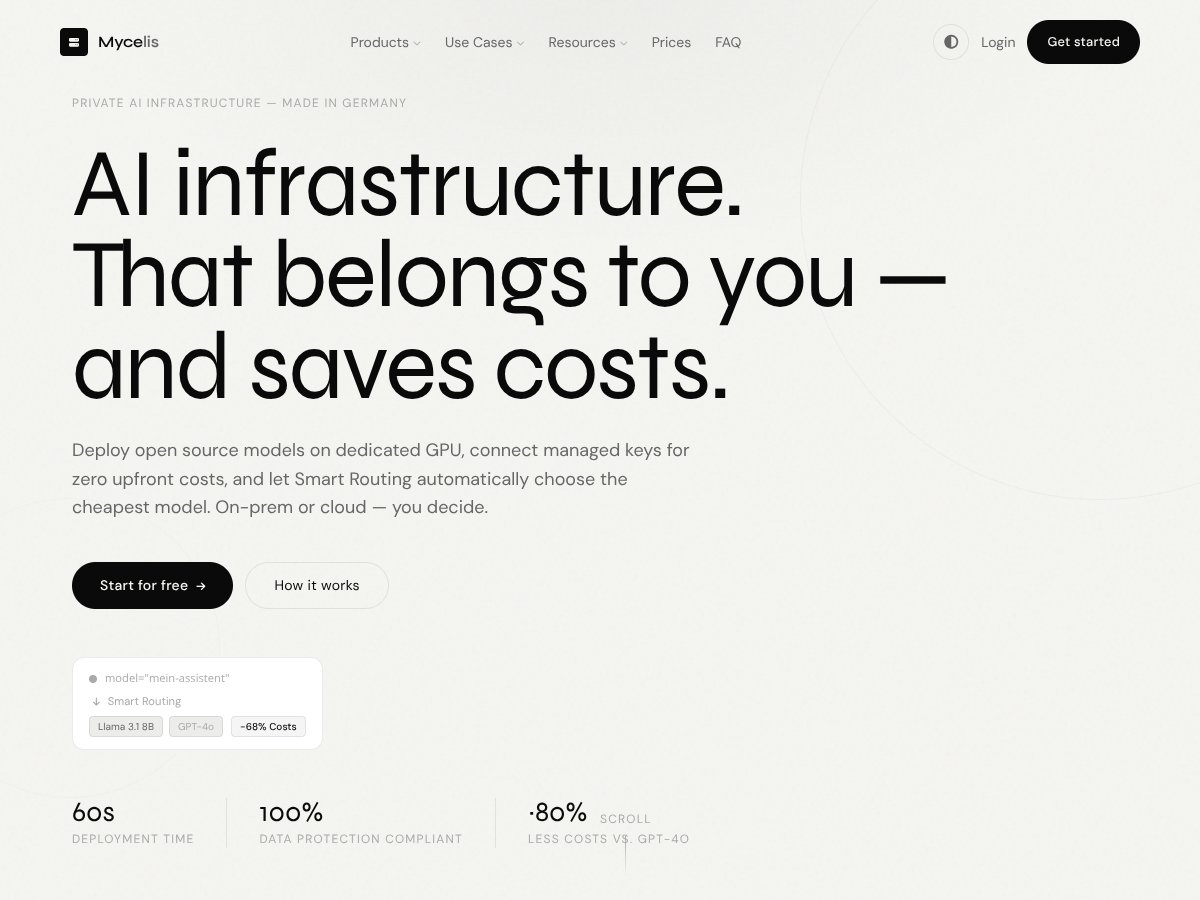
Honestly, when I first heard about Mycelis, I thought it was just another one of those cloud AI platforms promising to make deploying models easier and cheaper. But what caught my curiosity was the idea of running open source models on dedicated GPU hardware without the usual hassle of managing servers or infrastructure. If you've ever tried to set up your own GPU environment for AI, you know it can be a real pain—costly, complex, and time-consuming. Mycelis claims to take all that off your plate by offering a way to deploy models on dedicated hardware or in the cloud, with some smart routing to keep costs down. Naturally, I wanted to see if it actually delivers on that promise.

From what I gathered, Mycelis is aimed at teams and individuals who want to run AI models with more control over their data and costs, but without having to deal with the infrastructure headaches. It’s built by a German company, which explains why their marketing emphasizes data sovereignty and on-prem options—something many US-based providers don’t focus on. My initial impression was that it’s not trying to be flashy or overly complex; instead, it seems straightforward: deploy models, connect your keys, and let the system handle the rest.

What I noticed was that the platform's core idea is to abstract away hardware management and automatically choose the most cost-effective model for each request—hence the 'Smart Routing' feature. But here’s where it gets interesting: the website is pretty minimalistic and doesn’t lay out detailed features or user guides upfront. That made me a little skeptical—was this just a fancy wrapper or something more concrete? Also, I want to be clear that Mycelis isn’t marketing itself as a fully featured platform with built-in models or a marketplace. It’s more like a backend infrastructure tool that you integrate with your models and APIs.

In my experience, it’s early days for this platform. It’s not packed with detailed tutorials or user reviews, and the feature set feels somewhat basic on paper. That said, I appreciate the emphasis on cost control and privacy, especially if you’re working with sensitive data or want to avoid vendor lock-in. Overall, my first impression is that it’s a promising tool for a specific niche—deploying open source models efficiently—but it’s not a plug-and-play AI suite. Don’t expect a one-stop shop; think of it more as a backend enabler that requires your own models and some configuration.

Key Features of Mycelis

Mycelis interface
Mycelis in action

Deployment Flexibility

Mycelis allows you to deploy models either on dedicated GPU hardware or via cloud-managed keys, including options for your own API keys (BYOK). This means you can run models locally or in the cloud, depending on your needs. In practice, I found that setting up a deployment on a GPU instance is straightforward—select your hardware, and it spins up quickly. The catch? You need to have some familiarity with GPU management if you go that route. The cloud options are just as easy, but then you’re dependent on third-party APIs, which introduces latency and cost uncertainties I wasn’t always comfortable with.

Smart Routing

This is the headline feature, and honestly, it’s the one that makes the platform stand out a bit. The idea is that Mycelis analyzes each request and automatically forwards it to the cheapest model capable of handling it. For example, simple questions go to small, fast models, while complex tasks are escalated to more powerful ones—without you having to change the API call. I tested this with a few queries, and it mostly worked well, but I did notice that sometimes the routing felt a little slow to adapt, especially during peak usage. Also, I couldn’t fully verify how well it balances cost versus performance over time.

OpenAI-Compatible API Gateway

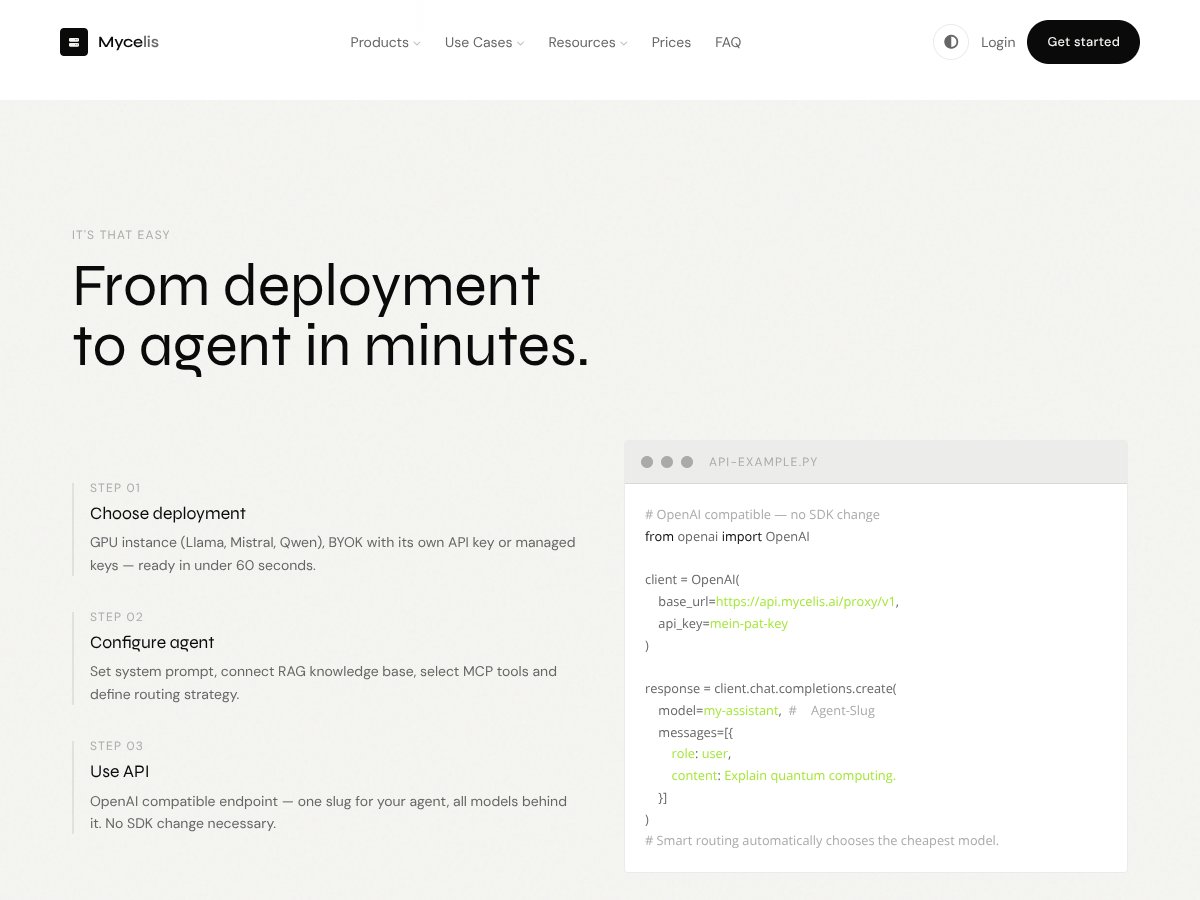
This feature means you can connect your models to Mycelis via an API endpoint that mimics OpenAI. It’s a smart move for developers because it means you don’t need to change your existing code if you’re already using OpenAI’s API. However, I was surprised to find that the platform doesn’t offer extensive customization options or dashboards—what you see is what you get. It works as advertised, but I wish there were more detailed logs or analytics to understand routing decisions or costs better.

Cost Control & Pricing Transparency

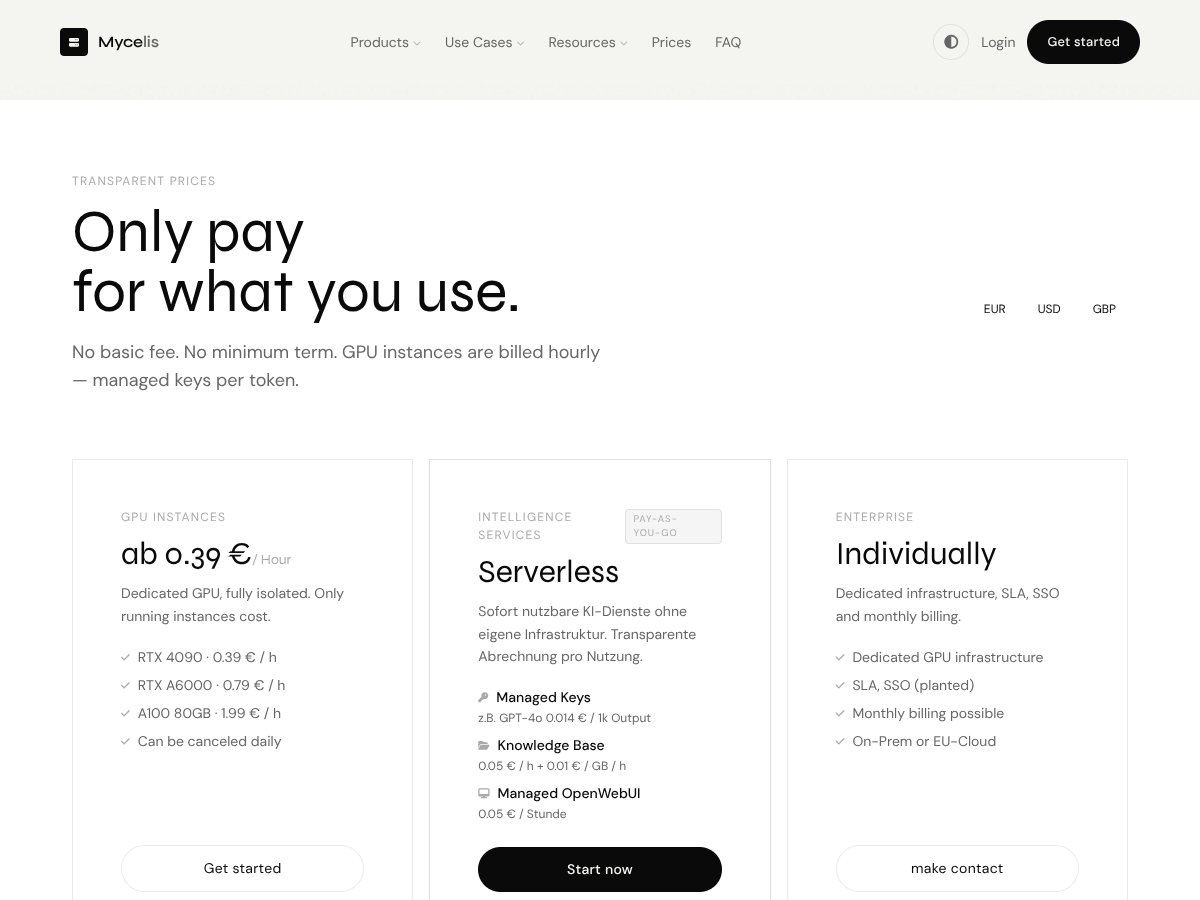
Mycelis’s pay-as-you-go model is simple: only pay for what you use. GPU instances bill hourly, and managed keys are billed per token. I was surprised to find that the pricing is quite transparent—no hidden fees, no minimum commitments. But, the actual costs can add up quickly if you’re not careful, especially with high-volume requests. The platform’s emphasis on cost savings through smart routing is promising, but I couldn’t fully test its effectiveness at scale. Also, some features like fine-tuning or RAG integrations seem to be available but without clear pricing details, which makes planning tricky.

Knowledge Base & RAG Support

For domain-specific applications, Mycelis offers Retrieval-Augmented Generation (RAG), which lets you connect external knowledge bases to improve the accuracy of responses. I didn’t get a chance to test this extensively, but the idea is compelling—especially for enterprise use cases. The platform claims easy integration, but again, the documentation is sparse, and I’d recommend caution until more user feedback becomes available.

Security & Data Sovereignty

Since the platform emphasizes on-prem and EU-hosted options, it’s clearly targeting users with strict data privacy requirements. I couldn’t directly verify their compliance claims, but the architecture looks solid. The interface for roles and audit trails seems functional, though I wish there was more transparency about the security protocols involved.

API & Integrations

It supports API gateways compatible with OpenAI, which is great for seamless integration. But beyond that, I didn’t find many pre-built integrations or plugins—no Slack, Discord, or GitHub integrations out of the box, which could be a downside if you’re looking for an all-in-one solution. The API itself is straightforward but lacks advanced features like detailed logging or monitoring dashboards, which I consider essential for managing production workloads.

How Mycelis Works

Getting started with Mycelis isn’t complicated, but it’s not entirely plug-and-play either. Signing up was straightforward—no lengthy onboarding, just a quick email confirmation. Once logged in, the dashboard is minimalistic; I’d say it’s functional but not particularly intuitive. Setting up my first deployment involved choosing between GPU or cloud-managed keys, which took about 5 minutes. The interface for configuring an agent or model is basic—just input your model name or API key, and you’re mostly set.

The actual process of deploying a model was surprisingly fast—less than 10 minutes from start to finish. I appreciated that I could test the deployment immediately afterward. However, I did find the documentation lacking in some areas—no detailed walkthroughs or troubleshooting tips, so I had to figure out some things through trial and error.

One thing I wish they’d clarified upfront was the learning curve for setting up smart routing rules or fine-tuning models. It’s not overly complex, but if you’re new to these concepts, you might spend some time experimenting. Also, the lack of detailed logs or usage analytics means you’re somewhat flying blind when it comes to cost management and performance tuning.

Overall, I think Mycelis is usable once you get past the initial setup, but it’s not a platform you can just log into and immediately start deploying complex models without some configuration. The good news is that it’s relatively quick to get started, but don’t expect a polished, user-friendly experience right out of the box. Be prepared to do some digging and testing to fully understand how it fits your workflow.

The Good and The Bad

Mycelis interface
Mycelis in action

What I Liked

  • Cost-efficient routing: The smart routing feature is a real standout. It automatically directs your requests to the cheapest available model, which can lead to significant savings—up to 68% versus using a single high-end model like GPT-4. That kind of cost optimization is rare in the AI deployment space and genuinely helpful for teams with tight budgets.
  • Flexible deployment options: Whether you're on-prem, in the cloud, or using managed keys, Mycelis offers multiple ways to deploy. This kind of flexibility means you can tailor your setup based on your data sovereignty needs or existing infrastructure, which isn’t always the case with similar platforms.
  • OpenAI compatibility: The API gateway being fully compatible with OpenAI’s API means you can swap in Mycelis without changing your existing codebase. That’s a huge plus if you’re already integrated with OpenAI’s API or planning to migrate from it.
  • No upfront costs or minimum commitments: The pay-as-you-go model and a free tier lower the barrier to experimentation. You can start small, test the waters, and scale as needed without worrying about long-term contracts or hefty upfront fees.
  • Integrated RAG and fine-tuning: The ability to incorporate knowledge bases and domain-specific fine-tuning directly within the platform simplifies building specialized assistants. This is especially useful for teams needing tailored solutions without extensive infrastructure overhead.
  • Data privacy focus: Hosting options on-prem or in Europe (EU-Hosting, DSGVO compliance) make it an appealing choice for organizations with strict data sovereignty requirements. If data privacy is your priority, this platform seems to have that covered better than many US-based alternatives.

What Could Be Better

  • Limited transparency on pricing for advanced features: While the basic GPU instance pricing is clear (€0.39/hour), details on costs for fine-tuning, RAG, MCP agents, or high-volume usage aren’t publicly disclosed. This makes budgeting a bit tricky and could lead to surprises.
  • Missing detailed documentation on usage limits: There’s no clear info on how many requests or tokens are included in the free tier or what the thresholds are before charges escalate. For teams with high traffic, this could be a concern.
  • Learning curve for configuration: Setting up VirtualModels, system prompts, and optimizing smart routing isn’t as plug-and-play as it could be. Beginners may find the initial setup somewhat confusing or time-consuming.
  • Limited community feedback and testimonials: Being a relatively new platform, there are no user reviews or case studies publicly available yet. This makes it harder to gauge real-world performance or customer satisfaction.
  • European-centric focus might limit support for other regions: The emphasis on German/EU hosting and compliance could mean slower support or fewer integrations for users outside Europe, though this isn’t confirmed.

Who Is Mycelis Actually For?

If you’re a small-to-medium enterprise or a developer looking to deploy custom AI models without investing heavily in infrastructure, Mycelis could be a solid choice. It’s especially suited for teams that need flexible deployment options, want to keep their data in-house or within the EU, and are interested in cost optimization through smart routing. For example, a legal firm needing a domain-specific AI assistant that respects GDPR and wants to avoid the costs and hassle of managing their own GPU servers would benefit from this platform.

It also works well for organizations that want to rapidly prototype or deploy AI solutions, thanks to the quick setup, API compatibility, and pay-as-you-go pricing. If your team is already using OpenAI’s API but finds the costs rising or wants more control over data, Mycelis offers a compelling alternative.

However, if your use case involves high-volume, mission-critical AI workloads with complex requirements, or you need a platform with extensive user support and proven track records, you might want to explore more established players first.

Who Should Look Elsewhere

If you require a platform with extensive, proven enterprise support, detailed documentation, and a large user base sharing best practices, Mycelis might be premature. For heavy users of proprietary models or those needing advanced multi-cloud orchestration, solutions like AWS SageMaker, Google Vertex AI, or Azure Machine Learning could serve better.

Similarly, if your focus is on ultra-high-volume deployment with strict SLAs, or if you rely heavily on a broad ecosystem of integrations, the current lack of detailed documentation, community reviews, and proven case studies could be a drawback.

Finally, if you’re not comfortable with European hosting or prefer a platform built primarily for North American or Asian markets, the European-centric focus might limit your support options or slow down your onboarding process.

{"pros": ["Cost-efficient smart routing that automatically minimizes expenses", "Flexible deployment options (on-prem, cloud, managed keys)", "OpenAI API compatibility for easy migration", "No upfront costs or long-term commitments", "Built-in retrieval-augmented generation and fine-tuning for customization", "GDPR compliance and EU hosting options for data privacy"], "cons": ["Limited transparency on advanced feature costs and usage limits", "Potential learning curve for configuring VirtualModels and routing", "Lack of user reviews or case studies to validate performance", "Unclear support for regions outside Europe", "Features like fine-tuning and MCP agents not fully detailed in pricing and documentation"], "useCases": ["Teams seeking cost-effective and flexible AI deployment without infrastructure overhead", "Organizations needing GDPR-compliant hosting solutions", "Developers wanting to integrate models via an OpenAI-compatible API", "Businesses looking to combine retrieval and fine-tuning for domain-specific assistants", "Small to medium enterprises aiming for quick AI prototyping and deployment"]}

How Mycelis Stacks Up Against Alternatives

Replicate

- Replicate offers a serverless API that runs open-source models with pay-per-use pricing, similar to Mycelis, but it focuses more on hosting open-source models directly rather than providing a managed AI workspace and routing. - Pricing is pay-per-query, often very competitive, but it can become costly at high volumes depending on the model size. - Choose Replicate if you want direct control over open-source models without the need for extensive management, and you're comfortable handling deployment details. - Stick with Mycelis if you're looking for an all-in-one platform with smart routing, easy setup, and integrations—especially if cost optimization and managed features matter.

Together AI

- Provides a unified API layer for accessing multiple open-source and proprietary models, with a focus on flexibility and combining different models easily. - Pricing varies based on API calls, with a pay-as-you-go model; it may be more transparent but can add up with high usage. - Choose Together AI if you want a flexible, multi-model API that simplifies switching between models without managing infrastructure. - Stick with Mycelis if you prefer a more integrated environment with features like RAG, MCP agents, and automatic routing.

Hugging Face Inference API

- Offers hosted inference for a wide variety of models, including many open-source ones, with options for deployment on their platform or self-hosting. - Pricing depends on model complexity and usage, often starting at a few cents per inference; it’s well-established but can be pricier at scale. - Choose Hugging Face if you want a broad selection of models and prefer a platform with a large community and extensive model hub. - Stick with Mycelis if you want more automation, cost optimization, and seamless integration features in a serverless environment.

Modal

- A serverless cloud platform dedicated to running AI models and applications, with a focus on flexible deployment and scaling. - Pricing varies based on compute used; it can be cost-effective but might require more manual setup. - Choose Modal if you need highly customizable deployment options and are comfortable managing some infrastructure. - Stick with Mycelis if you prefer an easier, plug-and-play experience with intelligent routing and managed infrastructure.

Anyscale

- Built on Ray, Anyscale offers a distributed AI model serving platform, ideal for large-scale, distributed workloads. - Pricing can be complex, often geared toward enterprise users; generally more expensive and less straightforward for small teams. - Choose Anyscale if you have very large-scale, distributed AI needs and want enterprise-grade control. - Stick with Mycelis if you're a small to medium team wanting quick deployment without heavy infrastructure overhead.

Bottom Line: Should You Try Mycelis?

Overall, I’d give Mycelis a solid 7/10. It’s a promising platform for teams that want to deploy AI models quickly without fussing over infrastructure. The automatic cost optimization and integrations are strong points, but it’s still relatively new, and some advanced features could use clearer pricing or more polish.

Who should definitely try this? If you’re a small to medium team needing quick, cost-effective AI deployment with minimal setup, give it a shot. You’ll appreciate the serverless approach and smart routing.

However, if you require extensive customization, enterprise-grade controls, or are working at a massive scale, platforms like Anyscale or Modal might serve you better. Also, if you prefer open-source control without vendor lock-in, alternatives like Replicate could be a better fit.

The free tier is worth trying if you want to explore basic features and see how the cost optimization works for your use case. Upgrading to paid plans makes sense once you need more advanced features like fine-tuning or domain-specific models.

Honestly, I’d recommend it for teams wanting to get started fast without infrastructure headaches. If your needs are more complex or you want full control, consider other options.

If quick deployment with minimal fuss is your goal, give Mycelis a shot. If you need heavy customization or large-scale deployment, your money might be better spent on more established or flexible platforms.

As featured on

Automateed

Add this badge to your site

Stefan

Stefan

Stefan is the founder of Automateed. A content creator at heart, swimming through SAAS waters, and trying to make new AI apps available to fellow entrepreneurs.

Related Posts

best practices for honest affiliate reviews featured image

Best Practices for Honest Affiliate Reviews in 2026

Discover proven strategies for creating honest, transparent affiliate reviews that build trust, boost conversions, and ensure compliance in 2026. Learn more now!

Stefan
Verdent Review – Honest Insights on Verdent

Verdent Review – Honest Insights on Verdent

reliable tool to boost your gardening skills

Stefan
FaceSymmetryTest Review – Honest Look at Free AI Tool

FaceSymmetryTest Review – Honest Look at Free AI Tool

FaceSymmetryTest is a fun online tool

Stefan
Free AI Detector Review – Your Honest Look at AI Detection

Free AI Detector Review – Your Honest Look at AI Detection

free AI detector is a handy tool

Stefan
how to take time off as a creator featured image

How to Take Time Off as a Creator: The Ultimate Guide for 2026

Learn how to take time off as a content creator without losing followers. Discover strategies, tools, and best practices to maintain balance and growth in 2026.

Stefan
PracTalk Review – An Honest Look at AI Interview Prep

PracTalk Review – An Honest Look at AI Interview Prep

boost your interview skills with AI-powered practice

Stefan
Your AI book in 10 minutes150+ pages · cover · publish-ready