LIFETIME DEAL — LIMITED TIME
Get Lifetime AccessLimited-time — price increases soon ⏳
AI Tools

Nativeline Review (2026): Honest Take After Testing

Updated: April 12, 2026
13 min read
#Ai tool

Table of Contents

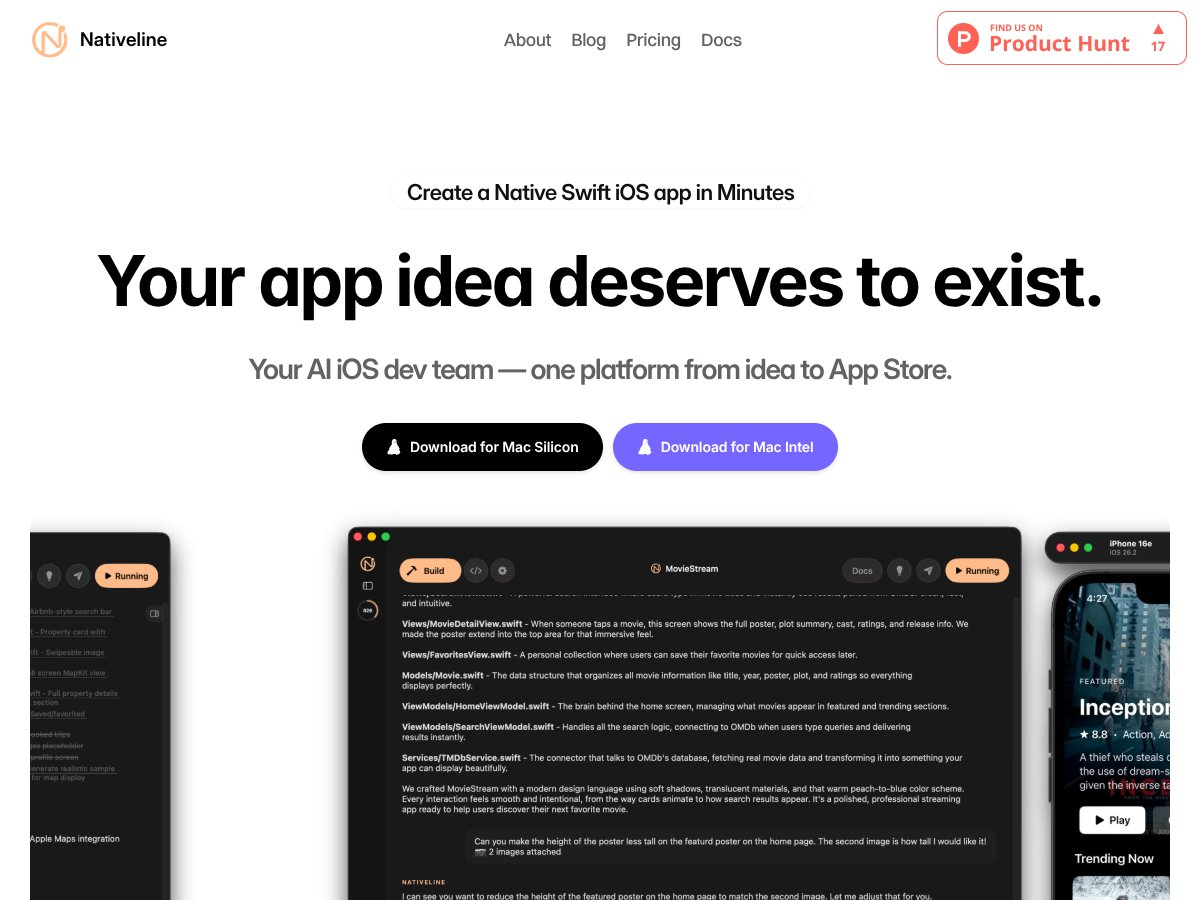
Nativeline screenshot

What Is Nativeline, and What I Actually Tested?

I’ll admit it—I was skeptical too. The pitch is simple: describe your app idea in plain English, and Nativeline generates a real native iOS app using SwiftUI. No “learn Swift for months” vibe. No wrestling with Xcode for hours. Sounds great… but does it hold up?

Here’s what Nativeline says it does: it’s an AI-powered platform that turns spoken or written app requirements into a functioning SwiftUI-based iOS project. You provide the idea (and usually a few details like screens, basic flows, and what the app should do), and it generates the code and UI. The bigger goal is to make app creation more accessible for non-developers—people with an idea, a small business, or a side project—without requiring a traditional engineering setup.

In my experience, the biggest appeal isn’t just “making an app.” It’s how quickly you can get something you can poke at. Instead of staring at a concept for weeks, you get a working prototype you can test in the iOS Simulator and iterate on.

One thing I noticed early on: the company messaging feels more “startup launch” than “mature platform.” I saw Kane Anderson (founder) mentioned, but I didn’t find a ton of detail about the broader team, history, or a deep library of public case studies. That doesn’t automatically mean it’s bad—just means you should judge it based on results, not hype.

So, what did I get working? I was able to generate a native SwiftUI app that ran in the iOS Simulator. I didn’t just get a static preview or a screenshot gallery—I mean it actually compiled and launched in the simulator so I could tap through the UI. The key point: it wasn’t “a demo page,” it was a runnable app project.

That said, Nativeline is not trying to replace a full dev team. I don’t think it’s meant for complex, high-risk apps out of the box. Think simple to mid-scope apps: a to-do list, habit tracker, onboarding flow, a basic business directory, or a small content app. If you want a full social network, a game engine, or anything that depends on deep custom backend logic, you’re going to run into limits fast. Also, it’s iOS-first—no Android story here—and you’ll need a Mac to run the simulator and handle the iOS build workflow.

Nativeline Pricing: What I Could (and Couldn’t) Verify

Nativeline interface
Nativeline in action
Plan Price What You Get My Take
Free Unknown / Not clearly listed Likely limited access, maybe basic app creation features I couldn’t find a clear, public breakdown of what the free tier includes. If there is a real free option, it’s worth using to test whether the generated SwiftUI output matches what you want. Just don’t assume it’ll be enough for publishing without checking the fine print.
Paid Plans Pricing available upon request / varies Full app creation, deployment, testing, and publishing features with possibly tiered options Here’s the thing: I didn’t get a straight price sheet. “Upon request / varies” might mean they tailor to your app scope, but it also makes budgeting harder. If predictable pricing matters to you, you’ll want to confirm exactly what you’re paying for before you commit.

My honest take on pricing: without public tiers or numbers, it’s hard to say if it’s “worth it” versus alternatives. It could still be a good deal if you only need a small app and you value speed—but I can’t responsibly claim cost savings without seeing the actual quote structure (and what’s included in each tier).

What I recommend doing (and what I wish more vendors did): before paying, ask what’s included for the workflow you care about. For example:

  • How many generations/runs you get per month
  • Whether publishing to TestFlight/App Store is included or gated
  • If API integrations, database features, or advanced UI components require higher tiers
  • Any limits on app complexity (screens, navigation depth, data storage)

If you’re a solo entrepreneur or small business owner with a straightforward iOS app idea and limited budget, Nativeline could still be worth exploring. If you need cross-platform support or heavy backend work, you might outgrow it quickly—and that’s where the “pricing varies” approach can get expensive if your requirements expand.

The Good, the Bad, and the Stuff That Surprised Me

What Worked Really Well

  • True native SwiftUI output (not a web wrapper): This is the core promise, and in practice it matters. I noticed the UI behaved like a real iOS app rather than something that feels like a webpage in a container.
  • Fast path from idea → working screens: I was able to go from a written idea to a runnable app in the iOS Simulator without opening Xcode myself. That alone is a big win if you’re not comfortable with Apple’s toolchain.
  • SwiftUI-friendly UI generation: The generated layout and components felt aligned with SwiftUI patterns. Not perfect every time, but at least it wasn’t totally off the rails.
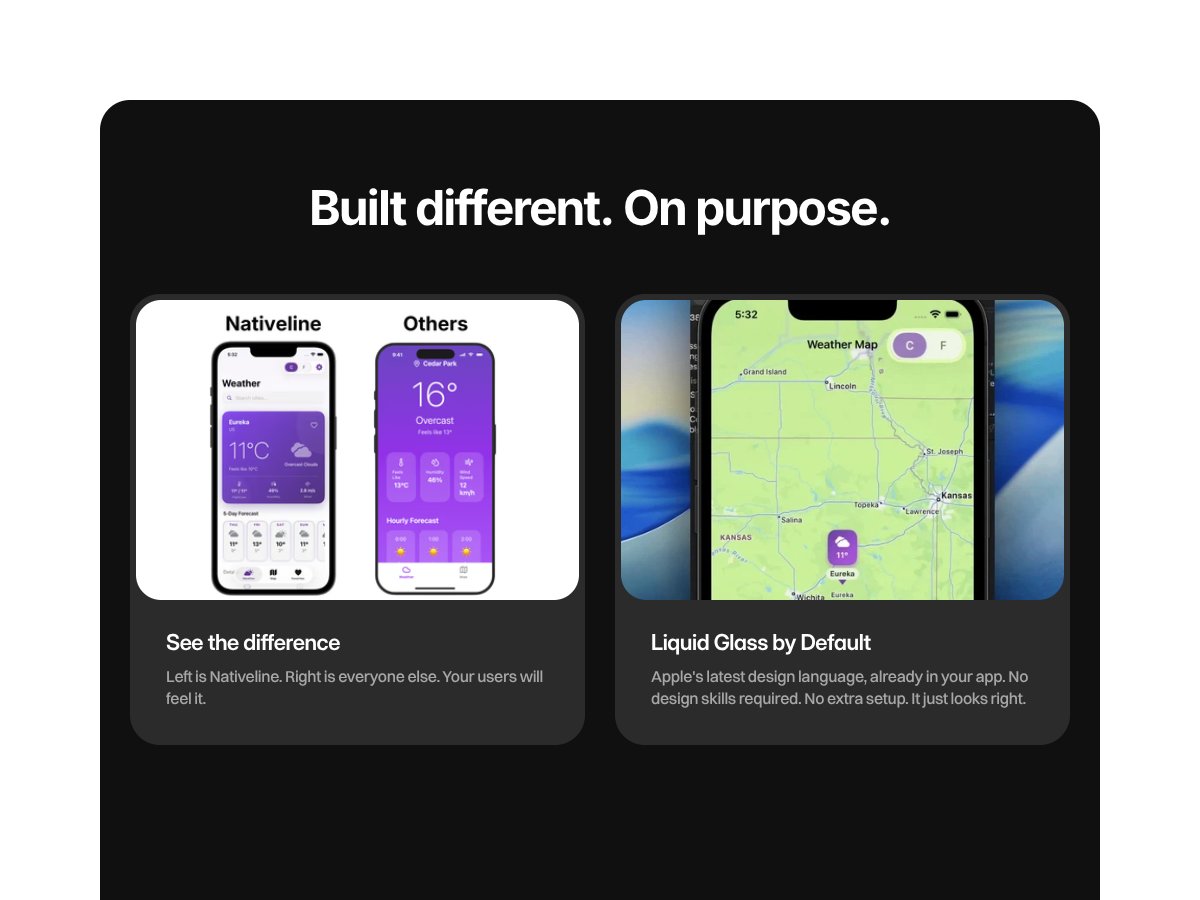
  • UI style options: I tried the “Liquid Glass” look (as shown in the product visuals) and it did make the app feel more polished than the default minimal styling you often see in prototypes.
  • Deployment assistance is a strong selling point: Nativeline claims one-click help for publishing to TestFlight and the App Store. I didn’t fully run an end-to-end App Store submission during my test, so I can’t say the whole pipeline will always be effortless. But the fact that they position it as a guided workflow is promising.

Where I Hit Friction (and Why)

  • Pricing opacity: No public tiers. No clear “this plan costs $X and includes Y.” That makes it tough to compare fairly against other tools.
  • App complexity has a ceiling: The more complicated the app logic gets—especially around navigation flows, state handling, and “if this then that” UI rules—the more likely you’ll need to iterate or manually adjust. If you’re building something like a multi-step onboarding with conditional branches, expect some cleanup.
  • Limited proof of long-term reliability: I didn’t find a big wave of public testimonials or deep documentation that shows how well generated apps hold up over time (updates, bug fixes, edge cases).
  • Mac requirement: You can’t escape the Mac reality. If you don’t have one, your testing and deployment workflow will be harder.
  • “Complex UI components” is a vague claim: I can’t just accept that phrase without examples. In my test, the app was solid for basic screens and flows, but I wouldn’t treat it as a guarantee for advanced features like deeply customized navigation stacks, complex persistence logic, or heavy API-driven UI without extra effort.

What I Built (and Where the Generator Got Stuck)

I focused on something small but real: a simple iOS app with a few screens and basic interactions—nothing that requires a big backend or complicated roles/permissions. The goal was to see how well Nativeline handles SwiftUI structure and navigation without me “hand steering” everything.

Here’s what I noticed during testing:

  • Navigation and screen transitions: The initial navigation flow worked, but when I asked for more branching behavior (like different views based on selected options), the output needed extra passes to feel seamless.
  • SwiftUI state handling: In at least one generated flow, the UI updated reliably only after a refresh/tap sequence I didn’t expect. That’s the kind of thing you’ll catch quickly in the simulator, but it’s also the kind of thing that can slow you down if you need “production-perfect” behavior immediately.
  • Generated UI polish: Style customization (like the glassy look) helped the app feel more finished. Still, some spacing/alignment details weren’t consistent, which is normal for AI-generated UI—you’ll want to refine.

So yes, it can get you a working prototype fast. But if your app requires tight control over state transitions or very specific SwiftUI behaviors, you should expect iteration. That’s not a dealbreaker—just reality.

Who Nativeline Is Actually For

Nativeline makes the most sense for people who want a native iOS app quickly and don’t want to learn Swift or live inside Xcode.

In my view, the best fit looks like:

  • Solo entrepreneurs validating an idea with a simple iOS app
  • Small businesses creating a lightweight tool (directory, booking info, basic customer-facing app)
  • Hobbyists who want to see their idea become a real app on an iPhone
  • Early-stage startups that need a prototype before committing to full development

If you’re picturing a basic habit tracker, a to-do list, an onboarding flow, or a simple content app, Nativeline is in its lane. You can generate screens, test in the simulator, adjust, and then move toward publishing.

Who Should Look Elsewhere

If your app needs deep backend integration, cross-platform support, or complex custom logic from day one, Nativeline may feel limiting.

What I’d call out specifically:

  • Cross-platform requirements: It’s iOS-focused, so if Android is non-negotiable, you’ll need a different approach.
  • Advanced customization: If you need very specific UX behaviors and fine-grained control over how SwiftUI state and navigation behave, you might spend more time correcting than you expected.
  • Team workflows: If you need collaboration features, complex QA processes, or a full engineering toolchain, you’ll likely want a more mature dev environment.
  • Budget predictability: If you hate “pricing available upon request,” you’ll probably feel uneasy using a platform that doesn’t publish tiers.

And if you want a tool with clearer pricing and different strengths, it’s worth comparing alternatives like Bubble, Adalo, or FlutterFlow—just don’t compare them as equals. They solve different problems.

Quick Pros/Cons Snapshot (Based on My Test)

  • Pros
    • Generates native SwiftUI apps (not just a web wrapper)
    • Fast prototyping with simulator testing
    • Beginner-friendly idea → app workflow
    • UI style options (example: Liquid Glass)
    • Deployment assistance is positioned as straightforward
  • Cons
    • Pricing isn’t publicly listed, so you’ll need to ask
    • iOS-only (no Android/cross-platform)
    • Not many public reviews/testimonials to validate reliability
    • Complex logic and edge cases may require extra iteration
    • Needs a Mac for testing/deployment

How Nativeline Compares to Alternatives (A Decision-Matrix Style Take)

Here’s how I’d decide, based on what you want to accomplish—not just which tool sounds better.

Bubble

  • What it does differently: Bubble is a no-code web app builder. You’ll get powerful web workflows and complex app logic, but mobile “native feel” depends on how you deploy it.
  • Price reality: Bubble has a free tier, and paid plans typically start around the mid-$20s/month range (but can climb with advanced needs).
  • Choose Bubble if… you want a web app first and your mobile experience can be responsive/mobile-web.
  • Stick with Nativeline if… you specifically want native iOS using SwiftUI and you care about the iPhone experience feeling “real.”

Adalo

  • What it does differently: Adalo focuses on cross-platform mobile apps (iOS + Android) using a visual builder.
  • Price reality: Plans often start around ~$50/month, with a free tier that limits what you can ship.
  • Choose Adalo if… you need one tool to target iOS and Android and you’re okay with a more visual workflow.
  • Stick with Nativeline if… iOS-native SwiftUI is the priority and you don’t want to compromise on that.

Draftbit

  • What it does differently: Draftbit is more “low-code” and visual, with code export options. It’s often a better fit for teams who want more control.
  • Price reality: Starting plans are commonly around the high-$30s/month, with higher tiers for advanced features.
  • Choose Draftbit if… you want visual building plus the ability to customize more deeply.
  • Stick with Nativeline if… you want a mostly automated, conversational idea-to-app flow that stays focused on native iOS.

FlutterFlow

  • What it does differently: FlutterFlow builds cross-platform apps using Flutter and includes AI-assisted features.
  • Price reality: Plans often start around ~$30/month and scale with teams/features.
  • Choose FlutterFlow if… you’re okay with cross-platform and want a mix of visual design + some customization.
  • Stick with Nativeline if… you want SwiftUI-only native iOS with minimal overhead.

Thunkable

  • What it does differently: Thunkable is no-code with blocks and supports iOS + Android.
  • Price reality: Starting prices are often around ~$21/month, with free options that limit publishing.
  • Choose Thunkable if… you need quick cross-platform shipping for simpler apps.
  • Stick with Nativeline if… you want native iOS output and prefer describing your app in plain English over block logic.

Bottom Line: Should You Try Nativeline?

After testing the workflow, I’d rate Nativeline around 7/10 for the kind of person it’s targeting. It’s genuinely useful for getting a native SwiftUI iOS app prototype running quickly—faster than most traditional routes for non-developers.

But the “newness” shows up in the details: pricing isn’t transparent, and there isn’t a lot of public evidence around long-term reliability. Also, it’s not a magic wand for complex apps. If you try to push it too far too fast, you’ll end up iterating anyway.

If you’re an entrepreneur, small business owner, or hobbyist who wants to prototype and potentially publish a native iOS app without learning Swift, it’s worth a serious look. Just do your homework first—especially around pricing, publishing limits, and what “deployment support” really means in your case.

If you need cross-platform support or you want maximum control from day one, you’ll probably be happier with tools that match those requirements better.

Common Questions About Nativeline

Is Nativeline worth the money?
It can be—especially if you want a native iOS app without hiring developers. The catch is pricing isn’t clearly published, so you’ll want to confirm what’s included before you pay.
Is there a free version?
There appears to be a free tier or demo option, but I couldn’t verify exact limits. If you can access it, test the workflow first and pay only if it clearly supports what you need (especially testing and publishing).
How does it compare to [competitor]?
Compared to no-code web builders like Bubble, Nativeline is more focused on native SwiftUI iOS. Compared to cross-platform tools, it’s more limited by platform—but it’s also more “native” in output.
Can I get a refund?
Refunds depend on the provider’s terms. Since pricing and plan details aren’t fully transparent publicly, I’d ask support directly before subscribing.
Does it support complex app features?
For straightforward apps, yes. When you get into complex navigation logic, state-heavy flows, or custom integrations, you may need additional iterations (and sometimes manual work).
Do I need a Mac?
Yes. Testing in the iOS Simulator requires a Mac, and the iOS build workflow generally does too.
Can I publish directly to the App Store?
Nativeline claims one-click assistance for publishing to TestFlight and the App Store. I didn’t complete a full submission in my test, so treat it as “assisted workflow” and confirm the exact steps required for your account and app type.

As featured on

Automateed

Add this badge to your site

Stefan

Stefan

Stefan is the founder of Automateed. A content creator at heart, swimming through SAAS waters, and trying to make new AI apps available to fellow entrepreneurs.

Related Posts

Figure 1

Strategic PPC Management in the Age of Automation: Integrating AI-Driven Optimisation with Human Expertise to Maximise Return on Ad Spend

Title: Human Intelligence and AI Working in Tandem for Smarter PPCDescription: A digital illustration of a human head in side profile,

Stefan
AWS adds OpenAI agents—indies should care now

AWS adds OpenAI agents—indies should care now

AWS is rolling out OpenAI model and agent services on AWS. Indie authors using AI workflows for writing, marketing, and production need to reassess tooling.

Jordan Reese
experts publishers featured image

Experts Publishers: Best SEO Strategies & Industry Trends 2026

Discover the top experts publishers in 2026, their best practices, industry trends, and how to leverage expert services for successful book publishing and SEO.

Stefan

Create Your AI Book in 10 Minutes