Table of Contents
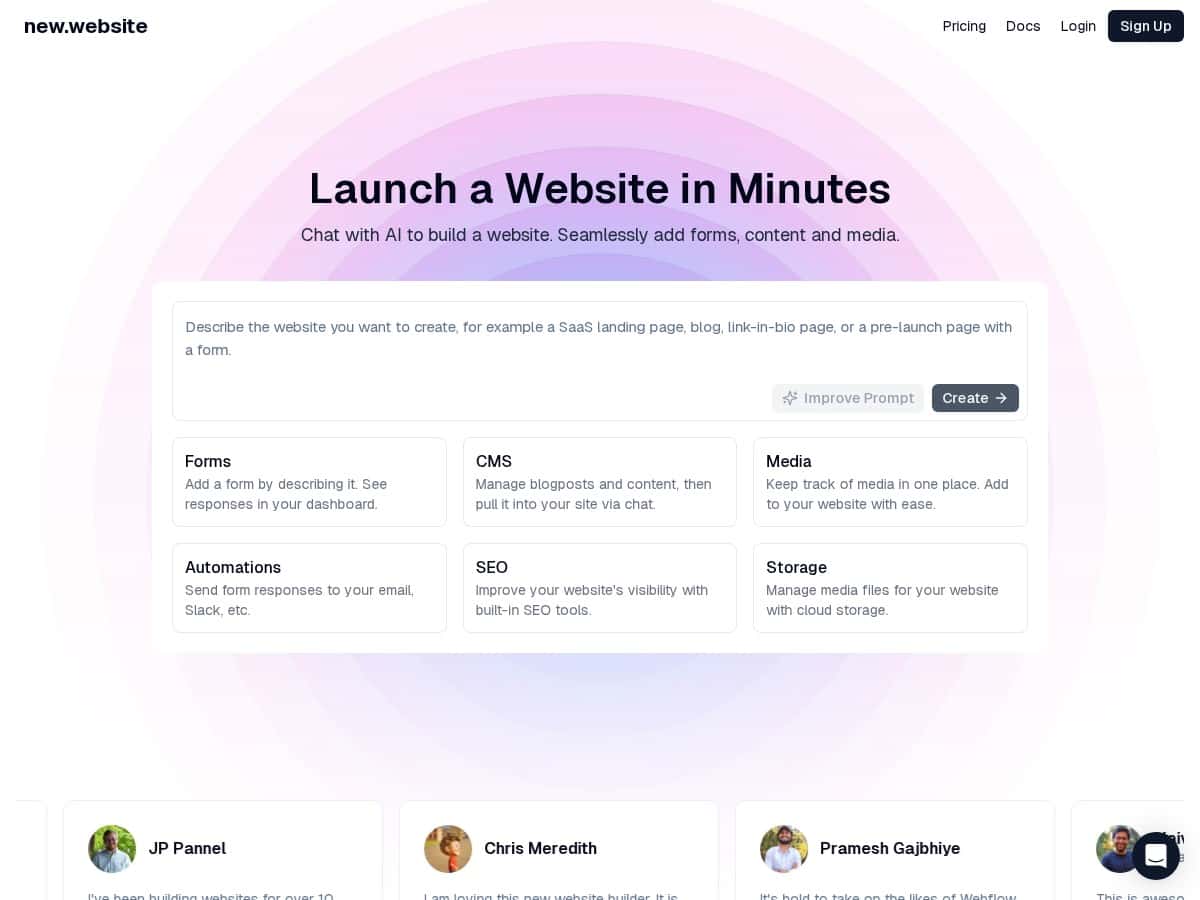
If you’ve ever tried building a website and thought, “Why is this so complicated?”—I get it. New.website is aimed at people who don’t want to wrestle with code or spend days tweaking layouts. The big hook is that you can build pages through an AI chat flow, then manage the stuff that usually takes real effort (forms, media, basic SEO, publishing).
Quick note on my testing: I tried New.website on April 2026 using a desktop browser (Chrome). I spent about 45–60 minutes going from “blank project” to a publishable draft, then I checked a few settings like forms, SEO fields, and what happens after you connect a domain. This review is based on that hands-on setup experience—not just marketing claims.
new.website Review: AI-built pages, real dashboard controls
Here’s what surprised me—in a good way—about New.website. The experience isn’t just “generate a page and hope.” You still get a dashboard where you can manage what you created.
1) Starting with the AI chat
When I opened a new project, I used the AI chat to generate the structure (sections like hero, services, and a contact area). I didn’t have to manually drag blocks around like I’ve done in other builders. Instead, I gave it a simple prompt (business type + what I wanted the site to say), and it produced a layout I could work with.
2) Editing and filling in content
After the initial draft, I went back and edited text and sections. What I noticed: the editor felt more like “refine what the AI made” than “build from scratch with pixel-level control.” That’s not inherently bad. It’s actually faster if you’re trying to launch.
3) Forms (this is where I tested it for real)
I added a contact form and then checked whether responses showed up in the dashboard. In my test, I could see the form fields and review submissions after I sent a test message. The part that impressed me was the automation/routing angle—so you’re not just collecting leads, you’re actually sending them somewhere.
4) SEO fields I could actually touch
I looked for the typical SEO controls (page titles, descriptions, and the basic metadata you’d expect). New.website didn’t feel like a “SEO afterthought.” It gave me fields to set per page, which is exactly what you want when you’re publishing multiple pages (like Home, Services, and Contact).
5) Publishing and hosting
Publishing was straightforward. I also checked the “domain connection” step and the SSL promise. I didn’t run through every DNS scenario, but the flow felt like it was designed for quick setup rather than “call your IT person.”
So, is it “almost too easy”? Kind of. But I’ll say this plainly: if you want full control over every design detail (custom CSS everywhere, deep theme editing, total layout freedom), you may feel boxed in. If your goal is to get a clean, functional website live quickly, it’s a strong fit.
Key Features I Tested on New.website
- AI-Powered Design: You start with a chat prompt and get a site structure back. In my case, it generated the core sections quickly, then I refined copy and layout.
- Forms: Create forms and manage submissions in the dashboard. I tested a basic contact form and confirmed that responses were visible after sending a test entry.
- Form automations: The builder supports routing responses to other tools (for example, email and other connected apps). I didn’t build complex multi-step workflows, but the routing setup was clearly there.
- CMS for blog/content: You can manage blog posts and content without jumping through hoops. If you plan to publish updates, this matters more than most people think.
- Media management: Images and video assets are organized centrally, which makes it easier to reuse visuals across pages.
- SEO tools: You can set key SEO fields per page. I specifically checked for editable metadata like titles and descriptions so pages don’t all ship with generic defaults.
- Analytics: There’s built-in traffic monitoring. I didn’t go deep into advanced reporting, but it’s the kind of “get started now” analytics panel that doesn’t require extra setup.
- Hosting & SSL: One-click domain connection and free SSL certificates are part of the pitch, and the setup flow felt aligned with that goal.
One thing I wish was clearer: I wanted more detail on how analytics is implemented (for example, whether it integrates with Google Analytics directly or uses its own tracking). That’s not a dealbreaker, but it’s something I’d check before fully committing.
Pros and Cons (with the stuff that actually mattered to me)
Pros
- Fast path to a publishable draft: I was able to go from idea → site structure → edited pages in under an hour.
- Beginner-friendly: If you don’t know what a “section” or “template” means, the AI flow still guides you.
- Forms + response handling: It’s not just a form generator—there’s a dashboard and routing/automation options.
- SEO fields aren’t hidden: I could set basic page SEO metadata without digging through five menus.
- Hosting/SSL setup is designed to be quick: The publishing experience feels built for speed.
Cons
- Customization isn’t “developer-level”: It’s more about refining than hand-coding. If you want to fully control CSS/layout, you might hit limits.
- You’re relying on the AI’s structure: If the AI generates a layout you don’t like, reshaping it can take more back-and-forth than you’d expect.
- AI learning curve: Not everyone is great at prompts. If you’re not specific, the results can be generic.
- Pricing transparency: Pricing wasn’t something I could confirm directly from the text in this review draft. You’ll want to check the live page because plans and limits can change.
Pricing Plans: what to check before you pay
I’m going to be straight with you: pricing details aren’t clearly listed here. Because of that, I recommend checking the official page first: new.website pricing page.
When I looked at AI website builders in general (and what I’d check on New.website), there are usually a few things that determine whether a plan is actually “worth it”:
- Free tier vs paid: Is there a free plan for testing, or is it a trial that converts into a paid subscription?
- Publishing limits: How many pages can you publish on a plan? Is it unlimited or capped?
- Forms limits: Are there limits on the number of forms or monthly submissions?
- Storage/bandwidth: Are there caps that matter if you add lots of images/video?
- Domain + SSL: Is custom domain included on every plan, or only on higher tiers?
- SEO/analytics features: Do you get full SEO controls and analytics on the cheapest plan?
If you’re comparing options, this roundup can also help you sanity-check whether you’re paying for the right kind of AI builder: AI website builders.
Wrap up
After testing New.website, my take is simple: it’s a solid choice if you want to launch quickly and don’t want to get stuck in design complexity. The AI chat gets you started fast, the dashboard makes it practical (especially for forms and basic SEO), and the hosting/SSL flow is built for getting online without drama.
Just don’t go in expecting total, code-level control. If you’re the type who wants to tweak every pixel or build highly custom layouts, you may feel constrained. And because pricing details can be plan-dependent, check new.website pricing before you commit—especially around limits for forms, pages, and domain publishing.