Table of Contents
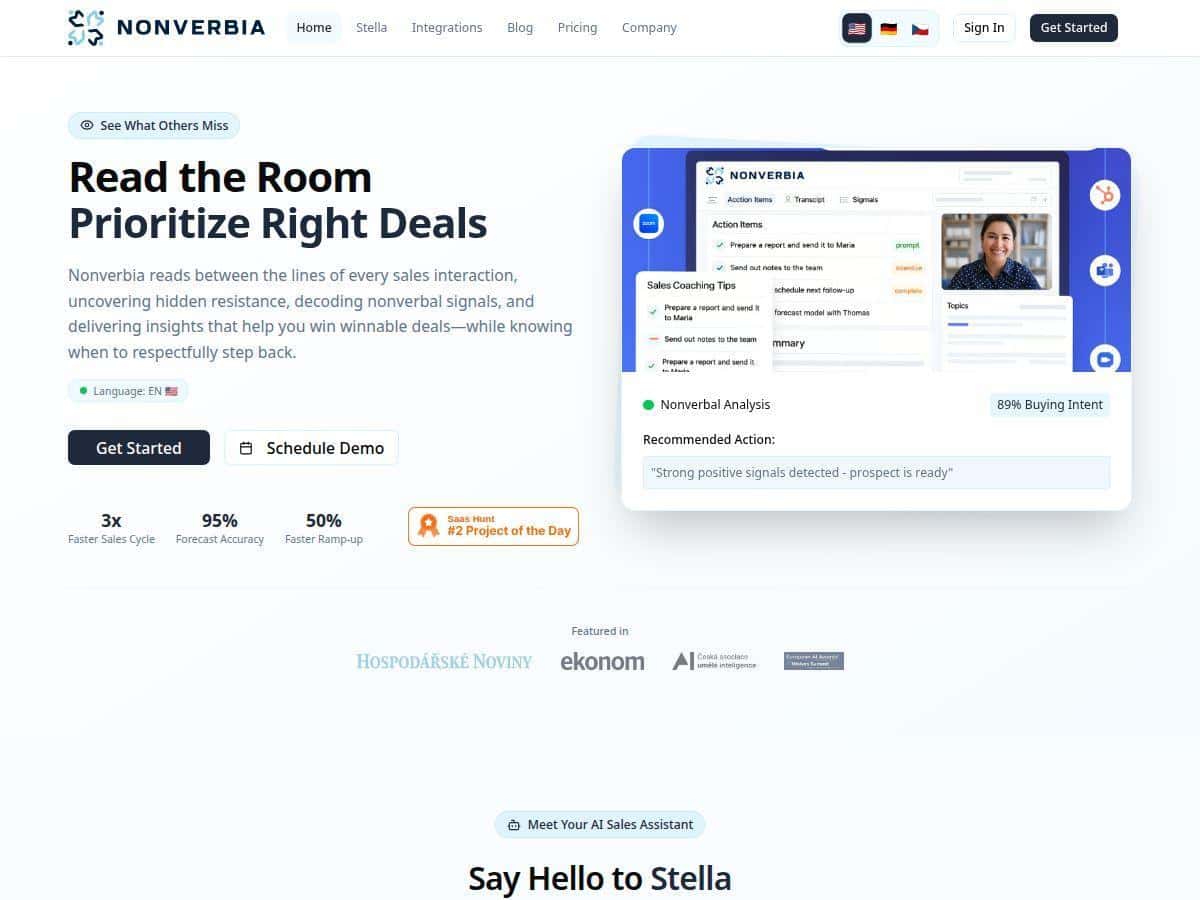
If you’re trying to get better at sales calls, you’ve probably had the same problem I did: you can feel a conversation going well… but you don’t always know why. Nonverbia is built to analyze what’s said and what’s happening nonverbally—tone, facial cues, gestures, the whole “are they interested or just being polite?” vibe. I tested it with a real sales workflow (remote calls, plenty of back-and-forth), and here’s what I noticed after actually using it—not just reading feature bullets.
Nonverbia Review: what I tested (and what I actually got)
Here’s the setup I used so this isn’t just “I tried it once” fluff. I ran Nonverbia on a batch of remote sales calls over a couple of weeks. My role was handling discovery and qualification, so the calls were usually 25–45 minutes with a lot of questioning, follow-ups, and soft objection handling.
How I used it day-to-day
- Call recording + analysis: I relied on the platform’s ability to analyze the meeting video/audio after the call. (In my experience, the output is only as good as what you feed it.)
- Real-time coaching: During the live call, I watched the prompts and tried to apply them immediately—mainly around pacing, probing questions, and when to push for the next step.
- Post-call summaries: After each call, I used the generated summary to capture key points, objections, and action items instead of rewriting notes from scratch.
- Follow-up actions: I compared what Nonverbia suggested to what I’d typically write in a CRM task. Then I used the suggestions to draft emails and schedule next steps.
What I noticed worked well
- Nonverbal “signal reading” felt more concrete than I expected. When the platform flagged moments like hesitation, disengagement, or uncertainty, it wasn’t just random commentary. It usually aligned with what I heard in tone and what I saw in facial/gesture cues.
- Coaching prompts helped me break bad habits. I’m guilty of talking too long when I get nervous. The live nudges pushed me to shorten my explanations and ask clearer questions. That alone changed the rhythm of a few calls.
- Summaries saved time. I didn’t stop taking notes entirely, but I stopped doing that “re-listen and type everything” routine. The summary + action items got me 70–80% of the way there.
Two specific before/after examples (the kind of thing you’ll care about)
- Example 1 (discovery → next step): On one call, Nonverbia’s coaching suggested I should confirm understanding and then ask for a concrete next step rather than continuing to explain features. I applied that within minutes. The follow-up call was easier to schedule because we had clear alignment on the problem and the timeline.
- Example 2 (handling objections): On another call where the prospect sounded polite but uncertain, the analysis leaned into “tone + engagement” cues. After that, I adjusted my approach: fewer assumptions, more direct questions about what “success” meant for them. The next interaction shifted from vague interest to specific requirements.
Where I saw limitations
- Audio/video quality matters. If the camera angle was bad, lighting was harsh, or audio was muffled, the nonverbal cues were noticeably less reliable. (This isn’t unique to Nonverbia—most computer-vision tools struggle when faces aren’t clearly visible.)
- It’s not magic automation. The best results came when I treated it like a coach, not a replacement for judgment. I still had to decide what mattered and what didn’t.
Key Features: how Nonverbia actually helps in a sales workflow
- Real-time speech analysis to identify buying signals
- Nonverbia watches the conversation for patterns in speech—things like tone shifts, confidence, and moments where the prospect moves from “curious” to “interested” (or the opposite). In practice, it’s most useful when you’re actively qualifying, not when you’re just doing a monologue.
- Inputs: live audio from the meeting.
Outputs: prompts during the call and cues in the post-call recap. - Body language and micro-expression interpretation
- This is the part people usually ask about. Nonverbia uses video cues to interpret engagement and emotional signals. My experience: it’s strongest when the prospect is clearly visible (front-facing camera, decent lighting). If your video feed is shaky or the participant is off-screen, it can’t “see” what it needs.
- Inputs: meeting video stream.
Outputs: nonverbal highlights and interpretation alongside the transcript. - Automated meeting summaries and next-step suggestions
- After the call, the summary pulled together the main topics and—importantly—action items. I used those suggestions to create follow-up tasks faster than I normally would. It also helped me spot what we said we’d do next versus what actually got agreed.
- Inputs: recorded meeting audio/video.
Outputs: structured recap + suggested next steps. - Live coaching prompts during sales calls
- The real value for me wasn’t “pretty insights.” It was the timing. When prompts show up while you’re still in the conversation, you can change course immediately—like asking a tighter question, confirming needs, or pushing for the next meeting.
- Inputs: live meeting context.
Outputs: on-the-fly coaching prompts. - CRM integration for seamless data updates
- Nonverbia’s CRM integration is meant to reduce manual copy/paste. In my workflow, this mattered because I’m otherwise stuck turning call notes into CRM fields and tasks. The integration is most helpful if your team already has a consistent CRM process (so the data lands where it should).
- Inputs: meeting data + CRM connection/permissions.
Outputs: updated CRM records and/or tasks (depending on configuration). - Team collaboration tools including clip sharing
- One of the underrated benefits: training. If your team can share short clips or specific moments from calls, you can coach faster than with generic “here’s what you did wrong” feedback.
- Inputs: analyzed call content.
Outputs: shareable clips/segments for team review. - Multi-language support for international teams
- If your prospects speak different languages, this is a big deal. I didn’t run a huge multilingual test, but the feature matters for teams that sell globally and don’t want to standardize everything into English-only calls.
- Inputs: spoken language in the meeting.
Outputs: localized analysis and summaries where supported. - Analytics for team performance and deal insights
- This is where you can go from “my calls improved” to “our process improved.” I used the analytics to look for patterns—like whether certain behaviors correlated with better outcomes. Just remember: analytics are only as good as the data quality and how consistently your team uses the tool.
- Inputs: call history + structured outputs.
Outputs: team-level trends and performance breakdowns. - API and webhook support for custom workflows
- If you’re building internal tooling, API/webhooks can let you push call insights into other systems. I didn’t wire up my own automation, but I tested the idea: the value here is connecting Nonverbia’s outputs to your reporting or CRM pipeline.
- Inputs: integration endpoints + event triggers.
Outputs: data payloads for custom handling.
Pros and Cons: what I liked, what I’d watch out for
Pros
- Speech + nonverbal insights feel aligned. The cues weren’t just “interesting,” they usually matched what I was seeing/hearing during calls.
- Real-time coaching is the most practical feature. It helped me adjust while the conversation was still happening, not after the fact.
- Post-call summaries cut down admin time. I spent less time rewriting notes and more time preparing the next step.
- Training potential for teams. Clip sharing and consistent feedback make it easier to coach new reps without relying on memory.
- CRM integration reduces manual work. When configured well, it saves you from duplicate data entry.
Cons
- Lower-quality video/audio reduces accuracy. If faces aren’t clearly visible or audio is noisy, the nonverbal interpretation suffers.
- Privacy concerns are real (and you should check settings). You’ll want to confirm how recordings are handled, what’s stored, and who can access what.
- Some features can be limited by tier. In my experience with tools like this, limits often show up in analysis volume, retention, advanced analytics, or collaboration features depending on the plan.
- Not everyone will trust AI cues the same way. If your team hates automation or refuses to review AI-generated prompts, adoption will be slower.
Pricing Plans: what it cost (and what to verify before you buy)
Nonverbia’s pricing is typically presented as a freemium model, with paid tiers starting around $19–$29 per month, and higher plans offering more analysis hours, advanced features, and team management. There’s often a free trial so you can test the workflow before committing.
What I recommend you verify on the pricing page (because it can change):
- Plan names and current price points (I’m referencing the common range, but your screen may differ depending on date/promos).
- How many minutes/analysis hours are included in each tier.
- Whether team collaboration + clip sharing are included on your chosen plan.
- CRM integration scope (which CRMs are supported and whether it’s full sync or limited updates).
If you’re deciding between tiers, think in terms of call volume. If you only run a handful of calls per week, you might not need the top tier. But if your team is actively coaching and reviewing clips, the “analysis + collaboration” parts become the real value.
Privacy & security: what you should be checking before you upload calls
Let’s be honest: uploading calls is a big ask. Before I’d roll this out broadly, I’d want clear answers on a few basics:
- Data retention: Are call recordings stored? For how long?
- What gets stored: Just transcripts/summaries, or the full audio/video too?
- Encryption: Is data encrypted in transit and at rest?
- Access controls: Can admins restrict who views clips, summaries, and coaching prompts?
- Consent requirements: Do you need explicit consent from participants, and can you manage that inside your process?
In my view, the “right” tool is the one where your team can configure privacy appropriately—not the one with the flashiest insights.
Who should buy Nonverbia (and who might not need it)
Nonverbia is a strong fit if you’re running a sales motion where call coaching and follow-up notes actually matter—like SDR/AE discovery calls, qualification calls, or sales teams with lots of remote selling.
- Best fit: teams that do frequent remote calls, want consistent coaching, and care about improving next-step conversion.
- Maybe not: teams with very low call volume, strict “no AI analysis” policies, or calls where video quality is consistently poor.
Wrap up
After using Nonverbia for a few weeks, I genuinely liked what it did for my sales calls—especially the live coaching and the time saved from post-call summaries. It’s not perfect, and the accuracy depends heavily on audio/video quality and how your team uses the insights. But if you want a practical way to read customer signals (and coach yourself or your reps in the moment), Nonverbia is worth a serious look.