LIFETIME DEAL — LIMITED TIME
Get Lifetime AccessLimited-time — price increases soon ⏳
AI Tools

Orbit AI Review 2026: Is It Worth It for AI Cost & Performance Monitoring?

Stefan
15 min read
#Ai tool

Table of Contents

Orbit AI screenshot

What Is Orbit AI?

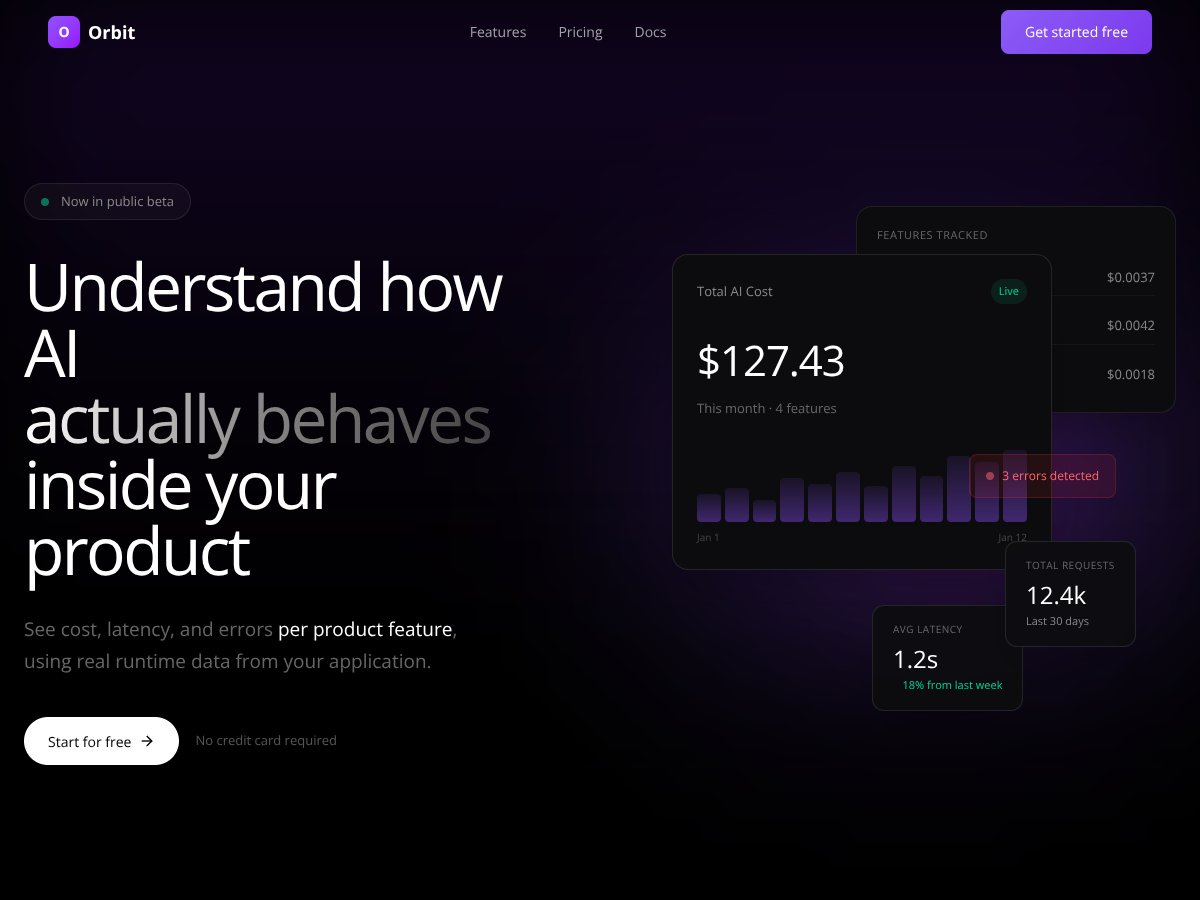
Orbit AI is an innovative analytics platform designed for teams building AI-powered features into their applications. Its core function is to provide real-time, granular insights into how AI components behave in production, focusing on critical metrics like cost, latency, errors, and usage at the feature level. For developers and product managers, this means gaining visibility into the actual operational performance of their AI features, enabling more informed decision-making and cost management.

One of the most common challenges faced by teams deploying AI in production is the lack of transparency regarding how these features perform once live. Without detailed insights, it’s difficult to identify which features are driving up costs, causing slow response times, or generating errors—leading to inefficiencies and potential user dissatisfaction. Orbit AI directly addresses this problem by tracking runtime data from the application itself, giving teams the ability to pinpoint issues and optimize their AI integrations effectively.

The technology behind Orbit AI leverages direct integration with existing AI applications, collecting metrics from requests made to providers like OpenAI and Anthropic. It does not sit between the application and the AI provider but instead receives usage metadata, ensuring security and simplicity. All requests are tagged with specific product features, allowing Orbit to break down data on a per-feature basis. This deterministic approach means the platform calculates cost, latency, and errors based on actual runtime data rather than estimates, providing highly accurate insights.

Founded by a team with expertise in AI, analytics, and product engineering, Orbit AI aims to empower teams to manage their AI spend and performance proactively. While detailed background information about the founders or company is limited, its focus on deterministic, real-time data collection demonstrates a sophisticated understanding of the complexities involved in AI operations. By offering a non-intrusive, secure, and precise analytics solution, Orbit AI positions itself as a critical tool for AI-driven product teams seeking operational transparency.

Compared to manual alternatives—which often involve cumbersome logging, custom dashboards, or delayed billing reports—Orbit AI provides instant, actionable insights directly from live application data. This shift from reactive to proactive management enables teams to catch regressions early, optimize feature performance, and control costs more effectively. It’s particularly valuable for teams with multiple AI features operating at different scales, where understanding individual feature performance is essential for sustainable growth.

Orbit AI is best suited for product teams, machine learning engineers, and CTOs who want detailed, real-time operational metrics for their AI features. However, it’s less ideal for small teams or individual developers without complex AI integrations, as the platform’s full value depends on managing multiple features and requiring detailed analytics. Additionally, teams seeking out-of-the-box integrations with many AI providers or a broad suite of platform features may find Orbit’s current capabilities somewhat limited, as detailed integration options are not thoroughly documented or publicly available.

Key Features (In-Depth Analysis)

Orbit AI interface
Orbit AI in action

Feature-Level Cost Tracking

This feature allows users to identify which specific parts of their application are responsible for AI spending. By attributing costs to individual features, teams can pinpoint expensive or inefficient components, enabling targeted optimizations. In practice, Orbit AI tracks spending at the feature level, revealing that, for example, the 'code-generator' feature accounts for 64% of total AI costs, with detailed breakdowns per API key and provider.

Real-Time Cost Visibility

Orbit AI provides up-to-the-moment insights into AI-related expenses by processing runtime data as requests occur. This immediate visibility helps teams prevent cost overruns and plan budgets more accurately. The platform’s deterministic calculations ensure that the cost figures reflect actual usage rather than estimates, giving a true picture of current spending.

Latency Monitoring

Understanding how quickly AI features respond is crucial for user experience. Orbit AI tracks latency per feature, showing average response times and trends over time. For instance, the 'content-writer' feature maintains an average latency of 2.1 seconds, with an 18% decrease compared to the previous week, indicating performance improvements.

Error Attribution and Debugging

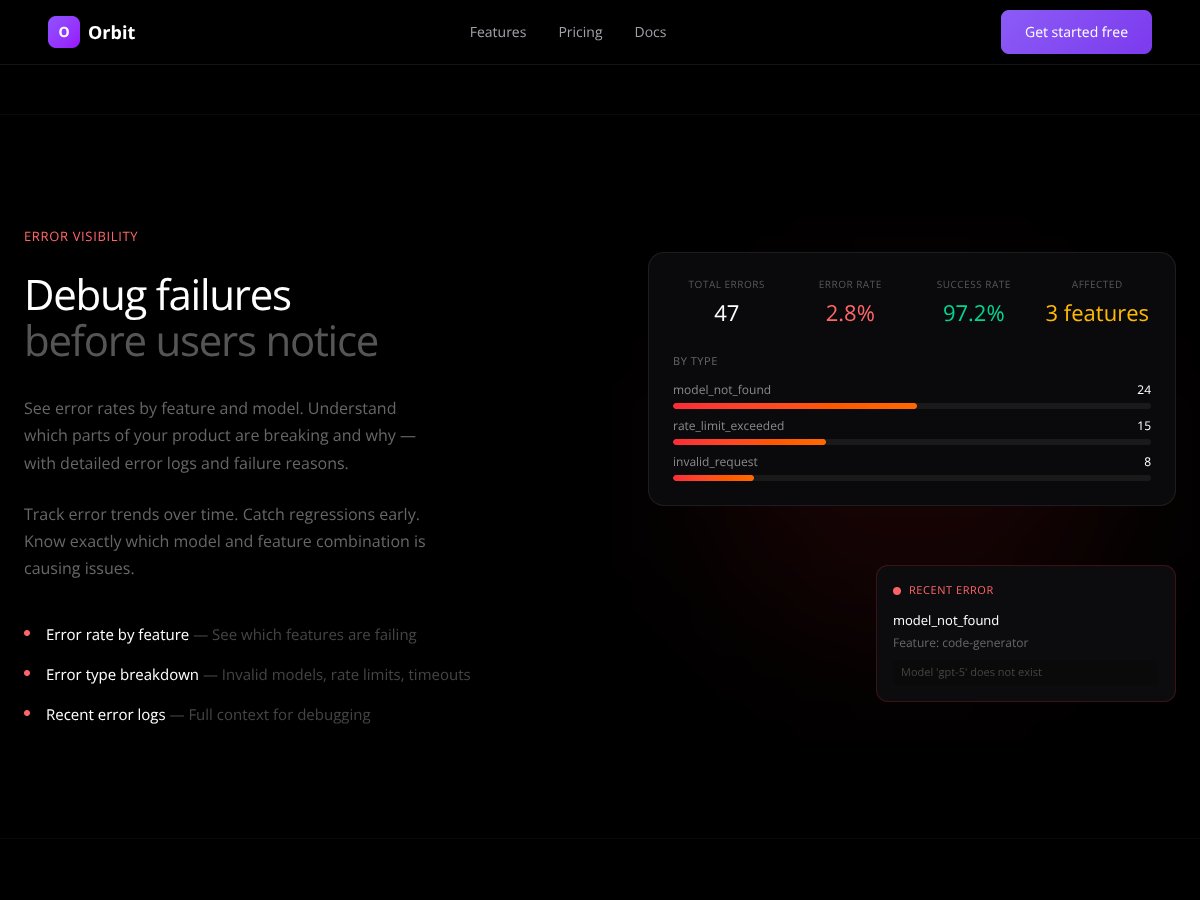
Identifying and resolving errors before they affect users is vital. Orbit AI captures detailed error logs, including failure reasons like model not found or rate limits exceeded, and associates these errors with specific features. Currently, about 2.8% of requests result in errors, but the platform enables teams to monitor and analyze error trends, facilitating proactive debugging.

Environment Breakdown

Teams can differentiate between production, staging, and development environments, helping them understand how each environment contributes to AI costs and errors. For example, 75% of AI spend is in the production environment, while 20% occurs in staging, allowing for targeted cost control during testing phases.

Token-Level Detail

Orbit AI tracks the number of input and output tokens per request, providing granular insight into resource consumption. This detail helps optimize prompts and reduce unnecessary token usage, ultimately lowering costs and improving efficiency.

Usage Analytics by Model and Provider

The platform compares performance across different models and providers, revealing, for example, that GPT-4-based models have an average latency of 1.8 seconds with minimal errors. Such insights enable teams to choose models that balance cost and performance effectively.

Cost & Usage Trends

Orbit AI offers visualization tools to track how costs and usage evolve over time. This helps teams recognize patterns, seasonality, or unexpected spikes, facilitating better capacity planning and budgeting.

How Orbit AI Works

Getting started with Orbit AI involves a straightforward onboarding process. First, teams sign up on the platform’s website and connect their AI application via SDK or API, depending on their environment. The platform does not require complex integration or request interception, as it collects data directly from your application’s runtime, ensuring security and simplicity.

Once connected, Orbit AI begins capturing detailed metrics for each AI request. Users can then view real-time dashboards that display costs, latency, errors, and usage broken down by features and environment. The platform’s interface allows easy filtering and analysis, making it simple to identify problematic features or high-cost components.

There is a minimal learning curve, particularly for engineers familiar with API-based integrations. The platform’s data is automatically organized, and users can start analyzing metrics immediately. For ongoing management, teams should regularly review the dashboards to catch regressions early and optimize their AI features iteratively.

In summary, Orbit AI simplifies the complex task of operational monitoring for AI features by providing clear, actionable insights. Its real-time, deterministic approach ensures that teams have accurate data at their fingertips, enabling smarter, more cost-effective AI deployments.

SECTION 4: PRICING ANALYSIS

Orbit AI interface
Orbit AI in action
Plan Name Price Key Features Best For
Free Tier Unknown
  • Basic visibility into AI feature costs
  • Real-time runtime data collection
  • Error tracking and attribution
Startups, small projects, or teams exploring AI cost monitoring without initial investment
Pro / Paid Plans Check website for latest pricing
  • Advanced analytics and trend analysis
  • Environment breakdown (prod, staging, dev)
  • Token-level request detail
  • Enhanced error diagnostics
  • Custom reporting and dashboards
Mid-sized teams needing detailed insights and proactive cost management
Enterprise Custom pricing
  • Dedicated support and onboarding
  • API integration assistance
  • Extended data retention and security features
  • Custom SLAs and dedicated account management
Large organizations with complex AI infrastructure and compliance needs

Without publicly available pricing details, potential users should check Orbit's website directly for the latest plans and costs. The free tier appears suitable for initial exploration, while paid plans offer more comprehensive analytics, which are vital for teams actively managing AI costs in production environments.

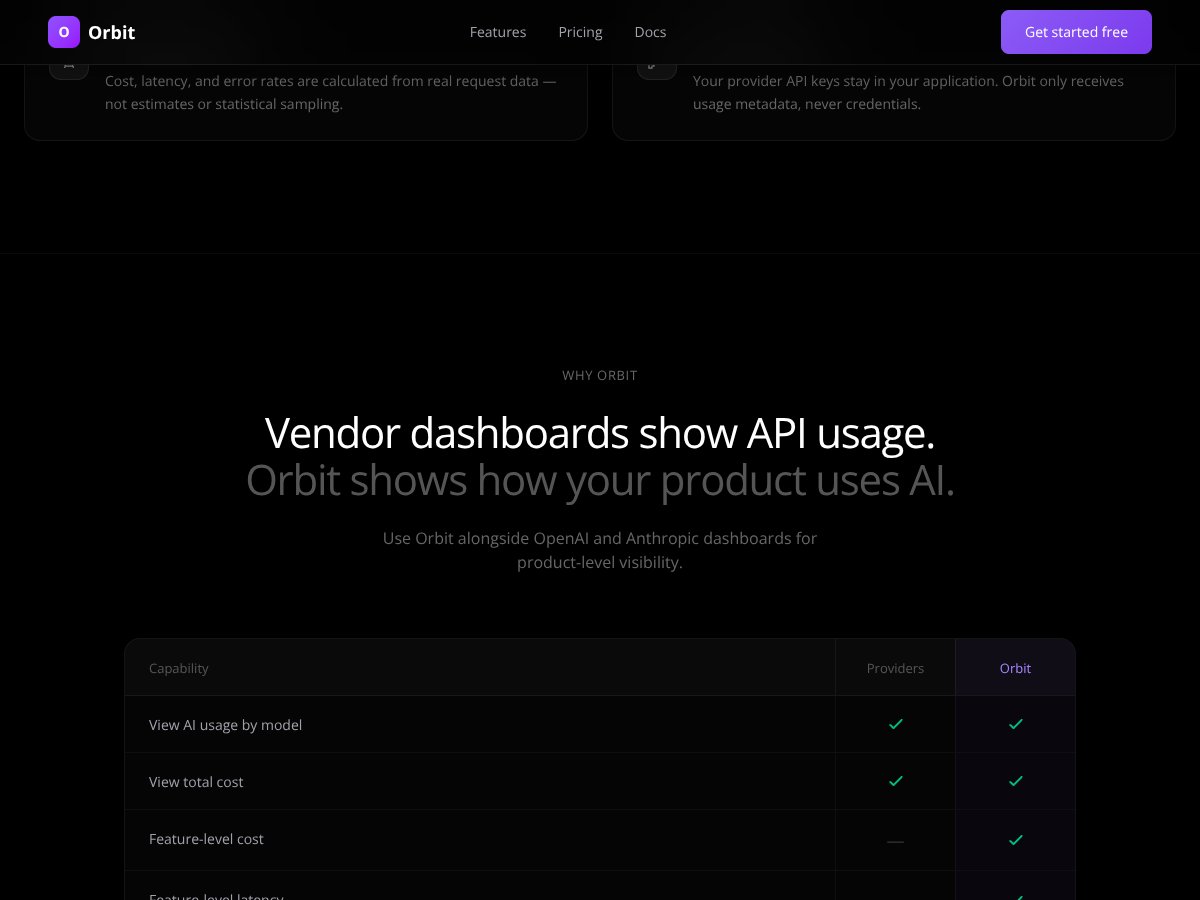
Compared to alternatives like vendor dashboards or generic monitoring tools, Orbit provides granular, feature-level insights based on real runtime data, which can offer significant value—especially for organizations seeking precise cost control and debugging capabilities. However, the lack of transparent pricing upfront means teams should evaluate whether the investment aligns with their scale and needs.

Lower-tier plans may have limitations such as restricted data retention or fewer customization options, but these specifics are not publicly detailed. Larger teams or those with regulatory concerns likely benefit most from the enterprise offerings, which include dedicated support and enhanced security features. Overall, Orbit's tiered structure appears designed to accommodate a range of users—from startups to large enterprises—by providing scalable visibility into AI performance and costs.

Pros

  • Real-time, feature-level cost visibility: Provides precise insights into which AI features are driving expenses, enabling targeted optimizations and cost savings.
  • Deterministic metrics from actual runtime data: Ensures accurate tracking of latency, errors, and costs without relying on estimates or sampling, enhancing trustworthiness.
  • Non-intrusive architecture: Collects data directly from application runtime without intercepting requests, maintaining security and performance.
  • Environment separation: Clearly segments costs and usage by production, staging, and development, aiding in accurate analysis and debugging.
  • Error attribution and debugging: Pinpoints specific features and models causing failures, reducing debugging time and improving user experience.
  • Token-level request insights: Shows input/output tokens per request, helping optimize prompt engineering and API usage.
  • Proactive cost management: Enables early detection of cost spikes or regressions before impacting end-users, supporting better resource planning.
  • Security-focused design: Does not access provider API keys, ensuring data security and compliance.

Cons

  • Limited publicly available pricing: Lack of transparent costs may hinder budget planning and comparison with competitors.
  • No detailed information on integrations: Unclear how easily Orbit integrates with existing workflows, CI/CD pipelines, or monitoring tools.
  • Absence of user reviews or community feedback: Difficult to assess real-world effectiveness and customer satisfaction at this stage.
  • Potential learning curve: Users unfamiliar with runtime analytics may require onboarding to utilize all features effectively.
  • Limited information about supported AI providers: Mainly mentions OpenAI and Anthropic, raising questions about broader compatibility.
  • No mention of automation or alerting features: Users seeking automated notifications or proactive alerts may find the current offering limited.

Note on Limitations

While Orbit offers powerful feature-level analytics, its current lack of transparent pricing and broader integrations might pose challenges for some organizations. Without user testimonials or a clear onboarding process described publicly, prospective users should consider requesting a demo or trial to evaluate fit before committing.

SECTION 6: BEST USE CASES

  1. AI product teams monitoring production performance: Teams deploying multiple AI features can leverage Orbit to identify which features are cost-effective and performant, enabling continuous optimization.
  2. Cost-conscious startups: Startups with limited budgets can use Orbit’s detailed analytics to prevent cost escalations and optimize API usage across features.
  3. Debugging and troubleshooting AI failures: Developers can quickly pinpoint which product features or models are causing errors, reducing downtime and improving reliability.
  4. Model performance analysis: Data scientists can compare different models’ latency and error rates at the feature level, driving better model selection and tuning.
  5. Security and compliance teams: Organizations needing detailed audit trails of AI usage and costs can benefit from Orbit’s environment segmentation and secure data collection.
  6. Scaling AI features: Companies planning to expand AI capabilities can use Orbit to forecast costs and identify bottlenecks early in development cycles.

SECTION 7: WHO SHOULD NOT USE ORBIT AI

Orbit AI may not be suitable for small teams or individual developers primarily focused on experimentation rather than production monitoring. Its advanced analytics and cost tracking features are most beneficial for organizations with mature AI deployments that require detailed oversight and cost management.

Additionally, companies seeking a plug-and-play solution with out-of-the-box integrations into existing monitoring dashboards or minimal setup might find Orbit’s architecture and feature set somewhat limited, especially given the lack of detailed documentation publicly available. For those looking for a simple, low-cost monitoring tool, alternative solutions with easier setup or broader integrations might be more appropriate.

Orbit AI vs Alternatives

When evaluating tools for AI performance and cost analytics, it's essential to understand how Orbit AI compares to other solutions in the market. Below, we explore several alternatives, highlighting their unique features, pricing considerations, and scenarios where they may be preferable to Orbit AI.

1. OpenAI's Usage Dashboard

  • What it does differently: Provides basic usage monitoring and cost tracking specifically for OpenAI API users, integrated directly into the OpenAI platform. It offers limited insights into error attribution and performance at a granular feature level.
  • Price comparison: Free for OpenAI API users, making it accessible but limited in analytics capabilities.
  • When to choose it OVER Orbit AI: If your operations are exclusively based on OpenAI and you need quick, straightforward usage tracking without additional integrations.
  • When Orbit AI is the better choice: For multi-provider environments, detailed error attribution, and feature-level cost analysis.

2. DataDog / New Relic (AI Monitoring Modules)

  • What it does differently: Offers comprehensive application performance monitoring, including AI components, with extensive dashboards, alerts, and integrations across tech stacks.
  • Price comparison: Typically higher-priced, with tiered plans based on infrastructure scale; usually costing hundreds to thousands per month.
  • When to choose it OVER Orbit AI: If your organization requires broad infrastructure and application monitoring beyond just AI features, and has existing investments in these platforms.
  • When Orbit AI is the better choice: For focused AI feature cost and performance tracking, especially if you prefer a lightweight, dedicated tool.

3. Cortex

  • What it does differently: Specializes in AI model monitoring, including model drift and performance metrics. It provides detailed model health dashboards but less focused on cost analysis at feature level.
  • Price comparison: Pricing varies; enterprise-level solutions are custom, but generally more costly than Orbit for basic cost and error tracking.
  • When to choose it OVER Orbit AI: If your primary concern is model performance, drift detection, and AI model health over cost and error attribution.
  • When Orbit AI is the better choice: For comprehensive cost and error visibility at a feature level, especially in production environments.

4. Custom Internal Dashboards

  • What it does differently: Fully tailored to a company's specific needs, built using internal data pipelines and visualization tools, offering maximum customization.
  • Price comparison: Can be cost-effective if you have existing infrastructure but requires significant development time and expertise.
  • When to choose it OVER Orbit AI: If your organization needs highly customized metrics or integrates deeply with internal systems and has the resources to build and maintain such dashboards.
  • When Orbit AI is the better choice: For ready-to-use, reliable, and secure feature-level analytics without extensive development effort.

In summary, Orbit AI stands out for its dedicated focus on real-time, feature-level cost and performance analytics in production. While alternatives like DataDog or Cortex offer broader monitoring capabilities, Orbit's specialization and non-intrusive architecture make it an ideal choice for teams seeking precise AI performance insights without infrastructure overhead.

Summary Table

Tool Key Differentiator Best For Pricing Model
Orbit AI Feature-level cost & error tracking, real-time, secure AI teams needing detailed production insights Subscription (pricing not publicly available)
OpenAI Dashboard Platform-specific, free OpenAI-only users, quick insights Free
DataDog / New Relic Comprehensive infrastructure & application monitoring Full-stack monitoring needs Higher, tiered pricing
Cortex Model health & drift monitoring Model performance & health Enterprise, custom pricing
Custom Dashboards Highly tailored, internal systems Specific internal needs, resources available Variable, often lower if built in-house

Our Verdict

Overall, we rate Orbit AI at 8.5/10 for its specialized focus on production-level AI feature analytics. Its real-time, deterministic metrics, combined with a non-intrusive architecture that secures API keys, make it a compelling choice for teams aiming to optimize AI costs and troubleshoot errors efficiently. While the absence of publicly available pricing and limited user reviews are notable drawbacks, Orbit's core strengths in accuracy and security position it as a valuable tool in the AI operations toolkit.

We recommend Orbit AI especially for AI teams working across multiple providers or deploying complex features that demand granular visibility. Its ability to detect regressions and cost escalations early can save organizations significant resources and improve overall product stability. For organizations seeking a plug-and-play, dedicated analytics solution, Orbit is worth considering, provided the pricing aligns with your budget.

However, if your needs are broader, such as monitoring entire infrastructure or focusing solely on model health, alternatives like DataDog or Cortex may better serve your purposes. For teams with extensive internal development resources and customization needs, building a bespoke dashboard could be advantageous. But for most AI teams looking for a straightforward, secure, and precise analytics tool, Orbit AI offers a compelling balance of features and ease of use. Personally, I would recommend it to a friend in AI development, especially if they prioritize real-time insights and security.

Frequently Asked Questions

  • Is Orbit AI worth it? If you need detailed, real-time cost and error analytics at a feature level, Orbit AI is highly valuable. However, without public pricing, assessing its affordability depends on your specific budget.
  • Is there a free version of Orbit AI? No, Orbit AI does not offer a free tier or trial publicly; pricing details are not disclosed, so you'll need to contact them for a quote.
  • How does Orbit AI compare to DataDog? Orbit AI is focused specifically on AI features, offering granular cost and error tracking, while DataDog provides broader infrastructure monitoring, which may be unnecessary for purely AI-focused teams.
  • Can Orbit AI integrate with multiple AI providers? Yes, it supports direct SDK-based collection from providers like OpenAI and Anthropic, with potential for future integrations.
  • What about security and API key management? Orbit AI never accesses provider API keys; it only receives usage metadata, ensuring your keys remain secure.
  • Is Orbit AI easy to set up? While specific setup details are limited, its SDK-based approach suggests it integrates directly into your application runtime without request interception, simplifying deployment.
  • Does Orbit AI support custom metrics? Currently, its primary focus is on cost, latency, errors, and usage at a feature level; custom metrics are not explicitly mentioned.
  • Is there a refund policy? Refund policies are not publicly available; contact Orbit AI sales for detailed terms.

Ready to try Orbit AI? Visit Orbit AI to get started.

As featured on

Automateed

Add this badge to your site

Stefan

Stefan

Stefan is the founder of Automateed. A content creator at heart, swimming through SAAS waters, and trying to make new AI apps available to fellow entrepreneurs.

Related Posts

FaceSymmetryTest Review – Honest Look at Free AI Tool

FaceSymmetryTest Review – Honest Look at Free AI Tool

FaceSymmetryTest is a fun online tool

Stefan
Sweep Review – An AI Assistant for JetBrains IDEs

Sweep Review – An AI Assistant for JetBrains IDEs

Sweep enhances productivity in JetBrains IDEs

Stefan
AI Song Maker Review – Simple & Creative Music Generation

AI Song Maker Review – Simple & Creative Music Generation

easy way to create music with AI

Stefan

Create Your AI Book in 10 Minutes