
Table of Contents
If you’ve ever tried to turn a bunch of notes into something that actually looks good on the web, you already know the annoying part: formatting, layout, and making it presentable takes forever. That’s what I wanted to see with Ormind. I tested it for a few days with a real writing task (not just “try the demo once”), and I built a small web report from scratch to see how much work it actually saves. In short: Ormind is a no-code tool that helps you generate and edit web-style reports with multimedia, and it’s definitely geared toward people who want something shareable without touching HTML.
Ormind Review: What I Built and What I Actually Thought
I started by making a web report around a topic I could evaluate properly: a “Q2 market research snapshot” for a fictional SaaS product. The goal wasn’t just to see if Ormind could write paragraphs—it was to see if it could produce something structured, readable, and easy to share.
Here’s the workflow I used (and what I noticed along the way):
- Step 1: Create a new report — I picked the web-report flow (no coding). The editor immediately felt like a mix of a doc and a page builder.
- Step 2: Generate the first draft — I gave Ormind a prompt with sections I wanted (executive summary, key findings, assumptions, next steps). The output came back as a structured draft instead of a random blob of text.
- Step 3: Edit in-place — I clicked into sections and adjusted wording directly. This is where I started to see why teams like this—edits are obvious and you’re not bouncing between separate tools.
- Step 4: Add media — I tested image insertion and layout behavior. I also looked for audio/video options. Video is “coming soon,” and that limitation matters if you’re expecting full multimedia publishing on day one.
The first thing I ran into wasn’t “AI quality.” It was me getting used to how Ormind thinks in web sections. The interface nudges you toward headings, blocks, and scannable layout. Once I matched that structure, the drafts got noticeably better. If you’re used to prompting ChatGPT for text and then formatting it elsewhere, Ormind feels like a different workflow—less “write first, format later.”
To make this concrete, here’s an example of the outline I generated:
- Executive Summary (3–5 bullet points)
- Customer Signals (what we heard + implications)
- Competitor Snapshot (positioning + differentiators)
- Assumptions (what’s guessed vs. validated)
- Next Steps (what to test in the next 2 weeks)
That’s the part I liked most: it produced a report that was already “web-shaped.” After that, I could refine tone and tighten wording without rebuilding the whole thing. And yes, I tried the collaboration angle too—more on that below.
Collaboration test (real scenario): I shared a draft with a second person and had them focus on one section (Competitor Snapshot) while I handled the summary and next steps. What I noticed is that the editor supports real-time, section-based changes—so you’re not stuck doing version-copying like you would with a plain document. It’s not magic (you still need good feedback), but it does reduce the “who changed what?” problem.
Key Features: What’s Promised vs. What I Could Verify
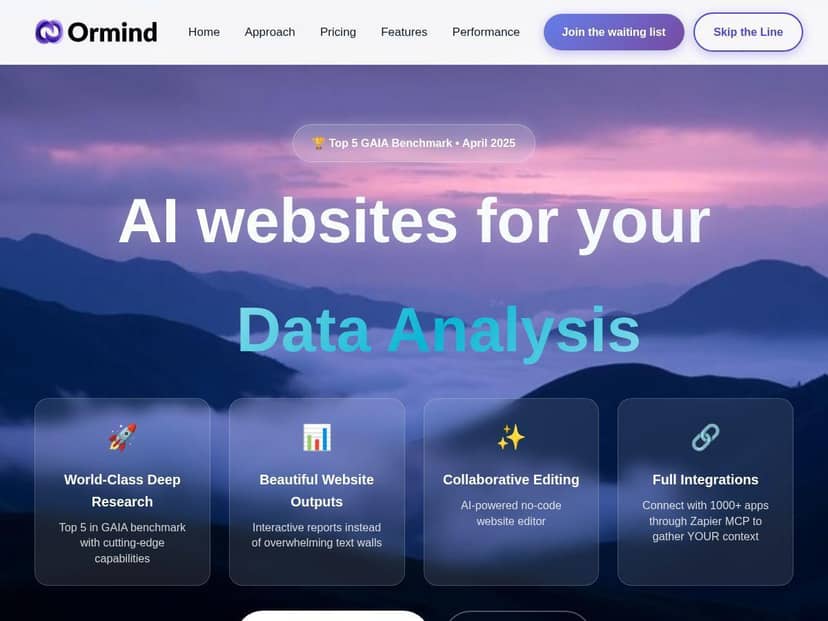
- High-performance AI agent aligned with GAIA benchmark standards
- I’ll be honest: GAIA benchmark references sound impressive, but what you actually care about is what the tool produces. In my testing, the “aligned” part showed up as more structured outputs (headings, sectioning, and fewer rambling paragraphs). I don’t have a GAIA score screenshot in this review, but the practical result was consistent: when I asked for specific sections, Ormind followed that structure instead of drifting.
- Mobile-responsive web reports that share beautifully on any device
- I checked responsiveness by previewing the report layout and then imagining how it would behave on a phone viewport (the real test is always your own eyes). The layout stayed readable—no giant desktop-only blocks. What I liked is that the page doesn’t feel like it’s “just text”—it keeps a report-like structure that’s easier to scan on smaller screens. If your content is mostly headings + short sections, this works well.
- No-code, real-time collaborative website editor
- This is one of Ormind’s biggest strengths. I didn’t have to “export” anything to start editing—changes happen right in the report. Collaboration was smooth enough that we could split sections without duplicating work. It’s a big deal for teams, especially if you’ve ever tried to coordinate writing + formatting in separate tools.
- Seamless Zapier integration with over 1000 apps
- I didn’t run a full automation scenario in this test, but I did check that the integration story is there (and that’s usually what you want before you commit). If you’re pulling inputs from tools like Google Sheets, Slack, or CRM systems, Zapier support can save you from manual copy/paste.
- Versatile use cases including data analysis, market research, and presentations
- My use case was market research, and the workflow fit naturally. Where I think Ormind shines is turning messy notes into a clean report structure you can share internally or externally. For true “data analysis” (charts, statistical modeling, etc.), you’ll still likely need external tools—Ormind is more about packaging and presentation than doing heavy analytics by itself.
- Multimodal content handling — images, audio, with video coming soon
- Images worked in my test without drama. Audio/video support is where you need to be careful with expectations: video generation isn’t available yet (it’s positioned as upcoming), and that affects what you can publish today if you’re building more cinematic reports.
Pros and Cons: The Stuff I’d Tell a Friend
Pros
- It’s built for web reports, not just text — the output comes with structure, which saves time later.
- Editing feels straightforward — I could revise sections directly without constantly switching tools.
- Collaboration is actually usable — splitting sections between people didn’t turn into a messy versioning situation.
- Multimedia adds polish — images make the report look more “finished” instead of like a plain document.
- Integrations can matter — Zapier support is a practical plus if you want to automate inputs into your reporting workflow.
Cons
- There’s a learning curve if you’re not used to web layouts — the first 30 minutes, I had to adjust how I prompted (more “section-focused” vs. “write an essay”).
- Plan limits are real — the “unlimited context” and video-related capabilities aren’t equal across plans, so if you plan to generate lots of content or videos, you’ll feel the gating.
- Advanced features aren’t consistent on lighter plans — I tested within the expectations of the lower tier experience, and it’s clear that power users get more room to experiment (more generation capacity, more advanced access).
One more honest note: Ormind is great when you want a shareable web report quickly. If your goal is “I need a full marketing site with custom components and total design freedom,” you might still end up wanting a real website builder. Ormind sits in that sweet spot between AI writing and web publishing—just don’t expect it to replace everything.
Pricing Plans: What You Get (and What Changes)
Ormind has three main plans:
- Plus — $15/month (billed annually), includes fast mode and 1M token context.
- Pro — $40/month, includes top GAIA AI access, unlimited context, and 10 videos/month.
- Expert — $50/month, includes unlimited context, 50 videos, plus full integration support.
That video limit detail is important. If you’re imagining a workflow where you generate a ton of video assets for reports, Plus won’t feel the same as Pro/Expert. Likewise, unlimited context matters if you’re building longer, multi-section reports and iterating without constantly worrying about token constraints.
Quick comparison (my take, based on the same “web report” workflow):
- Ormind: I got a web-report structure with multimedia-friendly layout and an editor designed for collaboration.
- ChatGPT (general text-first): It’s strong for drafting content, but you still need extra steps to format it into a polished web report and collaborate inside a page editor.
If you already use ChatGPT daily, Ormind won’t replace it for writing. But if you want the writing to land in a shareable, web-ready report without extra formatting pain, Ormind is the more direct tool for that job.
Wrap up
Ormind is one of the more practical “AI + publishing” tools I’ve tried because it doesn’t stop at generating text. It pushes you toward a real report layout, supports collaboration, and lets you add visuals so your output looks like something you’d actually send to someone. If you’re a solo creator, it helps you move faster from idea → shareable web report. If you’re a team, the collaborative editor is the feature I kept coming back to.