Table of Contents
Reference management sounds boring until you’re halfway through a paper and realize you can’t tell which PDF you cited for that one paragraph. I’ve been there—scrambling through folders, renaming files like “final_v7_reallyfinal.pdf,” and hoping the bibliography still matches what I actually read.
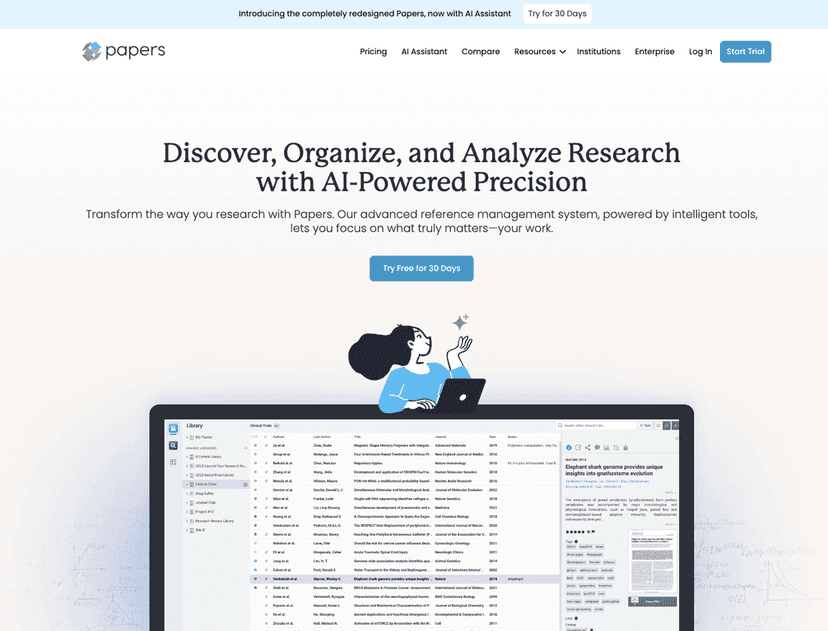
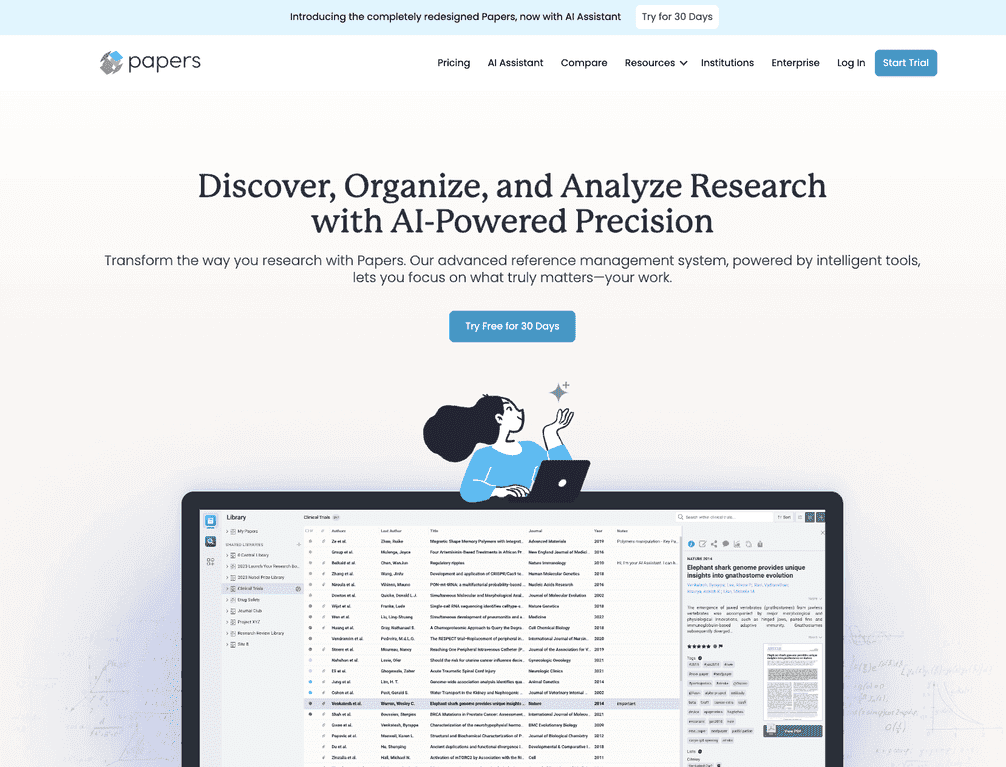
That’s why I tried Papers. It’s a reference management tool aimed at students, researchers, and teams who want a cleaner workflow for importing papers, organizing them, and generating citations without losing their mind. The big promise here is that Papers keeps your library searchable and your citations consistent—while adding AI features to speed up discovery and reading.

Papers Review: does it actually make research easier?
Papers is built for one main job: keeping your research organized from the moment you find a paper to the moment you cite it. In my experience, the difference isn’t just “it stores PDFs.” It’s how quickly I can get from a citation to the right note, highlight, or section of the PDF.
What stood out immediately is the way Papers handles importing and metadata. If you’ve ever dragged in a PDF and then spent 10 minutes fixing author names or journal details, you’ll appreciate the automatic metadata matching. It’s not magic—occasionally it needs a quick correction—but it saves real time.
Then there’s the discovery side. Papers includes AI-powered recommendations that help you surface related work without starting from scratch every time. I didn’t treat it like an oracle, but it was genuinely useful for finding “nearby” papers based on what I’d already saved.
Collaboration is another area where it feels more modern than a lot of older reference managers. If you’re working on a shared bibliography or reviewing papers with a lab group, Papers makes it easier to keep everyone aligned across devices.
Key Features I’d pay attention to
- Easy Importing from various sources
I like that you’re not limited to one method. Whether you’re pulling in PDFs you already have or importing from sources you use regularly, it keeps the process from feeling clunky. - Automatic Metadata Matching for articles
This is the feature I notice most when cleaning up a library. If the metadata comes in wrong, Papers usually makes it quick to correct rather than forcing you to start over. - Flexible Collection Management with tags and custom fields
Tags are great, but custom fields are what helped me stay consistent—especially when I wanted to track things like study type, dataset used, or “used in draft section 2.” - Extensive Research Discovery through AI-powered recommendations
It’s not just “related articles.” It’s recommendations that feel connected to your library, so you’re not hunting in the dark. - Impact Measurement linked with citations and Altmetrics
When I’m deciding what’s worth deeper reading, having citation/altmetric context is helpful. It doesn’t replace judgment, but it speeds up triage. - Dynamic Annotations & Notes for detailed insights
Highlights and notes aren’t just for show. In practice, I used these to capture why a paper mattered—methods choices, limitations, and results I wanted to reference later. - AI Assistant that analyzes research and PDFs
This can be handy for summarizing what you just opened. Just remember: AI summaries are only as good as the PDF text quality. If the document is scanned or messy, expect more errors. - Real-time Collaboration across devices
If you’re the kind of person who edits on a laptop and reviews on another device, this matters. I found it reduces the “wait, which version did we use?” problem. - Seamless SmartCite Integration for citation management
SmartCite is where Papers earns its keep when you’re writing. The goal is simple: cite accurately without rebuilding your bibliography at the end of the process.
Pros and Cons from a real user’s perspective
Pros
- Faster organization than “folders + filenames”
Once your library is set up, retrieving the right paper and notes feels quick. - AI recommendations can actually help you discover better leads
I found it useful when I wanted papers that were adjacent to what I’d already saved. - Collaboration works well for team projects
If you’re sharing research with others, Papers makes it easier to keep things consistent. - Strong citation formatting support
Generating citations is less painful than many alternatives, especially when you’re writing repeatedly across drafts.
Cons
- There’s a learning curve
Not everyone will click with the interface immediately. If you’re used to simple tools, you’ll probably need a couple of sessions to set up your tagging and collections the way you like. - Advanced features may cost extra
Some of the more powerful capabilities can depend on your plan, so check pricing before you assume everything is included. - AI features depend on PDF quality
If your PDFs are scanned or poorly formatted, AI summaries and analysis won’t be as reliable. I still had to verify key details.
Pricing Plans (and what I’d do before paying)
Papers offers a 30-day free trial for new users. If you want the full picture on what’s included at each tier, check their Papers Pricing page.
If you’re on the fence, I’d use the trial to test three things: (1) how well metadata matching works for your typical imports, (2) whether SmartCite fits your writing setup, and (3) how the AI assistant handles the types of PDFs you actually have.
Wrap up
Papers is one of the more polished reference managers I’ve used. The combination of organization tools, citation support, and AI-assisted reading/discovery is genuinely useful—especially if you’re writing regularly or collaborating with others. I still think it’s smart to verify anything AI summarizes, but overall it cuts down the busywork that usually eats time in research.
Try the 30-day free trial and see if it matches your workflow. If it does, you’ll probably wonder why you were managing references any other way.