LIFETIME DEAL — LIMITED TIME
Get Lifetime AccessLimited-time — price increases soon ⏳
AI Tools

Racoons.ai Review 2026: Effortless Website Insights for Small Teams

Updated: April 12, 2026
13 min read
#Ai tool

Table of Contents

Racoons.ai screenshot

What Is Racoons.ai, and Who Is It Actually For?

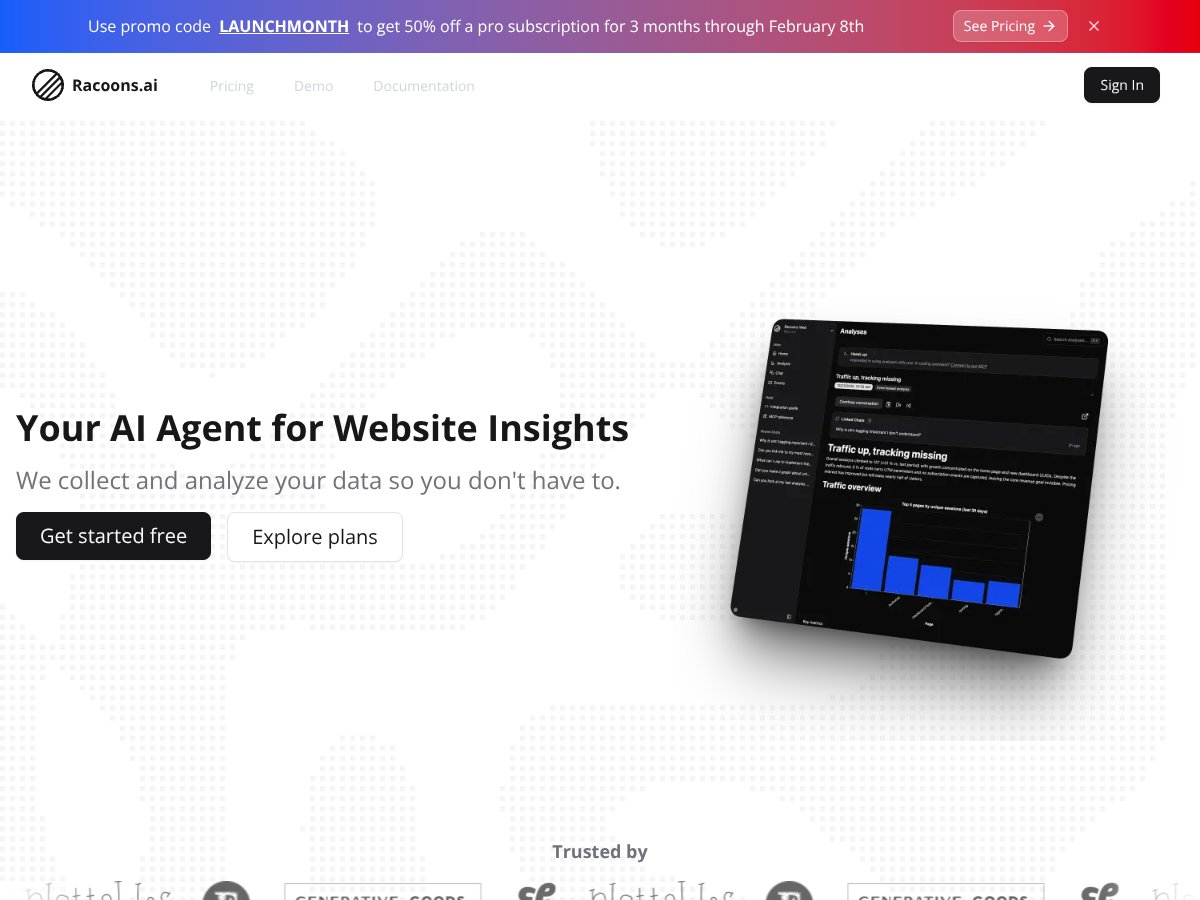
Racoons.ai is an AI-powered website analytics tool built for small teams who don’t want to spend their week staring at dashboards. Instead of handing you a wall of raw metrics, it tries to translate what’s happening on your site into plain-English insights and next steps—often delivered as recommendations you can act on.

In my experience, the hardest part of website analytics isn’t collecting data. It’s figuring out what to do with it. Most tools show you numbers. Racoons.ai leans toward “here’s what’s likely going wrong” and “here’s what you can try next,” which is exactly the kind of help smaller teams usually need.

How it works (at least at a high level) is pretty straightforward: you install a snippet, the platform collects anonymized visitor and page/event data, and then the AI analyzes patterns and bottlenecks. The pitch is that you don’t need SQL, data modeling, or a dedicated analytics engineer to get value from it.

Now, I’ll be honest—some of the “real time” and “automated” language is marketing-y in the way it’s written online. What I can say confidently is that the workflow is designed to feel fast and lightweight: setup first, insights soon after, and a chat-style interface so you can ask questions without digging through complex reports.

Is it for everyone? Probably not. If you need super granular tracking, deep segmentation, and heavy custom event hierarchies, you’ll likely hit limits and start wishing you had a more customizable product analytics platform. But if you want quicker decision support—especially for ecommerce, lead gen, subscriptions, or landing page optimization—Racoons.ai seems positioned to help.

Key Features of Racoons.ai (What You’ll Notice Day One)

Racoons.ai interface
Racoons.ai in action

Single Snippet Setup

Getting started is the first thing I’d call out. The platform is built around a single JavaScript snippet, and the claim is that you can start collecting data in about five minutes. No “let’s talk to your developer for two weeks” vibe.

What I like about this approach is that it lowers the barrier for non-technical teams. You’re not juggling multiple integrations or building a tracking plan from scratch just to see basic insights.

Automated Data Collection (Anonymized Visitor + Page Signals)

Racoons.ai collects anonymized visitor interactions, page metrics, and user events. The idea is that you don’t have to manually upload data or maintain a bunch of exports just to keep insights fresh.

That matters for small teams because “keeping analytics working” is often the hidden cost. If the snippet handles the heavy lifting, you can spend your time improving the site instead of maintaining the instrumentation.

AI-Driven Insights and Recommendations (Not Just Charts)

This is the core difference. Instead of giving you only raw numbers, Racoons.ai focuses on prioritized recommendations—things like optimizing specific pages or improving user flows. In other words: it’s trying to reduce the time between “we saw a problem” and “we tried a fix.”

In the UI, you’ll typically see insights presented in a way that’s easier to scan than a traditional analytics report. It feels more like “what should I look at?” than “here are 40 metrics, good luck.”

Plain-English Chat Interface

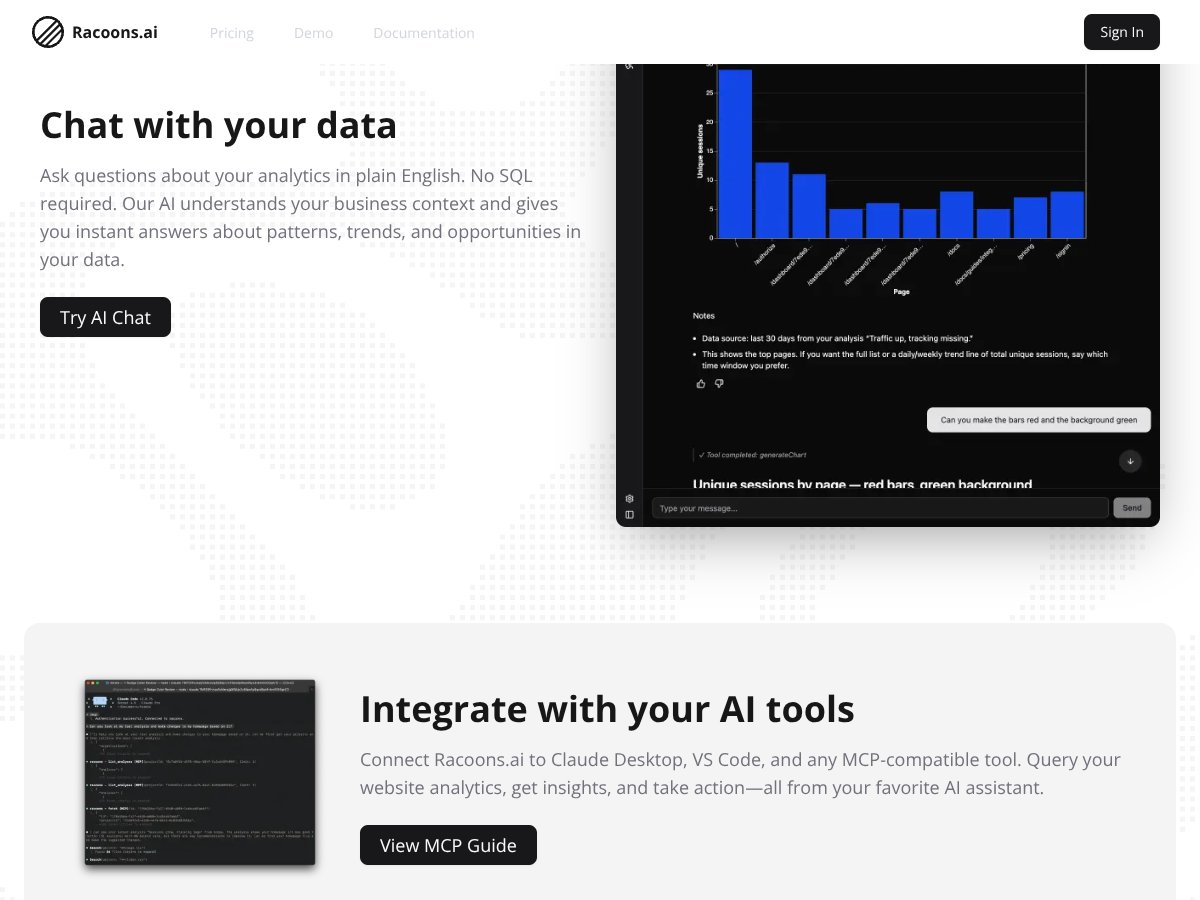
The chat interface is one of the more practical features. Instead of hunting for the right report, you can ask questions like why a metric is moving or which pages seem to be getting more engagement.

What I noticed with tools like this is that the chat becomes most valuable when you already know what you’re trying to improve. If you ask vague questions, you’ll still get vague answers—but when you ask the right thing, it can save time.

Proactive Recommendations Delivered to Your Inbox

Racoons.ai is positioned as proactive, meaning it doesn’t only sit there until you open a dashboard. The vendor claims you’ll get recommendations as data comes in, including email-style updates.

I didn’t find enough public, verifiable detail on exact timing (like “every Monday at 9am” or “daily after 24 hours”). So I can’t promise a specific delivery cadence from personal testing alone—but the intent is clear: insights should land without you having to actively dig.

Team Sharing and AI Tool Integration

You can share insights with your team, and the platform also mentions integration with MCP-compatible tools (including Claude Desktop and VS Code). If you already live in AI assistants for work, that’s a nice “meet me where I am” feature.

One thing to watch: integrations like these can be great, but they also depend on what your team actually uses day to day. If your workflow is mostly email + a basic dashboard, you might not feel this benefit immediately.

Goal-Based Customization

During setup, you pick a primary goal—things like ecommerce, lead generation, subscriptions, or traffic. The point is to tailor insights to the outcome you care about, not just generic website health metrics.

This is the kind of feature that can make recommendations feel more relevant. If the AI knows you’re optimizing for conversions, it shouldn’t waste your time with “engagement” tips that don’t move revenue.

How Racoons.ai Works (Setup Flow, Step by Step)

From what’s described publicly, the onboarding is built to be quick:

  1. Create Your Account: Sign up on the website. The claim is that it takes under a minute and you don’t need to provide a credit card upfront.
  2. Enter Your Website + Choose a Goal: You add your URL and select your primary goal (like conversions or traffic). This helps Racoons.ai tailor what it looks for.
  3. Install the Snippet: Copy/paste a single JavaScript snippet into your site. The platform says data collection starts after it’s installed.
  4. Review Initial Insights: The vendor claims you’ll get a landing page analysis with initial insights within minutes, and then ongoing actionable reports as data builds.

What I’d recommend you do if you’re evaluating Racoons.ai: don’t just install it and wait. Install it, then immediately write down 2–3 questions you actually care about (for example: “Why is checkout dropping?” or “Which landing page is underperforming for leads?”). When the insights start coming, ask those exact questions in the chat and compare whether the recommendations match your real priorities.

One limitation to keep in mind: tools like this often start simple and get deeper over time. If you need heavy customization, advanced tracking schemas, or deep exploration of complex journeys, you may find the experience less flexible than mature analytics suites.

Racoons.ai Pricing (What’s Public vs What Isn’t)

Racoons.ai interface
Racoons.ai in action
Plan Name Price Key Features Best For
Free Tier Not publicly specified (likely free)
  • Single snippet setup in under 5 minutes
  • Basic website data collection
  • Initial landing page analysis
  • Limited or no access to automated insights or AI chat
Small websites or teams wanting quick setup and basic insights without paying
Pro / Paid Plans Pricing details not publicly listed; available after sign-up
  • Unlimited or enhanced data collection (exact limits not shown publicly)
  • Automated actionable insights and recommendations
  • AI chat for querying data in plain English
  • Insight delivery via email and dashboards
  • Integration with MCP-compatible tools like Claude, VS Code
  • Personalized insights based on goals
Small to medium teams that want automated, goal-based website insights
Enterprise / Custom Contact for pricing
  • Advanced integrations and customization
  • Dedicated support and onboarding
  • Potential for tailored analytics solutions
Large organizations with specific requirements

Here’s the honest part: I couldn’t find fully transparent pricing published in advance. The free tier is described, but the exact paid plan costs (and the precise feature gating) appear to be handled after you sign up.

So if you’re the kind of buyer who needs to see exact numbers upfront, you’ll want to confirm pricing and limits inside the app before committing. That’s not me guessing—that’s just what’s publicly visible.

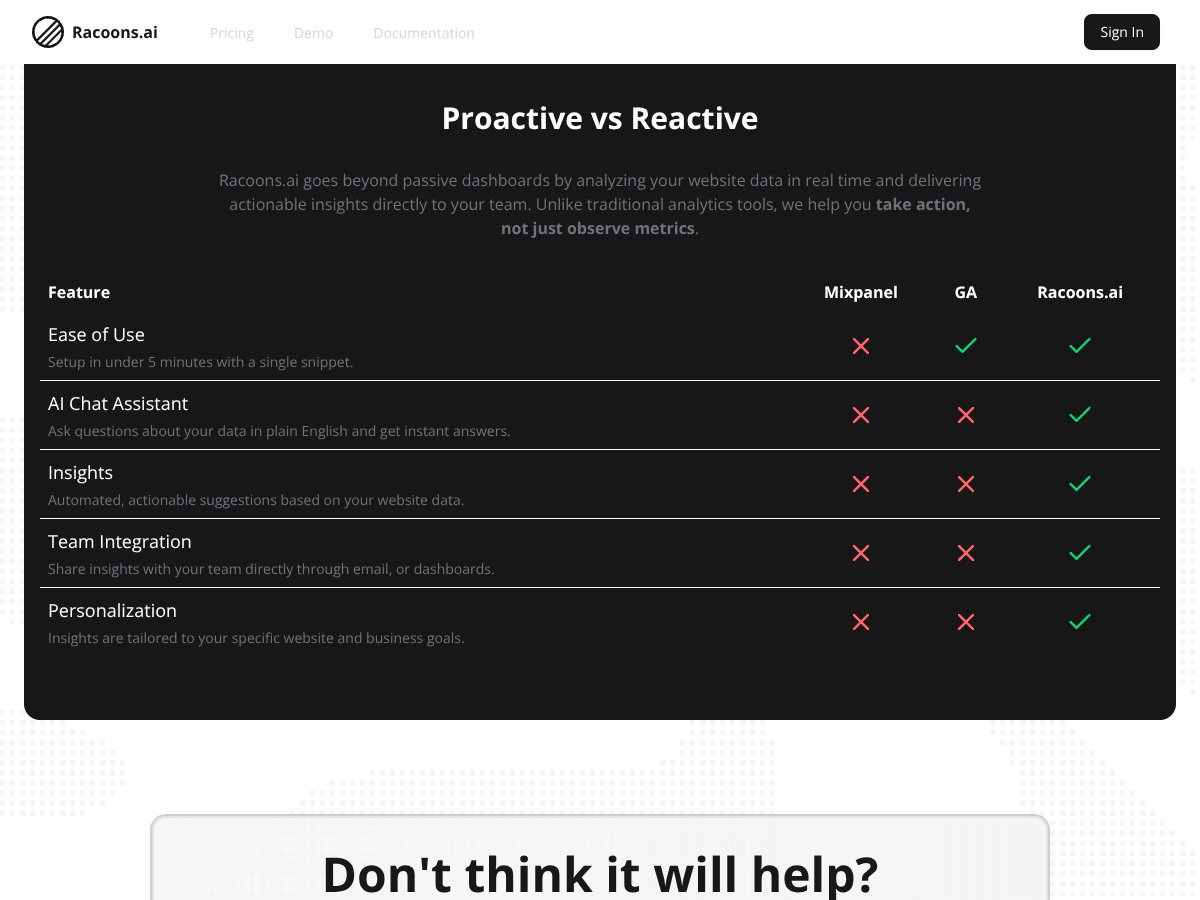
Compared to tools like Google Analytics or Mixpanel, Racoons.ai is clearly trying to sell simplicity and action over deep customization. The trade-off is that you may have less clarity about what you’re buying until you’re in the product.

Racoons.ai Pros and Cons (My Take After Looking Closely)

Pros

  • Fast setup: The single-snippet approach is designed to get you collecting data quickly without technical heavy lifting.
  • AI recommendations instead of raw charts: The value is in turning signals into “do this next” guidance.
  • Plain-English chat: You can ask analytics questions without writing queries or building custom reports.
  • Goal-based insights: Recommendations are intended to match outcomes like ecommerce conversions or lead gen.
  • Sharing for small teams: Email/dashboard sharing helps when you don’t have a dedicated analyst to translate results.
  • AI ecosystem integration: MCP-compatible integrations (like Claude Desktop and VS Code) could fit teams already using those tools.
  • No credit card for initial exploration (claimed): That lowers the risk if you just want to test whether it’s useful for your site.

Cons

  • Pricing transparency is limited: Exact paid plan pricing and data limits aren’t clearly published, so you’ll need to verify in-app.
  • Not enough public detail on advanced tracking: I couldn’t confirm from public docs how far custom event tracking, segmentation depth, or complex journey mapping goes.
  • Fewer independent case studies: There’s not much third-party evidence publicly available to validate performance or support quality.
  • Potential gaps for complex analytics needs: If you rely on deep exploratory analysis, you may outgrow it.
  • Unknown scaling limits: Without clear data volume and processing limits, it’s hard to predict cost as traffic grows.

Best Use Cases for Racoons.ai

  • Small ecommerce sites: When you want quick guidance on conversion bottlenecks without building a full analytics stack.
  • Content publishers: To spot which pages are actually engaging and which ones aren’t pulling their weight.
  • Digital marketing teams: Especially for landing pages and campaign traffic where you need fast optimization feedback.
  • Startups without analytics specialists: If you need actionable insights but don’t have the bandwidth for dashboards and SQL.
  • Product managers of simpler websites: For faster feedback loops on user flow and page performance.
  • Landing page optimization: When you’re running multiple campaigns and want recommendations that target specific pages.

Who Should NOT Use Racoons.ai?

If your team needs highly customizable, granular analytics—think deep event hierarchies, advanced segmentation, and extensive exploratory journey analysis—Racoons.ai might feel restrictive.

Also, if pricing, limits, and integration specifics are non-negotiable for your procurement process, you may not like the lack of fully public plan details. In those cases, you’ll probably be better served by established analytics platforms where plan tiers and constraints are clearly documented.

Racoons.ai vs Alternatives (Where It Makes Sense, Where It Doesn’t)

Google Analytics (GA)

  • What it does differently: GA is built around passive dashboards and raw reporting. You can go very deep, but you’re usually the one doing the interpretation.
  • Price comparison: GA has a free tier, and it’s widely used. I don’t have a verified public price for Racoons.ai paid tiers, since that info appears to be available after sign-up.
  • When to choose GA over Racoons.ai: If you need granular tracking, custom events, and advanced exploration, GA is still hard to beat.
  • When Racoons.ai is better: If you want goal-based recommendations and faster decision support without spending hours building reports.

Mixpanel

  • What it does differently: Mixpanel is strong for product analytics—funnels, retention, and detailed event-based analysis.
  • Price comparison: Mixpanel’s free/paid tiers exist publicly, usually with pricing that depends on data volume and features. Racoons.ai’s pricing isn’t fully public, so you’ll need to check in-app.
  • When to choose Mixpanel over Racoons.ai: When your main job is analyzing user journeys and running deeper product behavior investigations.
  • When Racoons.ai is better: When you want simpler setup and automated, actionable insights for website growth.

Amplitude

  • What it does differently: Amplitude is built for deep product analytics, including feature adoption and experimentation workflows.
  • Price comparison: Amplitude has a free tier and paid plans based on usage. For Racoons.ai, exact pricing isn’t listed publicly.
  • When to choose Amplitude over Racoons.ai: If you need advanced analysis and testing capabilities.
  • When Racoons.ai is better: If you want faster insight delivery with less setup complexity for smaller teams.

Pendo

  • What it does differently: Pendo blends analytics with in-app guidance and feedback tooling.
  • Price comparison: Pendo is generally enterprise-oriented. Racoons.ai is positioned as more lightweight for small teams.
  • When to choose Pendo over Racoons.ai: If you specifically need in-app onboarding and feedback loops.
  • When Racoons.ai is better: If you only care about website performance insights and want recommendations without in-app product tooling.

PostHog

  • What it does differently: PostHog is open-source and supports session recordings, feature flags, and lots of customization.
  • Price comparison: PostHog can be free self-hosted (with paid cloud hosting options). Racoons.ai is a hosted, automated experience.
  • When to choose PostHog over Racoons.ai: If you want full control and don’t mind managing infrastructure or configuration.
  • When Racoons.ai is better: If you want plug-and-play analytics with AI recommendations and minimal technical overhead.

My Verdict on Racoons.ai (Is It Worth Your Time?)

Racoons.ai looks like a solid option if you’re a small team and you want website insights that actually tell you what to do next. The “single snippet + AI recommendations + chat” approach is designed to cut through the usual analytics friction.

That said, I can’t verify every claim like “real time” delivery quality or the exact recommendation accuracy without access to concrete, measurable before/after results from the same site. Public information also doesn’t give a full view of advanced features or scaling limits, and pricing isn’t clearly listed upfront.

So my recommendation is pretty simple: try it with a specific goal in mind. If you install it and your questions get answered in a way that leads to real changes on your site, then it’s doing its job. If you need deep customization or you’re strict about transparent pricing and limits, you’ll want to compare it more carefully against GA, Mixpanel, Amplitude, or PostHog.

Frequently Asked Questions About Racoons.ai

Is Racoons.ai worth it?

If you want quick, actionable insights without complex setup, it’s likely worth trying—especially for small teams. The biggest question is whether the recommendations match your actual priorities once you’re looking at your own data.

Is there a free version of Racoons.ai?

There appears to be a free tier, and the setup is described as not requiring a credit card. The exact free plan limits (and whether AI chat/automated recommendations are included) aren’t fully spelled out publicly.

How does Racoons.ai compare to Google Analytics?

Google Analytics is built for raw reporting and deep analysis. Racoons.ai is built to deliver AI-driven, goal-based recommendations and plain-English answers. If you want quick decisions, Racoons.ai may feel easier; if you want maximum depth, GA wins.

What kind of website data can Racoons.ai analyze?

Based on the product description, it analyzes visitor behavior, page performance, and conversion-related signals, then turns that into tailored insights.

Is Racoons.ai easy to integrate?

The integration is centered on a single snippet, and the claim is that you can get started in under five minutes. For most small sites, that’s about as simple as analytics gets.

Can I share insights from Racoons.ai with my team?

Yes. The platform supports sharing insights via email and dashboards, which is helpful when you don’t have someone dedicated to interpreting analytics.

Are there any known limitations or downsides?

From what’s publicly available: pricing transparency is limited, advanced feature details aren’t fully documented, and independent third-party reviews/case studies seem scarce. You’ll also want to confirm data volume limits and feature gating inside the app.

Racoons.ai Review 2026: Effortless Website Insights for Small Teams

Ready to try Racoons.ai? Visit Racoons.ai to get started.

As featured on

Automateed

Add this badge to your site

Stefan

Stefan

Stefan is the founder of Automateed. A content creator at heart, swimming through SAAS waters, and trying to make new AI apps available to fellow entrepreneurs.

Related Posts

Figure 1

Strategic PPC Management in the Age of Automation: Integrating AI-Driven Optimisation with Human Expertise to Maximise Return on Ad Spend

Title: Human Intelligence and AI Working in Tandem for Smarter PPCDescription: A digital illustration of a human head in side profile,

Stefan
AWS adds OpenAI agents—indies should care now

AWS adds OpenAI agents—indies should care now

AWS is rolling out OpenAI model and agent services on AWS. Indie authors using AI workflows for writing, marketing, and production need to reassess tooling.

Jordan Reese
experts publishers featured image

Experts Publishers: Best SEO Strategies & Industry Trends 2026

Discover the top experts publishers in 2026, their best practices, industry trends, and how to leverage expert services for successful book publishing and SEO.

Stefan

Create Your AI Book in 10 Minutes