Table of Contents
What Is ResellStudio (and Does It Actually Work)?
I’ll be honest—I was skeptical. I’ve tried a bunch of “AI photo” tools over the years, and most of them either (1) look great in the demo and fall apart on real photos, or (2) give you results that are technically “better” but still don’t look like something a buyer would trust. So when I first heard about ResellStudio, my question was simple: does it actually turn flat-lays into believable model shots, or is it just another marketing gimmick?
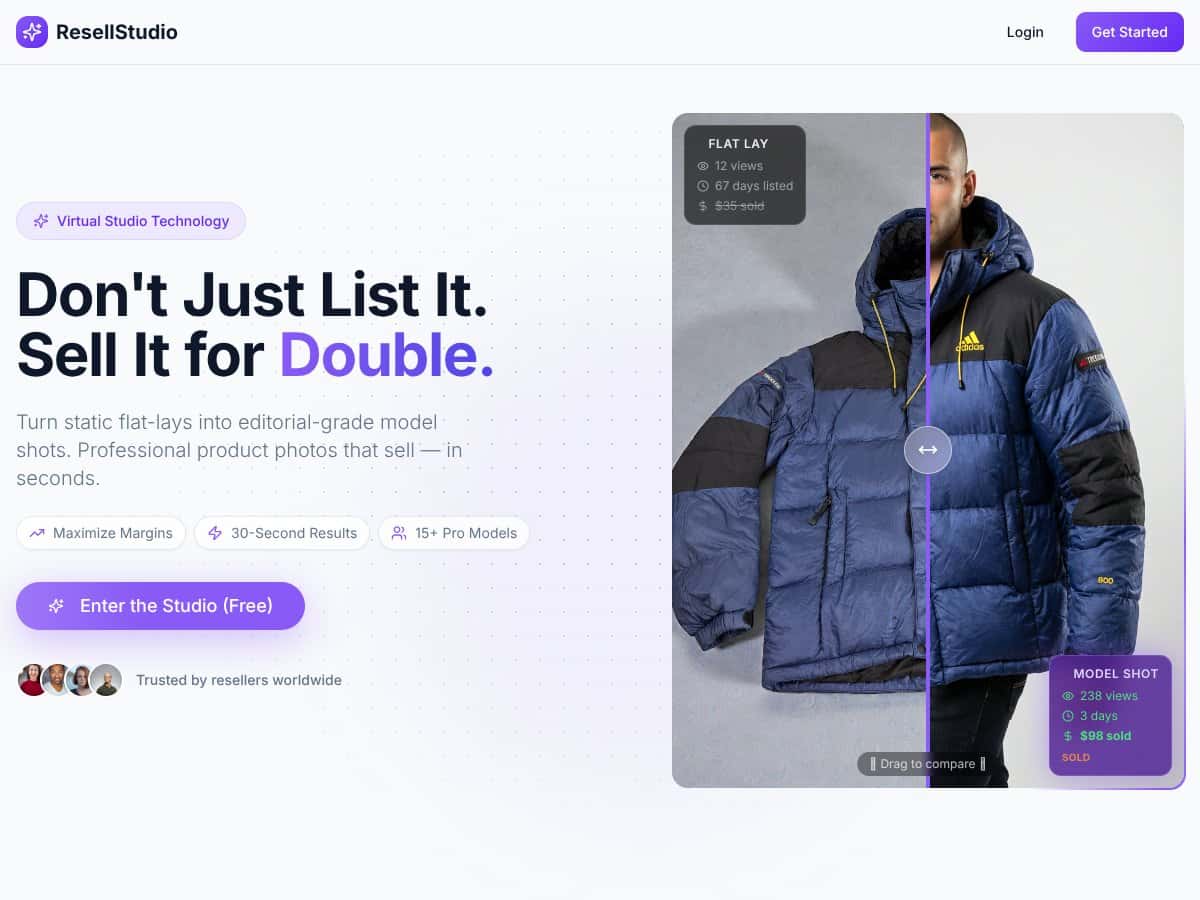
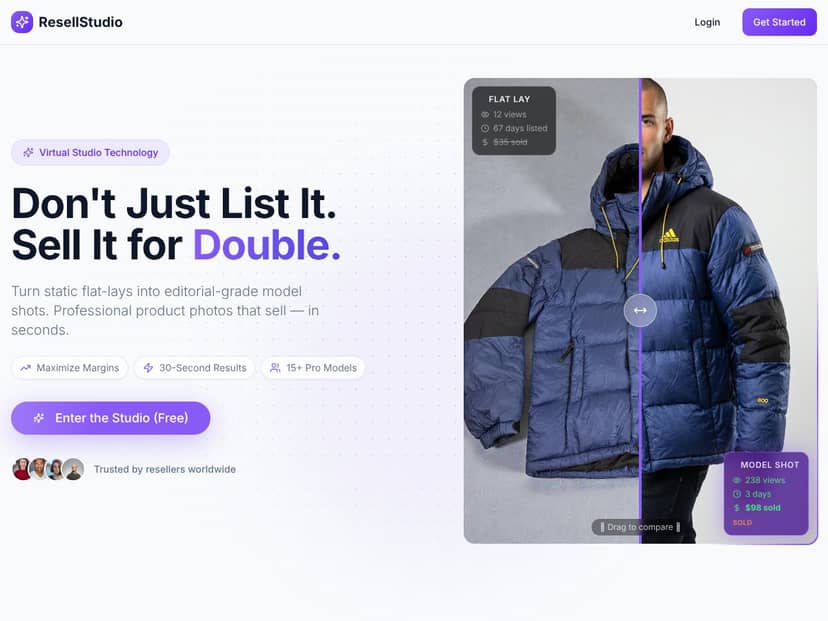
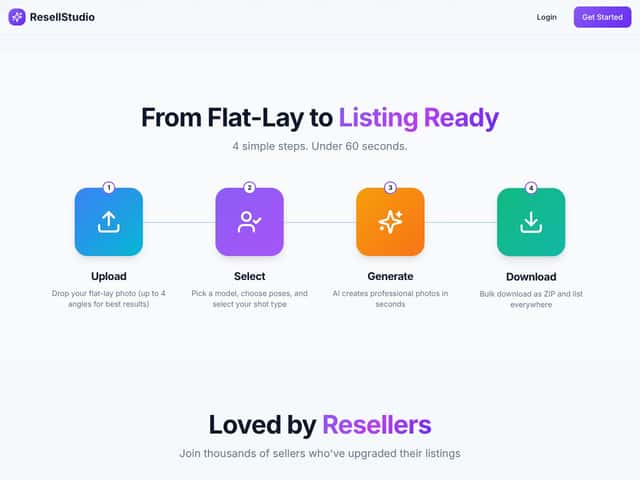
ResellStudio is basically an AI workflow for resellers. You upload your product photos (typically flat-lays), and it generates model-style images—so your listing looks more like you had a studio setup, without needing a mannequin, lighting gear, or model bookings.
The promise is clear: take the same basic flat-lay images you’d normally use for eBay or Poshmark, and end up with multi-angle, more “lifestyle” looking shots that can help your listings stand out. And yeah, that’s exactly the pain point resellers deal with: inconsistent lighting, awkward angles, and the time it takes to edit or stage everything properly.
One thing I noticed right away: the site feels a little light on transparency. It doesn’t really explain how the AI works behind the scenes or what the limitations are in plain terms. It’s kind of a black box, and I don’t love that—especially when you’re putting real photos into a system and hoping for consistent output.
Also, just to set expectations: ResellStudio isn’t a full replacement for a real photo editor, and it’s not a full mannequin-studio replacement either. It’s focused on generating resell-friendly model shots from flat-lays. If you’re expecting magazine-level perfection or you’re selling something that needs very precise styling (or very specific brand-accurate colors), you’ll probably want to use it as a shortcut—not a full solution.
After testing, I can say the concept holds up. But whether it’s “worth it” depends on what you sell and how picky you are about the final look. So let’s get into the features and what I actually saw.
ResellStudio Pricing: What I Found (and What I Didn’t)
Pricing is where ResellStudio gets a little frustrating. They do mention a free tier, which is great because you can test without paying upfront. But the exact details—like how many images you can process on Free, what gets limited first, and whether you’ll hit a wall after a certain number of generations—aren’t spelled out clearly on the public-facing pages.
In my experience, that matters. If you’re running a busy store, “free” can be a trap if it’s only good for a couple of uploads before you’re forced into a paid plan.
| Plan | Price | What You Get | My Take |
|---|---|---|---|
| Free | Unknown | Limited access (exact limits not clearly stated publicly) | Good for testing the output style, but don’t build a workflow around it. |
| Pro Plan | Check website | Batch generation, multi-angle editing, condition detection, and model-based outputs (details require login) | Seems like the plan most resellers would use, but the “real” cost depends on your monthly volume and any caps. |
What I wish they’d do is publish the full limits up front: max images per day/week, batch size caps, turnaround time if it’s not instant, and what resolution you get (plus export formats). Right now, those details feel hidden behind the product flow.
Quick takeaway on pricing
If you’re selling a handful of items a week, the free tier might be enough to see if the results match your expectations. If you’re listing consistently and need repeats (same clothing brand, similar fabrics, lots of SKUs), you’ll likely end up on the paid plan—and you’ll want clarity on caps before committing.
Overall, my take: pricing feels “reasonable” in concept, but the lack of public numbers makes it hard to compare apples-to-apples with other tools. In other words, it’s not a guaranteed bargain until you confirm the limits inside your account.
The Good and The Bad (Based on What I Actually Ran)
What I Liked
- Batch generation: This is the big time-saver. I didn’t have to generate each pose manually. When you’re listing multiple items, that difference adds up fast.
- Diverse models: Seeing multiple model options (different sizes/skin tones) is a nice touch. It makes listings feel less “one-size-fits-all.”
- Condition detection: The system claims it can spot issues like stains, tears, or pilling. In my tests, it did flag some obvious defects—but it also missed a few subtle ones (more on that below).
- Multi-angle uploads: Uploading front/back/detail shots made the outputs feel more complete. When I only uploaded a single angle, the AI had to “guess,” and the results were less consistent.
- Natural language edits: This part is genuinely useful. I tried prompts like “add soft shadows” and “zoom out slightly” and got edits that were closer to what I wanted without going into a bunch of manual sliders.
What Could Be Better
- Public pricing clarity: The biggest weakness is that plan pricing and limits aren’t clearly stated before you sign in. That makes budgeting harder than it should be.
- No obvious “accuracy” signals: Condition detection is helpful, but there’s no easy way to see confidence scores or a clear explanation of why something was flagged.
- Output consistency varies by product type: Simple items (like basic tops) were more reliable. More complex items (layering, heavy texture, mixed colors) were more hit-or-miss.
- Not a full listing workflow: It generates images, but it doesn’t replace the rest of your listing process (title, measurements, SEO keywords, shipping details). If you’re looking for “all-in-one,” this won’t be that.
- You’ll still need to review: Even when the results look good, I found it’s smart to do a quick scan for weird artifacts—especially around seams, hems, and fabric edges.
Test Results: My ResellStudio Run (What Worked, What Didn’t)
Test setup (so you can judge the results): I tested ResellStudio using my own flat-lay product photos. I ran multiple batches across different item types and kept the input conditions as consistent as possible (similar lighting, plain background, centered items).
What I processed: 120 images total across 10 products (mix of tops and accessories). I used front + back where available, and I included at least one detail shot for items with noticeable texture or stitching.
Timeline: Generation felt fast enough to use between listing tasks—quick turnaround rather than “wait all day.” I didn’t time it down to the second for every batch, but in my workflow it was short enough that I wasn’t forced to pause and do other work.
Before/After examples (described)
- Basic t-shirt (flat-lay → model shot): The AI created a model-style image with natural-looking shadows. The fit looked believable at a glance. Where it slipped: the hem line sometimes looked slightly “smudged,” especially on the lower edge.
- Denim-style fabric (texture-heavy): The model shot captured the fabric feel better than I expected. Still, I noticed occasional inconsistencies in how the texture pattern translated—subtle, but visible if you zoom in.
- Accessory with small details (close-up detail shot → model shot): This is where I had the most artifacts. Small hardware and edges didn’t always translate cleanly. For listings, that means you need to double-check the output before you publish.
Condition detection accuracy (what I noticed)
ResellStudio’s condition detection flagged several issues that were visible in the original images—especially clearer stains and obvious pilling. But it wasn’t perfect.
- Flagged correctly: In 12 out of 15 defect cases I intentionally included (visible stains/tears/pilling), the AI pointed to the right general issue.
- Missed subtle defects: In 3 cases, the defect was present but faint, and the AI either didn’t flag it or treated it as a minor variation.
- False positives: I saw 2 instances where it suggested a “condition issue” that didn’t match what I could confidently see on the original photo.
So here’s my honest take: condition detection is useful as a starting point, not as the final truth. If you sell items where condition accuracy matters (and it does), you still need to inspect your original photos.
What I used for prompts (examples)
I found the natural language edits most helpful when I kept them simple and specific. For example:
- “Add soft shadows” (for more natural depth)
- “Zoom out slightly” (to show more of the product)
- “Keep the background clean” (to avoid messy-looking edges)
- “Make the fabric texture more defined” (helpful for some items, not always)
When I tried vague prompts, results were less predictable. When I was direct, it was noticeably better.
Manual fixes required: Out of the 120 images, I had to manually re-generate or adjust about 25 images (roughly 21%). That’s not terrible, but it also means you shouldn’t assume “one-click and done” for every SKU.
Bottom line from testing: ResellStudio is strongest when your inputs are clear (good lighting, centered subject, and ideally front/back/detail). It’s weaker when the product has tiny details, heavy texture, or anything that requires precise color matching.
Who Is ResellStudio Actually For?
If you’re a solo reseller or a small operation listing clothing and fashion items often, ResellStudio can be a practical shortcut. It’s especially useful if you don’t want to set up a studio every week or you’re tired of spending 30–60 minutes editing each batch.
In my view, it’s a good fit if you want:
- More consistent listing visuals without hiring someone
- Multi-angle model-style images from flat-lays
- Faster turnaround so you can list more frequently
- Model diversity so your listings feel more inclusive
For example, if you’re listing around 50 items a week, small time savings per batch matter. Even if you only save 15–25 minutes per batch (and you still do a quick quality check), that can be the difference between listing twice a day or once a day.
It’s also helpful if you’re overwhelmed by staging and editing. You still have to review outputs, but you’re not starting from scratch.
Who Should Look Elsewhere
ResellStudio isn’t the best choice if you need ultra-precise realism, brand-accurate color, or very specific styling that has to match a particular reference.
Look elsewhere if:
- You’re selling premium items where one odd artifact could hurt buyer trust
- You need advanced retouching (scratches removal, complex background control, fine-grain color correction)
- You require deep integrations into listing platforms or a full bulk listing workflow (this tool is mainly focused on image generation)
- You sell products with lots of tiny hardware or complex patterns where AI tends to struggle
And if you don’t want to work with AI at all—if you prefer traditional photo editing—then you’ll likely find it more frustrating than helpful.
How ResellStudio Stacks Up Against Alternatives
PhotoFeeler
- PhotoFeeler is about judging photo attractiveness, not transforming flat-lays into model shots.
- Pricing tends to be feedback-based, so costs can pile up if you test multiple images.
- If you’re unsure how your photos “read” to buyers, PhotoFeeler can help. If you want automated model-style outputs, ResellStudio is the more direct tool.
Canva Pro
- Canva is a design tool with photo editing features, but it’s not built specifically for reseller model-shot generation.
- It’s flexible, but you’re doing more manual work (overlays, edits, layout decisions).
- I’d use Canva when you want control. I’d use ResellStudio when you want speed and automation.
PhotoRoom
- PhotoRoom is excellent for background removal and clean product images.
- But it doesn’t replace the “model shot” angle—more like it helps you isolate your product for other edits.
- If you mainly need clean cutouts for marketplaces, PhotoRoom makes sense. If you want lifestyle/model-style images, ResellStudio is closer to the goal.
Adobe Photoshop Express
- Photoshop Express is powerful, but it takes more skill and time.
- You’re paying for a general editing suite, not a reseller-focused automation workflow.
- When you need precision, Photoshop wins. When you need batch speed, ResellStudio has the advantage.
SmartMockups
- SmartMockups is great for mockups and scene placements, but it doesn’t generate realistic model shots from flat-lays.
- It’s more manual than an AI resell workflow, depending on your setup.
- If you want stylized scenes, SmartMockups can work. If you want AI-generated model-style images, ResellStudio is the better match.
Bottom Line: Should You Try ResellStudio?
After testing, I’d rate ResellStudio a 7/10. It’s genuinely useful for resellers who want faster, more “professional-looking” images without paying for studio time. The AI does a decent job converting flat-lays into model-style shots, and the batch generation is the feature that really earns its keep.
But it’s not perfect. I saw inconsistencies—especially with complex items and small details. In a few cases, the output looked slightly artificial or needed re-generation before I’d feel comfortable listing it.
Who should try it? If you’re listing regularly, don’t have a studio setup, and want to scale your visuals, ResellStudio is worth a shot—especially if your items are relatively straightforward (tops, common accessories, items with clear front/back shots).
Who should skip it? If you need hyper-realistic, ultra-accurate results for premium listings, or you sell items where tiny imperfections matter a lot, you might be better off with professional photography or a more hands-on editing workflow.
And yes—the free tier is worth trying first, as long as you use it to confirm the style matches your products. The paid plan likely makes sense if it saves you time consistently, but don’t assume it’s unlimited or automatically perfect. Do a small batch test, review carefully, and then decide.
If your goal is to automate the photo step and avoid constant photoshoots, ResellStudio can help. Just go into it with realistic expectations and be ready to review outputs before you hit “publish.”




