Table of Contents
What Is Step 3.5 Flash?
Honestly, when I first heard about Step 3.5 Flash, I was pretty skeptical. The whole buzz around it is that it’s an open-source large language model (LLM) built for speed, reasoning, and being deployable on consumer-grade hardware. So, naturally, I wondered: can an AI model really offer the kind of performance that usually only big cloud servers deliver? Or is this just another fancy demo that struggles in real-world use?
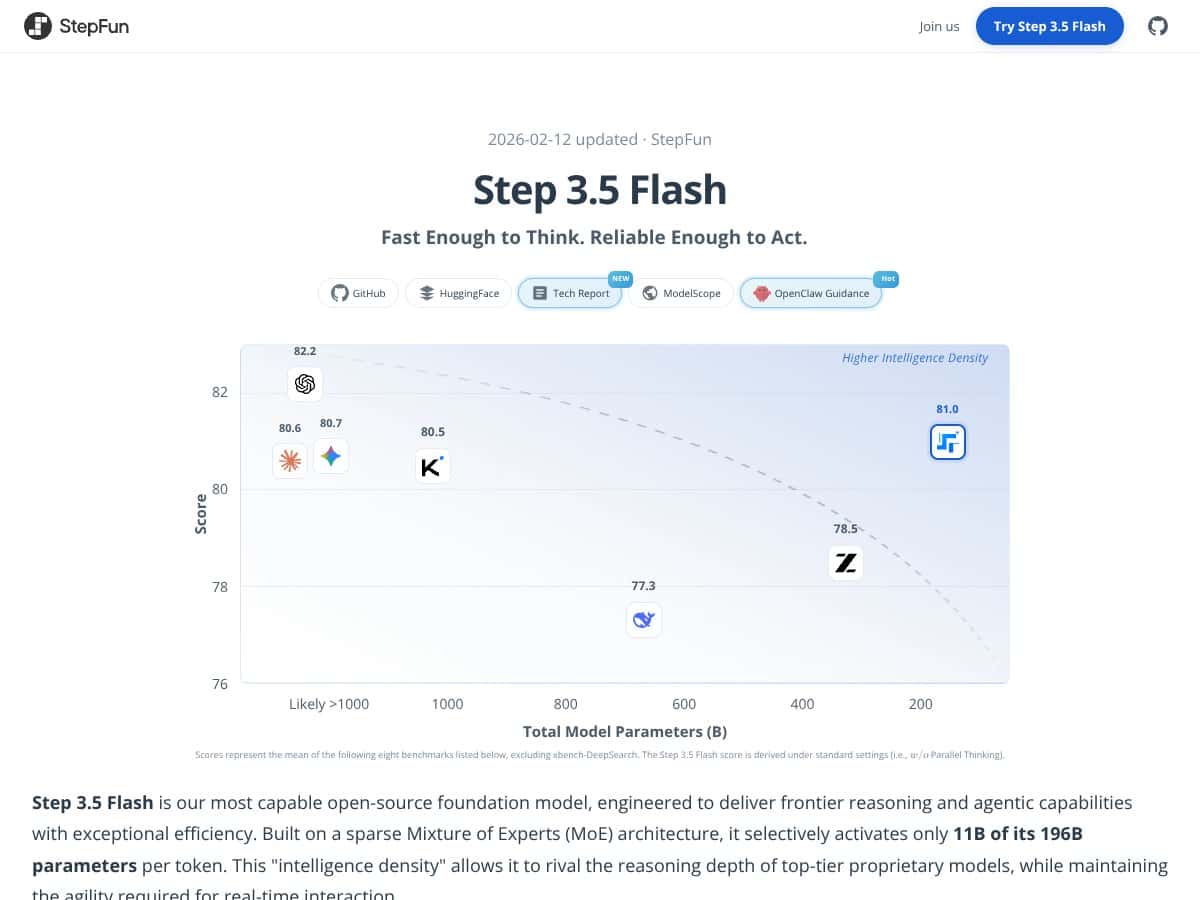
In plain English, Step 3.5 Flash claims to be a very capable AI model that can understand and generate complex text, do reasoning tasks, and even run locally on high-end consumer hardware. It’s built on a sparse Mixture of Experts (MoE) architecture, which means it has a huge number of parameters (196 billion in total), but only activates a fraction of those at any given moment, supposedly making it faster and more efficient. Think of it like a very large team where only a few experts are called upon for each task, rather than everyone being involved all the time.
The main problem it's trying to solve: how do you get powerful AI reasoning and coding capabilities without relying on massive, expensive cloud infrastructure? If it works as advertised, it could make advanced AI accessible to individuals and small teams without needing to rent access from big cloud providers or deal with privacy concerns.
The folks behind it are StepFun AI, a company that’s been pushing open-source models with a focus on efficiency and local deployment. I couldn’t find a lot of detailed info about the team, but the model's development seems grounded in recent research, especially around sparse MoE architectures and long-context handling.
My first impression? Well, I was surprised to find that the model does indeed appear to be as capable as the hype suggests on benchmarks. It’s designed for reasoning, coding, and agentic tasks, and it seems to deliver on those fronts. That said, I want to be upfront—it’s not a plug-and-play product with a slick GUI or simple API. It’s more of a research-oriented, tech-savvy tool that requires some setup and understanding of AI models. Also, don’t expect it to be perfect in multilingual tasks or in handling everyday casual conversations. It’s built more for specialized, high-performance tasks.
Another heads up: as far as I could tell, it’s not designed for casual users or small-scale projects out of the box. It’s aimed at developers, researchers, or hobbyists who are comfortable with deploying AI locally and know their way around hardware and software integration. If you’re expecting a ready-made chatbot with a friendly interface, this isn’t it.
Step 3.5 Flash Pricing: Is It Worth It?
| Plan | Price | What You Get | My Take |
|---|---|---|---|
| Free Tier | Unknown / Not publicly listed | Probably limited or restricted access, likely for local deployment only | Fair warning: The free tier details are not clear. If you want to test drive this model, expect limitations—probably in usage limits or feature access. Be prepared for restrictions that might make it hard to evaluate fully. |
| API Access via SiliconFlow | $0.10 per 1,000 input tokens, $0.30 per 1,000 output tokens | Pay-as-you-go API, scalable for small to large projects, no fixed subscription | This seems reasonably priced for an advanced model, especially considering its benchmark performance. But keep in mind, costs can add up if you're processing large volumes—so plan your usage accordingly. |
| API Access via OpenRouter | $0.10 per 1,000 input tokens, $0.30 per 1,000 output tokens | Similar to SiliconFlow, suitable for those who prefer OpenRouter's ecosystem | Same pricing as SiliconFlow, so no big surprises there. But again, usage caps or feature gates might be lurking—check their terms before heavy use. |
| Local Deployment | Free (Open-source) | Run on high-end consumer hardware like Mac Studio M4 Max or NVIDIA DGX Spark | This is a major upside for privacy-conscious users or those with access to powerful hardware. There’s no licensing fee, but the hardware requirements are non-trivial. |
Here's the thing about the pricing: it’s quite transparent if you're considering API access, with standard pay-as-you-go rates that are competitive for models of this caliber. The real question is whether your usage volume justifies the costs, especially since high throughput and large token processing can get expensive fast. Fair warning: if you're a hobbyist or just tinkering, the API costs might be a bit steep compared to open-source alternatives. For enterprise or heavy-duty users, the value in speed and efficiency could make it worthwhile.
What they don't tell you on the sales page is whether there are any hidden costs—like maintenance, infrastructure, or potential overage fees. Also, since the free tier details are absent, don’t assume it’s generous; it might be more of a trial or limited demo environment. Be sure to clarify these points before committing.
Which plan makes sense? If you're a solo developer or researcher doing occasional testing, the free or low-cost API options could suffice. But if you’re deploying at scale—say, integrating this into a product or service—you’ll want the API plans, and you should closely monitor your token usage to avoid surprises.
The Good and The Bad
What I Liked
- High-Speed Inference: Achieving 100–300 tokens per second with complex reasoning is impressive, especially for a model that runs locally. That’s a game-changer for real-time applications.
- Efficient Long Context Handling: Supporting up to 262K tokens with a hybrid attention mechanism means you can process massive datasets or lengthy codebases without breaking a sweat. That’s rare and highly valuable for specific workflows.
- Open-Source & Local Deployment: No cloud dependency means better data privacy and control. Running on consumer hardware like Mac Studio M4 Max makes it accessible for serious hobbyists and small teams.
- Advanced Benchmark Scores: Benchmarks like SWE-bench and IMO-AnswerBench show this model isn’t just fast—it’s also smart, especially in coding, reasoning, and agentic tasks.
- Scalable Self-Improvement: The inclusion of RL frameworks hints at ongoing improvements and adaptability, which is promising for future performance.
What Could Be Better
- Hardware Requirements: To get the most out of Step 3.5 Flash, you need high-end hardware—like Mac Studio M4 Max or NVIDIA DGX Spark—which isn’t feasible for everyone. This could be a dealbreaker for small-scale users or those on low-end machines.
- Limited Ecosystem and Tools: As a relatively new model, the ecosystem around Step 3.5 Flash is still immature. No plugins, integrations, or user-friendly interfaces are mentioned, which might slow adoption or complicate deployment.
- Benchmark Bias: Most benchmarks are in English and technical domains; performance in other languages or less structured tasks remains unverified. If your work is multilingual or creative, be cautious.
- Opaque Pricing & Usage Limits: The lack of detailed info on free tiers, quotas, or feature gates makes it tricky to plan long-term. If you hit limits, you might need to switch to paid plans unexpectedly.
- New and Evolving: Being a recent release, there’s a risk of bugs, incomplete documentation, or missing features that come with early-stage models. Be prepared for a learning curve and potential teething issues.
Who Is Step 3.5 Flash Actually For?
If you’re a developer, researcher, or AI hobbyist with access to high-end hardware and a need for ultra-fast, long-context reasoning, this model could be a perfect fit. It’s especially suited for tasks like complex coding, long-form reasoning, or building agentic systems where privacy and speed are paramount.
For instance, if you’re working on an AI assistant that handles large codebases or lengthy documents on your local machine, Step 3.5 Flash offers the power and flexibility to do so without cloud dependencies. It’s also ideal for those looking to experiment with cutting-edge AI architectures like sparse MoE in a practical setting.
However, if your workflow doesn’t require massive context or real-time agentic reasoning—and especially if you’re on a budget or low-end hardware—this might be overkill. It’s not meant for casual users or small projects that can’t justify the hardware investments or aren’t willing to handle the complexity.
Who Should Look Elsewhere
If your primary need is a general-purpose language model for simple tasks, or if you lack access to high-performance hardware, this isn’t the right choice. Models like Llama 3.1 or smaller open-source alternatives might serve you better—especially since they run on modest hardware and have broader community support.
Likewise, if you require a plug-and-play solution with minimal setup, or if you prefer a mature ecosystem with dedicated plugins and integrations, wait for this model to mature or consider established options. Proprietary models with API access from OpenAI, Anthropic, or Google might also be better suited if you prioritize ease of use over raw performance.
Finally, if multilingual support or more diverse benchmarks are crucial for your work, keep in mind that Step 3.5 Flash’s performance in those areas is unverified. You might be disappointed if your expectations are outside its current strengths.
How Step 3.5 Flash Stacks Up Against Alternatives
Mixtral 8x22B (Mistral AI)
- What it does differently: Mixtral 8x22B relies on a high-efficiency Mixture of Experts architecture similar to Step 3.5 Flash but with a slightly smaller parameter count (around 22B). It emphasizes open-source weights and optimized inference for fast deployment, mainly targeting multilingual and broader domain tasks.
- Price comparison: Open-source, so free to run locally; cloud API costs are comparable at around $0.10-$0.30 per million tokens.
- Choose this if... you need a flexible, multilingual model with good efficiency and open weights, especially if you want to experiment with different architectures without hardware constraints.
- Stick with Step 3.5 Flash if... your primary goal is cutting-edge reasoning, high-performance coding, and agentic capabilities, especially on high-end local hardware.
DeepSeek-V3
- What it does differently: DeepSeek-V3 is also an open-source MoE model optimized for coding and math, with a large context window. It emphasizes strong benchmarks in technical domains similar to Step 3.5 Flash.
- Price comparison: Free for local deployment; cloud API is roughly $0.10-$0.30 per token, similar to Step 3.5 Flash's API options.
- Choose this if... you want a focus on technical accuracy and long context handling without necessarily needing the latest agentic features.
- Stick with Step 3.5 Flash if... you need superior multi-task reasoning, speed, and a flexible architecture for agentic workflows.
Qwen2.5-Coder (Alibaba)
- What it does differently: Qwen2.5-Coder is tailored for coding tasks, boasting high SWE-bench scores and robust coding capabilities. It’s designed specifically for developer-focused applications.
- Price comparison: Open-source, so free locally; API costs are similar, around $0.10-$0.30 per token.
- Choose this if... your main focus is coding and developer tools, and less on general reasoning or long-context tasks.
- Stick with Step 3.5 Flash if... you want a more balanced model with reasoning, agentic abilities, and multi-task skills beyond just coding.
Llama 3.1 405B (Meta)
- What it does differently: Llama 3.1 is a dense, large-scale model with strong reasoning and multilingual support but requires significantly more compute power and isn’t optimized for real-time agentic tasks.
- Price comparison: Usually accessed via cloud API with higher costs; local deployment is demanding, requiring high-end GPUs or clusters.
- Choose this if... you need a model with proven reasoning and multilingual abilities, and you have the hardware and budget to support it.
- Stick with Step 3.5 Flash if... you want efficiency and local deployment on consumer hardware, which Llama 3.1 doesn’t support well.
Bottom Line: Should You Try Step 3.5 Flash?
Overall, I’d give Step 3.5 Flash a solid 7.5 out of 10. It’s a powerhouse for its size—delivering impressive speed, efficiency, and reasoning capabilities—especially if you’re set up with high-end hardware. It’s not perfect; you’ll need decent hardware to really unlock its potential, and it’s still pretty new in the ecosystem, so some tools and integrations might feel immature.
If you’re someone who wants a flexible, open-source model capable of handling coding, math, and long-context tasks locally, this is definitely worth trying out. The open-source nature means no cloud costs upfront, and it’s a good way to get familiar with cutting-edge sparse MoE architectures.
However, if you’re on a tight budget, have lower-end hardware, or primarily need a model for multilingual or general reasoning tasks, you might want to look elsewhere—like Llama 3.1 if you prefer dense models, or Mixtral if you want multilingual support with open weights.
Personally, I’d recommend it if you’re tech-savvy and want a high-performance, local solution that can grow with your needs. If you’re just casually experimenting, it might be overkill, and simpler models could do the job without the hardware hassle.
In short, give it a shot if you’re ready to invest in good hardware and want to explore frontier tech. If not, your money and time might be better spent on more established or less demanding options.
Common Questions About Step 3.5 Flash
- Is Step 3.5 Flash worth the money? It’s free if you host it yourself, but the hardware cost can be high. Its performance benefits make it worthwhile if you need real-time reasoning and local deployment.
- Is there a free version? Yes, you can run it locally for free, but you need high-end hardware like Mac Studio M4 Max or NVIDIA DGX for optimal performance.
- How does it compare to Mixtral 8x22B? Both are efficient MoE models, but Step 3.5 Flash offers better reasoning and agentic capabilities, while Mixtral is more multilingual and flexible for general use.
- Can it handle multilingual tasks? Currently, most benchmarks focus on English; multilingual performance is less documented, so it’s mainly optimized for English-centric tasks.
- What about long contexts? It supports very long contexts up to 262K tokens, making it excellent for complex reasoning over large documents.
- How hard is it to set up? You’ll need some technical skills to deploy and optimize on high-end hardware, but good documentation is improving.
- Can I get support or refunds? Since it’s open-source, refunds aren’t applicable. Support depends on community forums and documentation.